I have seen something similar mentioned on a discussion on the wx forum from Feb last year.
Thanks for that link. I discovered some interesting things about my unifi router because of this. Geo blocks are better handled by simple mode firewall rules instead of the pre-existing country restrictions feature. I can now see when a connection is blocked as a result of a geo block in the system log, triggers, and I am able to create an exemption for that IP as well. Also, there are differing opinions on where that IP actually resides.
1 Like
Located in Maine (US). I've got two ecowitt systems running here (yes, they see and report most of each others sensors) and several z-wave devices, and nothing has ever interfered with anything else.
As for the Ecowitt web service resolving to Russia or China I've no idea. I always thought it was China, like about 99% of all consumer electronics these sad days (for things like that). HOWEVER, I also think Simon's @sburke781 excellent Hubitat driver reads the Ecowitt data before it goes off to those places, and in fact doesn't need the cloud service at all, but Simon will need to confirm or deny that. Either way, Ecowitt with Simon's driver has performed incredibly well for me.
1 Like
That's good to hear that you have also had no issues between EcoWitt sensors and Z-Wave devices in the U.S.
Thanks for the kind words @Madcodger . It is also my understanding that the EcoWitt drivers do not have any reliance on the cloud servers EcoWitt support, though I would need to confirm this before I could be 100% sure.
Data can be fed from the Gateway device to a number of destinations, including cloud services hosted by EcoWitt, Weather Underground, plus other cloud services (I believe). Sensor data can also be sent to a "custom" destination, e.g. a HE hub, Home Assistant, etc. This is the "custom" desintation for the data feed.
This is a long-winded way of getting to the point that @user1781 was initially concerned about the location of the "commercial" site used during research.
Ultimately I think this sits outside of what I would feel comfortable making any particularly formal statement about. All I can do is explain what I believe to be the case to best of my knowledge, in the end people need to make their own minds up about what they are willing to accept and feel comfortable using.
I want to make a off-hand quip to lighten the mood, but I tend to mess those up at this time of night.... 
1 Like
That’s why I like these Ecowitt devices.
The gateway is talking directly to my hub.
It has an internet connection, but that’s primarily so I can get firmware updates, which Ecowitt releases from time to time.
My Pi-hole has also noticed that the gateway tries to reach a baidu.com address regularly. I’m not sure why exactly it’s doing that, but I block that domain and everything still works fine for my needs.
And as Simon mentioned, it’s possible to configure the Ecowitt gateway (in Ecowitt’s own mobile app) to forward data to a number of cloud servers. One option is the ecowitt.net service, which they host obviously.
I have never tried using that service because I have no need for it.
The sensors are great, and as mentioned you can use the data entirely locally, plus you could probably even totally restrict the gateway from communicating with the internet if all you need is the local integration with Hubitat.
2 Likes
But equally, if you are comfortable with letting the world know the temperature and/or humidity in your living room, you can also broadcast that information.... The choice is yours....
1 Like
It's actually worth mentioning that people should check their Ecowitt dashboards because as I recall, it defaults to sharing all your sensors. At least it used to, I found my account and a friend's that way when I first started using Ecowitt stuff. So if you do not want your "Crawlspace Playroom," "Justice Shed," and "Private Time Area" temperatures shared with the world, check your gateway settings under Menu/Devices/Pencil icon. There, you can select which sensors are public.
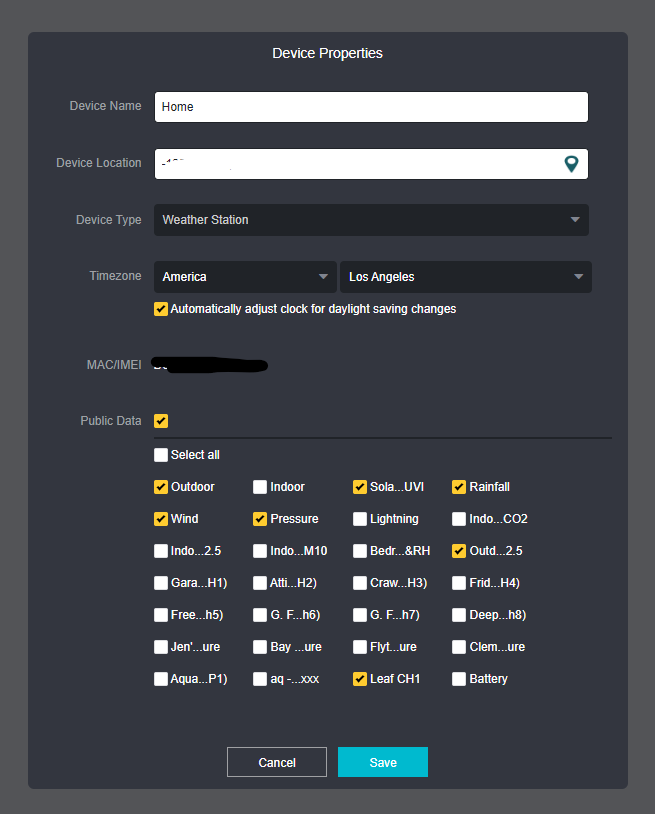
I am OK sharing the outside sensors, YMMV.
4 Likes
I think it still does by default. Every time I add a new device, I have to go in and block it. No one outside this house needs to know what the temperature in my attic or bedroom is or that I haven't watered the flower pots on the porch in a few days (I use 20% is the threshold to water). I share the rest of the outdoor stuff so mine (and a fee neighbors) Rachio irrigation controllers can get a local reading to decide to skip watering or not.
2 Likes
Anyone have any feedback on the WS85 sensor assembly?
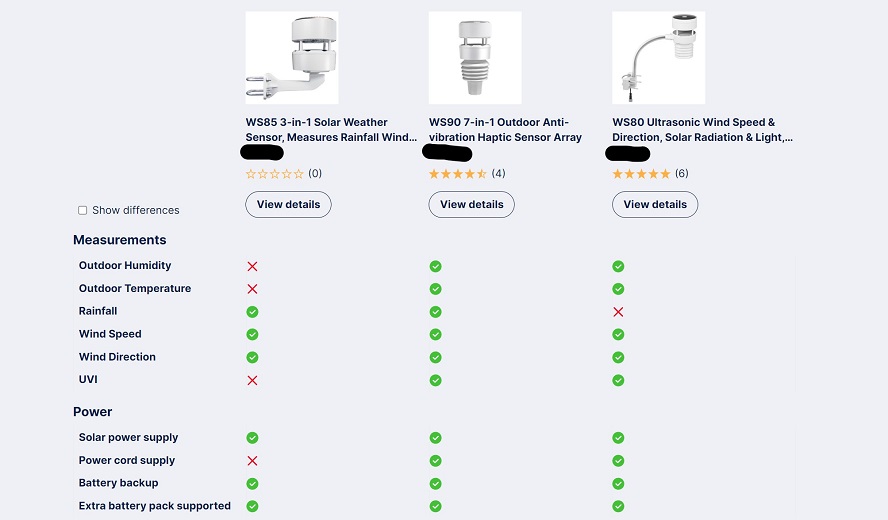
I don't really care about the missing temp/humidity since I have that already, plus the temp would be influenced by the exposed mounting position.
But it would be nice to have a local UVI. 
The Ecowitt system knows if you have a dedicated movable outdoor temp/RH sensor and it will prioritize that as the authoritative reading -- so you can find better placement.
The haptic rainfall sensors are mediocre from what I have read.
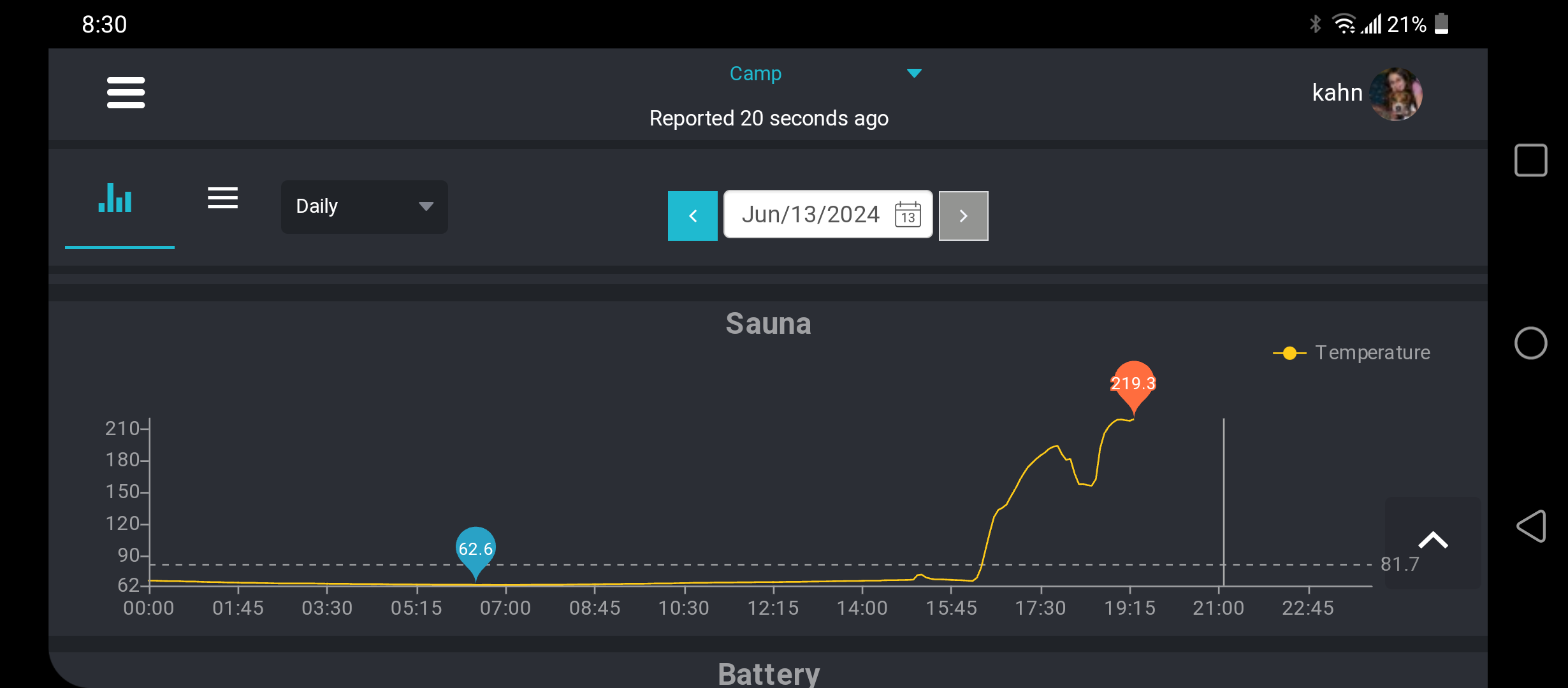
Happy F'Day to me. 
The WS85 on sale for $100CDN on Aliexpress, figured it was time to grab one and have a play with wind based rules.
1 Like
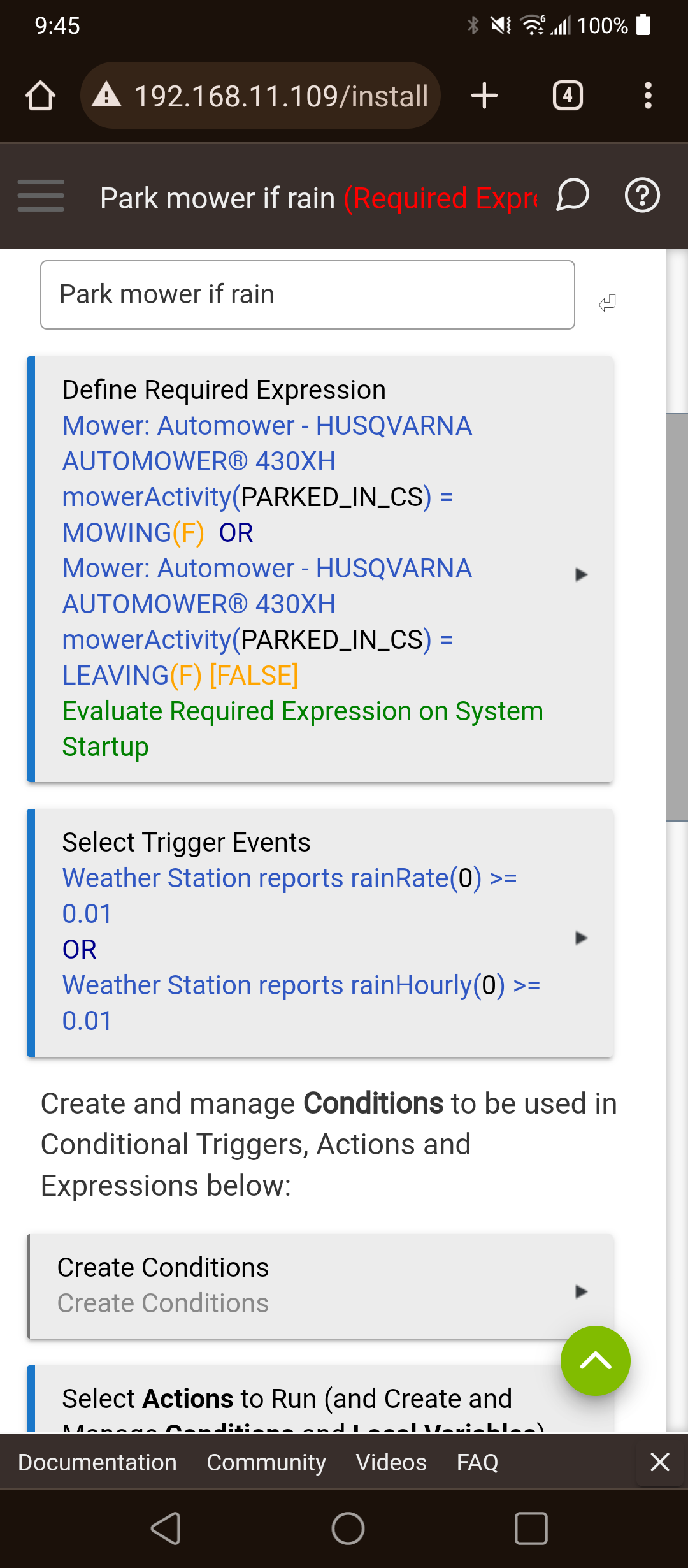
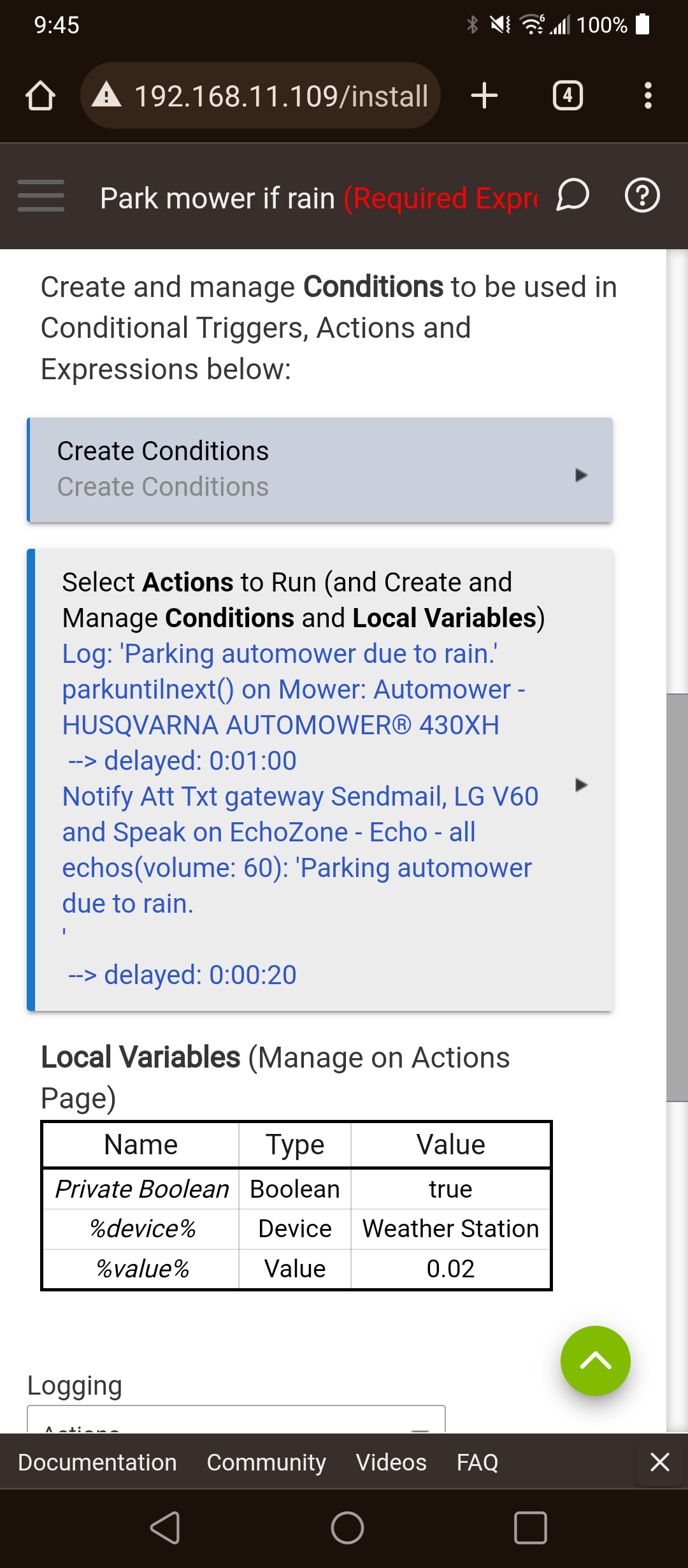
We are back in the u.p. of mich and my rain rule actually kicked in and sent the automower home. Gotta love automation.
1 Like
So it's not raining? Or you would prefer it to be mowing?
I know I would like an automated mower on the front of my property, but know it is a steep bog of a thing.... So am envious of those who can utilise automated setups...
Will the Ecowitt sensors work with the Misol hub and vice versa?
The Misol stuff sure LOOKS like Ecowitt (all actually manufactured by "Fine Offset") but even if they have the same OEM, it might not be cross-compatible.
For example, Ambient Weather is made by Fine Offset but their stuff is customized to only see Ambient Weather sensors... But Ecowitt hubs will see AW sensors.
So, I cannot say other than "maybe." You can check this forum for more information.
1 Like
Depends which region of the world you’re using Ecowitt sensors in.
In the US, the sensors use a different frequency than the Misol sensors:
I believe Ecowitt sensors in other regions of the world use 433 MHz, though?
2 Likes
@sburke781 - For consideration - Would it be possible to modify this setup to have different child device drivers? Right now, it looks like all of the children use the same device driver, which adds many more capabilities and attributes than each may actually have.
For instance, I have a bunch of garden soil moisture sensors, and they show up with illuminance, air quality, water, etc., but they actually only have humidity and battery. This was creating problems for me in Homebridge, because I couldn’t filter out AirQuality (custom capability for Homebridge), and it was being sent to Homekit. (Homebridge Hubitat v2 has some issues with custom attribute filtering, so if it were working, this wouldn’t be an issue, but still there are other use cases where having all of these extra capabilities and attributes could cause an issue or result in unwanted “junk.”
To fix this for my own use case:
EDIT: I jumped the gun on my below statement. After I created a new version of the driver, I was unable to swap it out in the child/component devices, because the field is locked. I’ll need to figure out how to unlock that. In the meantime, I commented out Air Quality Index components in the default “Ecowitt RF Sensor” device driver since they were the only components that I couldn’t filter out of Homebridge, and none of my devices use it, so it’s not needed globally.
created a copy of the child device driver for my soil moisture sensors and commented out the capabilities and attributes that aren’t needed, but that means I’m not on the production version of the driver, which I can deal with, but would be nice not to have to use this custom workaround.
Thanks for the consideration!
1 Like
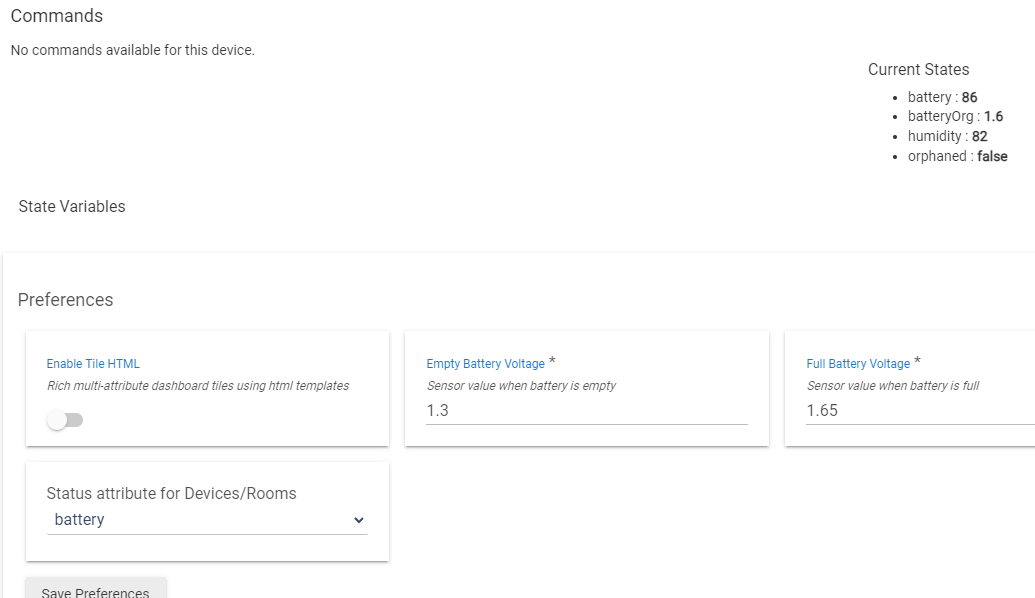
Yeah, this throws a lot of un-needed attributes for device.
Alternatively to separate drivers, a multi-selection drop down to pick the attributes you want. Maybe make all checked by default to make backwards compatible.

