One man's RAIN, is another man's DRIZZLE 
I bought a fancy manual rain gauge. I think it had a 3" opening. Latest model used by a rain monitoring network-I forget what it's called.
It and the 'regular' rain gauge on the WS90(?) were pretty much in agreement, although they weren't side by side. I decommissioned the fancy rain gauge.
I'd put that down as a justification for the "fancy" one, with automated reporting, without needing to brave the weather to take a reading.... 
The one I'm calling "fancy" is the $100 manual gauge, lol. That's the one i decommissioned.
So, my new issue. I did a migration from a C to a C8 last week, My Ecowitt Devices don't seem to have updated since the 13th. I changed the IP Address to the new IP address in WSView. Was there something else I needed to do?
Can you see if you are getting and data through to HE at all? If you turn on logging are you seeing anything?
Check the device network it on the gateway in HE. Perhaps it is reset during the migration (I would be surprised, but you never know).
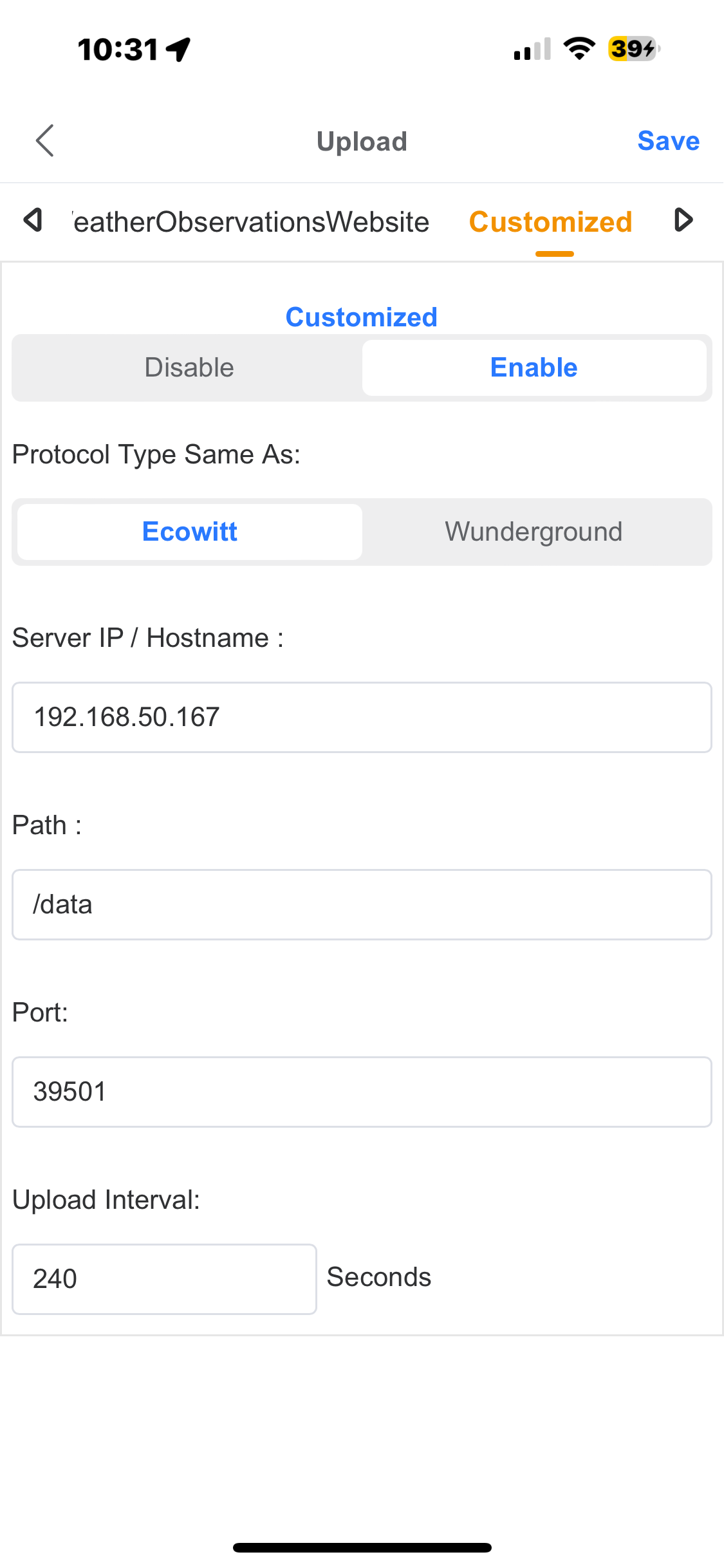
The fact you are seeing the error you are means this will not be the issue, but just for future reference, the DNI is located in the Device Information section of the device details page, where the name / label, Type (driver), Hub Mesh, Room, etc are situated. When HE receives data via HTTP on port 39501 is tries to find a device with a DNI that matches the source MAC address, i.e. your actual Gateway that sends the data. But like I said, this won't be the issue.
Is there a line number referenced in those errors?
No..
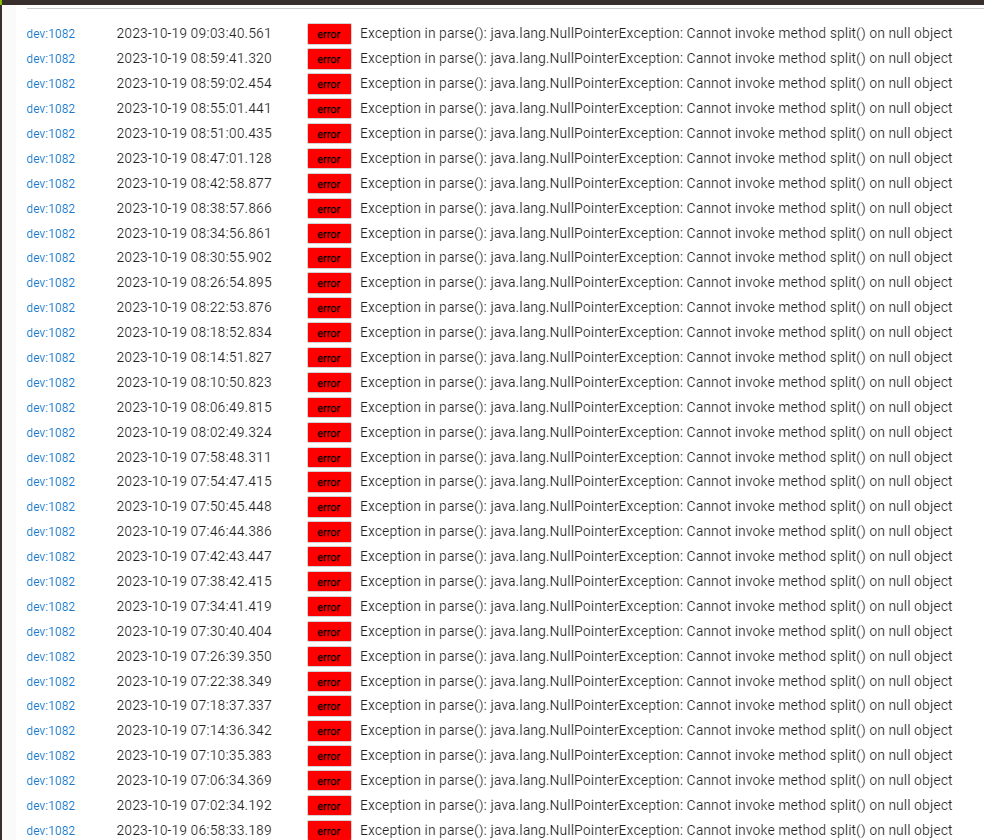
Exception in parse():java.lang.NullPointerException: Cannot invoke method split() on null object
over and over looks like it last got any update was the 13th, which is also the day I did the migration.. I suspect I may have a nuclear event about to happen .
Further Down I found this

That IP address is the one my gateway is on.
That is odd, I would have expected you to see one or the other, but not both of those. This warning is the symptom of what I was describing earlier, where there is no device with a DNI that matches the source of the data. From your earlier error logs, and this warning, it looks like the errors were occurring and then the warning, in that order....
Open the device details page in HE for the gateway device and check the DNI against the possible values at the end of the last warning log you posted.
well, this is interesting. No idea how this happened. I have 2 Ip's for the gateway (wired) and I had a reservation set for it.
Could it be connecting, or at least be configured in your router under both a wired and a wireless connection? They would have separate MAC addresses (I think), because I believe they are tied to the network "card", not one MAC address for the gateway, in this case. It would be a similar situation for a PC / laptop where you sometimes connect under a wired connection and sometimes using Wi-Fi.
No matches, but one was close.. ending in c13 instead of C10
ya that message is pretty s3el;f explanatory check the main hubitat device you will see it has a differnt ip than the one data is coming in on.. change it and save
Posssibly you used the IP to identify the gateway in the setup in HE, but it was connected under a different method at the time?
Try hitting Save Preferences
Save Preferences didn't help. I think some how I got it on one IP as a wired connection, and the new IP is a wireless connection. No idea how that happened, r really been how to fix it, even in the ecowitt app without loosing my data.
Tomorrow I'm going to have to go nuclear. Blow everything out and start over. 2nd time I've had a cloud migration NOT work the way it was supposed to. Oh well it'll give me a chance o rebuild my meshes .
I've released the update (v1.34.10) for the Lightning Distance fix that I made almost a month ago now. Should hopefully fix the issue, which was the case in testing.
I must have missed this discussion, what was the issue exactly?
@lcw731 had an issue where his lightning sensor was reporting in km instead of miles. There was a peculiar bug in the code when detecting whether to use metric or imperial measurements, which only affected the lightning sensor part of the driver.
The conversation started here:
Ah that makes sense. 