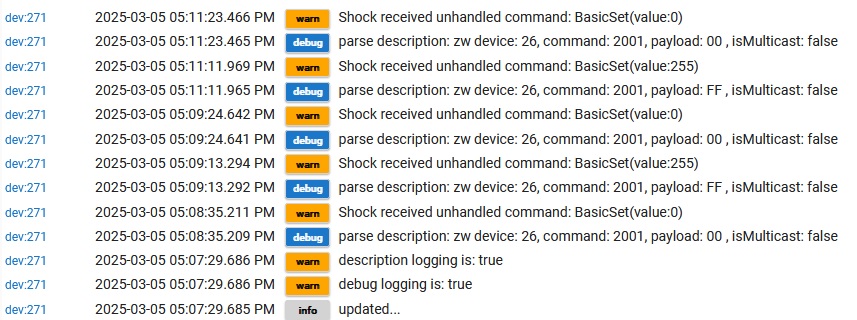
Post screenshots of logs please, I cannot make sense out of that.
So the device itself works you say, but it sounds like the driver is not capturing the reports from it and placing them into the correct state?
Can you please install this custom driver: [RELEASE] Z-Wave Universal Device Scanner
Switch the device to this, set the logging to Trace Logging and then activate the device a few times. This will give me an idea of all the reports it is sending.
Post a screenshot of the resulting logs.
Also, please post the info from the Device Info tab > Device Data section. I can use this to look up the device online and see all the settings it offers.
If you are feeling adventurous you could also try scanning the device for settings with that driver. Just wake the device up and then 2-3 seconds later click Configure on the device page. This should kick off a bunch of back and forth with the device. The Current States will give you some updates of what is going on. If it is able to find settings for it they will show up on the Preferences tab (may need to refresh the page).
Yes it reports the battery and tamper correctly, but shock is reported using a 0 or 255 value.
Also the documentation for this devices shows
Sensor will send an On status report (Basic Set, Value 0xFF) and Alarm Report(Type 07, level 0xFF)
Not triggered after 10 seconds will send a OFF Status Report (Basic Set, Value 0x00) and Alarm Report(Type 07, level 0x00)
An old SmartThings Groovy DTH, presumingly the same MonoPrice Shock Sensor device is here.
Jeff, I will probably create another post, as I am experimenting with another Z-wave device - vibration sensor - that sends notificationv8.NotificationReport, notificationType: 7, event: 10 when a vibration is detected. I couldn't find a HE inbuilt driver for it ...
Aren't the Z-Wave devices messages much better standardized when compared to the Zigbee protocol? Or Vibration and Shock Z-wave sensors are different?
@casey.ever try my universal switch driver. It will pick up those basic set reports and flip the switch on and off. If you really need it to come in as some other state we could easily patch the driver to duplicate the event to another capability.
Dont see how that would be possible. The logs are generated based on what the device sends to the hub, the driver would not make that stop. Did you turn on debug or trace logging?


 Or Vibration and Shock Z-wave sensors are different?