Hello...
I am wondering if it is possible to configure a switch to act like a momentary contact. Press "ON" and when you release the switch it goes to an "OFF" state.
Thanks for any assistance.
Assuming you are wanting to hold the switch button (long press) and when release turn off, You should be able to use a rule or the button control app. Set it so the switch is turned off when the button is released.
What kind of switch? Or are you thinking in general?
Button controller can probably do what you want. Turn on when held, turn off when released.
1 Like
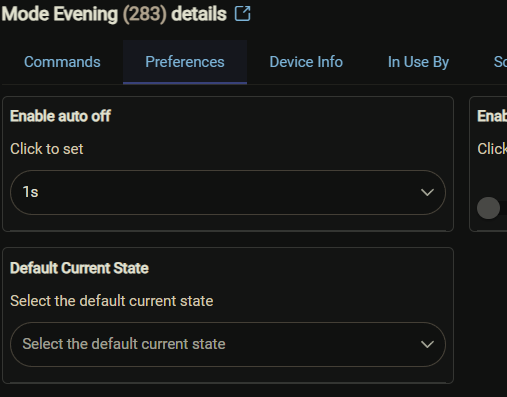
You can create a virtual switch in Devices that will act as a momentary; just enable Auto Off
3 Likes
I installed the "Basic Button Controller" app. When I tried to set it up it asks "Select Button Device" but the dialog box is not populated with any choices.
What am I doing wrong?
What kind of switch is involved here?
1 Like
I'm curious about this too. Are you wondering about a real device or just how to create a virtual one that does this? It's also normally best to state your use case, as there could also be a different approach that would work for whatever that is.
2 Likes
I have a z-wave switched outlet plugged into an AC receptacle with a 12v transformer plugged into the z-wave switched outlet. When the AC switched outlet is turned ON, it powers the 12v transformer to energize the coil of the 12v relay.
I want the relay to be energized only momentarily. Press the button to energize the relay and when I release, the z-wave switched outlet goes to OFF and the relay opens.
What kind of button or switch are you using to turn the switch outlet ON?
Normally, I'd just write a Rule that is triggered by the button/switch, with actions of:
- turn outlet ON
- delay x seconds or minutes
- turn outlet OFF
1 Like
A plug is not an eligible device to use with Button Controller, so a rule like John_Land suggests above is the way to go.
If you have a button or switch that reports "Release", then the rule might be:
- turn outlet ON [the trigger being "PUSH"]
- turn outlet OFF on RELEASE
Edited to specify the trigger.
Thank you gentlemen.... so I guess the way to proceed is to write a rule to turn off the switch after a predetermined time.
Everyone's help is appreciated!
1 Like
There is a simple/reliable Auto-Off app available that you can use for this if you want to...
I have it configured to manage a number of switches that I want to go off at a predetermined period after being turned on. One example, our whole house fan. Works w/switches and plugs.
1 Like
Seems overly complicated.
What is the relay controlling?
Garage door.... older model, no wifi, etc
Treat yourself to a Zen17 - you can then wire in a dumb reed contact sensor for the door with some 18-2 or bell wire, tie it all together with the ever-reliable Zooz GDO app, and then you got yourself an all-in-one garage door operation & monitoring solution.

1 Like
How about a ZEN58 low voltage relay?
I'm sure that would also work. I happen to have the 12v relays on the shelf so I figured I would use them. Everything works as it should, it's just that you have to push the switch a second time to turn off the power to the relay. Thanks.
A Shelly uni can simulate the button press with the auto off timer.
The zen58 also has an auto off with parameter 7.
I'm still a newbie here with the Hubitat....
I looked up the Shelly Uni and I believe it is wifi based. Will my C8 Hubitat control wifi devices? I currently have zwave devices included.

