This app is pretty much useless at this point, whenever I'm connected to a WiFi network it automatically thinks I'm local to the hub and it will not switch to cloud whatever I do except turn the WiFi radio off on my phone! Not exactly sure when this started as I don't use it that much but when I do, I expect it to work!
Even worst, if I open Hubitat app when connected to WiFi anywhere else in the world (or not at home on my local network to be clear), the "Use Hub's WiFi as present" feature kicks in and sends to my hub that I'm now present!!! How the heck does it communicate with it "locally" when I'm not even local and nothing else works in the app.
This is seriously broken and needs to be addressed.
Also I had reported in the past about Geofence debouncing, whenever I come back from a walk, on the fringe of the geofenced circle, it will sometimes send a present, not present, present, not present, present all within a few seconds. This is exactly like when coding a switch at the firmware level, you need to debounce the signal and wait a bit before sending the change of state only once.
Proof that the Hubitat app is the problem and not the iPhone, all other apps I use for presence work reliably 100% of the time, I really wish I could get rid of the others and rely on only one that I need to control and monitor stuff when not home, but right now even that does not work without have to jump through hoops like disable wifi and the sorts.
Since you are on iphone you dont have to use the hubitat app or add any new software to your phone for reliable presence detection. You can create a virtual switch (or virtual switch w/ presence) and use the homekit integration to present that virtual device to homekit. In the home app you can create an automation to turn on that switch when home and off when gone. the only time i’ve not had that work is with 26.0.x, but 26.1 fixed it.
You can also debounce the behavior at the edges of the geo fence by using a parent virtual presence sensor and using arrive/leave and stays automations in RM. There maybe even an app that can help with that, but i dont remember what it was called, presence manager? maybe?
Personally i use multiple ways to detect presence and roll them up to a single virtual device because things like 26.0 happen, batteries in fobs die and ios and android will kill background apps during inopportune times and like you, i just want presence to work.
I already do this but I'm planning on getting rid of my AppleTV, so I will be down one reliable source.
Why, the app should be doing this itself, do you need to debounce any other device in your smart, why would this be different?
Exactly what I'm doing, to be to the point, I'm using Homekit and Locative and they are always spot on, I also use "WiFi Presence Driver" but that is not very helpfull except for arrival, I use the Presence combiner app to drive the virtual device that is connected to the home/away state in Hubitat.
Why wouldn't Hubitat also be spot on 100% of time like the others stated above, ya I know they are a small team and I do understand this, but it has never really worked correctly, now that the new app has rolled out and out of Beta, why not identify what's broken and fix it once and for all before bringing new features.
From the user forums of smartthings, hubitat, and home assistant and the reddit threads of homekit i don’t think there is any presence solutions that works 100% of the time for all users in all places. If even Apple can mess it up, then anyone can mess it up. TBF i didn’t even add hubitat presence until i has issues on 26.0 and i saw others were too. Why make it more complicated when homekit working, but it also allowed my automations to fire as expected until 26.1 was released.
Why did hubitat presence work when homekit didn’t… i have no clue why id hubitat presence working for me and not for you, also no clue.
What i do know is that using multiple sources for presence is the only way to get close to the presence reliability that I want and this seams to common.
I just realized 1 more reason i have no expectation for any presence application to be 100% accurate for all users all the time in all places.
I play pokémon go, and i know several places around my house where gps drift is a “feature” i exploit so i dont have to walk so much to achieve the goals in the game. I can watch my avatar run across the street and into the golf course and back the other way and chill at a taco place while i’m sitting in the parking lot of a grocery store, trying to catch them all.
I’ve never considered using pokémon go for troubleshooting GPS or presence issues, but i have seen weird GPS stuff in that app that i have not seen in any others across different phones, ios versions and locations.
I know this doesn't solve your HE app issue, and don't know if you've tried it, but the community Owntracks integration is rock solid for me, I depend on it solely for presence. Android, but supports iOS as well. Developer is very active/responsive. If you haven't looked at it yet, worth a look.
Thanks for all the presence suggestions, but this is going off track, I have no problem with presence at the moment using combination of Homekit / Locative / HE app / WiFi, the original problem is local/cloud logic that does not work at all, as a side effect it brings problems with presence WiFi setting but that is not the main problem and it usually works pretty well except for the bouncing when coming inside the fringe of the geofence.
The only issue that I have seen with the app is when I am on the home WiFi, It sometimes has trouble connecting to my dashboards until I tap the home icon in the top left corner. iPhone 16 pro on iOS 26.2 beta.
Same thing happens with the update just released
@gopher.ny installed the new app and at first glance, I would say that in my case it's working pretty nice, as for local/cloud goes. When I got at work today (I had turned back on the "use Hubs WiFi as present") and opened the app, it did not switch to present like the last version did.
As for the geofence bouncing problem, I can't report for now, don't even know if you worked on this part of the problem, as this is a once in a while issue and with all the rain we've been having lately here, I don't go for walks as much, so will report back later on this one.
One other point I would like to talk about and I'm not 100% certain you guys can do anything about it, but might be nice to look into anyway. I noticed that each time the app is updated in the background overnight, it will not start in the background and geofencing does not work anymore until I open it manually. I know that as a developper you will most likely never see this behaviour, but for many this might be a problem when people say it's unreliable. I don't see this behavior on other apps that work in the background and was wondering if this has anything to do with the fact that the HE app has a splash screen that you need to click ok when it starts to let you know about improvements, just thinking out loud here. Might be something else also since I've never coded phone apps.
@gopher.ny Bad news this morning, when I got to work today, opened Hubitat and right away got a message from the hub that I had returned home! Yet when I go to the geofence settings page in the ios app v2.1.53 (454) it does say that I'm out of the geofence, if I click the "send geoevent" button in the settings page, Hub will go back as if I'm not present.
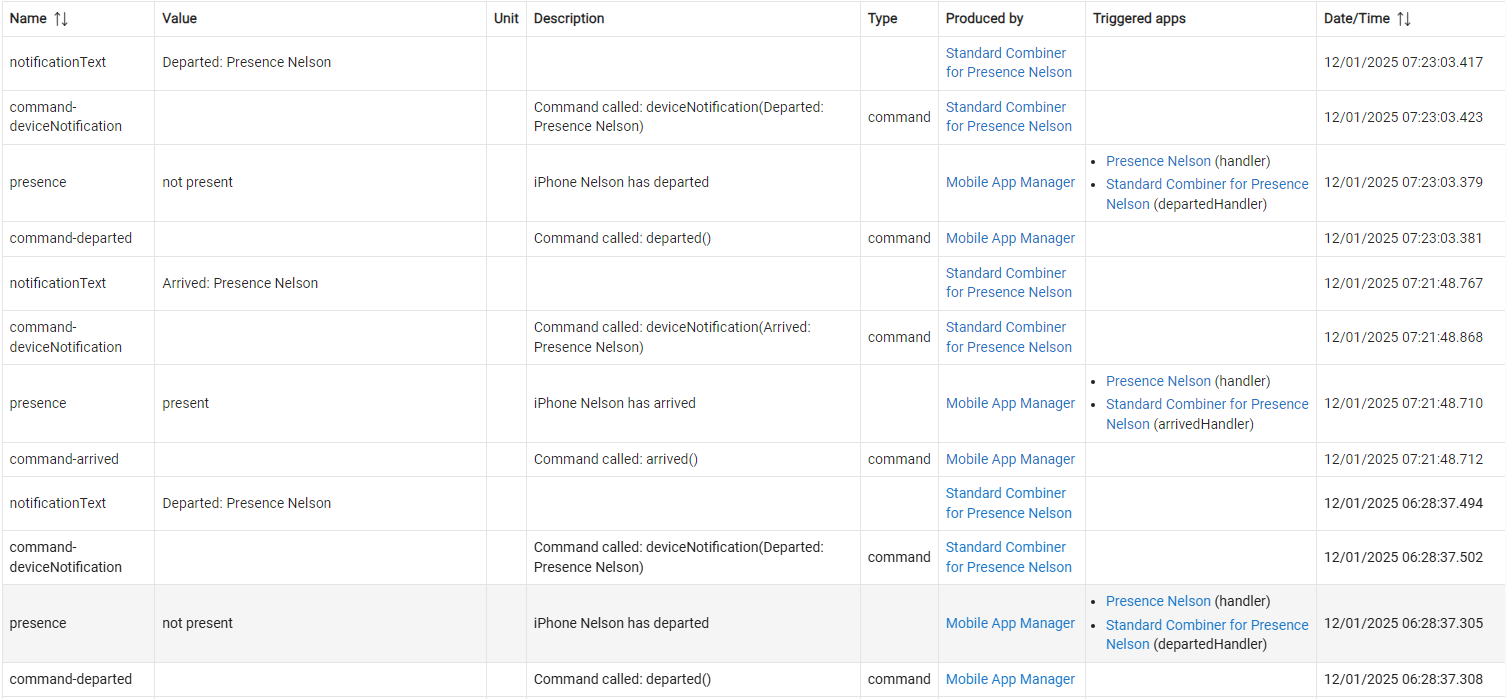
Here is a screenshot of all of this morning events since I departed for real until I opened the app and then sent geofence event again. This was with "use Hubs WiFi for presence enabled", could the message of what exactly triggered the presence (WiFi or GPS) be in the logs just to aid in debuging?
I was thinking about this and trying to reproduce it, but everything was working as expected, then I had an idea that maybe if I was local the last time I used the app, then go away from home and open the app again, it's thinking it's local again and some variable is set as local until it discovers that it's not local anymore, then switches to cloud.
Does the HE app send a geoevent based on WiFi as soon as the app is opened because it was last on local Wifi instead of waiting to see if it's still on the local WiFi ?
I will have to test this theory tomorrow and see if I can reproduce this misbehavior again.
@nclark do you use a VPN to connect to your home network when away? I've noticed when I have my VPN connected, the Hubitat app will switch to local (and also default to present if the wifi connectivity check it set to true).
Good point and I'm 99% of time no VPN, I do use a VPN when I need to be on my network with my phone but this is very rare, it was also the first thing I checked but forgot to mention it, I was not connected on the VPN every time this happened except for the first time it did and I did not think of checking either that first time as I did not really think of that "use local hub network..." option. Noticed it after the second time and started looking why it did what it did.
As stated above, it would be nice to have the info of what triggered the event but I'm pretty sure it has something to do with the local/cloud logic.