So I could have swore I saw official support for beta test versions in HPM a long time go. I could probably dig through the code and figure it out but wondering if anyone already knows how it works or has an example.
I thought there was something where you could add a beta version to the manifest, but I cannot find it in any of the docs.
There is an option in the settings which seems to indicate there is support for it:
Long story short.... I have so much different stuff going on now that it is very hard to make updates and do the thorough testing which I used to do for every version. So I am looking for the best way to release test versions for feedback before I post it in the main package.
that's the sample that Dom invented. When I adopted HPM, and added Bundle support, I wedged in an example in that sample code... not remembering it had Beta examples. Til today. I knew I'd seen it somewhere but couldn't put my finger on it.
Its not great, but it works. The release notes is not separated so I put beta info in the existing one. I dont think you can pick which packages you want beta versions for, its sort of all or none.
Ideally you could just point to a totally different manifest for beta but I know due to the way HPM was designed this is not really possible. I came up with a solution though by putting the beta on a new branch, and then updating the main branch manifest to point to those files. When beta is over I can update the manifest on the beta branch (which is not used for anything) and then merge that along with all the changes to main.
Hey, I have been working a bit with @jtp10181 on to figure how to use the option for beta release recently with my Govee Integration. One of the things that bothered me was the lack of a separate Release notes between Beta and Prod through HPM. It could lead to confusion around what was installed or being installed. I made some changes on my dev hub to get HPM to provide separate release note when doing installs based on if beta is being used or not. Any thoughts on getting this integrated into the broader HPM so we can use this option with our apps?
I am also going to see if i can figure out how to check for bundle version changes. It seems that when bundles are used they are reinstalled every time, but will not update independently. This is a problem for me at least because many of my changes end up actually being in the bundle files instead of the drivers or main app.
Bundle support started by copy pasting the File support, then adjusting to use Bundle
Although the Platform has, over the years, provided API to replace all the "UI button pushing" that existed when HPM was invented by Dominic, the functionality remains the same... HPM is sending content to the Hub to meet the Hub's interface. Bundles are a singular example because the Hub requires a specifically formatted ZIP file and rejects anything else. Then that ZIP is handled entirely within the Hub. HPM's task, therefore, is to push the ZIP rather blindly, just like the UI. Remember, the ZIP remains on the Hub, but it's useless immediately after processing. The hub keeps the entire ZIP, JUST to have a visual indicator that a Bundle was processed. Waste of memory to me, but because source compresses so well, it's not a big deal
I'm interested in your HPM improvements. I continue to see myself as the Steward of HPM, not the owner.
Yea, That was kind of the impression I got from some of our conversations a while back. So is the best way for me to submit code then just to fork the repo and submit a pull request for it through github?
I will go ahead and get that started for the Beta release Notes separation.
The Bundle changes I mentioned are a bit more involved as it appears allot of moving parts to figure out. I did get Bundles to show up as a component of the install though when viewing what is installed.
I feel like I need to do a little bit more testing, but what i have is seems to work in my setup.
Once I think of a good way to complete these last test i want to do i will put in a pull request for review into the main repo.
If you want to look at it before hand my fork is here
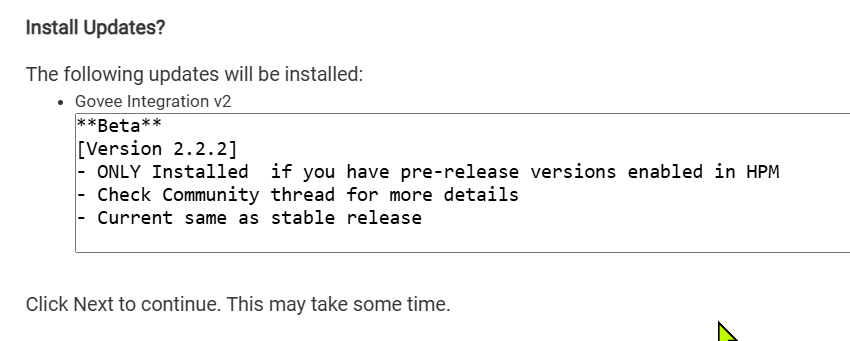
The changes made are if you add a tag for betaReleaseNotes you can now display different notes based on what is being installed.
Here is an example of what i mean so there is no confusion.
  "minimumHEVersion": "2.3.2",
  "dateReleased": "2022-09-13",
  "releaseNotes": "stable Release note information",
  "betaReleaseNotes": "**Beta**\n[Version 2.2.2]\n- ONLY Installed  if you have pre-release versions enabled in HPM\n- Check Community thread for more details\n- Current same as stable release",
  "apps": [
    {
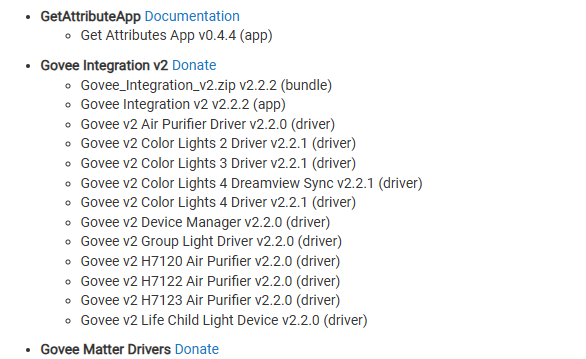
Then I enabled the "View Apps and Drivers " page to also show the bundle that is part of the install. In my testing it looks like this. You can see the top option is the Zip file with the label of bundle next to it with it's version. I also added a space in the text for Beta show now it isn't attached to the number value
Lastly and the item I need to test more is the option to update based on bundle version change. Not sure of a good way to show it right now. It did trigger based on version change, but i didn't see it download it and install it. I need to verify that before i can say it is 100%. i am not 100% sure it failed because as you pointed out above there are some strange things with bundles that don't exactly match the other stuff's behaviors.
Think I found another issue to work out with the bundle upgrade process related to beta builds. It appears the logic used to tag a item as beta and show the beta version doesn't work with bundles as they are right now. I am going to take a brake from this for now, but the rest of this does seem to work fairly well.
The one catch to using it as is now is that with beta turned the update check validation will always think there is a upgrade. I will think about this for a bit to see if i can come up with something.
Ok i now have the bundle showing that it is a beta package, and properly identified.
One strange thing that i didn't see previously. I did a clean install on my dev hub of the app i am testing with. When i did, it tagged everything as beta except the bundle. On the next update everything was removed from beta except for the bundle which should now tagged as being beta.
Does HPM tag everything as beta initially on install if it is new, the beta switch is flipped. Then if the beta and stable match it will tag them as prod code upon update?
This appears to be normal behavior. I have also observed this now with HPM 1.9.4 on a different hub with a clean install.
So now last thing to figure out is how to get it to install the beta for the Bundle at that time.
Update
Got the last item i was working on figured out and coded, and tested. I have created the pull request so you can do any further testing you want to. I look forward to hearing any input.
 *    mavrrick v1.9.6	Update to allow separate release notes for Stable and Beta Release
 *				           Updated ability to list installed bundle files from View Apps and Driver Page
 *                         Make Bundles upgradeable on their own
 *    csteele v1.9.5    Take advantage of v2.3.4 deleteHubFile()
 *    csteele v1.9.4    Take advantage of v2.3.4 uploadHubFile()
That happens often, the app is trying to update itself so depending on what code gets moved around it can break itself... Just close it out and then go back, it should be updated. If not run a repair on HPM.


 that's the sample that Dom invented. When I adopted HPM, and added Bundle support, I wedged in an example in that sample code... not remembering it had Beta examples.