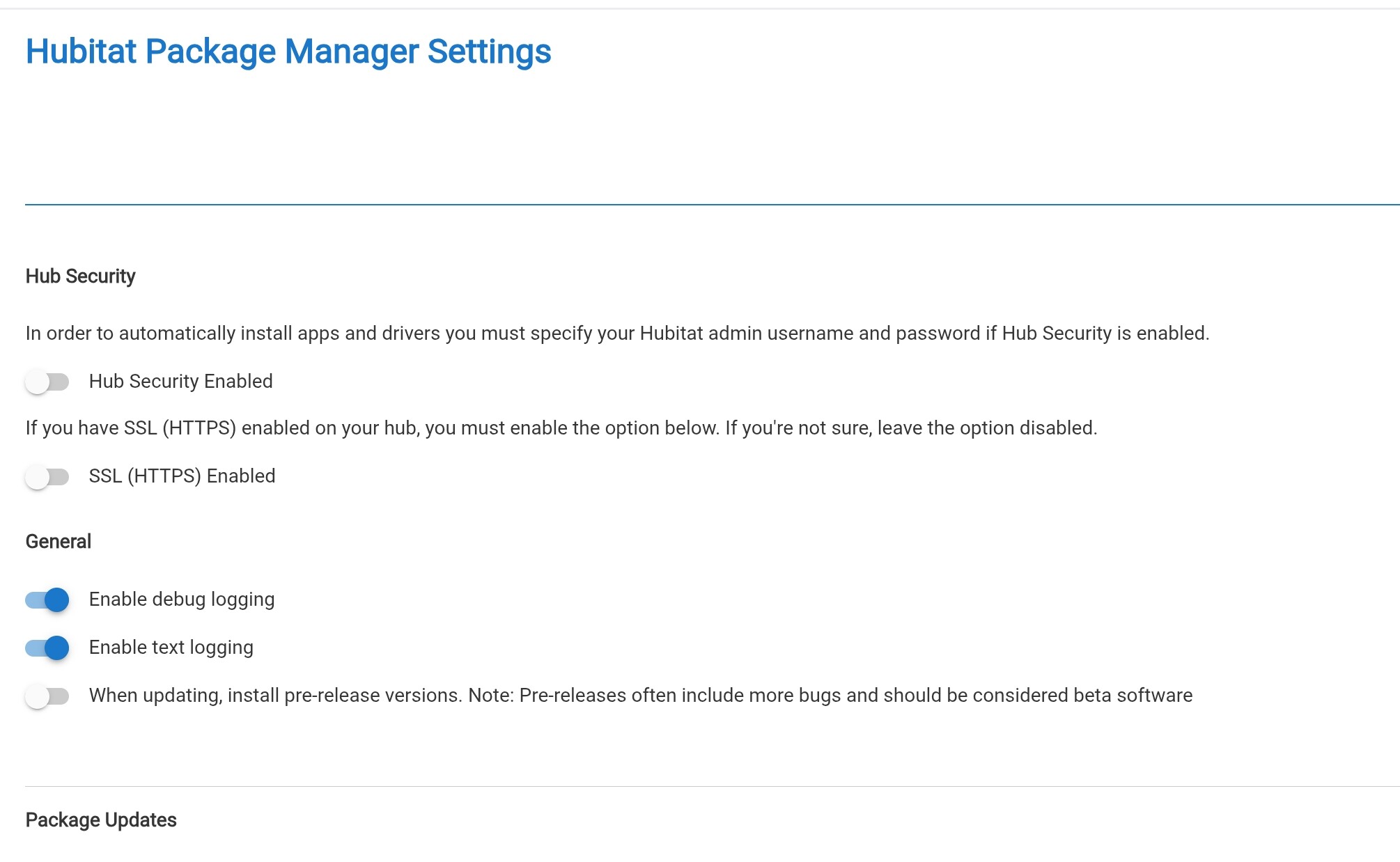
With "pre-release" disabled, as you show, I Installed Govee v2 as if it were the first time. It installed correctly.
I then ran Update and it (correctly in my opinion) found no update.
If I then enabled "pre-release", and clicked Update, I was presented with an update and saw the Beta release notes. The install of the Beta went correctly.
The reason you are seeing that is likely because of two things.
With the changes that were made HPM now has the ability to track bundle files as well as apps and drivers.
Because of the above the increased Version for the Bundle which i used for testing is triggering that update. It actually doesn't have anything new. You can ignore it. and i will fix that version shortly.
I just sent the version for the bundle back to 2.2.2 so this shouldn't show up for other users. What cSteel said is also true in that if you turned off the option for beta's then it shouldn't appear either.
Hey guys, I wanted to post a question here to get some feedback to make sure I am going down the right path for HPM.
Prior to the recent updates Beta was essentially a all or nothing thing. You turned on one flag in the HPM settings and if a package had a betaversions It was loaded. Everything else was essentially the same as to any regular HPM install
Recently Changes
I wanted to improve this as i felt it was lacking and very inflexable.
The first item address was the desire to have seperate release notes between Stable and Beta releases. That is effectively what was updated with 1.9.6 code. Simply put the app was updated to allow the use of a new tag in the Manifest called betaReleaseNotes which allows a developer to have different release notes just for beta items.
The second issue i attempted to tackle was the fact the Beta flag is a all or nothing. This is where 1.9.7 comes in. The idea for me behind that change was to give the user the option to only enable beta for specific packages/Apps/Drivers. That said we have found a bung with that code and the new code i am testing will address it. This did highlight a potential concern though Prior to 1.9.7 a user didn't have to think about if they were getting beta for a package once the flag was turned on. It could be a expected result simply as that was how thing were managed as whole. Now the user would have to actively enable it. I have talked with @csteele about it and we have gone back and forth on that as to weather it is a good or bad thing in either direction. My general though was that installing beta should always be a active effort and shouldn't happen automatically for any package. That wasn't exactly the case previously and i understand potential desire to keeep it the same.
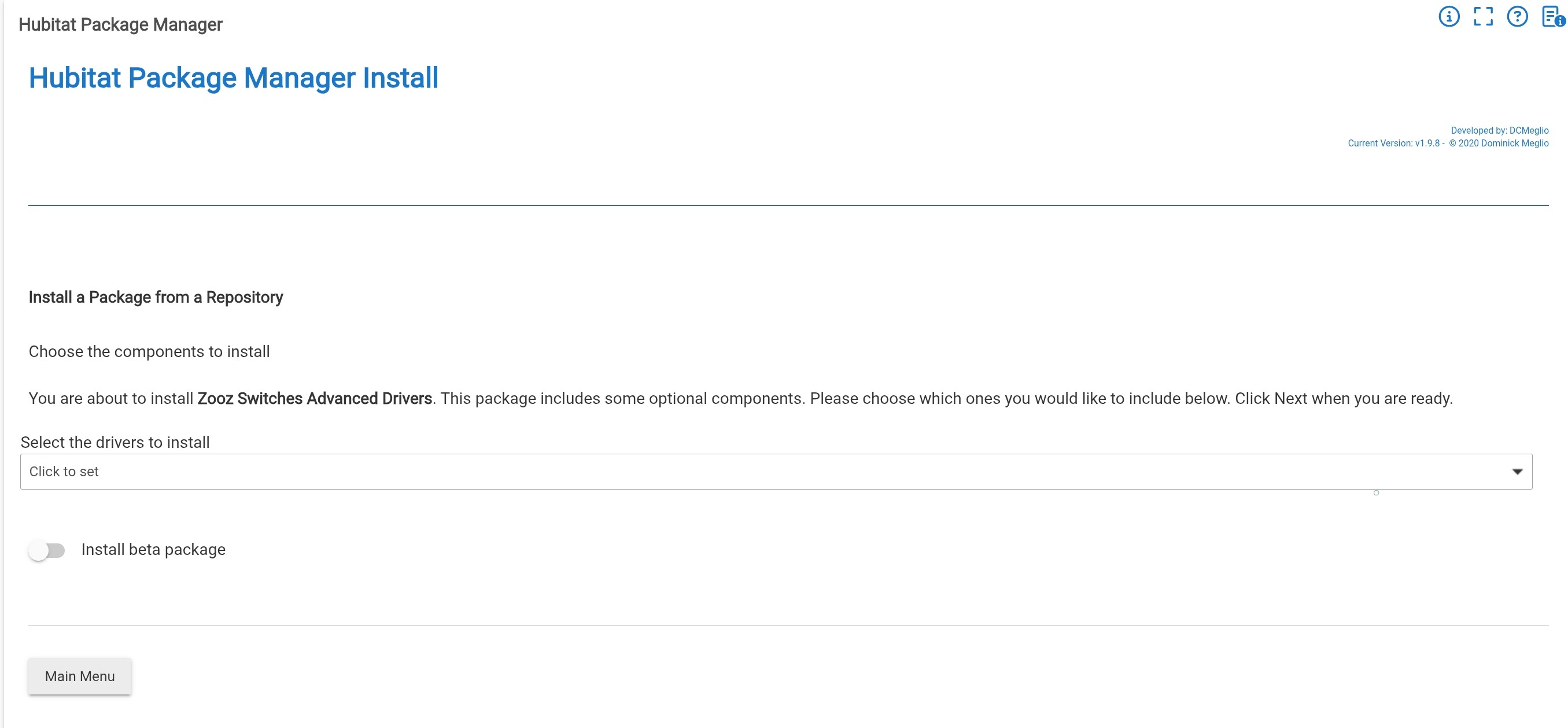
Last update that is in my current code for beta is a result of the above discussion. I wanted to give users athe ability to actively install a software item as a beta package since it wasn't as simple as it was before. With that understanding I added a toggle to the flow so a user could select the option to install beta code if they wanted to at install time.
My question to you all?
Simply put for those out there using this function what are your thoughts on this. I don't want to push a direction if it is generally not wanted by the users out there. This application is used by so many people i don't want to create problems either with my proposed enhancements.
I am testing a version 1.9.8 now with the latest fixes and changes listed above.
I also wanted to say thank you to everyone for your patiences with this as well.
I think almost no one was using the beta feature prior, other than you and me. It was under-utilized because it not understood or implemented that great.
The changes so far I think are good and needed in order for more devs and users to feel comfortable using it.
I am having a hard time understanding what the next change is?
What does this mean exactly? Does this toggle show up as your doing updates and ask if you want the beta version? Is that on top of having to enable something in the settings? Did you remove the individual beta package selection in the settings and now it is in the update flow only?
Only during installs you will see a toggle to install beta. This will tell the install flow you want to install the Beta option for the package if avalaible. Below you scan see the example when you go to the selection page for what drivers to select to install. This was added simply because you may want to install a new package and try a new beta feature out. Now you don't have to install it, Update the setting, and then Update it. You can just install and go straight to beta.
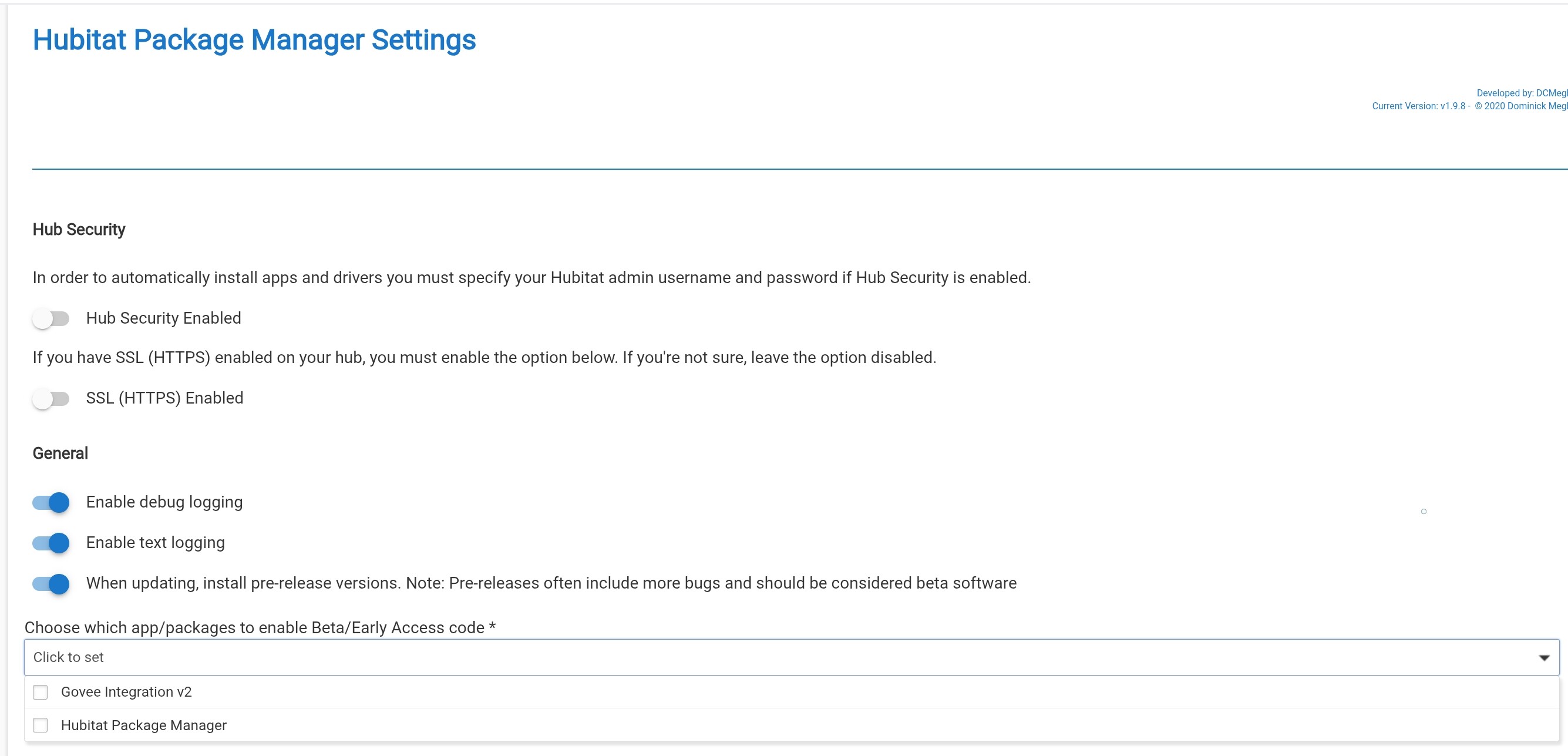
The option in the preferences will still be there as shown here. Similar to before there is a toggle to enable installing Beta. Once it is selected another option appears to select the package/service/app you want to be part of the feature.
If you install a package and hav PM isntall the beta, it will update the toggle on the setting page to "on" if it isn't already and it will add the package to the selected packages for beta install.
As of right now the update flow doesn't allow any selection of stable vs beta. It just uses the Preferences page options that are setup.
And to that end, What functionality do we think is needed to fix that. I have been trying to check off things that would be on my personal list. Much of my list will be checked off at this point. Any other thoghts for needed beta enhancements?
I do like the idea of option in the install or update flow to choose (or not choose) to install a beta version.
Curious how would this work w/the the Pre-release setting in HPM, and with HPM auto update? In this newer version of HPM does auto-update always only install full release code, and if you want the beta version you go in and manually choose the beta install? My HPM auto-update runs at about 3 am so I'm not around to decide if I want a beta version or not at that point... Just wanted to confirm...
Right now the update flow process as i have it depends on the flag in the settings and then also what packages are selected. After @jtp10181 mentioned the idea of doing the beta install from the update page flow i started thinking about how complicated it would be to do. I suspect it would require a good amount of changes. Plus it would redundent in a way. As you also mention i would have concerns about a non interactive process like a auto upgrade.
I will review the code now to see what i can figure out about the auto upgrade flow.
After looking through the code it looks like the Auto Aupdate uses the exact same method calls that the update from the main menu. That would indicate it functions the same, and i wouldn't worry about it working the way it is designed currently.
I want to just mention that Install handles one Package at a time. But UPDATE can handle multiple Packages. Thus the two flows through HPM are independent with:
Affecting INSTALL, while the "global" select is used by UPDATE.
I think the changes so far will be sufficient. The latest change is nice to bring attention to a beta version being available for new users.
The only other thing that might be needed is an example flow of how a dev should handle it in GitHub. The whole make a special permanent beta branch, point the manifest to it, make your updates in beta. When ready to release you update the (un-used) manifest in beta branch first then merge it all to main. Then you can just carry on with more beta updates on the same beta branch. Being not super experienced with GitHub it took me a good bit of pondering to figure out the best way to do it.
Yea.. This has been on my mind actually. I have been thinking about how to help explain how the beta functionality should be used going forward. Part of one of my pull requests were some updates to the github examples for the sample packagemanifest.
I wonder if @csteele manage the HPM documentation website or is that still take care of by the original Developer. This may be something that should be added there after the documentation is created.
I think that is a good start. We ceratinly need to update the examples so folks know what is possible and how it could look.
@jtp10181 correct me if i am wrong, but i think your point is helping developers understand when and how to use those values.
Probably a explination along the lines of if a developer wants to run a beta code base with their stable code base they can make them both avaliable for users. They can do it if they have a seperate location to publish their code bases to for example a with github having a main repo, and a beta repo. Then in the PackageManifest file use the tags "betaReleaseNotes", "betaLocation", and "betaVersion".
They are optional but if present they do xyz.
"betaReleseNotes" should only be in the main section of the Package manifest,
"betaVersion" similar to version depends on how you publish the contents of your package. If you make the parts of your package installable individually you will want betaVersion on each item. If you package them as one large item they should be in the main section of the PackageManifest. Beta version should always be above the regular version or it will be ignored.
"betaLocation" should only be in the section for each app,driver,bundle.
Maybe more. The point is to just make take the mystery out of how to start to use it.
Honestly it could be benificial to have a list of vaid items that can be in the manifest and how they work and when to use them. I now that is better then just beta though.
The example does help, but that only gets us so far. I know i had to do a fair amount of guessing initially to get everything working the way i wanted it to when i started. I suspect once someone doesn't it the first time though it will be easy for any more they want to do