I'll defer to you... Will the update query change be out soon? I have 11 rooms with 10-15 device tiles in each... I thought about trying to apply something to "All tiles" but was worried I might break something... I've put in a lot of time on each tile already making sure they all are symmetrical and have custom icons... Not looking forward to going through each one by one again...
Again, you have done some awesome work here. I played with sharp tools for about a second before dumping it. Your app is the best...
I want to try to integrate some security video and did some reading yesterday... I'm not a programmer so there is a pretty good learning curve for me.
Only file updated was housepanel.php so just grab that one. Takes a few hours for zip to be updated I think. If that still doesn’t work then something is still amuck. I didn’t have a lot of time to test it.
I do know that the customizer TEXT replacement of name fields works really well, but that would require you to edit your tiles one by one. Sorry about that. Another option is to download the hmoptions.cfg file and manually edit it to create customized names. The format of tile customizer inside that file isn’t obvious but it is workable and probably easier todo than one by one tile edits. To do that edit one tile using the customizer then download the file and mimick the format for others. Then upload the file and set the permissions back to 777.
Yeah, it still doesn't work.. Just to make sure, I copied the code directly to confirm I had the new stuff... Still switched back to the original names... Sorry...
Okay - thanks for trying. I’m on travel for my day job all this week in China so I won’t be able to help much. Your best bet is to try the tile customizer or to change your skin to use the headers which do use the custom names. So sorry about that — I just ran out of time before I had to catch my flight. I’m actually on the plane WiFi as we speak responding to you.
By the way, I love the look for your icons and what you did with the modern skin. Really nicely done.
Thanks! I was traveling all last week and working on this remotely... I also tried the plane WiFi just to say I did... Turned on some lights, etc., just to mess with the family... Anyway, thanks again for all your hard work and be safe!
Hi good people! I am back in the US after a long trip abroad. I won’t be at my computer again until Wednesday but I have been collecting a lot of ideas that I will work on as soon as I do. At the top of this list is fixing the name issue that @SuperDupe reported per above. I also have a GUI for the new macro feature about ready to roll. I am also working on adding a status field that reports the time of the last few actions for the tile. I also need to fix the clocks to use the user provided time zone. The js file currently uses the local time zone to update the clock every second which overrides the php code version. Most people won’t notice this but I did when I was traveling.
The custom name fields are really fixed this time. I finally got home and had time to fix the bug and fully test it. Other stuff I mentioned is still under development.
Hi, just an FYI
I just installed HP 2.031 via the install routine and it installed everything into: /var/www/html/housepanel/HousePanel-master/
Instead of the expected:
/var/www/html/housepanel/
It also threw a bunch of errors at the end of the install routine during the housepanel-push install, I assume because the files were not in the expected location.
I moved all the files and folders up one level and everything seems to be working
Edit: I had to redo the push install manually to get it working
Thanks for the feedback. Will help me debut things. Latest version is 2.040 so that may be the problem. If you have it installed I would change anything beyond refreshing the main files manually.
Any possibility of further development for HSM? Specifically, so more of the arming/disarming and cancelling features can be more easily activated... Since there are still some issues with the keypads, I find myself having to arm/disarm and also cancel alarms from the Huitat dashboard. If i could do those things from HP, I'd never need to use the Hubitat dashboard at all...
I thought that was already supported? I don't use it so I haven't tested. Let me look at it and get back with you. The design intent is to rotate from arm to disarm to arm away etc as you click on the icon in the HSM tile.
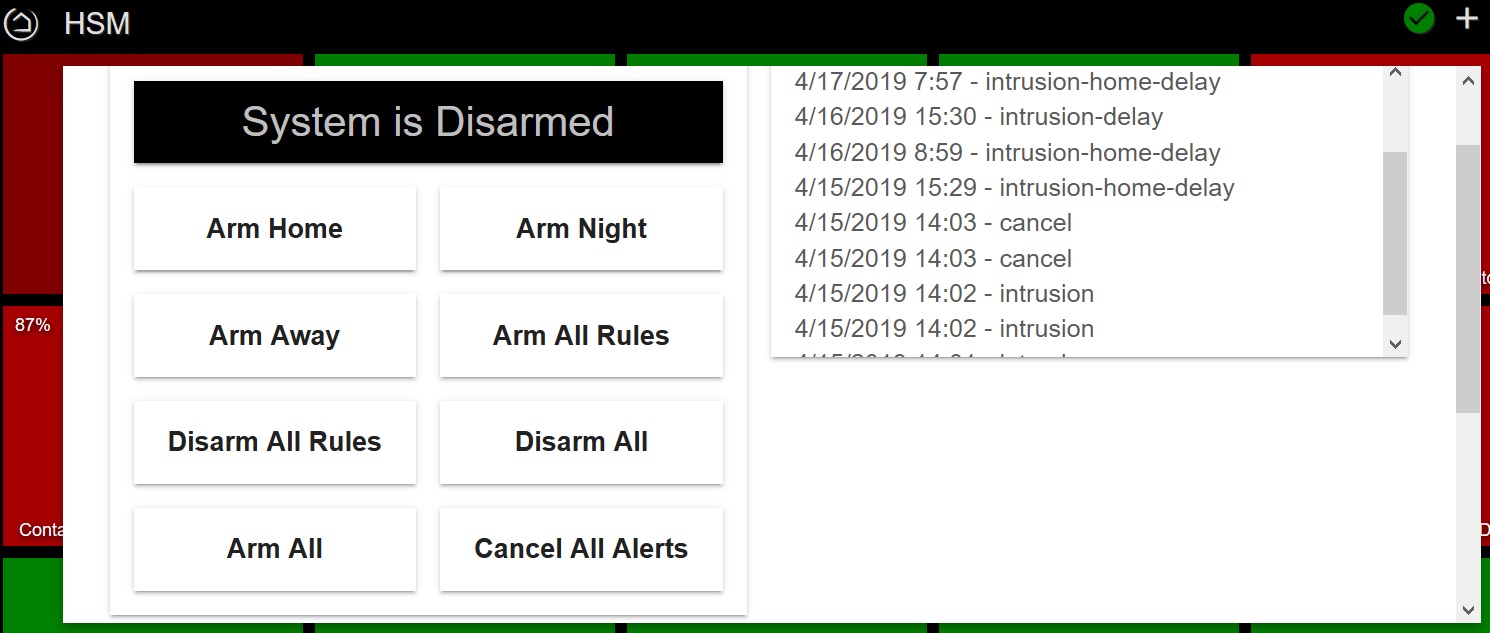
Yes, the rotate through does seem to work but it not the easiest. I'm attaching a tile for HSM from the Hubitat platform. Any thought of developing something more complex like this? This pops up and gives specific buttons to not only arm and disarm but also to cancel in cases where the alarm is activated. That is my scenario. I've been waiting and hoping the keypad issues will finally get resolved. My in-laws come and go throughout the day and because of the lingering keypad problems, they routinely set off the alarm. My wife and I find ourselves having to disabled it from the dashboard.... Anyway, arming and/or rearming does not seem to stop the sirens and flashing lights... Cancelling the alarm once activated is what I'm hoping for...
I see... yes, this is possible and not very hard. Basically it would involve exposing all states as clickable options in the tile. I currently don't do that for any other tile so it would be a special use case. I'm working on converging the SmartThings and Hubitat groovy files at the moment so I will only need to keep one updated in the future. Once that is done I will add this to the development queue. The history of prior events is already there as a new feature but it is only on the SmartThings side so once I merge the two groovy files that will come to Hubitat also.