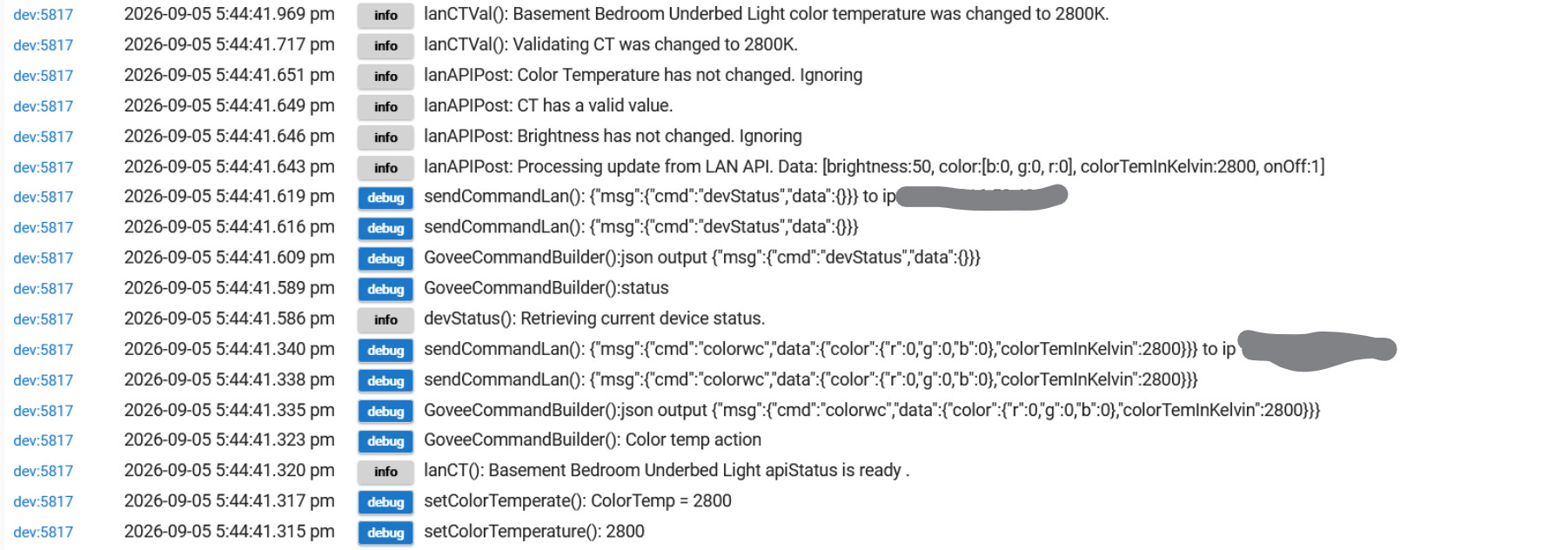
Are there any errors generated in the live logs you can share.
Can you show me the preferences tab and what is entered
Are there any errors generated in the live logs you can share.
Can you show me the preferences tab and what is entered
With LAN control disabled and debug logging--it was at 50%, I did the "setColorTemperature" with a color=2800 and level=0. The level didn't change and the light state was still "on":
A "Set Level" command resulted in the following (command failed error):
With LAN control enabled and debug logging--it was at 50%, I did the "setColorTemperature" with a color=2800 and level=0. The level didn't change and the light state was still "on":
So i think the first thing to understand is that the Govee API's (Cloud or LAN) and the Hubitat commands don't align exactly. Weather the level is being set with setLevel, or setColorTemperature, or any any other command it always calls setLevel.
When using the Cloud API I was able to replicate the failed command error message when the API tries to change to level to 0. The error message seems to point to that be a issue with a invalid value being passed with the brighness command to the Cloud API. I just reviewed my own API Data and it does appear that the allowed range is 1-100.
When using the Lan API it is a little different process but the command requirements are similar. Simply put the LAN API spec for the brightness command setting also requires a value range 1-100. The difference for the LAN API is i have code that simply ignores the value passed if it is below 1
So i guess my question is why are we trying to set it to a level of 0 instead of submitting the command off. I could add code that if a command is sent that sets level to 0 it will instead just submit the off comand, but not sure how that aligns with what you are trying to accomplish.
**Update
All that said it does look like there was code in place for the LAN API to handle the 0 value better. Let me enable it again and test it out.
Thanks.
The reason is that I often do a "Dim to 0" on several lights at once to turn them off slowly.
The Govee light doesn't recognize the "duration" but I still want it to shut off.
That avoids the need for a separate command just for those lights.
Thanks for looking into that.
What is the duration you normally use? When the LAN API is enabled the driver does have a function to fade over time if you can have the interval over a long enough period of time. MATTER may also be another option if you really want the fade over time option.
I just updated my dev hub. Made sure it had the most recent released code and made a few changes to enable a zero value. I just need to do some validation before i release it. I can't remember why it was disabled on the LAN API as it was mostly there.
Typically, 15-30 seconds
I found the reason why i had the function disabled in the LAN API. It doesn't play nice with the Retry Logic. I will spend some time thinking if i can figure out a way to help that work better.
If you set your "% Change each Increment of fade Value" to 15 you could use that to perform the fade over 15 seconds. or 8 for 30 seconds.
I did add code to the cloud API, but i need to test that.
Thanks
Could it just do an "off" anytime it got a dim to 0 value, and skip dimming?
The problem is how the commands are submitted. I was expecting you to call commands based on what you need done. So for instance if you were calling a Set CT command it would be to adjust CT and then if you need to change level that was secondary. By calling a CT command and not changing the CT then the main part of the command isn't doing anything. That still takes activity time though. The driver still executes the request to send that command and then verifies it. Then it sends the level command and verifies it.
By changing the set level to off the validation logic for the retry ends up simply ignoring the set level command. This is because of how that validation works to prevent overlapping commands from flooding the hub. It is a guardrail to prevent a bad state that causes the hub to get overloaded with repeat commands. I have made another tweak to the LAN API Library file to adjust the order of the actions under the situation where dimming is set to 0 and have done a very basic test which it passed. I need to perform more testing to see if there are any negative effects.
This also brings up the question of should i validate the current state vs the proposed state.
As for validating the current state, it's fairly easy for the Hubitat state to be out of sync with the device's actual state.
Which is why I always force my commands
For some stuff yea, but there are some that should be very accurate. They are the devices updated with the device status call from either the Cloud or LAN API. Those should be able to be used to reduce load on the device and minimize the chance of overloading the devices controller with non needed commands.
I have reworked several of the LAN API method to now validate if the requested settings are already set and then ignore them if the device is already set to that value.
What do you mean by that?
If you want to test the new code turn on Beta in HPM and update the integration. It should pull down new library files that enable the new processes.
The changes to this new beta code is as fallows.
I use the room lighting "Force" box and other options to issue commands to devices regardless of their current state. This just helps ensure that devices do what I want, even when they "look" to be right but aren't actually (certainly an issue I've had with z-wave devices in the past).
The problem is how the commands are submitted. I was expecting you to call commands based on what you need done.
I actually am largely doing that. But, I don't know what state they might currently be in--so, if I want to make sure the device is at CT=2800, Level=10, that's what I command it to do. It might be a CT=2800, Level=50 or running some DIY scene, or whatever--so I always set the device to the desired settings in my rules (certainly easier than numerous lines of code to retrieve and validate every setting and using different commands for each potential setting--especially in Rule Manager).
I tried to give your update a whirl, but I didn't find any available updates (the hub has Govee as using beta/early versions).
Thanks!
I am curious have you noticed that much with the Govee Stuff. Maybe what i need to do is set values to a default value when not in that mode. The concern with that approach is i think that would cause problems when the driver retrieves states from the API's i need to check that and see what is returned.
You can check what values are returned and update regularly based on device status calls to the LAN or Cloud API's. If you turn on debug logging and then click on refresh with either API you can see what is returned. The Cloud API Return will look something like this
dev:35332026-09-07 12:44:02.034 pmdebug
sendCommand() Cloud API call time 176 ms. Full Command Process time 480 ms
dev:35332026-09-07 12:44:02.026 pmdebug
getDeviceState(): Instance: diyScene value is empty. Skipping
dev:35332026-09-07 12:44:02.018 pmdebug
getDeviceState(): Instance: musicMode value is empty. Skipping
dev:35332026-09-07 12:44:02.010 pmdebug
getDeviceState(): Instance: lightScene value is empty. Skipping
dev:35332026-09-07 12:44:02.002 pmdebug
getDeviceState(): CT of 4500 did not change ignoring
dev:35332026-09-07 12:44:01.994 pmdebug
getDeviceState(): devices.capabilities.color_setting colorTemperatureK 4500
dev:35332026-09-07 12:44:01.924 pmdebug
getDeviceState(): ColorRGBNum of 16777215 did not change ignoring
dev:35332026-09-07 12:44:01.893 pmdebug
getDeviceState(): devices.capabilities.color_setting colorRgb 16777215
dev:35332026-09-07 12:44:01.810 pmdebug
getDeviceState(): Instance: segmentedColorRgb value is empty. Skipping
dev:35332026-09-07 12:44:01.803 pmdebug
getDeviceState(): Instance: segmentedBrightness value is empty. Skipping
dev:35332026-09-07 12:44:01.783 pmdebug
getDeviceState(): devices.capabilities.range brightness 67
dev:35332026-09-07 12:44:01.771 pmdebug
getDeviceState(): Instance: gradientToggle value is empty. Skipping
dev:35332026-09-07 12:44:01.679 pmdebug
getDeviceState(): devices.capabilities.on_off powerSwitch 0
dev:35332026-09-07 12:44:01.654 pmdebug
getDeviceState(): devices.capabilities.online online true
dev:35332026-09-07 12:44:01.594 pmdebug
getDeviceState():[[instance:online, state:[value:true], type:devices.capabilities.online], [instance:powerSwitch, state:[value:0], type:devices.capabilities.on_off], [instance:gradientToggle, state:[value:], type:devices.capabilities.toggle], [instance:brightness, state:[value:67], type:devices.capabilities.range], [instance:segmentedBrightness, state:[value:], type:devices.capabilities.segment_color_setting], [instance:segmentedColorRgb, state:[value:], type:devices.capabilities.segment_color_setting], [instance:colorRgb, state:[value:16777215], type:devices.capabilities.color_setting], [instance:colorTemperatureK, state:[value:4500], type:devices.capabilities.color_setting], [instance:lightScene, state:[value:], type:devices.capabilities.dynamic_scene], [instance:musicMode, state:[value:], type:devices.capabilities.music_setting], [instance:diyScene, state:[value:], type:devices.capabilities.dynamic_scene]]
The bottom most line is the returned data, while the lines above are the result of the parse and update if needed. Typically Online, Power on/off(on_off), Brightness(range), Color (color_setting), Colortemp (color_setting), are returned for light devices. Those values should stay prettry accurate.
When using the LAN API the returned data looks like this
dev:35332026-09-07 12:51:32.444 pminfo
lanAPIPost: Processing update from LAN API. Data: [brightness:67, color:[b:255, g:255, r:255], colorTemInKelvin:4500, onOff:0]
It is much simpler but contains the same info pretty much. You can see it has Power On/off(onOff), Brightness, Color, and Color Temp.
Now that is only 5 attributes of the 15 or so on the device. Most of the rest of them are derived from those 5. The real exception are the attributes related to Effects. Those are the ones that can cause things to be a little out of sync. But if we lean on the Colormode attribute it is easy to identify what values you should look at. The color mode has 3 possible values. CT, RGB, or Effects. Simply put you should check Color Mode and then check the connected attribute you want to use.
Adding a quick routine to return values to a default 0 value should be fairly easy, but i wonder I need to validate if that would have the expected effect.
This did bring up an additional validation that needs to be performed with the most recent changes. I will look at adding that to the code. Simply put it isn't just about if the value is the same but also is the device in the right color mode. With these most recent changes in beta,If it has the correct CT value but is running an effect, the most recent changes would prevent a CT command from being submitted. That shouldn't be hard to add.
Maybe just a switch on the preference page to tell it whether to check the current state or just send the command anyway
From my perspective i want to minimize the Command Calls. It is a waist of calls to send the same validated command multiple times. Sending to many commands to fast also runs the risk of causing the device to be slow to process a command at best, and at worst completely miss it. You will have more success if the first command is aborted if that state is already present.
I have already updated my dev hub with the new code with the additional colorMode Attribute Validation.
It may be a waste at times--but can be helpful in certain circumstances.
The issue with z-wave devices that could apply to any other was network congestion that prevented the device from receiving the command. The hub updated its state to what it sent. Nothing came back from the device, so the hub just assumed it was all fine.
At that point, say you'd tried to turn the light off but it stayed on while the hub thought it was off. There'd be no way to get it off with an off command--you'd have to send on on then an off to force a change.
That was what I ran into. The "Command Retry" has fixed almost all of that when it came out (probably one of the best additions they made to Hubitat in terms of reliability).
In any case, that's why I mentioned a preference switch--then, if anybody has a system where things aren't working as expected, they have an option to choose the somewhat more chatty communication or not.
When the Govee integration was first released it functioned very similarly. Now everything is validated. Every call to the new cloud developer API updates device attributes when the call responds with a successful response code. If it fails or doesn't respond, the call is repeated.
The LAN API as of a few major release ago validates every change after it is submitted as well. For instance when you submit the call to change the colorTemp in your examples. 250ms after the command is submitted a device status call is made to the device. Then the driver monitors for a set interval for the requested change to be returned and applied by the device status call. If it doesn't update within the interval the device status call is made again based on preferences.
Ofcourse that is for attributes related to the values that get returned.
So, I still don't see an update in HPM for Govee V2 (and I've got beta/early releases enabled for Govee V2).
Thoughts?
And, what you've done sounds great--that was a key thing missing from the platform in general before the "command retry" functionality. It's proven to be immensely helpful for the platform. 
Thanks!
Check again. I have posted the most recent changes to the Beta build. I had a update i needed to apply for the beta package to be avaliable. You should be good now.