Suddenly tonight, I can't control my Govee lights through this app.
Any ideas?
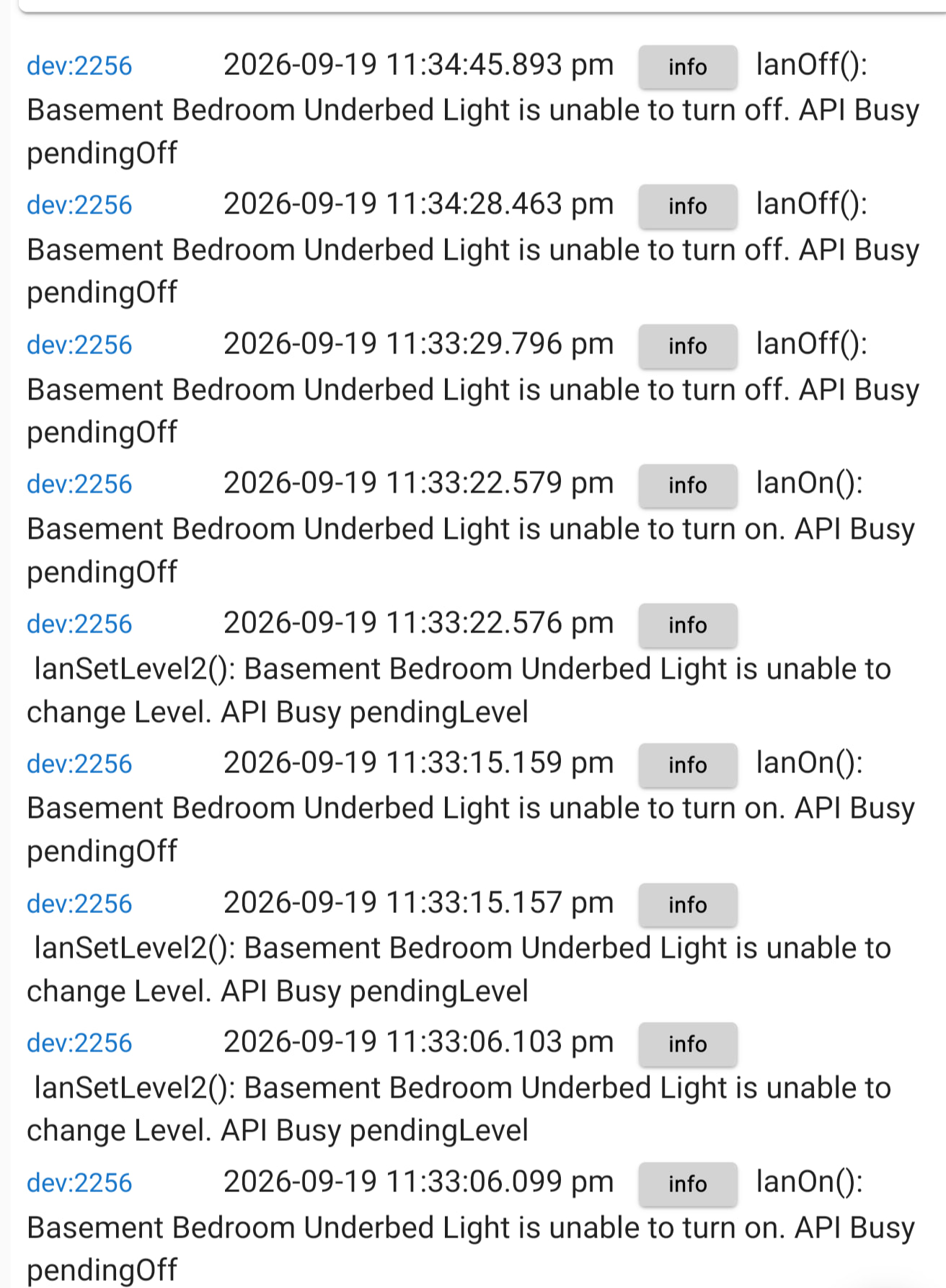
Debug logging didn't seem to show much more.
Things worked better when I switched the LAN API preferences off.
What that means is the device got into a pending change state and didn't come out of it for some reason. Specifically it tried to turn off and didn't get the update that it completed.
After a set number of retries it is suppose to clear the pending state. Clicking on initialize should force a reset of that value, but shouldn't be needed. Can you go back further in the logs for the device to perhaps show when it failed. It may also help to extend your retry interval and increase the number of retries.
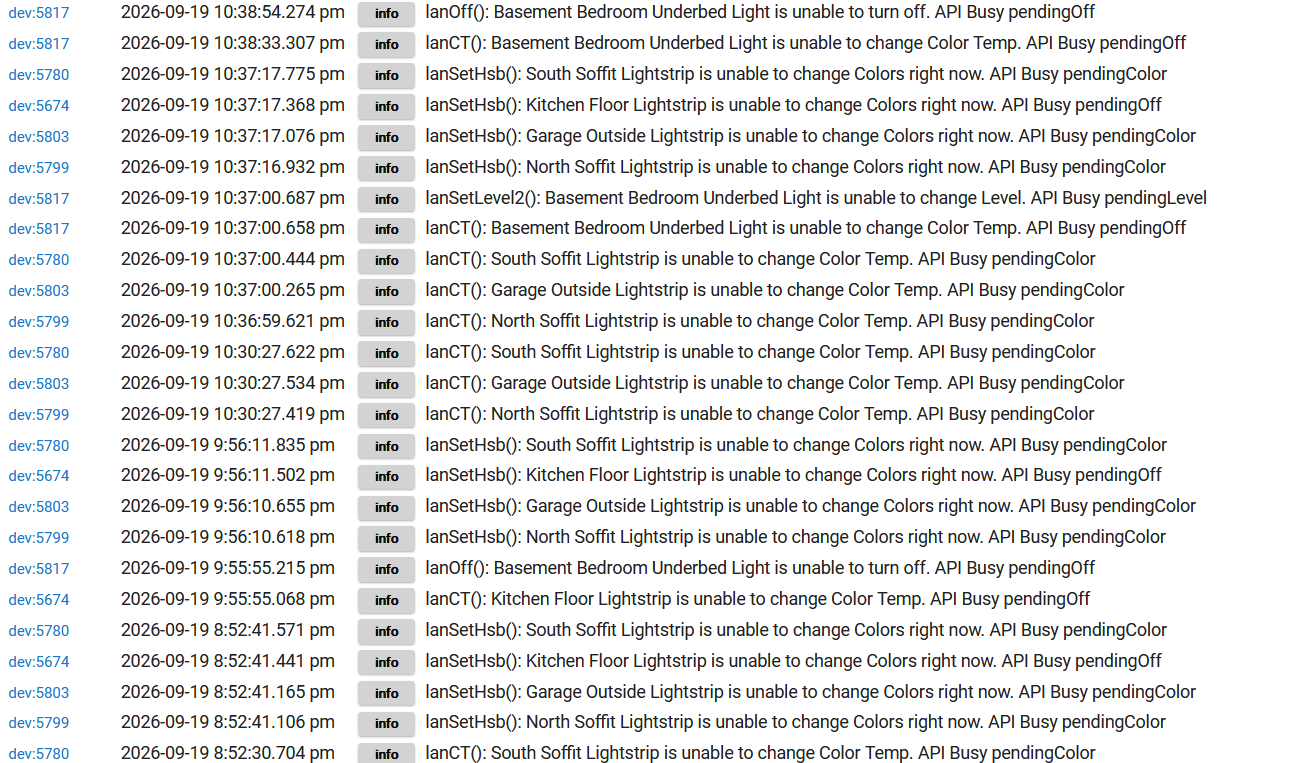
Pretty much ALL of my Govee lightstrips (which is all the Govee things I have) were messed up.
It went back to at least 8:46 pm (I run out of logs somewhere about then).
I did some initializes--and that only worked briefly (if at all) and it went back to being broken.
It's a bit frustrating--when I set "LAN Control" off then, later, turn it back on--it loses ALL the LAN control settings (retry time, retry count, %fade, etc.).
I believe I was using 7000ms interval, 10 retries, and 10-20% fade amount.
I tried using LAN Control again--and it still isn't acting right:
That almost looks like Govee Device manager stopped listening on the Multicast socket. Can you check your logs for the Govee Device manager and see if it had any errors in the logs at some point? Looking at the code now for clues. It is very odd that all of those device are generating those errors. You are running the beta code as well, right?
Update:
So the flow of the process goes like this
At the same time the "Govee Device Manager" is always listening for incoming data from all of your Govee devices on your local network.
Once the update is received from the Govee Device manager and the Child device updates it's status the Validation routine will see it is updated and change the apistatus back to "Ready".
So based on that flow the only common thing that could cause all of that to break is the Govee Device manager for some reason no longer listening the incoming calls.
The one big problem with that logic is that it doesn't make sense because there should be guardrails in place that prevent it from leaving the device in a pending state once the retry interval is passed. You are running a seven second interval with 10 retries so it should all reset after 70 seconds.
I am going to modify the code to test my theory on my dev hub i will update you when i get more details.
That is the cloud API so not exactly the same. I am glad it already stopped though.
Is there any possibility that the Device Manager could somehow have gotten locked up because there were issues with the cloud? Some weird, "shouldn't ever happen but it did" kinda thing?
Even with LAN Control to/from the Hubitat, the Govee devices are going to try to sync with the Govee cloud to keep it updated also. Could something there cause the devices to lock up internally??
It really shouldn't. The Govee Device Manager actually has zero direct interactions with the Cloud API.
It retrieves Govee API device data from the main Parent App. The Parent app only talks to the Cloud with user interactive activity. Devices configured for Cloud API Connectivity talk directly to the cloud and don't go through the Device manager at all.
The only thing the Govee Device manager does related to the cloud API, is devices will post Cloud API response time data to the Govee Device manager and if it has Stat tracking enabled in it's preferences, the Govee Device manager will update a attribute with the timing so i t can be exported.
Another real reasonable possibility is that Govee made more API changes that i need to hunt down and potentially account for.
DId you check the Govee Device manager to or atlreast reinitialize it so it closes and openes up the Mulitcast socket and then try everything again?
I think i may know what happened but getting the above question answered will help. I think this may be related to something breaking with the Multicast socket and then the combination of the values used for the number of retries and then Interval.
As stated above i added code on my dev hub so i could turn of the multicast socket manually. There is no reason you would ever want to do this yourself. Then i also modified my main test device with the interval and number of retries you specified.
When i attempted to turn the device on/off it worked but then because the mulitcast socket was down it never validated. Because i had debug logging on I got page s and pages of scrolling messages waiting for the status to update. with your settings it took almost 15 minutes for it to completely get through the retry cycle. Your logs show additional attemps in 5 min intervals. That would explain why you got the messages about the devices in a pendingxxx state.
The reason is because of how things stack with retries. As i explained in the steps of the flow there are a few places validations take place and a few active tasks that are happening. There is the validation of the status change and validation of the Device status update coming in. Currently i only have a single set of Interval and max retry intervals preferences. Those are used for both the Status validation and the command submission. When the state is never returned it is going to go through the retries for both of those actions. So you retried both of those commands 10 times with the device status logic running 7 seconds between each of it's retries. Then after each of it's cycles 10 retries of the command. From a math perspective that is (7 x 10) x10 + cpu time .
The first thing i would do is change your max retries to 3. 7000ms or 7 seconds interval is a very good value to allow the device to recover if for some reason it gets overwhelmed and should be sufficient.
The guardrail in my testing did recover the device once it worked completely though all the retry attempts, it just took a while to get there.
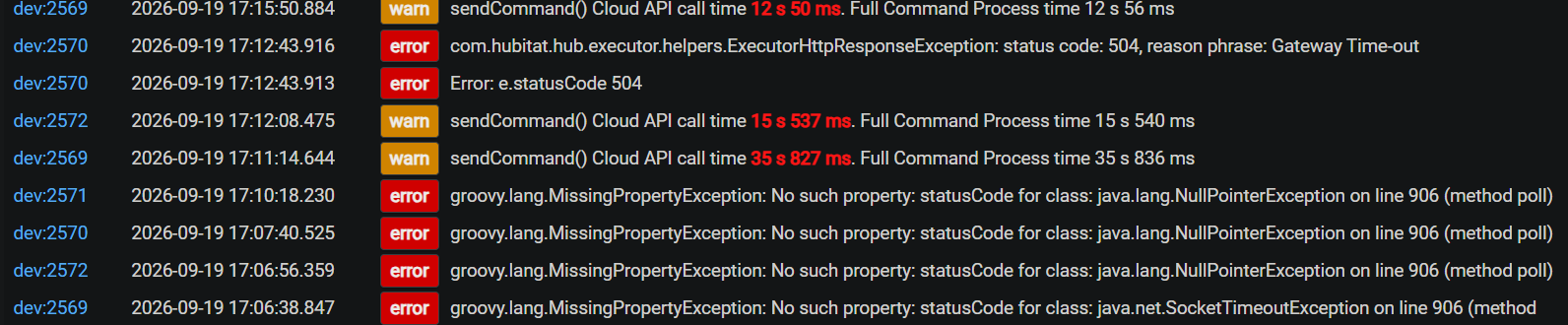
I just turned on my stats collection for the Govee Cloud API so i will have relevant dashboards soon. I saw some long transactions not long ago. So i don't know if what caused those long transactions has cleared yet. I will keep an eye on it.
OK, so I did some more testing.
I set the LAN API stuff back on for one of my lightstrips. I also set it to 7,000ms and 2 retries for testing.
It was getting stuck in the "pending" state just like before. Waiting a bit didn't seem to do much either.
The Govee v2 Device Manager device didn't seem to be doing much (even with Debug Logging enabled, nothing showed in the logs for it at all). Clicking initialize on it did nothing. Ah-something seems messed up with it. When I save the preferences (even just changing Debug Logging), it never returns from the save (the save button stays grayed out and spinning). When I refresh the screen, a number of errors pop up (in pink highlighted messages) and then disappear before I can read them. When I then click "Initialize", it doesn't seem to do anything (or log anything)--when I next refresh the web page (browser page refresh, not the refresh button), I get another pink error message that vanishes to fast to read.
HOWEVER, when I clicked "Initialize" on my lightstrip device, it then processed/recognized the command and updated the state.
I clicked "on" then waited a bit. The state didn't change.
I clicked "on" again then waited a while. The state didn't change.
I clicked "initialize" and it then recognized the state change.
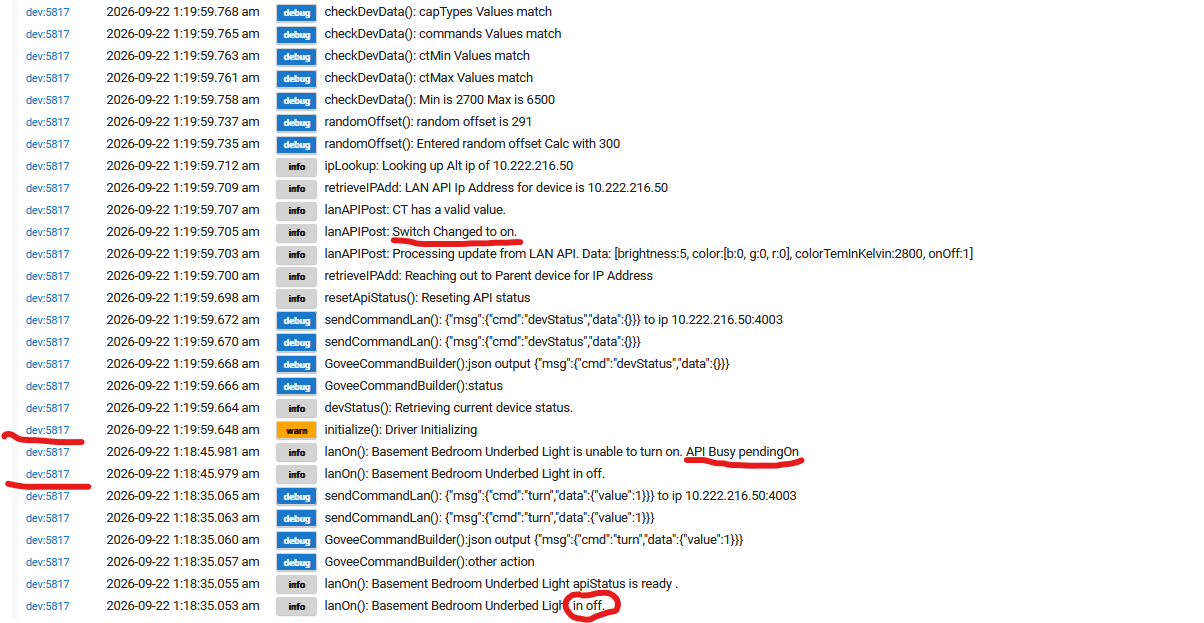
Note it appears there is a minor typo that I circled "in" instead of "is".
Thanks!
...Rob
Ok so lets break down the log
The first two lines in your log are these

This is what is triggered by you pushing the On command button in the UI or other app. It validates the current state is off and then checks the current apiStatus Value. So it is good and ready to submit
This next set of lines below is the send command processing. This indicates the command was sent.

10 seconds later you submitted the command to turn the device on again. It failed because when the validation of the apiStatus was checked it was in "pendingOn" state.
Then you triggered a Initialize which was the remaining entries in the logs.
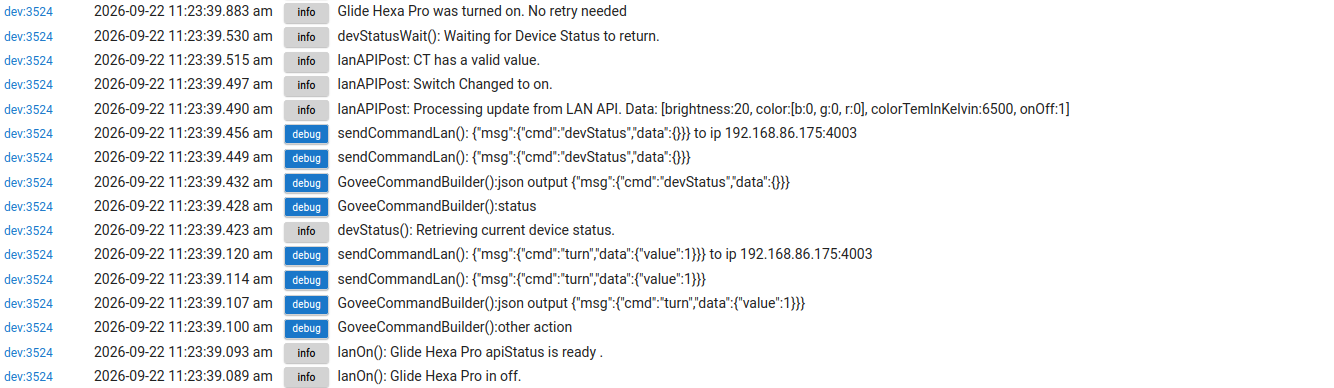
Clearly something got missed. When I try this same command on my dev hub, my logs look like what is below for a complete "on" command.
What is missing from your logs is this
The devStatus call is very important so the question is why did that not get scheduled properly. It works fine for me and if there was a fundamental problem with that routine this thread wouldn't be just a conversation between the two of us right now.
This does explain the problem though. If for some reason your hub is never scheduling the device status routine then everything that depends on that fails to move forward.
Please answer these questions.
The lack of errors in your logs don't make this easy to figure out. It has to be a scheduler issue.
So just to cover all of our basis i am going to ask you to perform a few things.
I'll work through those things when I can.
I have C8P hubs on 2.5.1.181
I actually did DB rebuilds recently.
I power cycled my router recently.
It seems most likely that the latest version of your app didn't get properly installed, so I figure I need to look at that first.
Maybe so which is why i asked about performing a repair in HPM. The problem is this devStatus call and then all the code around it isn't new and hasn't changed for a while. I will keep an eye out for your update.
Not sure what happened to my post from a few minutes ago--but it vanished.
In any case. I THOUGHT I'd done an HPM "repair"--but apparently it didn't complete. I tried again and, this time, it did complete.
Before the repair, I pulled power on my main router/wifi-router, my 1g switch, my 10g switch, another 1g switch, my meshed wifi-router--then plugged them in.
I did another reboot of the hub with a db rebuild.
It was still wonky then.
When I noticed the HPM repair didn't work, I did that again--and, this time, it completed.
After THAT, things are now seeming to work. Not sure what got the driver in a confused state. I'm hoping things work on the LAN now.
Fingers crossed! Thanks.