I can get the garage door opener on Zwave to hub but cannot wire successfully to overhead door unit. I do not understand need or how tilt sensor gets added
Going to need a few more details. What type of garage door? Does it have security? Most newer models will not work with just a dry contact wiring setup. So, it might require a workaround like soldering in on a remote that is paired to the controller.
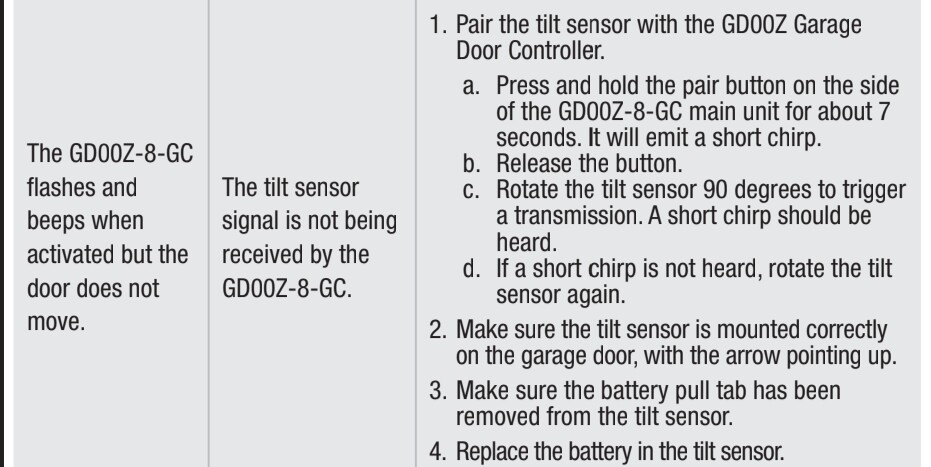
As to the tilt sensor, they describe how to pair it to the control unit if you need to in the manual for your specific model (You would need to look up your specific Go Control model- but I think they may all be the same for this). However, in most cases, it comes paired to the control unit already if I remember correctly.
This is for the GD00Z-8
The wall button may be 'smart' and as a result, the relay in the GDO won't work. There are digital signals running on the wire to the wall button and the GoControl detects them and refuses to let the relay fire. I know this because I fought this when I installed my GDO years ago. Ultimately I replaced the smart wall button with a dumb one and the GDO and Wall button have co-existed ever since.
The easiest experiment is to disconnect the wall button for a couple minutes. Just take the two wires out of the opener motor, and then momentarily short the two contacts. The opener motor should respond.
If it responds, then have ONLY the GDO's wires go in. Then try the GDO. You may need to power cycle the opener motor and the GDO.
If the short test fails, you may need to use the sacrificial remote.
Okay, this is an interesting statement. I do not have the smart one. But, if I am reading you correctly, you could bypass the security just by putting a dumb momentary button on the wall? (and does that mean if you wire the GDO directly to the terminals on the opener, that would work since it basically simulates a dumb push button?)
I have been waiting for the day mine quits working with apprehension thinking I was gonna just lose that capability
I had to do the same thing. Not using GDO but dry contact relay.
Welcome to our community!
As mentioned there are several versions of Garage Door Openers out there.
Some you'll need to add a bypass (Security 2 - see link below)
Some you may not be able to, ie Security 3.
That didn't take long Garadget 3.0 now available. 
Here's some links that may help:
The GoControl GDO is just a relay. There's no difference between it and a dumb momentary button from an electrical viewpoint. My particular Opener Motor offers either a smart wall button, which is what it came with, or a dumb momentary. Liftmaster makes a 'pretty' momentary and I bought that once I figured it out.
Both the Dumb Wall Button and the GoControl (relay) wires plug into the same lugs on the Opener Motor.
89 cent door bell button would work as well.. ignoring the mounting challenge.
But a
I am just thinking outloud here, but if you wire the Go control directly to the opener (not the button) in parallel to the switch(this is how mine is set up now due to proximity just making it easier), that would do the same as the doorbell button and save $0.89. I just thought that the opener itself had some detection method that prevented it or requred some security key from the button to function correctly. (This really begs the question of why the other workarounds are needed)
yes, AND
wire the dumb wall button directly to the opener.
Same connection points on the opener. That puts the two in parallel.
I have a couple of these:
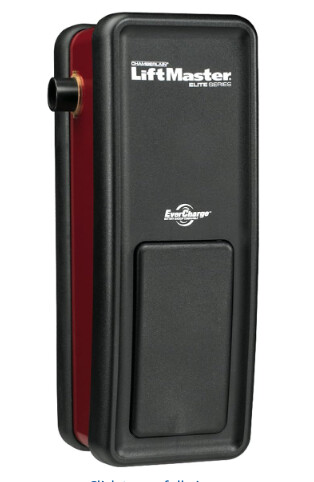
When it got installed, they mounted a smart button on the wall by the door to the house. Like these:
The communications between the motor and the button is "smart" because it needs to tell the button 'stuff'. It's a digital signal sitting on the same two wires between the motor and button.
The GoControl 'listens' on what you'd think are just dumb relay contacts. It's not. If it 'hears' digital signals, it refuses to use the relay. So.. just jettison the smart button and the controller inside the motor will happily dumb itself down to momentary contact. At least that worked for my vintage of Motor
I am so close.
I can jump the contacts and open the door. I put JUST the GDO wires in.
I paired the tilt sensor.
I ran antenna test and see RSSI signal from hub to GDO.
I click the open button on the Device but it WON’T acknowledge or work. It is supposed to beep 5 times and then open.
I thought the instructions were to manually open and then close the door twice so that the GDO can 'interpret' its own tilt signals. While the GDO wires are in, ALSO short the contacts. Let the door fully open, then short the contacts again to close it. I'm going from many years old memory, but I think you have to do that twice.
PLUS, the GDO will not operate quicker than 1 minute intervals. So, wait a full minute between attempts.
It's important to understand that the GDO is meeting all the safety requirements that have been established. The logic is there to prevent a kid from being crushed. The beep and flashing is all for the benefit of the dumb child gawking up at the door as it descends upon them.
Thus, anything that results in the GDO 'doing nothing' is a signal that it's not safe. IT thinks it's not safe... and that includes not knowing if the door is up or down. It would rather do NOTHING than move, if it's unsafe. I have cursed the Engineer that decided NOTHING is the correct way to inform us. It has a beeper, why not 3 LONG beeps if it's in an unsafe mode?