Havent tried it yet and need to budget some time to do it on my regular C-8. For those that have, can you share you experience? Did you have a lot of manual involvement?
For me it was pretty smooth, but I did it when it became available.
My process was as falllows.
- Shut down hub and removed power to fully restart the zwave radio.
- Go to the zwave page and switch to Zwave JS. That triggers a reboot.
- I found at this point if I walked around and triggered my zwave device manually they would complete the interview.
- I ended up with a few battery powered devices I needed to exclude and pair again.
Mine was pretty smooth, but that is also a long time ago. A lot has changed with Zwave JS since then for the better.
They did some memory compression magic to get Zwave JS on the non pro hubs. It will be interesting how that plays out as more people move to it. You really need to see a few people perform it on those older hubs.
There have been substantial improvements to Hubitat's implementation of ZWaveJS since its original release 2 years ago. My hub has been solely on ZWaveJS for about a year now with no complaints/issues.
With that said there are resolvable incompatibilities with some built-in drivers, especially for Fibaro devices.
And what is the reason or advantage to switching to JS?
Yes! This is exactly the purpose of my posting…to gather feedback from those with regular C8 and lower.
Appreciate knowing about the Fibaro issue and will keep an eye out for it. I’m really hoping my Zoos firmware update issues can be solved w the new Zwave SW stack.
This is already fixed in 2.5.2.128.
They only needed to be woken up...
I have a C8-P so might not be exactly the feedback you're looking for. But I tried it quite a while ago and had lots of problems and ended up having to roll back. I tried it again yesterday, and it was nowhere near that kind of headache. All but 4 devices connected automatically. The four devices that didn't are all older battery-powered devices. All I had to do was go around and wake them up and they connected. The whole process didn't take any time at all.
Except that in the process I knocked the blind off of a 6'x5' window and remounting the blind added quite a bit of time and effort, but I don't blame Hubitat or Z-Wave for that. Just my own stupidity.
Bummer - sorry to hear that. I've had things like that happen to me as well. I hate it when a 5 minute project turns into a longer ordeal.
I was forced to move to JS when I had some ghost issues that ZIP couldn't handle. I did move back to ZIP briefly after that due to a (Schlage) deadbolt issue but resolved that by switching lock brands and am now only on JS.
I found the transition back and forth between JS and ZIP painless. No devices were harmed or maimed in the migrations.
I find JS to be quite stable now due to a myriad of incremental platform improvements and update to more current library from Silicon Labs. I am mostly Zooz devices and they have refreshed all their OTA firmware for 800 series devices to the 7.24.2 library. So both Z-Wave ends are quite up to date for my system.
That was my expectations as well. Most of my battery powered devices did work that way. For all my Ring Gen 2 contact sensors I just triggered them and they showed up. After 24 hours though the Zen34' refused to show up. I then ran the process to wake them up and re-interview them. That didn't work. Finally I did a exclude and paired again it was fine.
It was just my Zooz Zen 34 remote switches that had the issue.
I had a mixture of results, some updated by themselves, others required me to wake the device. I am now stuck at 32 of 36 left to go. Two Ring Alarm Range Extenders and 1 Zooz Zen71 Switch. Since these are powered devices there is no "Wake Process". I have cycled the power on the Range Extenders, that didn't work. The last device is a Zooz ZSE44 Temperature Humidity XS Sensor. It has been in "Interview in progress" over night. I will try waking it again today. Is the exclude and rejoin process my only recourse for the other devices?
Zooz ZEN55 DC Signal Sensor. Updated successfully. Using @jtp10181 driver is stuck in healthStatus 'offline'. Pressing the Configure button brings it back.
UPDATE: Turning off "Enable power fail component switch" and Reinterviewing allowed the device to complete the update.
UPDATE: The Alarm healthStatus reverts back to 'offline' after a period of time. I've 'Configured' several times. I guess I will have to climb up and remove the smoke alarm to gain access to the ZEN55, exclude and re-include. Not a job for today.
I'm aware of that issue.. It is not actually going offline.. It's a false report of offline because of a filter that had to be put into place for false triggers caused by NotificationGet requests that act differently on ZWave-JS because the use case was not standards compliant.. I'm looking at providing a fake report when those are filtered so that these drivers won't complain
I am getting ready to make this change as well. I may have the same issue, where is this setting located?
Also, has anyone had any experience with the First Alert Smoke Detectors (I believe Gen 2)? With the switch did they interview and join quickly or did they have to be woken up somehow?
All sleepy devices have to be woken up.. Or wait for their wakeup cycle ..
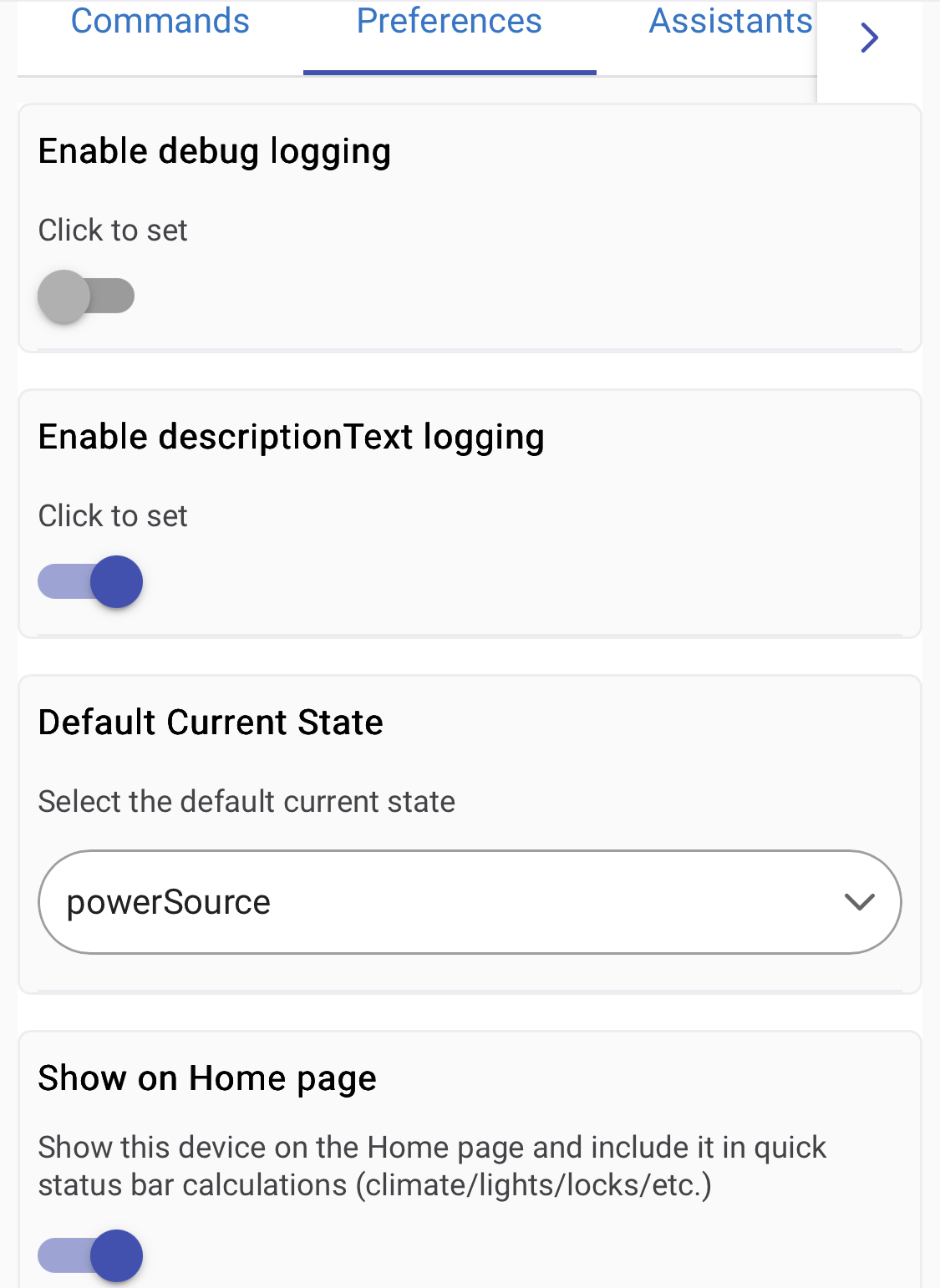
Located in the Device Preferences. Note disabling the switch will delete the child device break any rules using it. I rewrote my rules to look at the 'power source' directly.
I don’t have any child devices related to my Ring Alarm Range Extender and I don’t have that in my preferences either. Below is a screenshot of the only things in my device preferences.
Which driver are you using? The driver I am using is the Ring Range Extender Driver?
Do you happen to know if that setting was there before you switch to JS?