Good to know. I will create a second button map image to add to the tutorial post. I'd be interested to know if there are any other differences between the Xiaomi Mi and Aqara variants of the cube. I guess those would manifest themselves as behavior inconsistent to what's explained in the tutorial.
I will take a look at that as soon as I can, but I am a bit tied up for a couple of days (see below)
Just a FYI for anyone hoping to see the Vibration Sensor driver update or any other updates:
SmartThings is releasing a firmware update tomorrow with changes to the way ZigBee messages are sent to the device handler which breaks a bunch of Xiaomi / Aqara DTHs for SmartThings. Sound familiar?
I've been maintaining and updating the collection of SmartThings DTHs for a while now, so I will be busy making code changes for a bunch of updates over there. When finished I'll return to working on the Vibration Sensor driver update.
In the meanwhile...
[RELEASE] v0.8 of Aqara Wireless Smart Light Switch Device Driver
I have decided to move this driver out of beta, so it's now located in the repository among all the other drivers. This also means that the direct link to the code has changed.
The new permanent location to grab the code from is here. There are no other changes to the code than the version is listed as 0.8, not 0.7.5b.
I plan to soon retire the xiaomi-aqara-dual-button-hubitat driver, so if you've been using that, I'd recommend switching over to this newer Aqara Wireless Smart Light Switch Device Driver.
Thanks again for your patience and support everyone!
Cube:
Suggestion: alternative button naming .. for those of us who have forgotten our 6 times table! instead of 1..6, 7..12, 13..18 - how about a numbering scheme in 10's 1..6, 11..16, 21..16?
This has got to go low on your todo list, if it even makes it onto the list.
For Xiaomi smoke detector, does resetToClear() silent the alarm OR the alarm only cease when no smoke is detected?
I used resetToClear() but it doesn't stop the alarm and only when the device is removed from smoke source, the device revert to Clear status on its own.
From the screen capture, after smoke is detected, I used a switch to trigger resetToClear(). This doesn't stop the alarm. After removing the smoke source, the device sends a clear event which stops the alarm.
Can anyone chime in on channel changes and if they're Aquara door/window contact sensors find their way back? I'm finally moving my ST multifunction sensors over and found out they do not pair well on my existing channel. I went a few channels to find one that they both would pair on (was just using an Aquara on hand to test).
But none of my existing in place sensors are reporting back unless I go and repair/sync them. Am I stuck doing that or can this just be waited out? While it's only a few more sensors, more just curious as to how I should be doing this. All my outlet and motion sensor zigbee devices seemed to work fine.
Because its ZigBee, just a reboot of the hub should be sufficient according to this article (about half way down, just after the first picture of some circles):
@linh
you have to go and repair/sync each device xiaomi do not repair themselves unfortunately maybe when they make zigbee 3 versions they will fix this
Ok, at least I know I'm not crazy then. Sadly, one of my sensors now keeps dropping, lol. Not sure I'm liking that I went Xiaomi now. Hopefully it's just one unit.
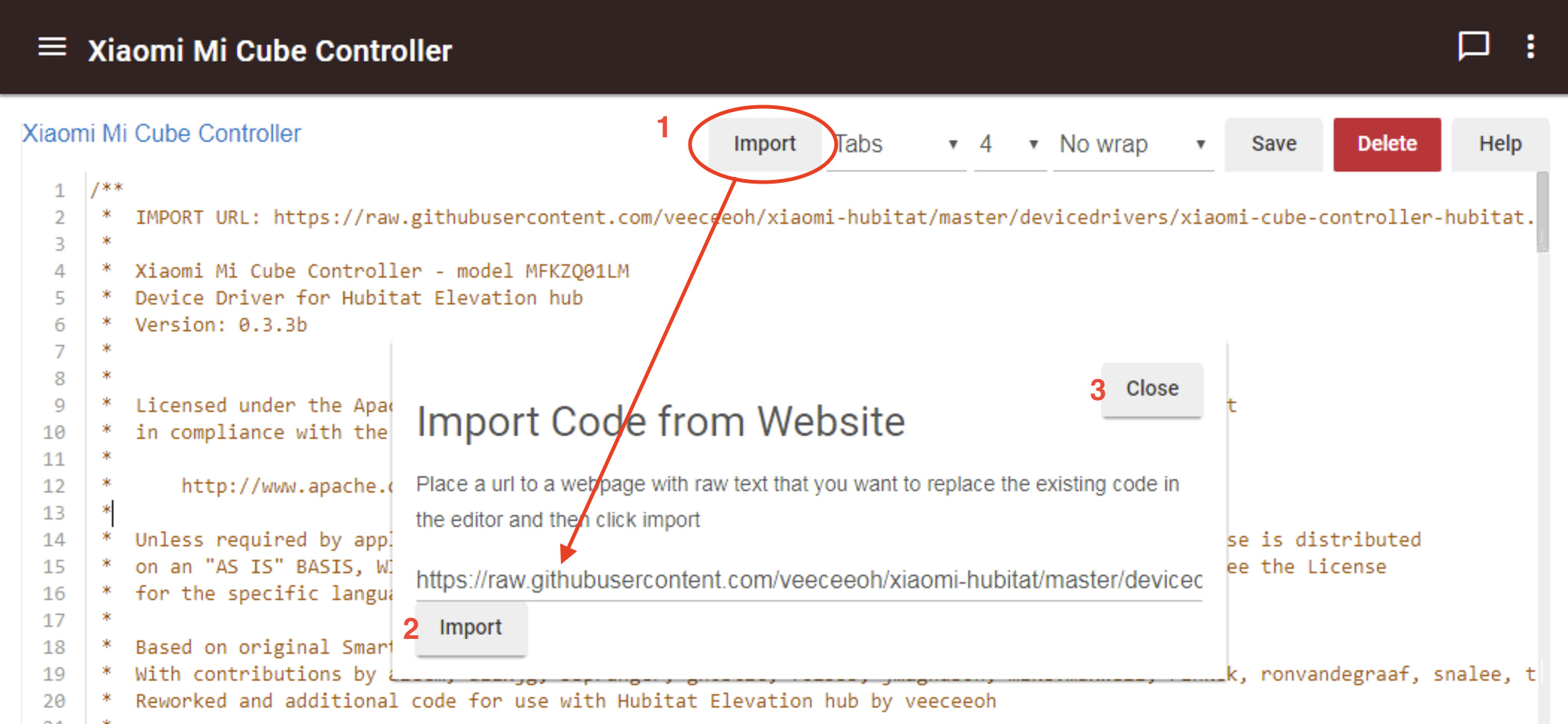
I also added the driver's Import URL both to the 2nd line of the code -and- to the driver's "definition" line. Adding the URL to the definition line should auto-populate the import URL when the [Import] button is pushed while viewing the driver. With the URL already filled in, to import the latest version of the driver, just click the [Import] button in the pop-up window and then [close], like this:
The updated beta device driver code can be grabbed from here.
Change List
Changed formatting of threeAxis event values to match Hubitat's requirements (thanks to Hubitat user @codahq for identifying this issue)
Added driver's Import URL to the top line of the header comments section
Added 'importUrl' data to the driver's metadata - definition line
resetToClear() only clears the smoke detected event state for the Hubitat hub.
I do not own a Xiaomi Mijia Honeywell Smoke Detector, but based on all of my reading nobody has discovered any way to send a command to the detector to either start or silence the alarm. Not even the native Mi Home app has this option, from what I understand.
If it's just one then that might be due to an incompatible ZigBee repeater device.
My first foray into the Xiaomi world may be my last. Apparently I own some of the repeaters that cause these devices to drop. I bought a cube and it stayed paired for an hour or so. It's really annoying to repair all the time. Too bad Xiaomi had to break ranks and not implement the protocol exactly to specs.
How many repeaters do you have? IKEA Trådfri outlets are just $10 a piece. That's not reasonable solution if you're only going to use one Xiaomi device, but if you want to use multiple, then it might be worth it to make the switch.
Correct. ST outlets don't play nice with Xiaomi devices. There is a post in this forum somewhere on which repeaters are confirmed to/not to work with Xiaomi devices.
EDIT: Here it is, but post #1 is not 100% complete as it doesn't have the Ikea outlets or the Ikea signal repeater listed as working, for instance:
Four repeaters maybe? I have an Ikea near me. Maybe I'll stop in there tomorrow just so I have the option. The cube is a really fun idea and I wanted to use it in my theater to choose scenes (and maybe movies).