[UPDATE] v0.3.3b of Xiaomi Mi Cube Controller device driver for Hubitat
Thanks to some sleuthing by @codahq, the driver should now produce correctly formatted threeAxis events for compatibility with his Hubitat port of SmartThings' Mood Cube app.
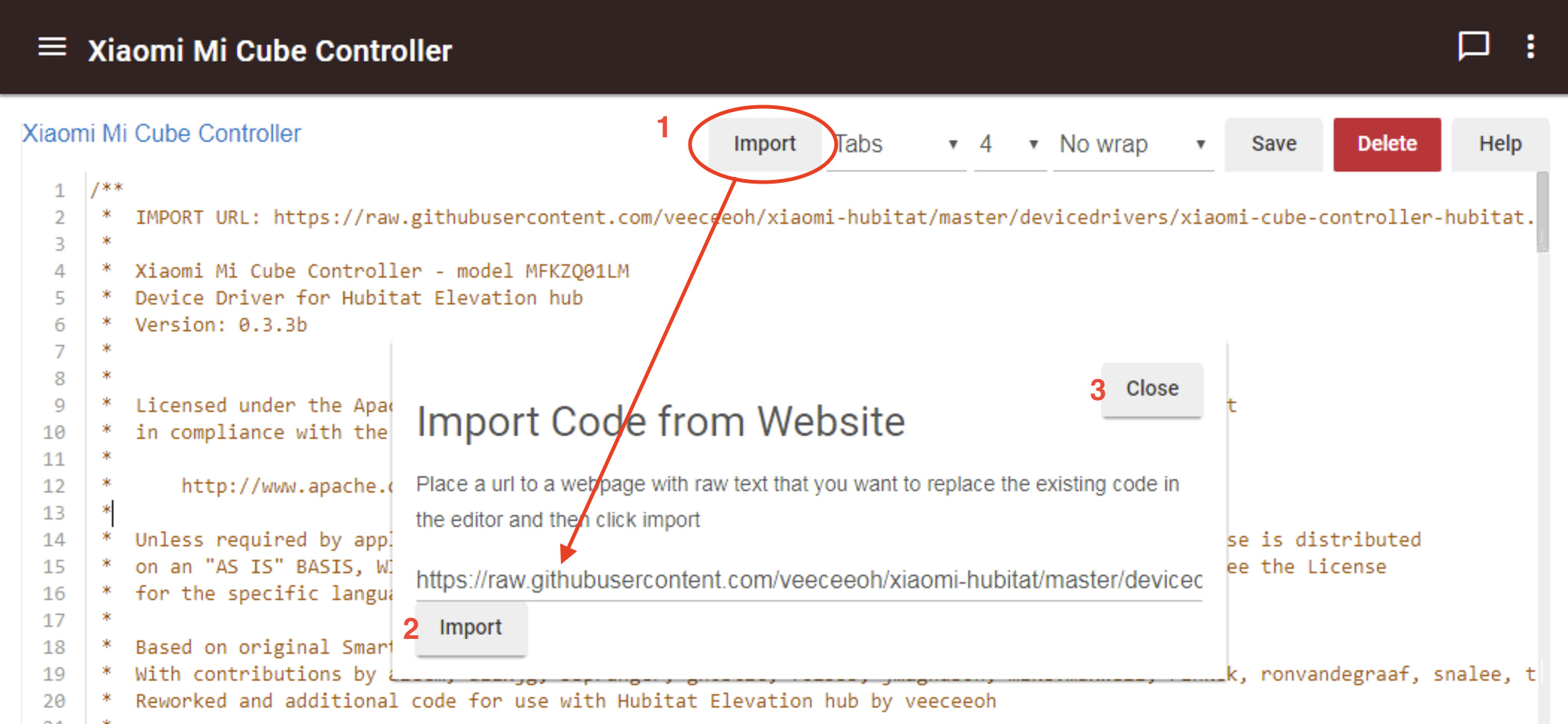
I also added the driver's Import URL both to the 2nd line of the code -and- to the driver's "definition" line. Adding the URL to the definition line should auto-populate the import URL when the [Import] button is pushed while viewing the driver. With the URL already filled in, to import the latest version of the driver, just click the [Import] button in the pop-up window and then [close], like this:
The updated beta device driver code can be grabbed from here.
Change List
- Changed formatting of threeAxis event values to match Hubitat's requirements (thanks to Hubitat user @codahq for identifying this issue)
- Added driver's Import URL to the top line of the header comments section
- Added 'importUrl' data to the driver's
metadata - definitionline
resetToClear() only clears the smoke detected event state for the Hubitat hub.
I do not own a Xiaomi Mijia Honeywell Smoke Detector, but based on all of my reading nobody has discovered any way to send a command to the detector to either start or silence the alarm. Not even the native Mi Home app has this option, from what I understand.
If it's just one then that might be due to an incompatible ZigBee repeater device.