Mine is still working, however, just in the last week or so, alexa started saying that the pin was wrong (which it is not). After 3 tries or so, she disables open with voice and you need to go into the alexa app to turn it on and reset the pin. Still says wrong pin. I can use alexa to close the door fine, but she is hungup on this pin situation. Any ideas?
You could set a custom command that sends the open to the hub either via the door device, or a virtual device (switch as an example).
Thanks. How exactly would I go about doing that?
There are a few ways to do this. Here is one of them:
From Hubitat, create a virtual device by going to the « Devices » screen, then « + Add Device ». From there, choose « Virtual » on the bottom and create a new « Virtual Switch ».
Stil from Hubitat, you can create a Rule Machine rule that is triggered by the new Virtual Switch turning on. The actions should be:
- Open garage door
- Turn off virtual switch
Then be sure to share that virtual switch with Alexa.
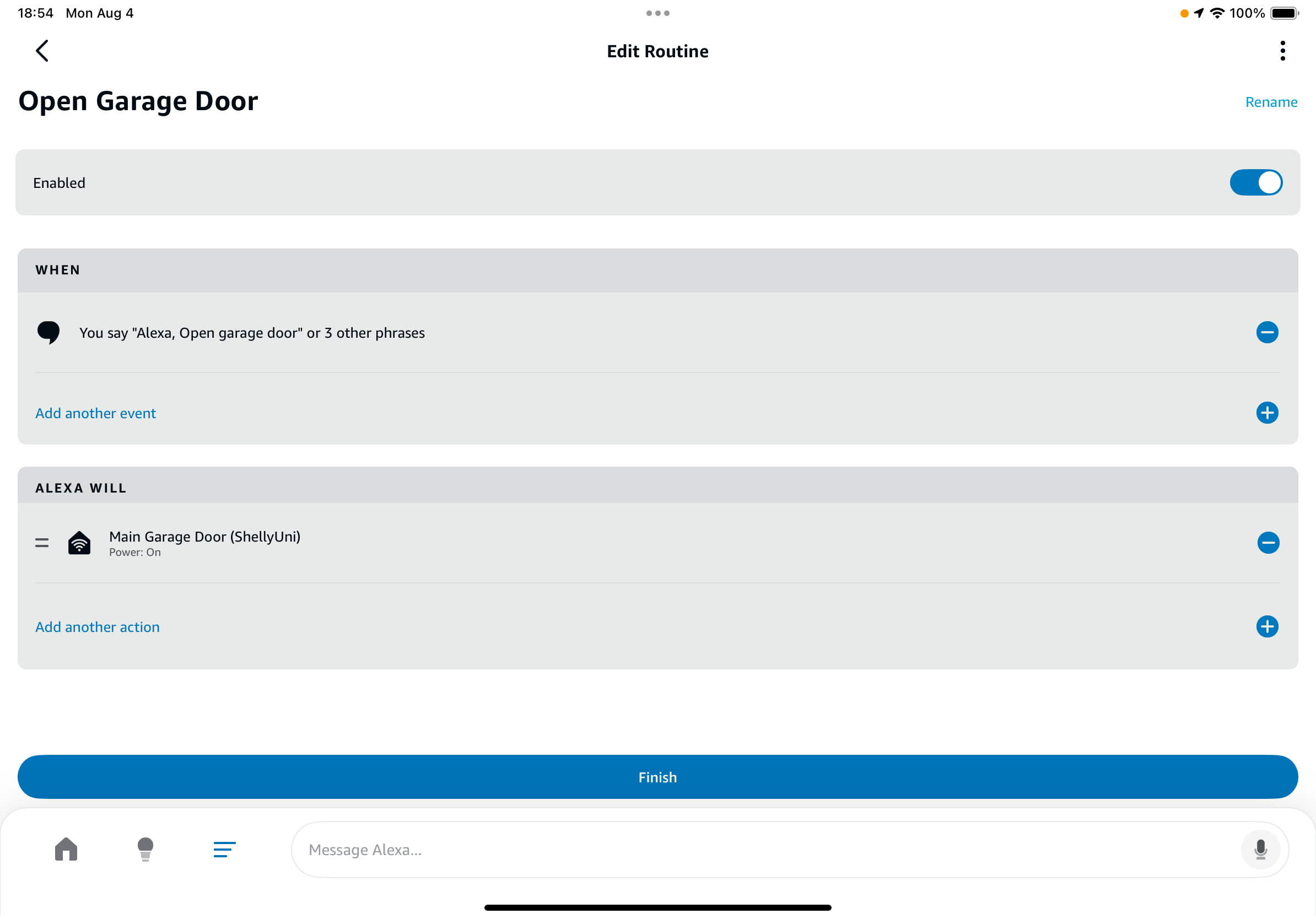
Once the above is done, in the Alexa app, go to routines and create one that looks like this:
1 Like
Anyone else seeing this failure on grandfathered logged in MyQ apps?
C4 was on 2.4.2.158 where this failed, reverted to 2.4.2.143 to fix a dashboard issue, but this continues failing.

MyQ Lite can't log in to Chamberlin finally, so after multiple ways to fix this I caved and bought the 'Konnected GDO blaQ' smart garage door acc, set it up, and now have local garage door control. Ya... $125 CAD isn't cheap, but it worked like a charm and fixed my broken automations.
2 Likes
ratGDO is much less expensive, works perfectly. There is a Hubitat ESP Home app/driver, and ratGDO can also be added as an ESP Home device in Home Assistant and then brought to Hubitat using HADB. I use ratGDO via Home Assistant, but I also got the Hubitat ESP Home app/driver to work.
2 Likes
Post 6 and 7 using a Zooz Zen 16.
Appreciate the pointers to the various workarounds. I knew MyQ would eventually do something to break this, but until a couple of days it was working 
This is what I do. Rock solid for last few years
I used this idea from one of the other posts a few years back. I bought this on Amazon for a few bucks.
I felt that this was the easiest...
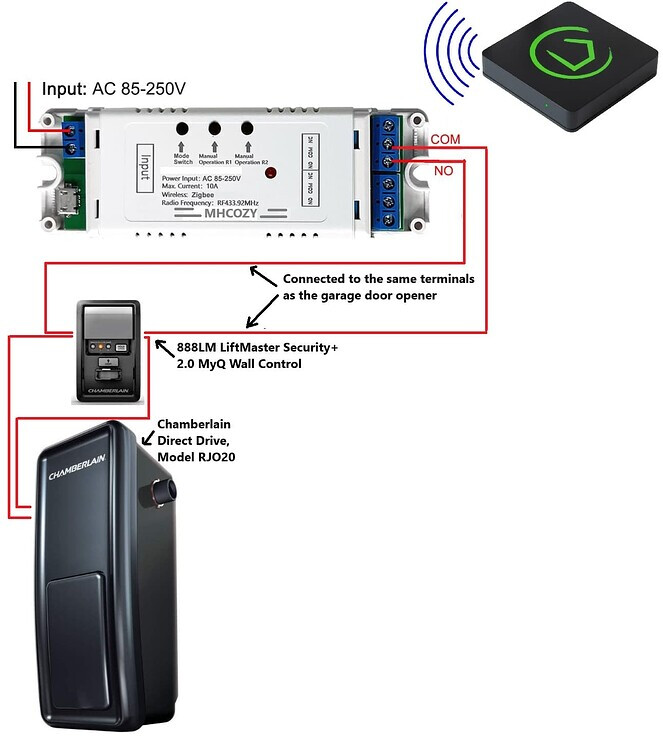
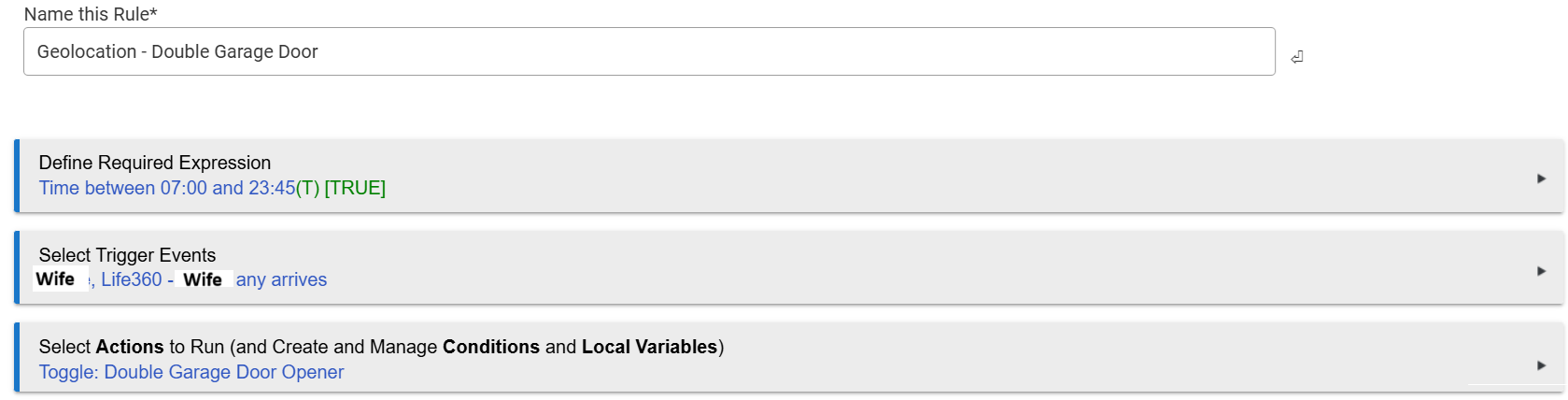
Using this rule...
1 Like
I haven't spent much time on this, at there are too many other things I need to do ahead of this on my to-do list, but I seem to remember reading that this won't work on most of their controllers. I was guessing they do more than just close a circut, which is what it looks like that's all your does. Is there anything on on your wall controller, like a time, the temp reading, or a separate switch for the light? Mine has all of that, not that I've ever used any of it. As aa side note, this is especially annoying as I'm growing increasingly angry at companies like Amazon becoming so ■■■■■■■ anti consumer and for lack of a better word, arrogant and evil. I'm singling them out of the way they are getting these companies to give them this type of exclusive access. I'm becoming more and more of a pirate in my older years. 

1 Like
Correct, most MyQ GDOs use a digital protocol that you need to emulate.
You can easily check if yours is analog by shorting out the terminals (e.g. paperclip).
If its analog, the GDO activates. 
But if it's digital, nothing happens. 
Either way, here's some other related threads.
4 Likes
Somehow its miraculously still working for me
3 Likes
You are 100% correct in that!
There are a couple options though.
- Emulate their 1-wire protocol. Yuck.
- Connect a relay across the wall mounted door button to simulate a physical button press.
- Connect a relay across a remote button to simulate a physical button press.
I ended up doing #3, and then 3D printed a box with a wifi controller to call back to the hub. Allowed me to hardware power to the door opener remote as well. It was just cleaner since I could mount it near the GDO.
I have an MHCozy device that’s powered, wired, and successfully paired to Hubitat Elevation using the Zemismart ZigBee Wall Switch Multi-Gang driver. However, I haven’t yet connected it to the MyQ garage door switch because I’m unsure about the correct driver settings.
Could someone please advise on the appropriate configuration for the following?
- Preference: Default Current State
- Command: Switch Backlight
- Command: Switch Type
I have a single garage door, so I assume I should use one of the child devices (rather than the parent device) when setting up dashboards or Rule Machine automations.
Unfortunately, I haven’t been able to locate documentation for this driver. If you or anyone has a link or reference, I’d greatly appreciate it.
Alas! Sometime in the last few days it stopped working for me. It was nice while it lasted. I guess I get to go back to pushing buttons. At least HomeLink still works.
RATGDO is the way to go!
4 Likes
or Konnected Blaq.
3 Likes
as one of the developers (mostly SEC+1.0) for Ratgdo HomeKit version
i wrote a driver for Habitat. YES you don't use anything APPLE related
in the HomeKit version of firmware, there is a full HTTP webserver
and it can take commands and get web events via stream for status changes
I only use mine with Habitat, and its perfect!
if you have SEC+1.0 GDO and have the 889LM i even came up with a HW solution
(add on to RATGDO) to solve the data collision issue
its not required, but does make it better
course works with SEC+2.0 too
if someone wants to use it with the Hubitat Driver, i can get it to them
i prob should just make a post in the developers/driver forum

3 Likes

