BIG news (again)...
Dropbox:
- HubVoiceSat now has an Ubuntu version!
- Now supports Sonos/DNLA speakers for Music playback
Github: beta-13
- Updated Instructions to include Ubuntu
BIG news (again)...
Dropbox:
Github: beta-13
Ok, a different issue I'm afraid, when I run the HubVoiceSat.exe nothing happens, I can see the executable in the processes list, but no web page opens 
Damn, okay. Need more info though. Version?
Also, be sure to delete everything in your HubVoiceSat folder and replace it with the new contents of the Dropbox download. Things have changed a bit.
I just fired up version 2026.04.08.1 and it loaded fine. Took about 30 seconds though... still working on that! After you make sure you have the latest version. Double click on the HubVoiceSat.exe and watch the directory. A third file should popup, hubvoice-runtime.lock. Once that is in there, wait a few more seconds and the webpage should open.
If the hubvoice-runtime.lock is already in there before clicking on the exe, that could be a problem right there. If the hubvoice-runtime.lock is in the folder, then the process in already running. Look in the toolbar (right hand corner) and see if the little microphone is there. If it is, right click on it and see if it's running or stopped. If it's running, double click the icon and the webpage will open. If it's stopped, select 'Shutdown and Exit' and the lock should disappear from the folder. You can now double click on the exe again. If you shut down from the icon and the lock is still in the folder, you'll need to reboot to clear the lock.
Seems you and I are the only two working on this, so hang in there! lol. I do appreciate it.
I am out of town at the moment visiting family, so i can't complete this setup until i get home. I have attempted the deployment on a Nvidia Jetson Orin Nano Super and a Ubuntu VM just to see if i can get it working.
My attempt to deploy on a Jetson Orin Nano didn't work. The default setup package uses Ubuntu which I had hoped would work. The problem was the python version. The default install with from Nvidia uses python3 3.10.x and doesn't allow upgrading easily. This integration seems to need 3.11.x. Do you know if your software has the ability to use the integrated GPU to help with performance. Just wondering before i put much effort into this.
That said i took time to deploy on a small Ubuntu VM on my Unraid Server. It deployed fine there with no issues. I will need to complete it when i get home.
One thing i noticed though is that it appears i need to use a ubuntu vm that has a functional GUI like kubuntu or gnome to setup with the browser. That is becuase it uses a loopback. Is there any way to configure the http server on initial setup so it can use the external IP instead of loopback. This would allow me to setup a minimal install with ubuntu server. I may also try to figure out if i can find a way to install on Alpine os to make it even leaner on resources.
New Release... Both Windows and Ubuntu
Dropbox:
.
Good news, this was actually an easy change.
Jetson Orin Nano Viability:
 Python 3.10 will work (no need to upgrade to 3.11)
Jetson has NVIDIA GPU (72 CUDA cores)—perfect for TTS/speech tasks
GPU acceleration support is now live with HUBVOICESAT_GPU_ACCELERATION=1 env var
faster-whisper and ONNX Runtime GPU modes enabled in code
Whisper uses float16 (better accuracy) on GPU vs int8 on CPU
All changes backward compatible—CPU-only mode remains the default
Updated README and Ubuntu install guide with GPU setup instructions
I haven't tested this because I don't have the hardware... Let me know how it goes!
Start everything (setup UI + runtime):
./start-hubvoice.sh
This opens the setup UI at http://127.0.0.1:8093/ and starts the runtime.
The browser will open automatically if a desktop is available.
For a headless Ubuntu server, you can expose the setup page to your LAN:
HUBVOICESAT_SETUP_BIND=0.0.0.0 ./start-setup.sh
Then open the printed http://:8093/ URL from another device.
If ufw is enabled, allow the port first:
sudo ufw allow 8093/tcp
This works great! Much easier than switching machines to edit something or start/stop the music.
It is not wise to modify the Jetson's OS and libraries with software from anybody but Nvidia. You might get lucky once and lulled into thinking it's OK. Shortly after that You too will warn people to not change the OS on Jetsons unless nvidia does it.
I was going to reload the latest OS pack from Nvidia on my Jetson Orin Nano. I believe it has been updated to 7.x based on their components. My comment about alpine was as a test on my unraid server using a VM.
The Jetson's os is just a variation of Ubuntu with Nvidia's Jetson packages on top. No doubt you have to be careful what you change though.
@bptworld Sadly still not working mate.
To be sure I rebooted although this didnt remove the .lock file.
But after reboot there was a change, simply an error.
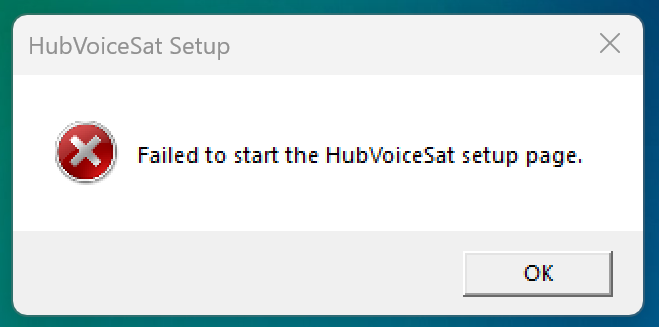
There is nothing in the system tray in order to try anything further.
Also checked the event logs for anything sinister, sadly no further information in there either 
Update, so I ran the runtime on its own, and see this, if its any hep?
2026-04-09 23:40:59,910 [WARNING ] 192.168.1.96: Connection error occurred: 192.168.1.96: Connection requires encryption
2026-04-09 23:40:59,910 [ERROR ] Voice bridge connect FAILED for sat-1: 192.168.1.96: Connection requires encryption
2026-04-09 23:40:59,912 [INFO ] Voice bridge sat-1 will reconnect in 8.0s (backoff)...
I also found that my IP had changed from the original, so I fixed it to as it was when working fine, sadly this didn't help.
that error means a lot!
Give hubvoice-sat-2026.04.09.3-release.zip a try. Be sure to flash you HA PE before launcing hubvoicesat.
Sadly the same error box. But ran the runtime again.
> 2026-04-10 00:29:58,095 [WARNING ] Model validation warning at startup: Piper voice models directory missing: C:\HubVoiceSat\piper_voices
> Expected voices in: piper_voices/
> 2026-04-10 00:29:58,102 [INFO    ] Configuration validated - 1/1 satellites reachable
> 2026-04-10 00:29:58,102 [WARNING ] 192.168.1.96: Connection error occurred: 192.168.1.96: Connection requires encryption
> 2026-04-10 00:29:58,103 [INFO    ] Configuration validation passed
> 2026-04-10 00:29:58,103 [ERROR   ] Voice bridge connect FAILED for sat-1: 192.168.1.96: Connection requires encryption
> 2026-04-10 00:29:58,104 [INFO    ] Startup milestone startup_validation_finished at 1.152s
> 2026-04-10 00:29:58,104 [INFO    ] Voice bridge sat-1 reconnecting immediately...
> 2026-04-10 00:29:58,105 [INFO    ] Voice bridge connecting to Master Bedroom (192.168.1.96) port 6054...
> 2026-04-10 00:29:58,126 [WARNING ] 192.168.1.96: Connection error occurred: 192.168.1.96: Connection requires encryption
> 2026-04-10 00:29:58,127 [ERROR   ] Voice bridge connect FAILED for sat-1: 192.168.1.96: Connection requires encryption
> 2026-04-10 00:29:58,127 [INFO    ] Voice bridge sat-1 will reconnect in 1.0s (backoff)...
> 2026-04-10 00:29:58,962 [INFO    ] HTTP Request: GET https://huggingface.co/api/models/Systran/faster-whisper-base.en/revision/main "HTTP/1.1 200 OK"
> 2026-04-10 00:29:59,131 [INFO    ] Voice bridge connecting to Master Bedroom (192.168.1.96) port 6054...
> 2026-04-10 00:29:59,219 [WARNING ] 192.168.1.96: Connection error occurred: 192.168.1.96: Connection requires encryption
> 2026-04-10 00:29:59,220 [ERROR   ] Voice bridge connect FAILED for sat-1: 192.168.1.96: Connection requires encryption
> 2026-04-10 00:29:59,222 [INFO    ] Voice bridge sat-1 will reconnect in 3.0s (backoff)...
> 2026-04-10 00:29:59,595 [INFO    ] Whisper model preloaded for fast STT
> 2026-04-10 00:29:59,595 [INFO    ] Startup milestone whisper_preload_finished at 2.643s
> 2026-04-10 00:30:02,230 [INFO    ] Voice bridge connecting to Master Bedroom (192.168.1.96) port 6054...
> 2026-04-10 00:30:02,295 [WARNING ] 192.168.1.96: Connection error occurred: 192.168.1.96: Connection requires encryption
> 2026-04-10 00:30:02,296 [ERROR   ] Voice bridge connect FAILED for sat-1: 192.168.1.96: Connection requires encryption
> 2026-04-10 00:30:02,297 [INFO    ] Voice bridge sat-1 will reconnect in 7.0s (backoff)...
try this... hubvoice-sat-2026.04.09.4-release.zip
BE SURE to flash the HA voice assistant PE before launching HubVoiceSat.
Ok, maybe I'm being to eager, nothing showing on Dropbox just yet I'll wait 
Now got it
@bptworld Sadly still the same error.
I updated the FW to the latest before trying.
show me please
What can I show mate?
So trying to load the latets release on my jetson nano. I am still getting this set of errors that looks like it is wanting python 3.11
Virtual environment already exists. Updating packages...

Upgrading pip...

Installing runtime packages from requirements-runtime.txt...
(This may take a few minutes on first run.)

ERROR: Ignored the following yanked versions: 5.1.0
ERROR: Ignored the following versions that require a different python version: 37.0.0 Requires-Python >=3.11; 37.0.1 Requires-Python >=3.11; 37.0.2 Requires-Python >=3.11; 37.0.3 Requires-Python >=3.11; 37.0.4 Requires-Python >=3.11; 37.1.0 Requires-Python >=3.11; 37.1.1 Requires-Python >=3.11; 37.1.2 Requires-Python >=3.11; 37.1.3 Requires-Python >=3.11; 37.1.4 Requires-Python >=3.11; 37.1.5 Requires-Python >=3.11; 37.1.6 Requires-Python >=3.11; 37.2.0 Requires-Python >=3.11; 37.2.1 Requires-Python >=3.11; 37.2.2 Requires-Python >=3.11; 37.2.3 Requires-Python >=3.11; 37.2.4 Requires-Python >=3.11; 37.2.5 Requires-Python >=3.11; 38.0.0 Requires-Python >=3.11; 38.1.0 Requires-Python >=3.11; 38.2.0 Requires-Python >=3.11; 38.2.1 Requires-Python >=3.11; 39.0.0 Requires-Python >=3.11; 39.0.1 Requires-Python >=3.11; 40.0.0 Requires-Python >=3.11; 40.0.1 Requires-Python >=3.11; 40.0.2 Requires-Python >=3.11; 40.1.0 Requires-Python >=3.11; 40.2.0 Requires-Python >=3.11; 40.2.1 Requires-Python >=3.11; 41.0.0 Requires-Python >=3.11; 41.1.0 Requires-Python >=3.11; 41.10.0 Requires-Python >=3.11; 41.11.0 Requires-Python >=3.11; 41.12.0 Requires-Python >=3.11; 41.13.0 Requires-Python >=3.11; 41.14.0 Requires-Python >=3.11; 41.15.0 Requires-Python >=3.11; 41.16.0 Requires-Python >=3.11; 41.16.1 Requires-Python >=3.11; 41.17.0 Requires-Python >=3.11; 41.18.0 Requires-Python >=3.11; 41.2.0 Requires-Python >=3.11; 41.3.0 Requires-Python >=3.11; 41.4.0 Requires-Python >=3.11; 41.5.0 Requires-Python >=3.11; 41.6.0 Requires-Python >=3.11; 41.7.0 Requires-Python >=3.11; 41.8.0 Requires-Python >=3.11; 41.9.0 Requires-Python >=3.11; 41.9.1 Requires-Python >=3.11; 41.9.2 Requires-Python >=3.11; 41.9.3 Requires-Python >=3.11; 41.9.4 Requires-Python >=3.11; 42.0.0 Requires-Python >=3.11; 42.1.0 Requires-Python >=3.11; 42.10.0 Requires-Python >=3.11; 42.2.0 Requires-Python >=3.11; 42.3.0 Requires-Python >=3.11; 42.4.0 Requires-Python >=3.11; 42.5.0 Requires-Python >=3.11; 42.6.0 Requires-Python >=3.11; 42.7.0 Requires-Python >=3.11; 42.8.0 Requires-Python >=3.11; 42.9.0 Requires-Python >=3.11; 43.0.0 Requires-Python >=3.11; 43.1.0 Requires-Python >=3.11; 43.10.0 Requires-Python >=3.11; 43.10.1 Requires-Python >=3.11; 43.11.0 Requires-Python >=3.11; 43.12.0 Requires-Python >=3.11; 43.13.0 Requires-Python >=3.11; 43.14.0 Requires-Python >=3.11; 43.2.1 Requires-Python >=3.11; 43.3.0 Requires-Python >=3.11; 43.4.0 Requires-Python >=3.11; 43.5.0 Requires-Python >=3.11; 43.6.0 Requires-Python >=3.11; 43.7.0 Requires-Python >=3.11; 43.8.0 Requires-Python >=3.11; 43.9.0 Requires-Python >=3.11; 43.9.1 Requires-Python >=3.11; 44.0.0 Requires-Python >=3.11; 44.1.0 Requires-Python >=3.11; 44.11.0 Requires-Python >=3.11; 44.11.1 Requires-Python >=3.11; 44.12.0 Requires-Python >=3.11; 44.13.1 Requires-Python >=3.11; 44.13.2 Requires-Python >=3.11; 44.13.3 Requires-Python >=3.11; 44.14.0 Requires-Python >=3.11; 44.15.0 Requires-Python >=3.11; 44.2.0 Requires-Python >=3.11; 44.3.0 Requires-Python >=3.11; 44.3.1 Requires-Python >=3.11; 44.4.0 Requires-Python >=3.11; 44.5.0 Requires-Python >=3.11; 44.5.1 Requires-Python >=3.11; 44.5.2 Requires-Python >=3.11; 44.6.0 Requires-Python >=3.11; 44.6.1 Requires-Python >=3.11; 44.6.2 Requires-Python >=3.11; 44.7.0 Requires-Python >=3.11; 44.8.0 Requires-Python >=3.11; 44.8.1 Requires-Python >=3.11; 44.9.0 Requires-Python >=3.11; 44.9.1 Requires-Python >=3.11
ERROR: Could not find a version that satisfies the requirement aioesphomeapi>=44.0.0 (from versions: 1.0.0, 1.1.0, 1.2.0, 1.3.0, 1.4.1, 1.4.2, 1.5.0, 1.6.0, 1.7.0, 1.8.0, 2.0.0, 2.0.1, 2.1.0, 2.2.0, 2.3.0, 2.4.0, 2.4.1, 2.4.2, 2.5.0, 2.6.0, 2.6.1, 2.6.2, 2.6.3, 2.6.4, 2.6.5, 2.6.6, 2.7.0, 2.8.0, 2.9.0, 3.0.0, 3.0.1, 3.1.0, 4.0.0, 4.0.1, 4.1.0, 5.0.0, 5.0.1, 5.1.1, 6.0.0, 6.0.1, 6.1.0, 7.0.0, 8.0.0, 9.0.0, 9.1.0, 9.1.1, 9.1.2, 9.1.3, 9.1.4, 9.1.5, 10.0.0, 10.0.1, 10.0.2, 10.0.3, 10.1.0, 10.2.0, 10.3.0, 10.4.0, 10.5.0, 10.6.0, 10.7.0, 10.8.0, 10.8.1, 10.8.2, 10.9.0, 10.10.0, 10.11.0, 10.12.0, 10.13.0, 10.14.0, 11.0.0, 11.1.0, 11.1.1, 11.2.0, 11.3.0, 11.4.0, 11.4.1, 11.4.2, 11.4.3, 11.5.0, 12.0.0, 12.0.1, 12.1.0, 12.2.0, 12.2.1, 13.0.0, 13.0.1, 13.0.2, 13.0.3, 13.0.4, 13.1.0, 13.2.0, 13.3.0, 13.3.1, 13.4.0, 13.4.1, 13.4.2, 13.5.0, 13.5.1, 13.6.0, 13.6.1, 13.7.0, 13.7.1, 13.7.2, 13.7.3, 13.7.4, 13.7.5, 13.8.0, 13.9.0, 14.0.0, 14.1.0, 14.1.1, 15.0.0, 15.0.1, 15.1.0, 15.1.1, 15.1.2, 15.1.3, 15.1.4, 15.1.5, 15.1.6, 15.1.7, 15.1.8, 15.1.9, 15.1.10, 15.1.11, 15.1.12, 15.1.13, 15.1.14, 15.1.15, 16.0.0, 16.0.1, 16.0.2, 16.0.3, 16.0.4, 16.0.5, 16.0.6, 17.0.0, 17.0.1, 17.1.0, 17.1.3, 17.1.4, 17.1.5, 17.2.0, 18.0.0, 18.0.1, 18.0.2, 18.0.3, 18.0.4, 18.0.5, 18.0.6, 18.0.7, 18.0.8, 18.0.9, 18.0.10, 18.0.11, 18.0.12, 18.1.0, 18.2.0, 18.2.1, 18.2.2, 18.2.3, 18.2.4, 18.2.6, 18.2.7, 18.3.0, 18.4.0, 18.4.1, 18.5.0, 18.5.1, 18.5.2, 18.5.3, 18.5.4, 18.5.5, 18.5.6, 18.5.7, 18.5.8, 18.5.9, 19.0.0, 19.0.1, 19.1.0, 19.1.1, 19.1.2, 19.1.3, 19.1.4, 19.1.5, 19.1.6, 19.1.7, 19.2.0, 19.2.1, 19.3.0, 19.3.1, 20.0.0, 20.1.0, 21.0.0, 21.0.1, 21.0.2, 21.0.3, 22.0.0, 22.1.0, 23.0.0, 23.1.0, 23.1.1, 23.2.0, 24.0.0, 24.1.0, 24.2.0, 24.3.0, 24.4.0, 24.5.0, 24.6.0, 24.6.1, 24.6.2, 25.0.0, 25.1.0, 25.2.0, 25.2.1, 25.3.0, 25.3.1, 25.3.2, 25.4.0, 26.0.0, 27.0.0, 27.0.1, 27.0.2, 27.0.3, 28.0.0, 28.0.1, 29.0.0, 29.0.1, 29.0.2, 29.1.0, 29.1.1, 29.2.0, 29.3.0, 29.3.1, 29.3.2, 29.4.0, 29.4.1, 29.5.1, 29.6.0, 29.7.0, 29.8.0, 29.9.0, 29.10.0, 30.0.0, 30.0.1, 30.1.0, 30.2.0, 31.0.0, 31.0.1, 31.1.0, 32.0.0, 32.1.0, 32.2.0, 32.2.1, 32.2.2, 32.2.3, 32.2.4, 33.0.0, 33.1.0, 33.1.1, 34.0.0, 34.1.0, 34.2.0, 34.2.1, 35.0.0, 35.0.1, 36.0.0, 36.0.1)
ERROR: No matching distribution found for aioesphomeapi>=44.0.0
I'm not a Linux guy at all, so relying on Claude to figure this out. Hopefully this makes sense to you.
The issue is that subscribe_voice_assistant with handle_audio and VoiceAssistantTimerEventType are both relatively recent aioesphomeapi additions — pinning to the last Python 3.10-compatible version (somewhere around v24-28) would likely lose those APIs and break voice assistant functionality.
The Jetson-safe approach is: install Python 3.11 alongside the system Python without touching it. No CUDA risk, no system Python disruption.
# Install Python 3.12 alongside the existing 3.10 — does NOT change system python3
sudo add-apt-repository ppa:deadsnakes/ppa
sudo apt install -y python3.12 python3.12-venv

# Wipe the old venv (it was built with 3.10)
rm -rf .envs/runtime

# Re-run setup pointing at 3.12
./setup-runtime.sh --python python3.12
The CUDA/NVIDIA stack is untouched — python3 still points to 3.10 on the system. The venv just uses 3.12 internally.
Well it was a good idea, but didn't work though. I am going to flash the whole thing to a slightly newer version and see how that goes. I think i have jetpack 6.2.1 on it and will reload with 6.2.2 and see if that helps any.
I also think jetpack 7.x is suppose to be coming to the orin nano it at some point soon. Hopefully that will do it.
Most of what i have read suggests to run it in a docker container to ensure the proper python version is used.
It took me and ChatGPT a lot of time to get it set up I had to change this aioesphomeapi>=44.0.0 to this aioesphomeapi>=36.0.1 (my version of Unbutu doesn't support it apparently) in the requirements folder plus a lot of line by line installation with the help of ChatGPT.
I haven't got my satellite yet so can't test.
Download the Hubitat app

