HubVoice is a local voice control system for Hubitat that lets your home hear commands, speak responses, and deliver announcements through satellite devices. It connects voice satellites, your HubVoice runtime, and your automations into one setup that works across the house. You can use it for text-to-speech, voice interactions, automation feedback, and whole-home audio responses without depending entirely on cloud services. The system is designed to make smart home control feel faster, more natural, and more integrated with Hubitat. Instead of treating voice as a separate gadget, HubVoice makes it part of your actual home automation stack. It is essentially the voice layer that gives your Hubitat system presence, personality, and a way to talk back.
How It Works (End-to-End)
A voice/text request arrives through the app endpoint flow.
HubVoice parses intent and tries local execution first.
If the request is non-control and local logic cannot answer, Gemini fallback is used.
If Gemini/Chat-GPT is weak/unavailable for sports, ESPN fallback can supply live score data.
The final response is formatted for natural speech and returned to the caller/speaker.
Test Page
There is a great Test page that you can use to do anything that voice can do.
Tasker (Android)
Tasker with Autovoice on my phone
tap the widget on my home screen
talk to it, 'Is the front door locked?"
Tasker sends 'stuff' to Hubitat
Hubitat sends me a push, 'The front door is locked'
I've uploaded my Tasker XML to show you how to do it. Requires Tasker and the plugin Autovoice. Just need to add your app URL found within the app.
Windows Voice Input app
Finished a windows app with wake word/hot key support - This is finished but to be honest, it doesn't work very well with the built-in mic of a laptop. Much, much better with an external mic. Will come back to this at some point
Windows Text Input app
Available on my Dropbox. A quick way to ask Hubitat anything HubVoice can handle, right from your Windows machine. See more about it in this post. Get it here: HubVoiceMini.
Voice Assistant Satellite
Requires a HA Voice Assistant – Preview Edition (no HA required!) and an always on win PC. See more about it in this post. Get the downloads here: HubVoiceSat.
FutureProofHomes Satellite 1 is now supported.
Available on my Github and HPM. Be sure to enable oauth when saving the code.
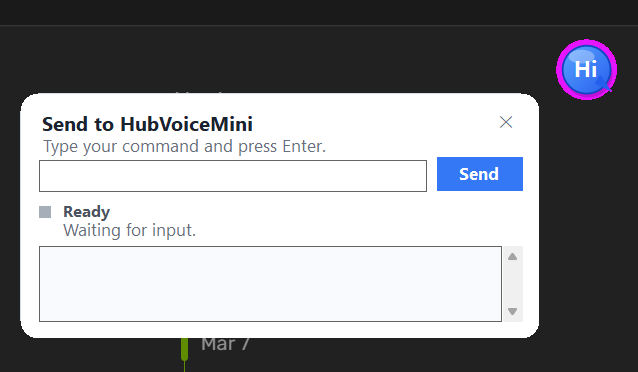
HubVoiceMini is a small Windows desktop utility that lets you quickly send typed commands to your HubVoice / Hubitat voice endpoint.
Instead of speaking commands, just press a hotkey or click the floating/tray icon, type your command, and hit Enter. The request is sent to Hubitat and the response appears in the popup.
Features
Floating draggable desktop icon
Optional system tray launcher
Global hotkey to open the command box
Displays Hubitat response
Auto-hide popup option
Start with Windows
Remembers window/icon positions
Lightweight and always available
Example command:
turn all living room lights off
A fast keyboard alternative when voice control isn’t convenient.
HubVoiceSat is a way to turn the HA PE satellites into a local voice assistant that lets you quickly send commands to your HubVoice / Hubitat voice endpoint.
Features
Requires an always on windows pc
First flash using USB, then all other updates can use wi-fi
Uses 'Hey Jarvis' or 'Okay Nabu' as the wake word.
Room Aware - no need to say "Living Room Ceiling Light", just say "Ceiling Light"!
Important note: This requires you to flash custom firmware on the HA Voice Assistant PE. This is completely reversable, if you decide this isn't what you want to do with the HA PE.
I have two of the Satellite 1 that have been shipped (from China) but the two encloser kits have not. Sounds like it might be a while for the encloser kits. So I already started 3d printing my own, since they provide the files. Will just have to do with 1 speaker per unit until the kits come in with that little board for the two speaker setup.
Hoping with everything I've been able to do with the HA PE, making the Sat1 talk to my HubVoice shouldn't be too hard. Plus their docs are awesome.
Okay, for anybody on the fence (and anyone already using this)...
BIG UPDATE for the HA Voice Assistant PE!
This is the update you have been waiting for. Download hubvoice-sat-2026.03.21.3-release.zip from my Dropbox.
Added Volume Control by Voice
-- set volume to 65 percent
-- set speaker volume to 72
-- set wake sound volume to 55 percent
-- safe ranges are clamped to 40-85%
Massive Groovy update... Beta-006 available through HPM
Added an OPTIONAL Gemini integration. All hub commands/questions are still local only, it will only go out to Gemini if the question is not Hubitat related. ie. What's the Bruins score?
Supports both the Free Tier 1 which is very limited and the Paid Tier 1 that is extremely cheap to use.
okay, at this point - I would love some feedback! If anyone (crickets, crickets) is using any part of this, please let me know what you think. Is there anything you would like to see added? Please be sure you are fully updated before posting.
A few years ago I would have been all over this, but unlikely now due wife's (seemingly ever growing) disinterest/distrust of any capability that requires letting anything in the house listen to us, local or not. In her words "It's only local until they hack you."
So I'm really enjoying watching this, but unfortunately cannot come out to play.
I’m hoping to get all over this with my HA voice unit after my spinal surgery on Wednesday. It’ll give me something to do while recovering. I’ve been following all and look forward to eventually saying bye, bye Bezos.
Is there any chance of Home Voice SAT being able to run on a linux distro, or be put in a container for docker. I know that may not be a easy ask though.
I have very limited windows licenses and if either of those were a option i could easily toss this on my NAS or some other low powered gear.