Add another plus to the Future Proof Homes Satellite-1...
I added a LD2410 (mmwave) sensor to the board, changed the code a bit and BAM, it works! Lots of testing to do but it looks promising. I also have a LD2450 (mmwave with tracking) to play around with but haven't done anything with that one yet.
I'm expecting my satellite shortly, I think I have the server side up and running, I have installed the app on my hub and that seems to function locally ok.
Can you just explain, like I'm a 3 year old how I integrate the 3 things together (hub, satellite, & server)
The most detailed instructions can be found in the Hubitat app. The very first thing is 'Open Instructions Instructions'
So first thing is to install the HubVoice App. You can leave everything as is except for the 'Master List', be sure to include some/all devices. Then as you get more comfortable, you can change the settings, again most you can just leave as default.
Next up would be to download the HubVoiceSat for Windows or Ubuntu. Again, follow the instructions in the Hubitat app. There are some built in debug visuals right in the main page, so you can see right away if it talking to Hubitat or not.
From here you have a few options. Use it with Tasker, Text input (windows) and/or Satellites. Each is detailed in depth in the Hubitat apps Instruction section.
When you satellite(s) come in, once again go to the instructions.
If you get stuck, feel free to reach out and I'll do the best I can to help.
To see the whole thing in action before your satellite come in. Install the Windows Text Input app. This can go on any computer running windows that's on the same network.
I got a cheap HA voice assistant PE from eBay. I didn't want to spend to much until we get this up and working.
I have the App up and working on my Hubitat hub at the moment with 1 light added which woks well using the built in test tool.
Just a quick note on the Linux version, it doesn't seem to start properly without at least one satellite added....that what ChatGPT claims anyway. I don't know if anyone else is using linux has experience something similar.
Thanks for trying this out. What HubVoice release are using on Linux? Make sure it's the latest one off of Dropbox. I just uploaded a new one yesterday with a lot of updates. Be sure to follow the INSTALL-UBUNTU.txt, as it has changed.
After a bit of struggling i finally got my Jetson loaded with a fresh install from the SDK. I noticed in your install procedure you had some tweaks specifically for the Jetson Nano. I executed them an made more progress. When I submitted the command
"./setup-runtime.sh --python python3.12"
I got further along. That removed the issue with the Python 3.10 but it did end with a error.
  Building wheel for pyaudio (pyproject.toml) ... error
  error: subprocess-exited-with-error

  × Building wheel for pyaudio (pyproject.toml) did not run successfully.
  │ exit code: 1
  ╰─> [28 lines of output]
      /tmp/pip-build-env-o51wof0f/overlay/lib/python3.12/site-packages/setuptools/dist.py:765: SetuptoolsDeprecationWarning: License classifiers are deprecated.
      !!

              ********************************************************************************
              Please consider removing the following classifiers in favor of a SPDX license expression:

              License :: OSI Approved :: MIT License

              See https://packaging.python.org/en/latest/guides/writing-pyproject-toml/#license for details.
              ********************************************************************************

      !!
        self._finalize_license_expression()
      running bdist_wheel
      running build
      running build_py
      creating build/lib.linux-aarch64-cpython-312/pyaudio
      copying src/pyaudio/__init__.py -> build/lib.linux-aarch64-cpython-312/pyaudio
      running build_ext
      building 'pyaudio._portaudio' extension
      creating build/temp.linux-aarch64-cpython-312/src/pyaudio
      aarch64-linux-gnu-gcc -fno-strict-overflow -Wsign-compare -DNDEBUG -g -O2 -Wall -g -fstack-protector-strong -Wformat -Werror=format-security -g -fwrapv -O2 -fPIC -I/usr/local/include -I/usr/include -I/home/craig/hubvoice/runtime/.envs/runtime/include -I/usr/include/python3.12 -c src/pyaudio/device_api.c -o build/temp.linux-aarch64-cpython-312/src/pyaudio/device_api.o
      In file included from src/pyaudio/device_api.c:1:
      src/pyaudio/device_api.h:7:10: fatal error: Python.h: No such file or directory
          7 | #include "Python.h"
            |          ^~~~~~~~~~
      compilation terminated.
      error: command '/usr/bin/aarch64-linux-gnu-gcc' failed with exit code 1
      [end of output]

  note: This error originates from a subprocess, and is likely not a problem with pip.
  ERROR: Failed building wheel for pyaudio
Successfully built biplist hexdump hkdf
Failed to build pyaudio
error: failed-wheel-build-for-install

× Failed to build installable wheels for some pyproject.toml based projects
╰─> pyaudio
I was hopeing that was something just for music playback so i kept going.
Whjen i went to run the ./Start-setup .sh script though i am getting a this error.
2026/04/17 10:25:14.445084 cmd_run.go:1583: WARNING: cannot create user data directory: failed to verify SELinux context of /home/craig/snap: cannot locate "matchpathcon" executable
Get-CimInstance: /home/craig/hubvoice/runtime/setup-web.ps1:1889
Line |
1889 |    $existing = @(Get-CimInstance Win32_Process -Filter "Name = 'python …
     |                  ~~~~~~~~~~~~~~~
     | The term 'Get-CimInstance' is not recognized as a name of a cmdlet, function, script file, or executable program. Check the spelling of the name,
     | or if a path was included, verify that the path is correct and try again.
That looks like a powershell issue, Any thoughts
**Update. I decided to try to get this working on my uraid server in a VM. Loaded 24.04 server. I am getting the same error as above. This doesn't seem to be related to Jetson specifically. The file being used is hubvoice-sat-2026.04.15.1-ubuntu.zip
raig@ubuntu:~/hubvoice/runtime$ chmod +x *.sh
craig@ubuntu:~/hubvoice/runtime$ HUBVOICESAT_SETUP_BIND=0.0.0.0 ./start-setup.sh
2026/04/17 12:34:18.368233 cmd_run.go:1583: WARNING: cannot create user data directory: failed to verify SELinux context of /home/craig/snap: cannot locate "matchpathcon" executable
Test-Path: /home/craig/hubvoice/runtime/setup-web.ps1:1877
Line |
1877 |    if (Test-Path $runtimeVenvPythonw) {
     |        ~~~~~~~~~~~~~~~~~~~~~~~~~~~~~
     | Value cannot be null. (Parameter 'The provided Path argument was null or an empty collection.')
I get this on both the Jetson and a Ubuntu VM running 24.04.4
Ok still get some errors but it does appear to have made it further now on the Jetson nano.
First when rrunning the runtime script on the Jetson i get a error message about the Pyaudio component not working during the setup. not sure if this is a problem or not.
When i use the line HUBVOICESAT_SETUP_BIND=0.0.0.0 ./start-setup.sh it just gets stuck and doesn't do anything. If i just specify ./start-setup.sh it works and loads seems to work. since i can't get it to run headless i have hooked up a monitor and enabled gnome again so i can proceed. It may be helpful if you an enable it to run on all interfaces from the begining. I know there are security reasons that make that not the best idea, but still make this much harder for setups that don't want to setup a full computer for it.
Now that i am in the UI i am having a few other issues.
When i setup the configuration it seems to blank out the fields if i don't exit with the ./stop-hubvoice.sh script. Now that i know that this doesn't seem to be as big of a deal, but could lead to problems if users just CTRL-C as suggested in the terminal window.
There seems to be a problem with the piper model included, or at least with the path in the configuration file. It seems that when setup it is specifying a \ as part of the path. I am not sure if that is a escape value for special characters, but it seems that the app is struggling with that being there. It intially says it is all good, and then when i try to test talking to my HA-PE it fails. The only error i can find is a reference to voicepipline. It says Connected. error on the Setup webpage. But if you click on the open url it shows a message.
"Piper voice model not found: /home/craig/hubvoicesat/runtime/piper_voices\\en_US-amy-medium.onnx\nAvaliable model:Nonetest
I managed to fix this by editing the config file and removing the \ with /
I am not sure how the link to return from the HubMusic page to "Return to Control" is set but it isn't working in my setup for some reason it is take me back to what would be the external ip of the system on port 8093. I don't have the specified anywere other then stuff related to Hubvoice URL on the main page but that is using port 8080 as the example suggests.
A while back you mention a value HUBVOICESAT_GPU_ACCELERATION=1. but where is that set
The good news is that i am able to have Hubvoice talk through my HA-PE. so that is cool and very fast as well. Darn near instant
The last comment is i am getting scrolling errors on my HA-PE with it complaining about the connection. I have moved the Jetson to the same network vlan to prevent any chance of firewall and such being a problem.
Wow, lots to digest there! Even with the issues, it's awesome to hear someone say that they are up and running. Before I try to take all this in, do me a favor and make sure you are using this mornings update... hubvoice-runtime-2026.04.19.3-ubuntu.tar.gz. The new bin files are compiling now but there are a lot of linux changes in the tar file.
Forgot to mention, for me - I log into my Ubuntu machine using Windows Remote Desktop Connection, download the new version from Dropbox, install and run. From that point on I just use my windows machine and Chrome to do everything. Again, this is with the newest version (hubvoice-runtime-2026.04.19.3-ubuntu.tar.gz).
Well that update does seem to have fixed most of what i said previously. Loopback and the external ip are now enabled for both runtime and setup pieces. The issue with the Piper voice seems to not be reoccurring even after saving the configuration data again. Values seem to persist after exiting the HubvoiceSAT.
What is till occuring is the wake word isn't working,and i am getting the errors shown above from the HA PE web ui.
I am seeing these messages from the HA-PE
[15:10:50][E][micro_wake_word:061][mww]: Failed to allocate tensors for the streaming model
[15:10:50][E][micro_wake_word:061][mww]: Failed to allocate tensors for the streaming model
[15:10:50][E][micro_wake_word:061][mww]: Failed to allocate tensors for the streaming model
[15:10:50][E][micro_wake_word:252]: Encountered an error while performing an inference
I am seeing Rate-Limit errors allot as well. Does this require a connection to a external AI to run without rate limits. I have reloaded ollama on the Jetson as well so i would be up for testing local AI if you are interested.
 Lots of testing to do but it looks promising. I also have a LD2450 (mmwave with tracking) to play around with but haven't done anything with that one yet.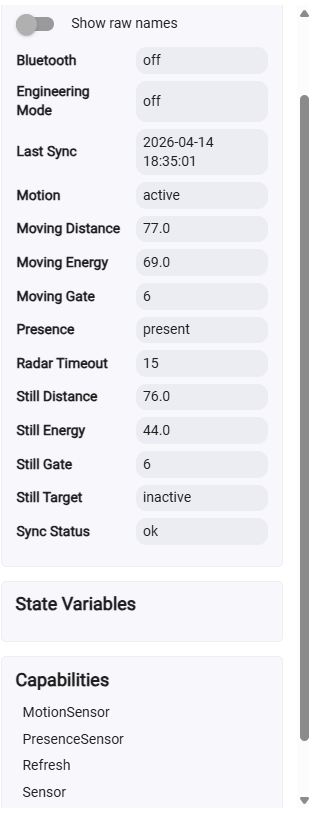
 how I integrate the 3 things together (hub, satellite, & server)



