i keep getting errors when i import the app code
What's the error you are getting? Are you importing/pasting into the Apps code?
I just pasted latest ver2.1.2 from github into "apps code" and had no issue. Then added the app and it opened fine.
Is there an error message you can share?
You have to open the link, click on the app name, and then click Raw, then use THAT URL.
Here is the link you need to import for your convenience: https://raw.githubusercontent.com/kampto/Hubitat/refs/heads/main/Apps/Switch%20Scheduler%20and%20More
Hi,
I just installed 3 water valves to my garden and this app is great for controlling them. Thanks @kampto
I just one feature request (if not available currently)
I have a weather device using "OpenWeatherMap-Alerts Weather Driver"
it can report precipitation possibility as :
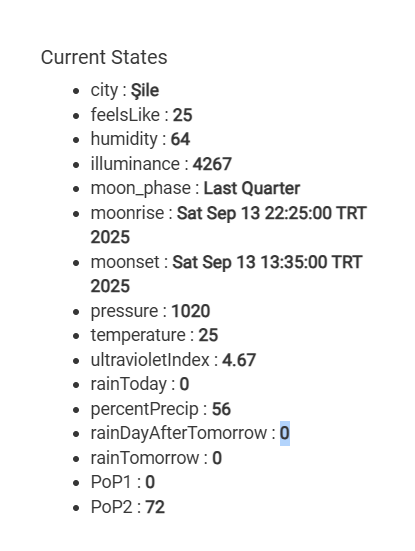
Would it be possible to poll this data (or any other string/integer from any device) and use it as a condition to activate/deactivate rules ?
It should be if you use a custom attribute as trigger/condition for the rule.
ok but I don't see that option on the app. where is it ?
You can use custom attributes as triggers or conditions in Rule Machine.
The app has pause features and they can be linked to devices attached to the hub. So the request is to use another apps data to pause? Does that app link to one of those existing pause cases? if not let me know and I can make another pause case.
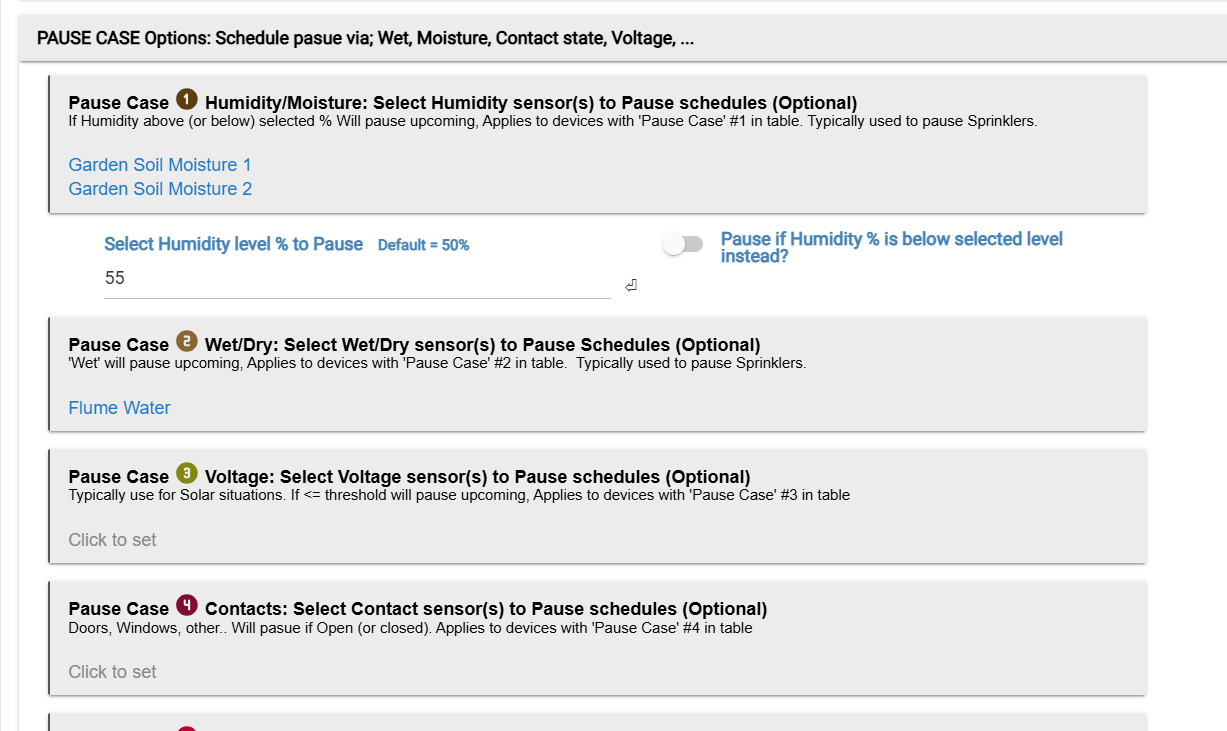
By the way, I've separated actions and triggers in the app. On Github now.
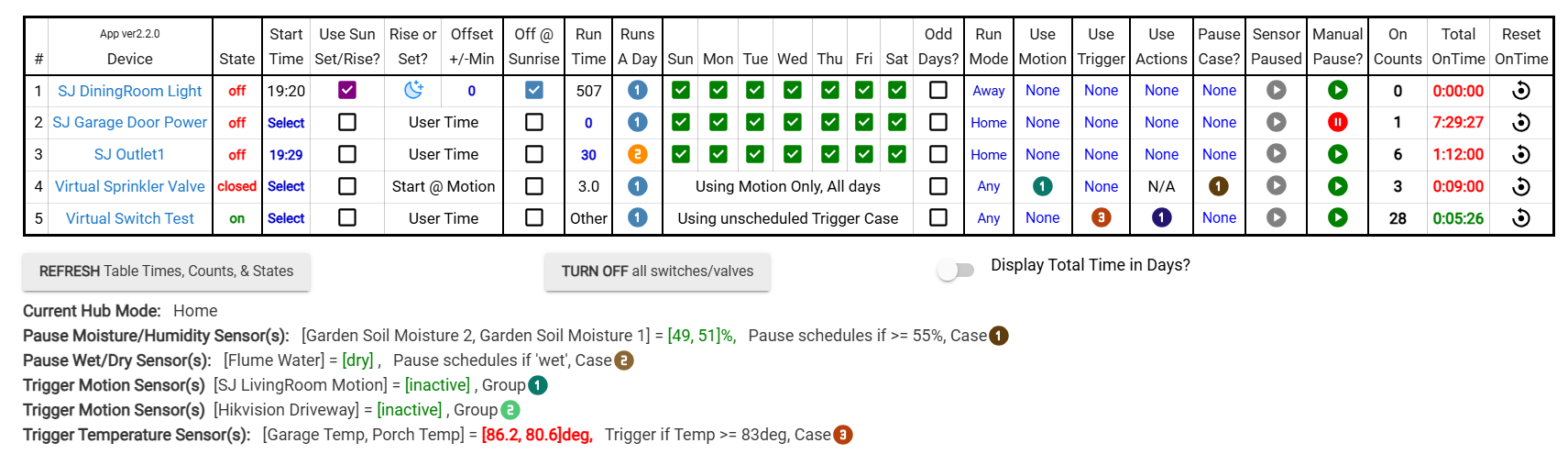
This change add triggers to the table, it might show up as 'null'. Will need to remove and re-add devices to resolve.
I didn't understand your proposed solution.
I have a device named weather and it has custom attributes like "precipitation percentage" (meaning rain possibility)
I want to pause actions when this value is over 10
how can I do that ?
@kampto
Author is offering to add more functionality but you can create a virtual wet/dry sensor and turn it on/off based on the openweather data in a rule machine rule...then you can use that sensor as a pause condition in this app.
2 Likes
well , ok. that seems like a solution. But instead of adding another virtual device, I would prefer to be able to write a custom rule. So why not add a new pause case with custom device/custom value comparison ?
I need to figure out how to grab the data from that device.
the feature is available in rule machine. Any type of device , and any custom value of that device. I guess there might be some sample groovy code to implement that.
if you add this feature, any device can be used as a trigger.
Hello @kampto your app looks amazing! Another developer (Simon) recommended I ask if your app can solve the problem I'm having. I've created multiple threads/posts about this, but here's the very basic concept:
I want to control the opening/closing of two outdoor shades using the time from one specific cell in a Google Sheet as the trigger.
I have the spreadsheet built. I have existing RM rules that currently control the shades using a different approach. Do you know how to pull time data from a Google Sheet and parse it for use as a trigger in RM? Does your app do that? If not, could it be added?
It's also been suggested perhaps it would be better to create an app in HE to handle everything and not connect it to a Google Sheet. That's great too, as long as it's still easy for me to enter user-observed time data into the app. (As user-observed times are entered, the time is averaged between them. As time goes on and I add more time data the shade triggering becomes more accurate. I already have data going back to late April.)
Any thoughts or suggestions are very appreciated!! Here's a link to our latest conversation if you're interested in reading more:
https://community.hubitat.com/t/re-re-release-ecowitt-and-wittboy-weather-stations-and-sensors-local/155655
Thanks in advance, cheers, Brian
Sorry, im not sure how to link to google sheets.
1 Like
Lates version 2.2.3 on github.
--Added column to display the last time the device was active. Possible breaking change, in order to get this to work you may need to remove and re-add the devices from the table and re-enter the schedule. No changes needed in any of the options below table by doing it that way.
--Also added using hub variables as a pause case. Needs to be a Number value. @ilkeraktuna not sure if this helps you out or not
Table with Last active column

Options to set-up variable for pause cases:

2 Likes
is it hub variables , variables from a device included ?
Uses hub variables in Numerical value. You can use RM to assign a value to a custom Hub variable. I do this to track how many times my motion sensor is tripped and assign to a hub variable. As example Here's my rule, "DrivewayMotionCounter" is the hub variable. Depends on your use case.
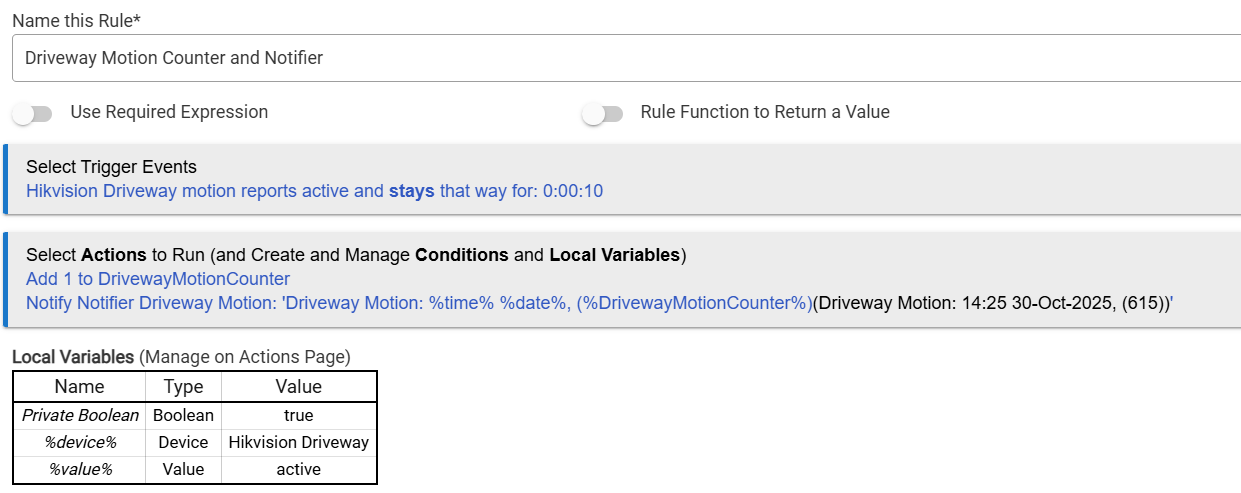
Precipitation is not in the Hub apps capabilities list. Not sure how to grab that value in the app yet if possible at all. So yo would need to use RM to assign to a virtual Wet/Dry device as mentioned above or assign the precip value to a Hub variable in RM and use the apps new pause case feature.
1 Like

