None of my zigbee devices will answer commands. Zwave switches work. It is like the zigbee network is gone. I rolled back a few hub versions and they worked for an hour then nothing. Everything was good this morning and prior. Had an issue with the hub network but s reset fixed that.
please provide hub model, platform version. Try a proper shutdown and pull power for 30 seconds.
2 Likes
Please explain this in more detail... What happened, what did you reset?
It started with this yesterday:Hub failing after update 2.4.3.167 - #21 by gikjll
It started failing after the normal hub update. Then when I got the hub to boot, using suggestions from above, the zigbee devices do not answer commands.
I am at 2.4.3.167 now but have tried rolling back a few versions with no luck. Well, one older version allowed some lights to work but they soon stopped working. I have tried many reboots. The last thing I did was reset the channel on the radio from 20 to 25 as many suggested.
NOw, I have nothing zigbee at all. In settings the device map is empty, and so are the zigbee logs. I have tried rebooting the radio, and rebuilding the zigbee network.
I am at a loss.
I am rolling back to .164...
at 164, no joy, put channel back to 20, increased power level, now see a zigbee device map, but not working
Choose one mains/USB powered Zigbee device, move it close to your hub and try to pair it again (without deleting it).
What happens?
It will not pair. It is a sengled plug, now it just blinks blue. Hub is pretty close. Something is def wrong
What model is your hub - C8 or older?
c8 pro. My zigbee chart is showing more and more devices with orange connectors, but lots of grey (tentative) those line up with the uncommandable ones
Have you checked your HE Zigbee channel compared to your 2.4GHz Wi-Fi channel or other co-located Zigbee channels being used?
1 Like
Also, what is the distance between the C8-Pro antennas and your 2.4Ghz router antennas?
1 Like
You think a neighbor is blasting me? All this worked up until the hub update yesterday
Distance is about 10-15 feet, I moved it away from my router months ago, it improved things alot
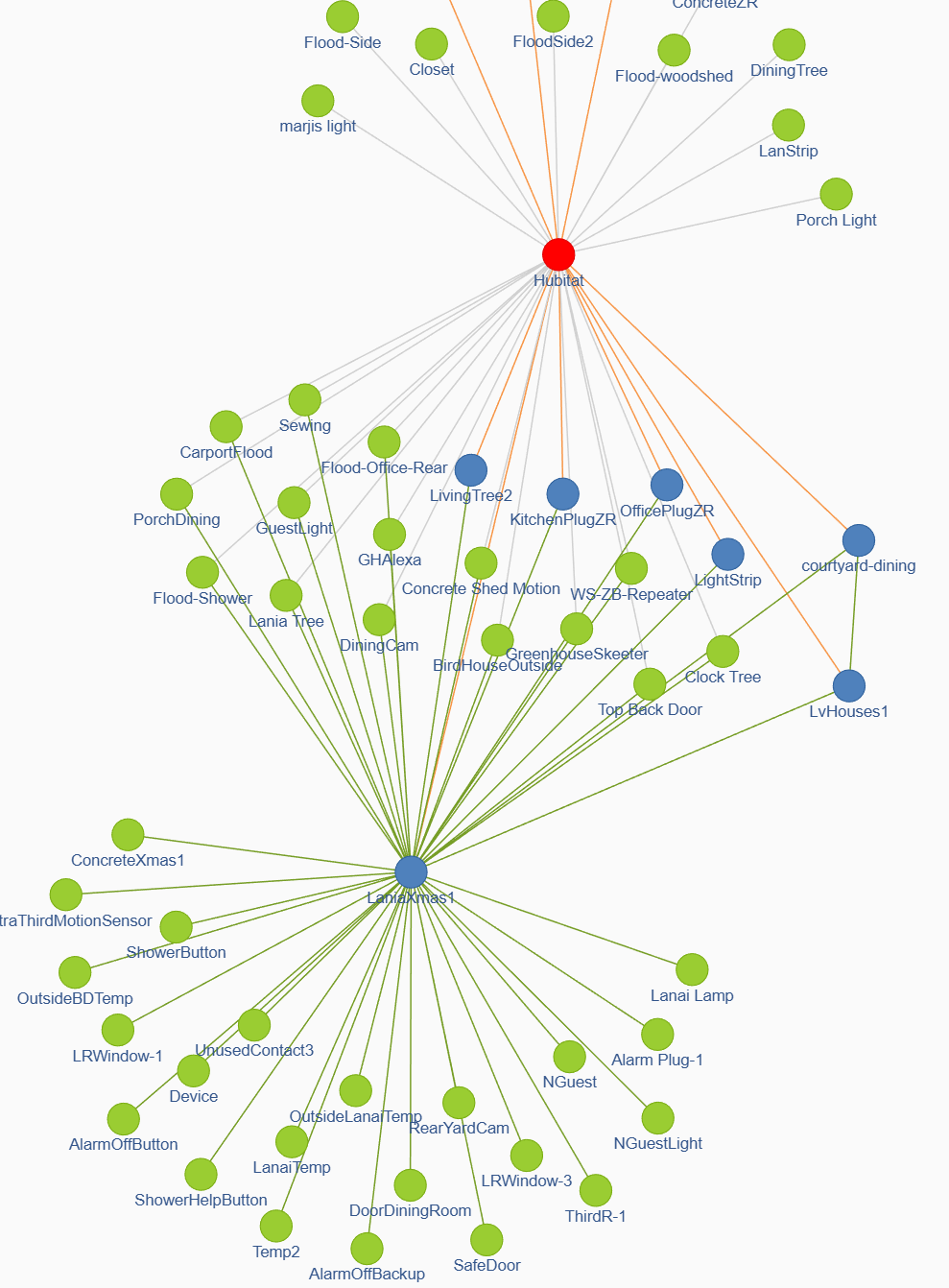
most devices show "lonely" green
I am alspo noticing that many of the lonely's are off of a new plug I added for some Christmas lights, LaniaXmax
That plug which seems to be trying to connect to tons of devices, is pretty far from the hub,
1 Like
The hub showing red doesn't look good, though not sure what that means...
Given:
Interference does seem likely....
That is just the legend color for a hub
2 Likes
I would troubleshoot the devices one by one , starting with this XaniaXmas1 - a ton of other devices depend on it.
2 Likes
I see that now that I look at my own graph.... Feels like it shouldn't be red, but not something for this topic....
I unplugged LaniaXmas and rebooted the radio, no change. I cannot command any devices.
Seems like a big cooincidence that everything happened after a failed reboot of the hub.
If only to rule it out.... might be worth posting the Zigbee and Wi-Fi channels, plus the power setting on HE.
The problem is definitely in LaniaXmas1 - what kind of device it is? It is attracting as a magnet dozens of other devices that are trying to communicate to the hub using LaniaXmas1 as a repeater?
Please post the Zigbee model/manufacturer, as shown on this device web page, bottom part of the ''Device Info' tab.
I can count 35 other Zigbee devices trying to route through it. It is not possible or highly unlikely for a single repeater to handle the routing of 35 other Zigbee devices.
Do not let other devices distract you until LaniaXmas1 is proven to be a 100% reliable repeater.
2 Likes