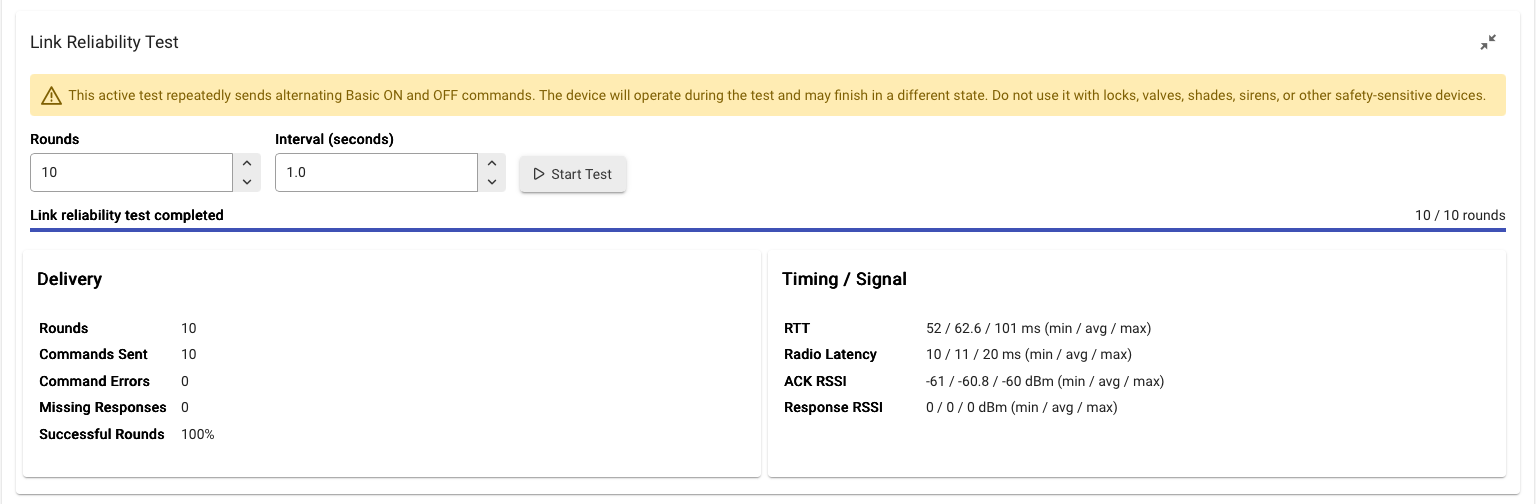
New: Z-Wave Link Reliability Test
We’ve added a new Link Reliability Test to the Z-Wave Details page for hubs using the latest Z-Wave JS integration.
This tool actively tests communication between the hub and an individual Z-Wave device by repeatedly sending commands and measuring the results.
What it measures
The test reports:
- Successful command delivery
- Command errors
- Missing responses
- Round-trip time (RTT)
- Radio latency
- ACK signal strength (RSSI)
- Live progress while the test is running
You can select the number of test rounds and the interval between commands. Tests can also be stopped while in progress.
Important safety warning
This is an active test. It repeatedly sends alternating Basic ON and OFF commands, so the selected device will physically operate during the test and may finish in a different state.
Do not use this test with locks, garage doors, valves, shades, sirens, or other safety-sensitive devices.
It is intended primarily for switches, dimmers, bulbs, outlets, and similar devices where repeated ON/OFF operation is safe.
How to use it
- Open the Z-Wave Details page and click on "State" for the device you want to test.
- Expand Link Reliability Test.
- Select the number of rounds and the interval.
- Click Start Test and confirm the warning.
- Watch the live progress and review the results when complete.
This test is especially useful when troubleshooting intermittent devices, delayed commands, weak routes, or suspected mesh reliability problems.