New: Z-Wave Firmware Database Integration
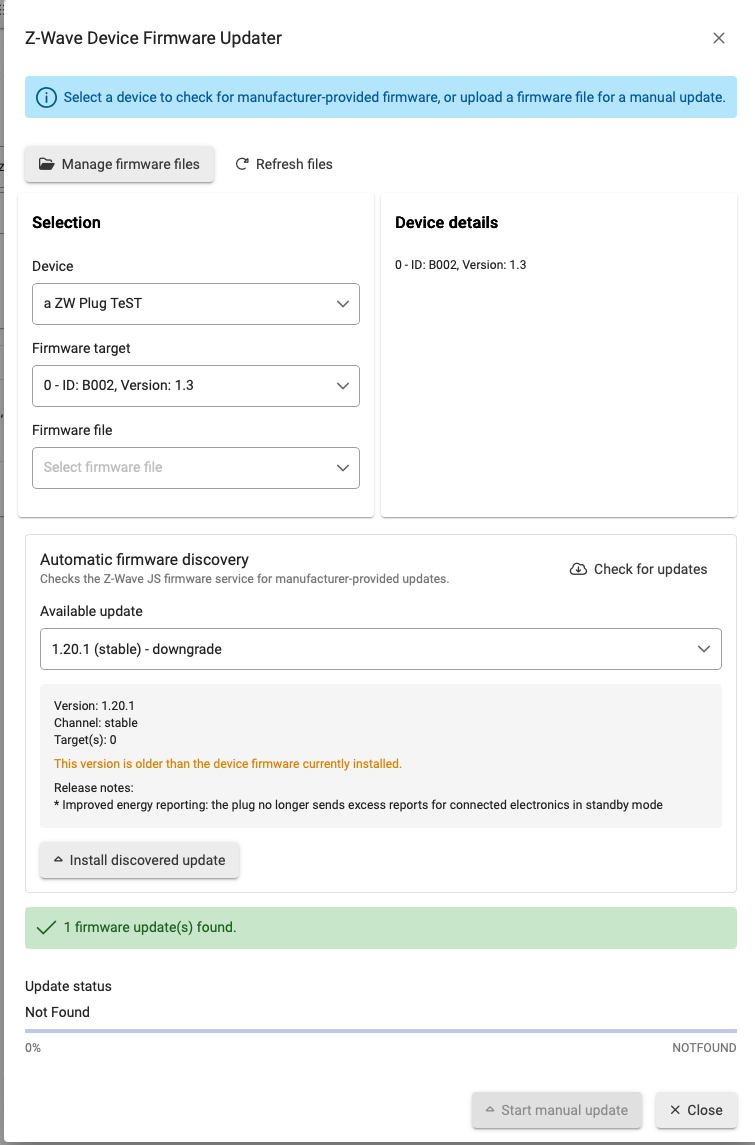
We’ve added automatic firmware discovery to the Device Firmware Updater for hubs running Z-Wave JS.
Instead of manually locating and uploading firmware files, you can now select a Z-Wave device and choose Check for updates. Hubitat will query the Z-Wave JS firmware database for compatible manufacturer-provided firmware.
When an update is available, the updater displays:
- Available firmware version
- Stable release channel
- Release notes
- Firmware target information
- Region information, when applicable
- A warning if the selected firmware is a downgrade
The firmware is downloaded from the manufacturer-provided source, verified for integrity, and installed through Z-Wave JS.
How to use it
- Open Settings → Z-Wave Details.
- Select Device firmware updater.
- Select a Z-Wave device.
- Click Check for updates.
- Review and select an available update.
- Click Install discovered update.
The existing manual firmware upload option remains available.
Important: Firmware database integration is available only when the hub is running Z-Wave JS. Devices are included only when compatible firmware has been submitted to the Z-Wave JS database, so updates may not be available for every device.
As always, avoid powering off the hub or device while an update is in progress.