I see, how confusing, It is good that I turned it off.
over the past 40 years of dealing with evolving computer applications, I have determined that the more "helpful" they try to be, the more annoying and counter productive they become.
1 Like
You just made me think of something...

Good old Clippy
9 Likes
Clippy lives on these days in Teams as a chat sticker. One youngster the other day asked "What is that thing??"
Damn, I'm old.
5 Likes
Nice, I use teams at work. Now I have to find an excuse to inject clippy somewhere and see how many people will actually know what it is.
2 Likes
You think I did it, apparently not. It happened again. Attached is the event screen of "Master bath main" device
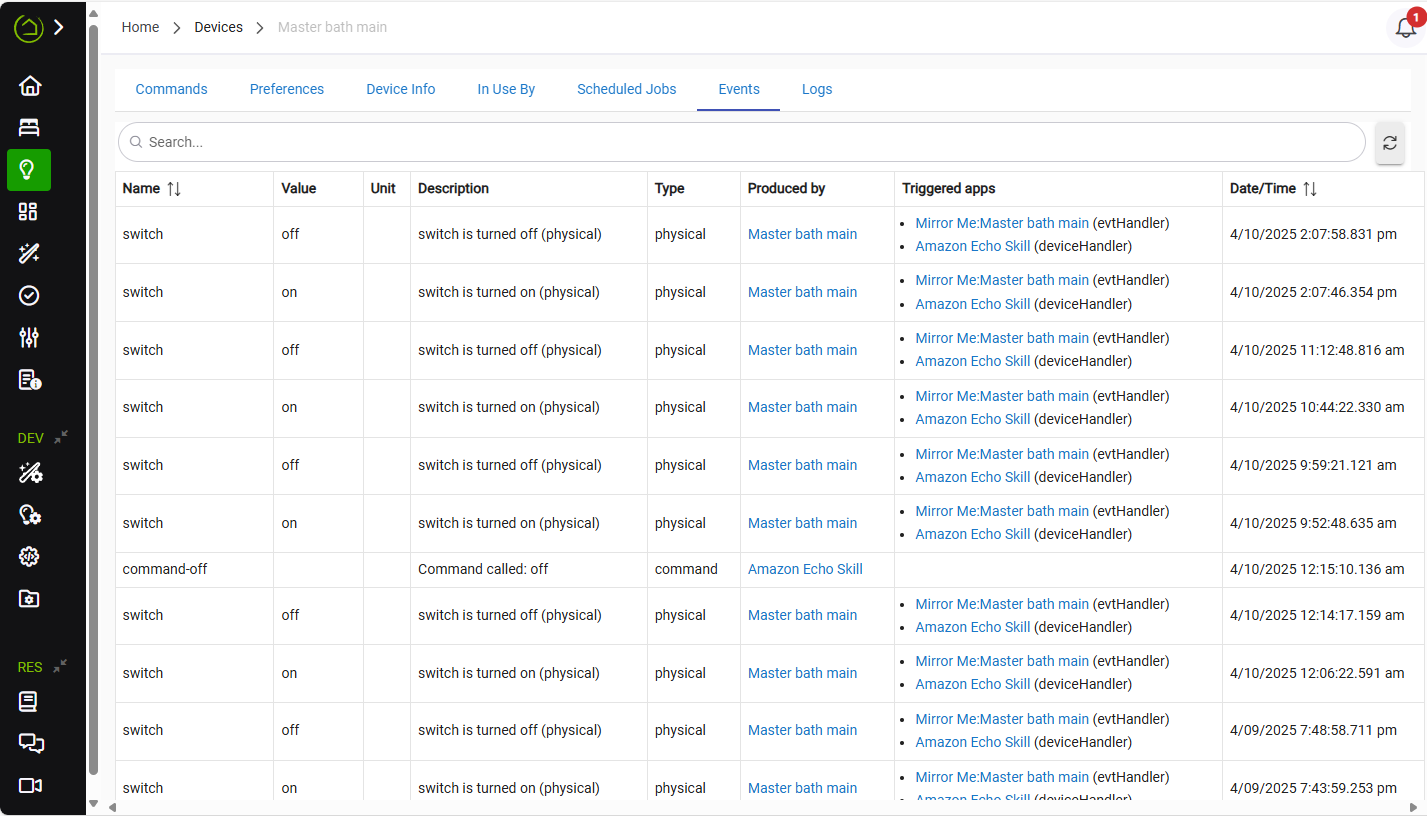
As I said, I turned off hunches, what else?
The last event 2;07PM - I was there when it happened. It was turned on at 2:07:46 and turned off at 2:07:58
According to that, nothing on or via Hubitat initiated the device to turn on. Basically, it turned on by itself.
Have you ever messed around with direct associations? That is the only other way a zwave device could be turned on without physically touching it or the hub sending it a command.
I think not. I am not sure what a "direct association" is. I have Hubitat for multiple years and have quite a few devices including Leviton and Zooz dimmers. As I mentioned before I recently installed 3 more devices and that's where it started to happen. I actually bought 5 ZEN72 devices. One of them decided that he would let me set it up. I tried several times and decided to put it away. Might be the "Master bath main" is a faulty one? Should I replace it?
An electrician let you install one? What does this mean?
Are any of these switches wired to be multi-ways to each other (or anything else)?
I was ironic. I tried to set it up multiple times. I followed the zooz instructions, pressed the top 3 times and waiting for z-wave inclusion, it never happened, Then I reset the dimmer and repeated inclusion again, multiple times. No joy.
About multi-ways - no, all 3 dimmers are single way, but the dimmer I am blaming "Master bath main" is attached to the "Mirror me" app as a primary
I contacted zooz, they gave me troubleshooting tips, the last one of them was to reset "factory default". It seems to work - once I did it, it started to work even though I did not include the dimmer to the system, which begs a question - how does the hubitat knows the dimmer? Is it a unique identifier on a dimmer or hubitat writes something to the dimmer?
If you did factory reset it without first excluding it, you would have a ghost node left on the hub, which is a node still listed on the zwave details but the device is no longer paired to the hub. The device would no doubt need to be included to the hub again in order to work.
If you by chance have scanned the QR code into SmartStart on the mobile app, the device would re-include itself again as soon as you factory reset it.
So if the device is still working and talking to the hub, and you did not use SmartStart or otherwise include it again, then there is no possible way you factory reset it correctly.
That was the point - I did not exclude it. And after the reset it started to work. So, what are you saying - the inclusion process does not write anything to the dimmer, it is just collecting information from the dimmer - right?
If by "started to work" you mean it was sending reports to the hub, and responding to commands, that is not possible if the factory reset was done correctly.
In order to send out reports to the hub the dimmer needs to know its node ID and network ID for the zwave network it is paired to. A factory reset wipes that information out. When that is wiped out the dimmer would not send any status updates out or be reachable by the hub.
So... whatever you did fixed it I guess, but it wasn't a factory reset.
2 Likes
OK, Here is what I did: I did not press the "Remove" button on the web user interface, I assumed that that is how Hubitat understands that the dimmer is supposed to be excluded. I just followed the zooz instruction: quickly pressed the upper button 3 times and after the 3 press hold it on. Apparently this is how factory reset is supposed to work. Did I do it wrong?
No idea if that is true. But if the factory reset had worked, then the device would have automatically LEFT the Hubitat z-wave network, leaving behind a ghost device in the Hubitat z-wave mesh. Ghost devices are a PITA to get rid of.
So count yourself very lucky that your attempt at factory resetting the device did NOT work!
1 Like
Hmm, so my dimmer is broken? Should I contact zooz about it?
More likely, you (very luckily) did not factory reset it for whatever reason - missed a tap, taps were too slow etc.
If I were you, I would continue using the device, since it now works as anticipated.
In general, avoid a factory reset of a device that is still paired to any z-wave controller. You leave a ghost device in the z-wave controller that will interfere with the functioning of your z-wave mesh and can be difficult to remove.
2 Likes
Doubling down on "avoid a factory reset of a device that is still paired"...
The Hub keeps a pair of Database entries for each Zwave device, One on the SOC (radio chip) and one for the platform. Keeping those two db locked to each other is necessary for smooth operation of the hub.
If you force a device to be unable to communicate to the hub, which Factory Reset does, then the Hub will still try and communicate, over and over. That consumes radio time that is better spent communicating with functioning devices. Slow automations are often the result of the hub waiting for timeouts before starting another device conversation.
To remove the Ghost, the db have to be updated but with NONE of the handshake normally available. To protect the db, neither the hub or the SOC will delete a device it thinks is still connected. Which we see as the Ghost is hard to remove.
Do your very best to not create Ghosts. 
3 Likes