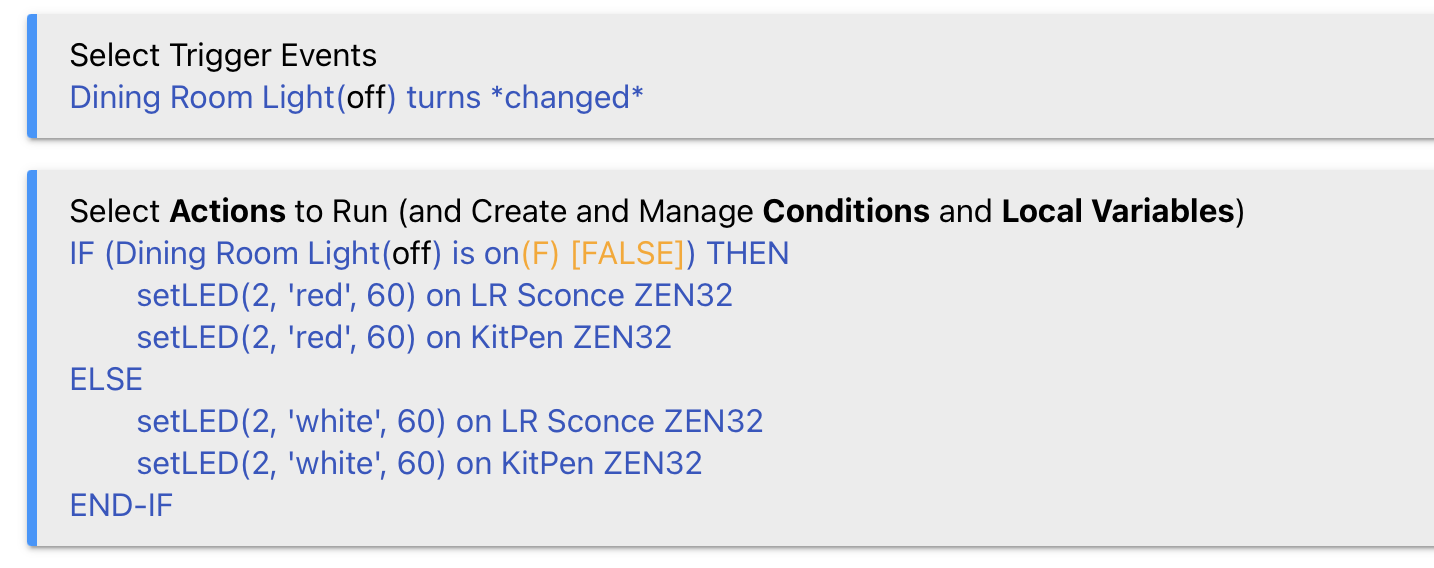
I have a few ZEN32 multi button controllers for which I have various related Rules written. The rules govern the ZEN32 LEDs and the rules are triggered by the change of state of select switches. There have been some changes, not to the rules but in the HE OS and possibly some related 'package. The LEDs are no longer reflecting the status of the related switch. I find the following in the logs:
(an example; edited to present in proper sequence)
Action: setLED(2, 'white', 60) on LR Sconce ZEN32
Invalid number value in string
error
The commands worked until recently, turning the LEDs to red or white depending on the state of the related device (red = on; white = off)
It would be helpful to see a screenshot of the rule and the actual error, as some data is not included above that would be good to see, including the source (app or device).
I have confirmed that my parameter types are entered correctly. I am now wondering if there should instead be a number rather than string (text) to identify the colour (i.e. a number (1?2?..) rather than the text 'white' or 'red'. I will research that.
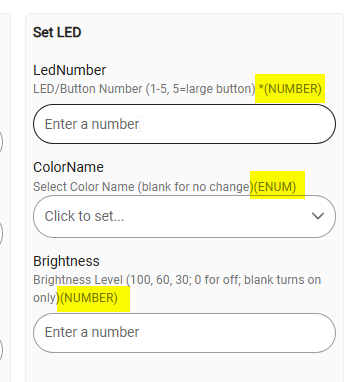
No, Robert is correct -- there are the 3 parameters involved there, and they are Number (button #), String (color) and Number (30, 60, or 100 for allowable brightness level).
I just verified again here that my own Z32 led-color rules are working well, and they are.
I realize this would be a unsatisfying solution, but perhaps try re-creating the rule from scratch?
It does look like you have the params as int, string, int so I would think it should be working. Did you somehow switch the devices over to the built in driver on accident?
For any driver though, if you just go to the device page it shows you exactly how it needs to be used in RM. An Enum is a list of strings, so that you send as a string, one of the choices exactly as shown in the drop down.
I would try for the Rule lines giving the errors, delete the line in RM and then re-create it.
Thanks all. I'm back to num/string/num after my experiment (i.e back to where I've been). I need to clarify one thing. The rules are working, and have been. It is the error message that puzzles me
My driver is v2.2.4 of Copyright 2025 Robert Morris (Zooz Scene Controller (ZEN32) Driver)
Re-create the rule from scratch and see what you get. I suspect a nagging artifact from previous editing attempts has somehow gotten gummed up in the machinery.
If true, I'd be the first to agree that's not great in terms of future confidence with any rule editing, but at least you'd know.
I have 6 (six) rule machine entities all exhibiting the same error messages. All rules are constructed similarly. The exercise this morning where I tried the colour to be a number, with the appropriate number, (which did not work btw), and restoring it, effectively rebuilt the rule.
Could it be that nobody else has enabled logging their rules and thus don't see the error being reported?
Found one other reference to that error. I think they are saying they deleted that line from RM and re-made it, and the error went away. Same as suggested above.
That did not resolve my issue. I would like to hear from Macguyer who posted the message of success. Everything else is simply guessing at what he was referring to. Thanks
I wrote the driver you are using, and I used a similar action in some rules, so I'm not guessing at what would work, at least. You can certainly wait to hear back from a specific person, but being a community support forum, there's no guarantee anyone will. I can say that as long as the order, type, and values for the parameters in your custom action are correct, there's no reason it shouldn't work.
If re-creating the action did not work -- assuming that is what you meant -- try removing and re-creating the entire rule, maybe? Also make sure that you are still using the driver you were before, as others may use different parameters. If not, just to be clear, can you share the entire rule here again plus the output from the rule with all logging enabled and driver with debug logging enabled (if it's the exact same problem, nothing will probably make it to the driver, but it's worth knowing)?
Hi Robert, Thank you for your note. Buried in the messages is one in which I noted that I have six instances using the rule to control ZEN32 LEDs in more than one ZEN32 unit. These weren't copied from one to another, but each crafted individually; and yet they all exhibit the same error messages. Noting also is that each rule addresses an if this or if that, thus there are two streams the system can follow. The error is recorded from the action commanded in both streams. I continue to seek the flaw.
This error smells a lot like you are using the built-in driver with parameters meant for my (community) driver. Can you please confirm the above? That was:
Specifically, look at the "Type" dropdown on the "Device Info" tab of the device details page (you'll see whether it's system or user), or provide a screenshot of the "Set LED" command on the "Commands" tab -- the latter of which is what really matters here (and if you're otherwise happy with how things are working is what I'd do).


 You can certainly wait to hear back from a specific person, but being a community support forum, there's no guarantee anyone will. I can say that as long as the order, type, and values for the parameters in your custom action are correct, there's no reason it shouldn't work.
