I have automated my solar system by switching to solar power for heating my water and using my heat pump for heating when there is solar power and switching to my wood boiler when there is not.
It works great most of the time but I've found that sometimes my Z-Wave relays get 'stuck' and quit responding and I have to unplug them and restart them to get them working right again.
Tonight it cost me 3 hours of running my heat pump before I figured out what was going on!
What version of ZEN-16 firmware? I have one and it’s been very reliable, but there have been some bugfix firmware updates from Zooz. Also, I don’t have mine included S2. I have no security on it because it’s not a perimeter device.
In this case, S2 may be helpful if his connection speed isn't at 100kbps at all times, making it more likely that turn off messages make it thru uncorrupted.
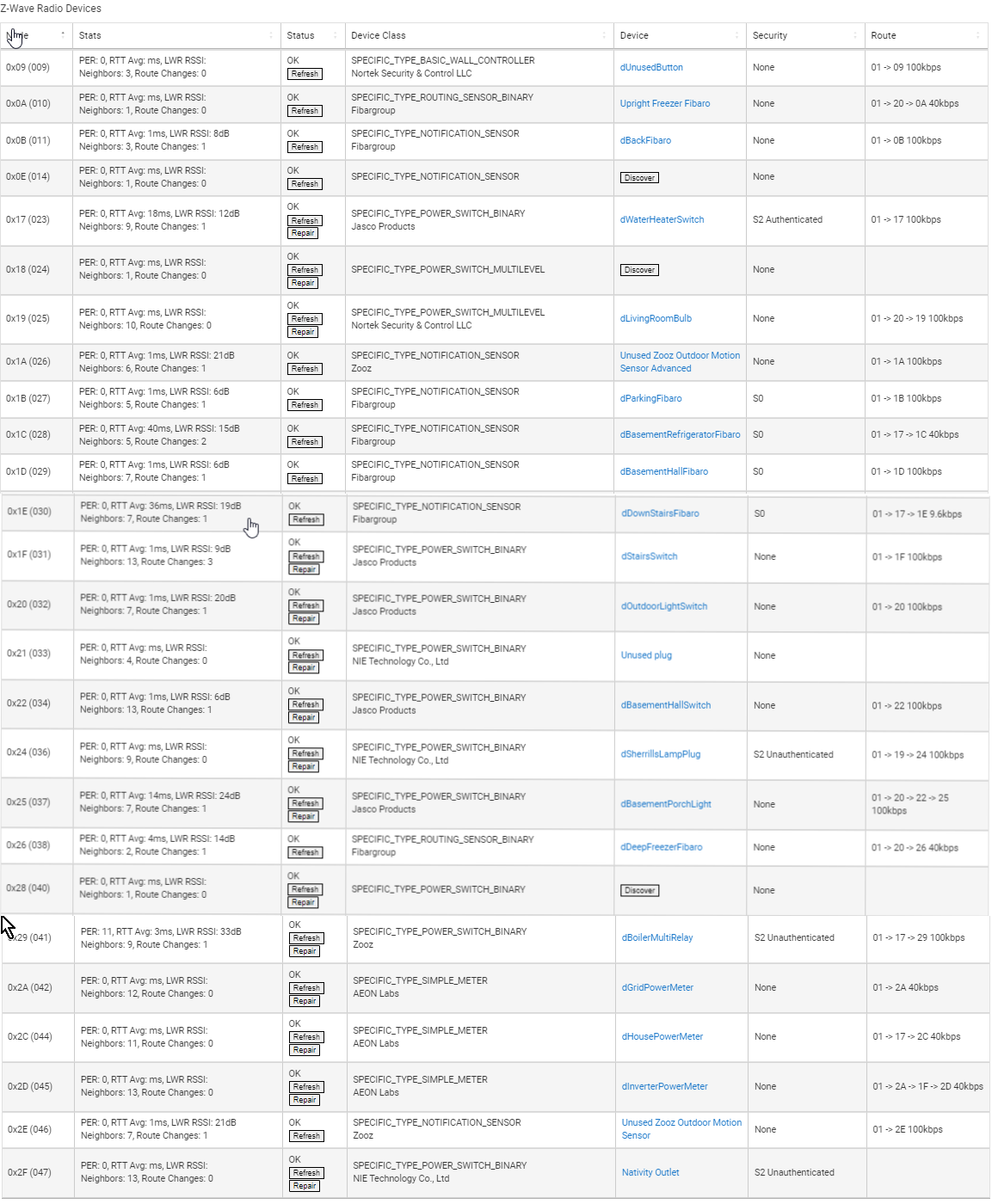
You have three ghosts that need to be removed: 0x0E, 0x18, 0x28
0x0E doesn't matter much because it is a sensor, and will not be marked as a router for the mesh. But both the others are powered devices and will be marked as routers.
Not just devices, sensors which can be sending lots of events in the first place. Aren't Fibaro known for only joining S0 and not giving the option for none?
Yes most Fibaro devices need to be included using a secondary controller to avoid being included at S0. I’ve had to include all my Fibaro Motion, Dimmer2s, Switch2s, outlets and Smart Implants that way
From my limited experience - you must use a secondary controller (stick) to join them (the Fibaro sensors) to a C-7 without security. I have done it for one of the ZW5 multi-sensors and it seems to be working well without causing problems.
You have to contact @agnes.zooz in order to get firmware updates - send her proof of purchase and she will send it, she is very responsive. I have 1.03 on mine for a couple of years.
Thanks everyone for your suggestions. I'll get on them.
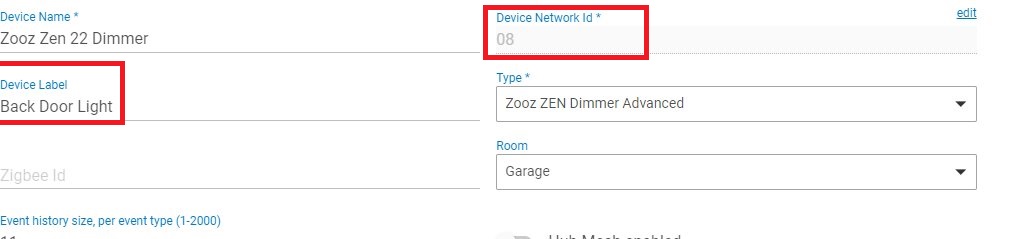
First I'm trying to translate zwave node IDs to Device ID's. I searched here for how to do that but haven't found it yet. Probably something very simple I'm overlooking.
I have learned that I should remove all devices that are not being used!
Yes. If you have for example holiday lights that are Z-wave, leave them plugged in, or do a proper removal. I think there is an advantage to keeping the devices powered up as it strengthens your mesh, and you don't have to rebuild the mesh every change of seasons.
?? Both are displayed together in your Z-wave details page.
The first number (0x__) should match what is shown in the device's settings page. Bad example here (used some existing screenshots, sorry) as both numbers match for the first few devices, but outlined is what should match.
But you shouldn't even need to match, just hit Discover, and it should come back with a Remove button.
There are a variety of devices that can serve, temporarily, as a secondary controller to allow you to do some things that can't be done natively (for reasons I won't go into at the moment). I have a "stick" that I use in a Windows PC along with a (free) software utility called Simplicity Studio. This can be useful for adding devices, like the Fibaro, to a hub with the newer Z-Wave software without activating the security protocol for that device. It also can be useful if a device has not paired correctly (or fully) and has left some tracks that can throw off Z-Wave performance. I think I have used my "Secondary Controller" twice but it sure comes in handy. Without it, I might have gotten rid of the Fibaro motion sensor because I didn't want to have it paired with S0 security due to my concern over the additional Z-Wave traffic that might generate.
Arrrg! When I selected a ZWave hub and devices I thought I was getting a "simple" automation platform! My days of dealing of complication were over when I retired I thought.
David


 I thought.
