I know I said this case was closed just wanted to go over my answers.
You could also try running the steps again in a slightly different order:
1 - Open Hubitat ON A PC OR DESKTOP
A: DONE
2- Disable the basic rule that might be conflicting (The power based one - unless it is still disabled)
A: DONE
3- Go to the Logs Section and click Live Logs - moved this one here so when you click done, it gets captured in the logs.
Do Not click on any devices or apps or filter at all.
A: DONE
4- IN A NEW TAB - WHILE THE LOGS ARE STILL RUNNING ON THE ORIGINAL TAB: Go to the rule itself, open it, and verify the logging has ALL the options selected and click DONE - EVEN IF YOU HAVE ALREADY CLICKED DONE BEFORE, DO IT AGAIN so we can see if there are messages such as the above "required expressions are false".
A: DONE
5- Go to the CNC Switch, turn it on NOTE THE TIME
A: DONE
6-Visually verify if the lights did or did not come on.
A: DONE - LIGHTS DID NOT COME ON ( Around 5:09 pm I turned the CNC back on. Around 5:13 I turned the CNC back off) see post #62
7- Wait one minute
A: DONE - LIGHT DID NOT TURN OFF BECAUSE THEY DID NOT TURN ON
8-Turn off the CNC Switch NOTE THE TIME
A: DONE
9- Verify if the lights are on or off
A: DONE - lights never came on. (see screenshot)
10- Return to the PC
11- If the logs are full, or have rolled down to the point you cannot see the time noted at step 5, then scroll down to the closest time stamp BEFORE the time you noted.
A: DONE
12-Grab a screenshot of ALL the logs for ALL the devices and apps in the log from that time stamp and up, NOT JUST THE ONES YOU THINK WE WANT TO SEE (Logs showing only device 388 are not helpful as we cannot see what else is happening at the same time)
We already know that you have at least two apps competing at the moment. The logs may show other devices/apps that could be preventing it from working. Without ALL the entries, you are handicapping your helpers.
A: DONE - I did this too.
13- Post the screenshot(s) and tell us the TIME you turn the switch on and off as well as your your observations from steps 6 and 9.
DONE
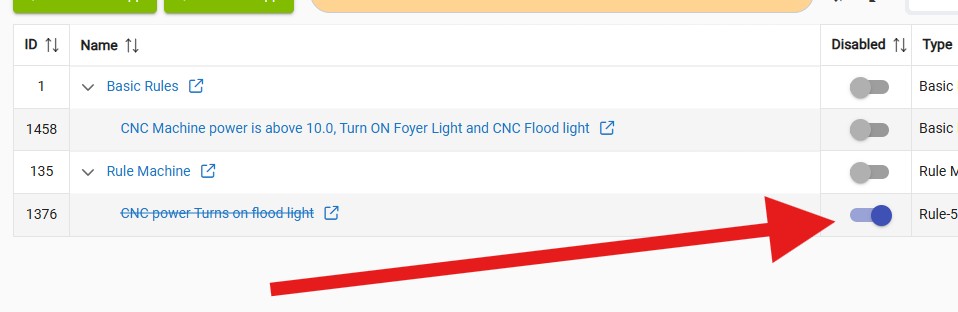
Recap: When testing rule 1376 my BR 1458 was disabled. The problem on MY PART IS I DID NOT MAKE IT CLEAR that it was power board. However I did state:
I have to manually turn the outlet on everyday. I have a rule that when I go to bed it turns it off just as a safety, Jan 26
I manually turn the outlet on for the day. At night before we go to be I have a rule that shuts off everything in the shop OFF.
When I switch off the machine the flood light (right over the CNC machine) goes off. Also our Foyer light inside the house turns off too.
When the CNC machine is turned on, the power level does not change. The cutting load is on a different circuit. The router is what draws a lot and it is not on the same outlet, it is plugged into a separate outlet. I NEVER FORGET the router. Way too loud to forget. What is plugged into the outlet is mostly the computer board that controls the router movements.
Statement below is 100% true.
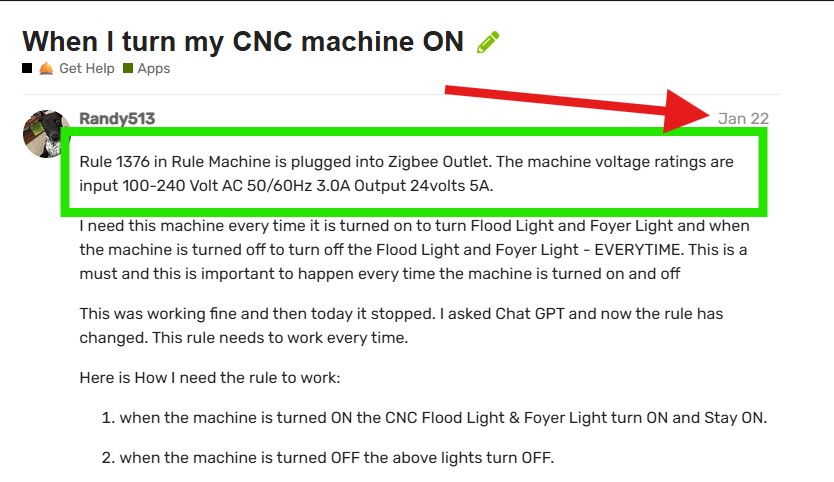
It sounds like this outlet is only powering the logic board for this machine .
However, it does power more than just a circuit board. Once I turn the machine power is applied to motors also. I can move the router head to from X to Y also move the Z axis too. So all three motors have power to them
76/80
AND you need to understand (this is just a start):
How often that outlet reports: In the logs
-Is it on a timed schedule? Yes, at 10:45 pm the outlet shuts off. Once I turn it on in the morning (manually by hand) it has power applied to it all day. I am talking about just the outlet. The CNC machine is only turned on when it is running.
-Is it based on a percentage change? See screenshot.
-Does it do both? Just percentage of voltage change.
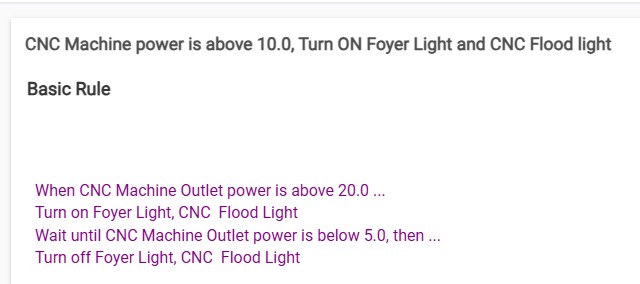
Trigger - power greater than or equal to ??? watts
Actions - turn on lights, wait for event (power less than ??? watts), turn off lights.
See screenshot from day 1
It sounds like this outlet is only powering the logic board for this machine. It does not provide the power to the actual motors. I have seen machines like this which are powered by a power brick similar to a laptop power supply. I asked the OP if that was what he had, but apparently he did not want to answer again.
You are 100% correct I am only powering the powering the logic board. NOT the router. That is on a completely different circuit.
I am not trying to ignore you I simply missed it. I have a lot of things going on in my life right now. Again I am sorry for missing your questions.
BR 1458 that is working most of the time. I have been using it for past 2 weeks and it appears to be working fine now. I am assuming now that there was some type of conflict between BR 1458 and RM 1376 (that has been disabled).
The only reason I am posting this to you tray_e(https://community.hubitat.com/u/tray_e) I don’t want you to think all you effort was ignored.
Again I thought the questions where answered.
Tray thanks again for all your help.
Thanks for Every ones help too.

