When activating a Scene, bulbs often come on at full brightness when the Scene calls for other

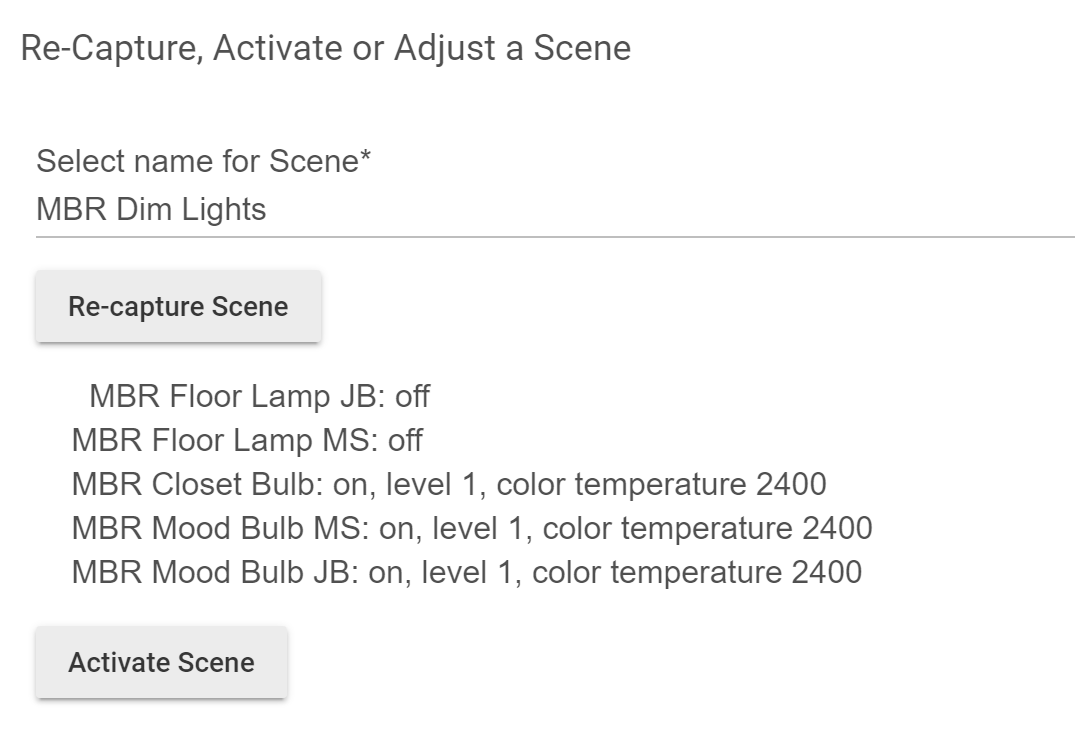
I have a Scene that turns on 3 Zigbee bulbs at minimum power, and ensures 2 other lights in the room are off. The hope is to turn the lights on at minimum power when waking up.

If I use the Scene in the morning... the 3 bulbs come on at full power. If I re-activate the Scene, the bulbs then dim to the expected brightness level. This happens if I activate the Scene from a dashboard button or a Zigbee button via the Button Controllers app.

At other times in the day, the scene seems to work, though I have not tested exhaustively.

I could understand commands not getting to the bulbs at all, or only some bulbs coming on.... but all of them coming on at the wrong brightness is strange.

These are Sengled bulbs and pre-staging is turned off.

The device settings for the scene are below. Any ideas? This kind of sucks because the one button I really want to work is the dim lights in the morning button!
EDIT TO ADD

I have a repro for this and the behavior does not seem desirable.

Consider the group of Sengled bulbs in the Scene--

  • The Scene I am invoking sets some bulbs to CT 2400, power 1/100. Others are set to OFF.
  • The bulbs that are meant to be off when the Scene is activated behave properly, turning off or staying off.
  • If any bulb in the ON group was in RGB mode before being turned off prior to scene activation, when the Scene is activated, that bulb will select the right CT, but it comes on at power 100, not power 1.
  • Bulbs that were in CT mode when powered off will power on at the low power level called for in the Scene.

In other words, if a light was in RGB mode and then turned off, it comes on too brightly when turned back on in CT mode.

I also discovered that in the Device panel, issuing direct commands, the level would jump unexpectedly.

  • Set CT 2400, Level 1 with Device buttons
  • Set an RGB color with the Device button--Level also increases to 100. Shouldn't it stay at 1?
  • Strangely, setting an RGB color at Level 1 and then setting a CT did not result in a Level increase... so in this context it is the opposite of my Scene problem.

I've also seen the "Set Level" problem you described. This is one of the reasons I went back to using a Hue Bridge after experimenting with a dedicated "bulb hub" as some do--the reliability there is basically 100%. I often had to issue commands twice for everything to "go through" otherwise, as you notice. I've seen a few other people post about the same thing, but I haven't seen any formal recognition that there is a problem other than that staff were going to take a look at UK (or maybe more generally European) Zigbee bulbs, which some users are reporting behave differently. My hope is that they're actually the same and no one believes that we have problems too. :slight_smile: (But it sounds like there may be other differences.) A more realistic hope, perhaps, is that whatever they discover there may help other bulbs, too. Just me dreaming...

Anyway, for your problem, if the app/rule you're using has a way to "double activate" a scene, that is one way to work around it in what sounds like both of our experiences. I also modified the Generic Zigbee RGBW light driver to slow down some commands, which seemed to help me sometimes. My hunch, again which sounds like yours, is that the bulbs are getting flooded with commands and simply miss some sometimes. Slowing things down, therefore, may help. (Maybe the same reason they make bad ZHA repeaters, which Sengleds aren't, but maybe related to the same underlying reason?)

In my experience, luck is better if the bulb (whether on or off) is or was already at the correct level, otherwise turning on to that level doesn't always work. It's been a while since I tried (have I mentioned a Hue Bridge yet? :slight_smile: ), but I remember something similar with color and CT as well. If you have a way to make this happen (or could use pre-staging to assist--never done that myself so can't say if it helps), that may work. Also, choosing "Enable Zigbee group messaging" in Groups for Groups and Scenes usually helps, so that's something else you can try if you haven't already--that will cut down on the amount of Zigbee network traffic.

So, I don't really have a real answer for you there...just some of the workarounds it sounds like you've already discovered, plus a couple other suggestions. Perhaps others can chime in with their experiences. I'm honestly surprised this issue doesn't get more attention--does this actually work well for anyone with more than one or two bulbs, or are a few of us the only one with problems?

This is the only part of your post I see that might describe a different issue--or really not a problem at all. The "Set Color" command sends three things as part of the color: hue, saturation, and level. The "level" attribute, therefore, will also change to whatever level is contained in this color. If you're using Hubitat's color picker, this is how close to the top or bottom you select in the left color rectangle, with the top being 100%. The other axis, left to right, is saturation. Phased differently, "Set Color" is a one-stop way to achieve the same result you could do with a manual combination of "Set Hue", "Set Saturation", and "Set Level", which you can use if you only want to change one aspect, but a "Set Color" is better if you don't since it's less traffic.

"Set Color Temperature" will, similarly to "Set Hue" or "Set Saturation" (which only apply when in RGB mode; color temperature, of course, is CT mode; level is applicable to both modes), not affect the level. Just like hue/saturation combinations, you can express a single color temperature (shade of white) over a variety of levels (which just corresponds to the brightness).

1 Like

Well... at least I am not crazy. Thanks for the validation. I am surprised I didn't find more gripes about this, because it really screws up a certain class of operations.

As is often the case... I guess the solution is "don't use the simple app, use Rule Manager." Or, "just buy Hue."

Aha, overlooked that. That makes sense now.