What did you buy? 
I was foiled! Wife decided to go with me down to my appointment because she wanted to go shopping afterwards in a mall that is in the area, but unfortunately the opposite direction from IKEA. 
Devices like Apple TV or eero Pro 6E work as Thread border routers (TBR), meaning they connect the Thread network to your home network. However, they don’t extend the Thread mesh themselves.
To actually strengthen and expand the mesh, you’ll still need mains-powered Thread devices (like smart plugs or switches) that act as Thread routers inside the network. The IKEA Thread plug (Grillplats) will definitely act as a Thread router, but it wasn’t available in the German store today. IKEA Thread bulbs are also expected to act as routers, as long as they remain powered on at all times.
Yeah, mixing different technologies always seems to create new problems… 
Each TBR ends up creating its own Thread mesh. This was supposed to be fixed in Matter 1.4 or later, but so far that still hasn’t really happened.
Please someone, give me a reason to buy a gadget I don't need 
Here are ten possible reasons — feel free to choose the one that convinces you best 
- You don’t need it — you deserve it. Big difference.
- Future-you already bought it. You’re just catching up.
- It was clearly designed to solve a problem you haven’t discovered yet.
- If you don’t buy it now, you’ll keep thinking about it. That’s basically rent.
- It’s not a gadget, it’s emotional support hardware.
- One day it’ll be discontinued, and then you’ll regret everything.
- Buying it is cheaper than therapy. Probably.
- It will make your smart home feel judged if you don’t.
- You can always say it’s “for testing purposes.”
- Because resisting is temporary, but owning it is forever.

OMG Krassimir. Posting this is completely irresponsible; we’ll all be rooned ! 
I wish I could take credit, but this one’s on ChatGPT. I merely enabled the chaos ...

How do we know that YOU aren't really just a chatbot in front of ChatGPT? You know a denial is exactly what a chatbot would say.
If you have multiple Apple pods for example, would that accomplish the same thing?
Yes, each Homepod is a Thread Border Router. Having those sprinkled around will give you a good Thread mesh.
You might need it one day....
But more importantly... @kkossev gives you even more reasons to waste spend your money....
This seems to be contradictory. I did some googling and perhaps they are torturing the definition of router to mean Matter router rather than Thread router, but ..
Eero says: eero, and other always-on devices like lights and smart plugs, will also act as a Thread router (a Thread device that forwards traffic for other devices and extends the overall coverage area of your Thread network).
https://www.threadgroup.org/Portals/0/documents/support/Thread1.3.0WhitePaper_07192022_3990_1.pdf implies that TBRs also strengthen the mesh but I could find a compelling statement.
In order for Thread Border Routers (TBR) to help strengthen the Thread mesh network, they must all belong to the same Thread Mesh network. This is achievable if all of the devices are from the same manufacturer, like all Apple devices. All of my AppleTV 4Ks and my HomePod Mini are part of the same Thread network. As such, they all help to strengthen the network and they improve robustness by each taking on various TBR tasks. If one should go offline (unplugged, firmware update, etc...) the other will pick up the workload from the offline TBR automatically.
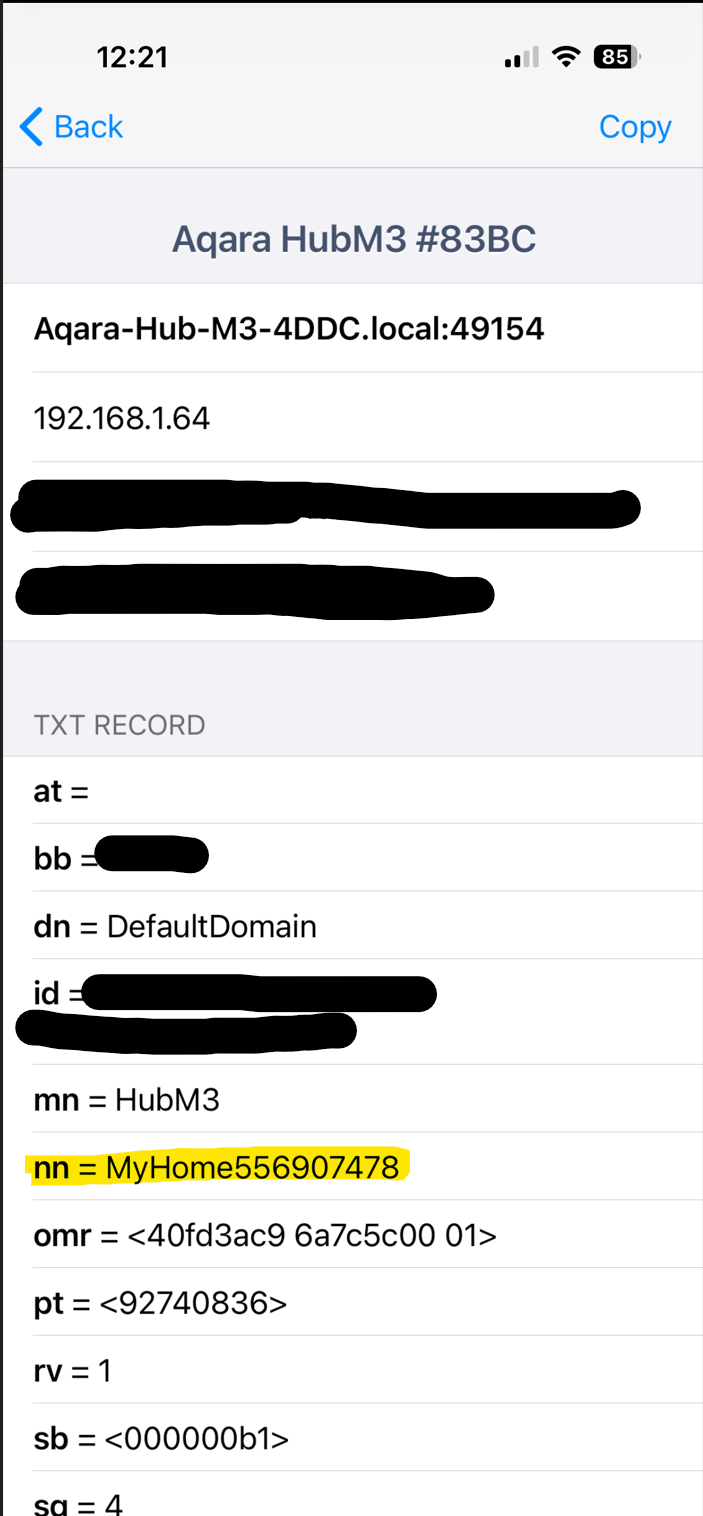
Getting TBRs from multiple manufacturers to work together...that can be a little more difficult, but not impossible. My Aqara M3 hub is part of my Apple Home Thread network. However, I am pretty sure that my Amazon Echo device is not. I know there are specific instructions that the Home Assistant community has developed to make sure that if your use their USB Thread Radio, that it can be joined to an existing Thread network versus creating its own.
As others have mentioned, Thread v1.4 is supposed to improve this. But vendors do not seem really eager to upgrade their Thread radio firmware, yet.
By adding manins-powered Matter over Thread devices (e.g. light bulbs, outlets, etc.), your get Thread Routers added to the correct Thread Mesh Network. Thus, they help to strengthen the mesh without the complexity of trying to get TBRs from multiple vendors all working together.
Thanks for that explanation. I'm in learning mode, so just questioning, nor challenging.
So when it is said that TBR share the same mesh as other devices providing they are sharing the same "credentials", that doesn't mean it is as easy as what credential you provide when setting up the device?
The user never provides 'credentials' that I am aware of. This all happens behind the scenes, typically. Using an iPhone seems to make some of this simpler, in that having the Aqara App on my iPhone, that already was part of a Apple Home system that includes TBRs in the form of my AppleTV 4Ks and HomePod Mini, seems to have automagically added the Aqara M3 hub's Thread radio to the same Thread Network. I am not sure how it works on Android, though. And as mentioned, Home Assistant seems to have cracked this nut with a procedure to allow a user to add their USB Thread Radio to an existing Thread Network. I have not read those details as my only actively used TBRs are all on my Apple devices.
What I don't have info on is how to determine if the TBR devices I have (two Homepods and one Google Nest) are sharing nicely. IIRC both the Homepods and Nest are Thread 1.4 at this point so they should create a shared network, but unclear how to validate.
I asked ChatGPT to explain how TBR would share "credentials" and the answer was something like 1) oh, it's a simple matter of copying the Active Dataset from the existing mesh, like the Thread standard says, and 2) consumer devices probably don't provide a way to actually do that and tend to stay in their own ecosystem.
I've decided I'm too much in the weeds with this since I don't have any Thread devices yet, nor a hub that could possibly support Thread directly. I may buy a few IKEA things and play around using my eero as TBR. But that's not high on my list.
Reddit seems to confirm that Apple is still on 1.3, and I can't find anything that suggests Google is on 1.4 yet. But I'm admittedly not following Thread news with much attention until all the big players are 100% confirmed to be on (at least) 1.4, and I'll likely even wait until everyone's on 1.5 before I consider playing around with Thread.
I just have zero enthusiasm to manage or corral disparate Thread networks when my zigbee networks (Hue and Hubitat) are both rockin' along really well these days.
Yup - this very recent post agrees w/that.
I could have sworn I'd read Apple had updated to 1.4, but I guess not!
The easiest way I have found is following @GuyMan's recommendation to download and use the "Discovery - DNS- SD Browser" app from the Apple App Store. Once you run the app, select the "local" domain, then "_meschcop._udp.", which will bring up a list of your TBR devices as shown below.
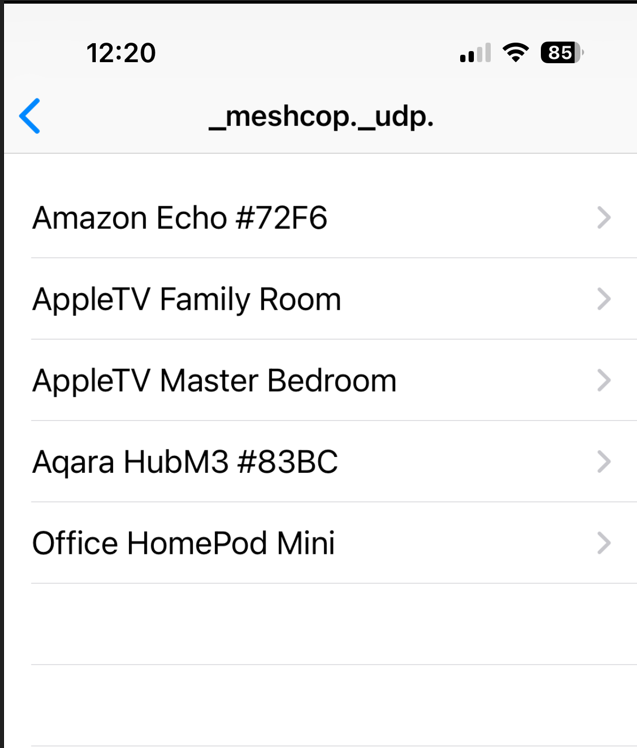
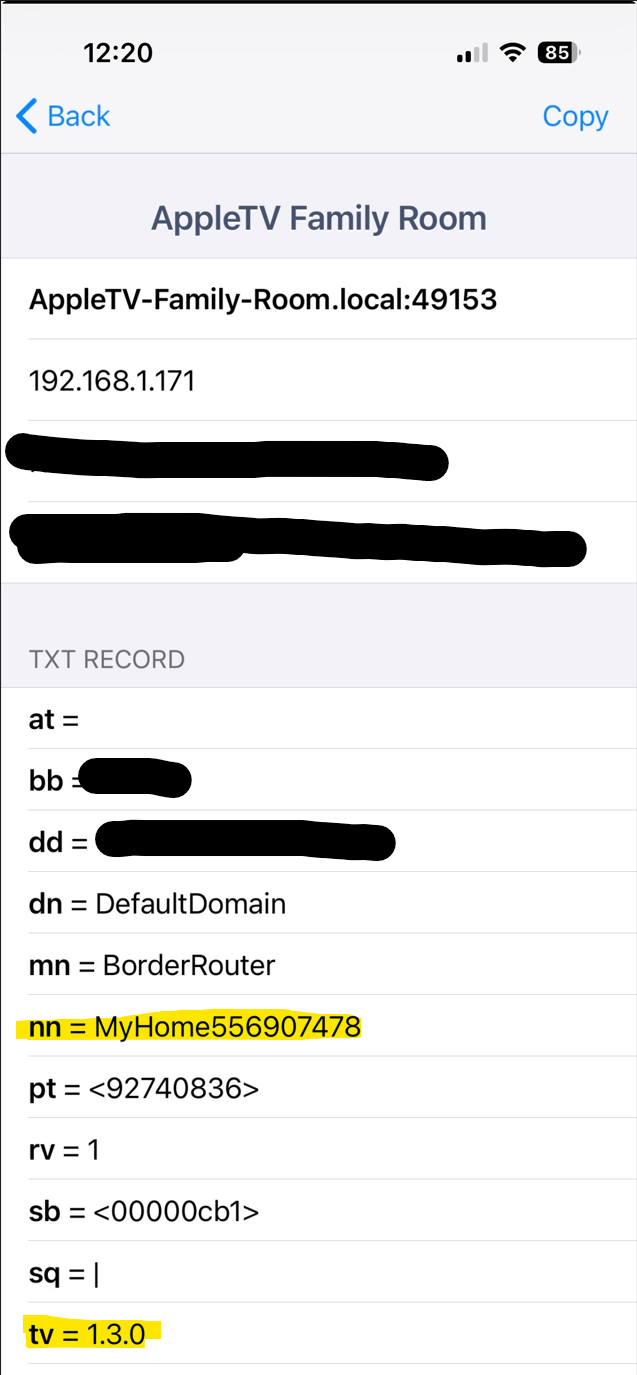
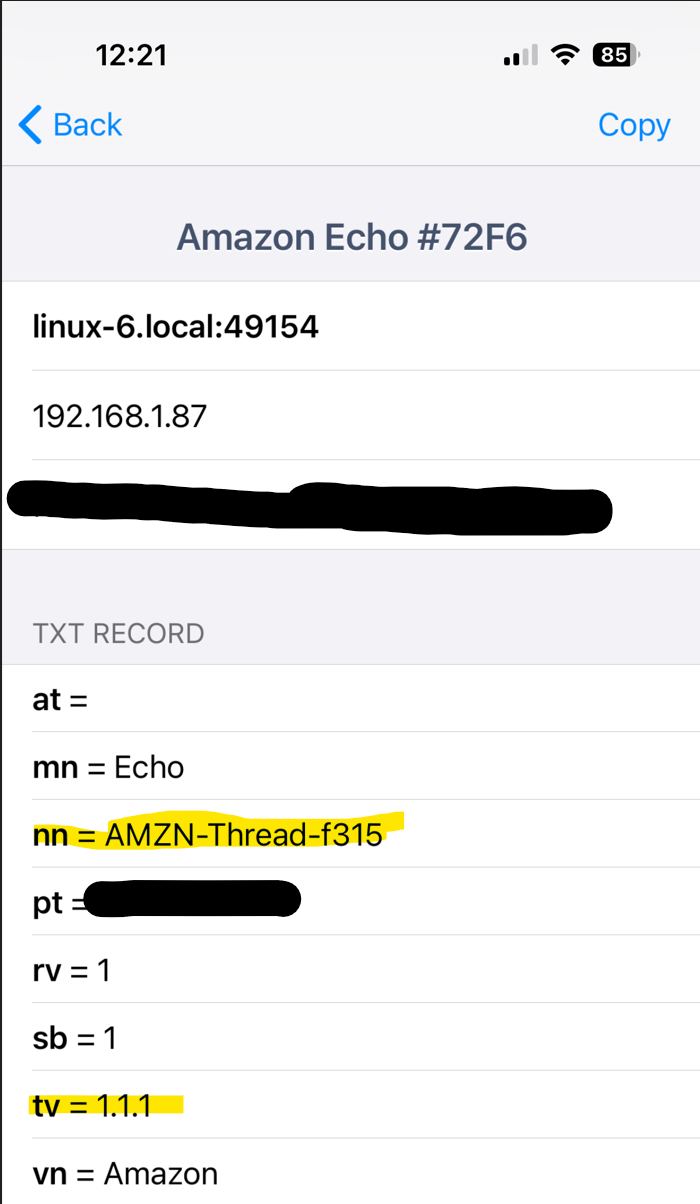
Select each device to analyze the details. Look for "nn = " to see the name of the Thread network that each device belongs to. Also look at the "tv = " section to see the Thread Version of each device.
Here is one of my Apple TV 4K devices
and my Aqara M3 Hub (same "nn = " entry as my Apple TV 4K
and finally my Amazon Echo that wants to do its own thing
Hope this helps!
P.S. None of my TBR devices have reported running Thread Version 1.4, yet. The Apple and Aqara devices are all running v1.3, while the Amazon Echo is way back on v1.1.1.