Is it possible that they (everyone except for NOAA) are treading "24 hour forecast" as midnight to midnight of today. And not right now + 24 hours? If this is true, at midnight tonight then I should see a rain alert pop up. (or see it when I wake up)
No. It's a code thing. Give me time to work through the mappings.
1 Like
Looks like you pushed an update. I just updated from 1.3.1 to 1.3.2
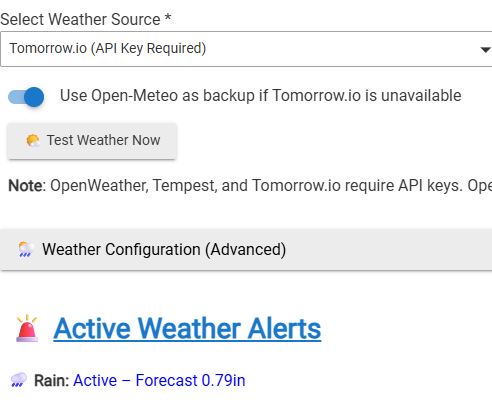
+++++++++++++
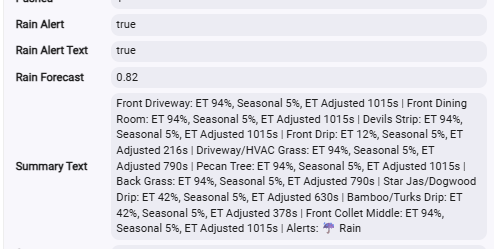
++++++++++++++
So right now it is still saying an ET of 94%. Should I expect as the day progresses and the forecast rain turns into reality that the ET will decrease? Given we are forecast for just shy of an Inch I would assume that the ET should shrink to near zero.
What should I expect my ET to look like as today progresses?
It's most likely an artifact from the multiple provider changes you had there.
You can manually reset ET rather than overwater and wait for the next program run to reset it.
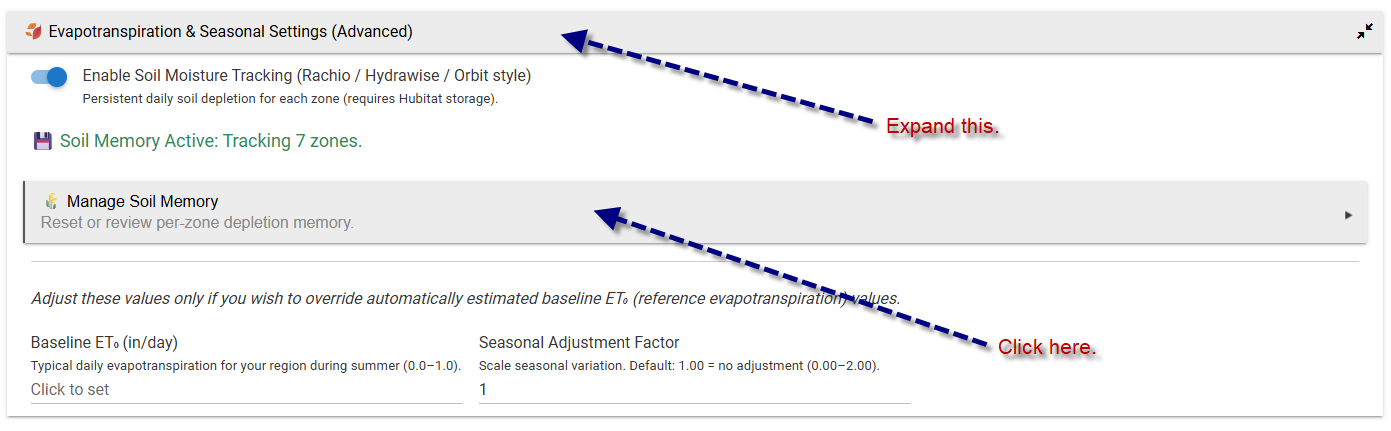
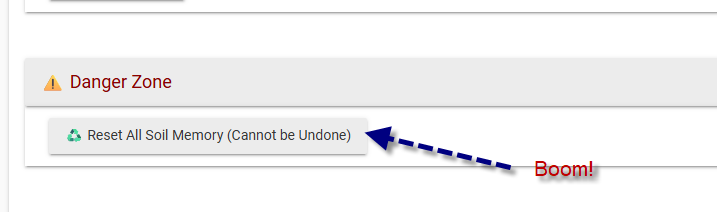
That will reset the ET to 0. Same as what happens after a program completes.
You can also reset each zone individually there.
Awesome.....Thanks!
As a personal educational bit.....If I didn't do this. Now that Wet-IT does see that I'm getting rain, would the ET's slowly decrease as the day progresses....and if so, with .8" of rain, how much should I expect it to drop? How does predicted and/or actual rain fall effect that ET %?
Sorry....the engineer in me Is trying to understand what is going on.
I'm going to wait until this afternoon to see how the day changes those depletion numbers/ET%. Right now, all my zones are sitting right around .64" depletion and a 94% ET.
It will most likely grow since the last irrigation event.
The ET balances are reset to zero when irrigation completes, or partially for a zone if you manually stop it before the prescribed time. If you stop it manually 50% through, it will reset the ET deficit to 50%. It's proportional. You just reset it manually, so the deficit started at zero.
WET-IT estimates atmospheric demand for water based on:
- temperature
- solar radiation proxy
- humidity effects (indirect)
- wind effects (indirect via calibration terms)
It answers:
“How much water the atmosphere wants today”
—not:
“How much water your soil currently has”
How much should 0.8" rain reduce depletion?
Typical answer: 0.8" rain ≈ 0.6–0.8" soil refill
Depending on:
- soil type
- runoff assumptions
- infiltration efficiency
- root zone depth
- zone settings
So if depletion was: 0.64" it should drop close to ≈ 0" after accounting is applied. Today, you could theoretically see it fall if we don't take into account the 12MPH winds, 59F air temperature, solar radiation, etc. But all of those other factors are part of the equation.
ET tracks weather trend vs seasonal baseline, so it changes gradually as:
- temperature rises
- radiation increases
- wind changes
- humidity shifts
It is not driven by rainfall events.
Rain often lowers ET indirectly later in the day because of:
- cloud cover ↑
- solar radiation ↓
- temperature ↓
— but that’s secondary weather impact, not the rain itself.
Rain reduces soil deficit; ET represents atmospheric demand. Rain changes the supply side, ET describes the demand side.
Oh woah......new knowledge here.
So, From reading through the documentation and what you posted above, Is this summary of how I understand it correct???
++++++++++++++++++++++++++++++
Each zone's run time is calculated purely on ET.... which does NOT take rain into consideration.
RunTime=Base time * (ET/100)
This RunTime is recalculated every 2 hours on the 2:06 weather checks.
Soil Depletion is a measure of how saturated the soil is. This is changed by actual zone running AND rain fall.
If Wet-It sees the Soil Depletion is above a certain threshold, it allows the program schedules to run and run with the RunTime calculated using ET equation.
However, if the Soil Depletion is below said threshold, the Program Schedules are put into "Saturation Skip" and will stay here until the Soil Depletion back above the threshold.
Saturation Skip can be accomplished by natural rainfall that is in the weather forecast acquired in the 2:06 checks OR can also be accomplished by a zone running and reaching a soil depletion below the threshold.
The Soil Depletion threshold....I'm a little unsure on this. I saw 50% someplace, but still a little confused on that since Soil Depletion is measured in inches. Also am a little unsure how I can adjust this (if I am even able to).
Assuming my above "3rd grade explanation" is correct, I can think of the RunTime calculation similar to my current rainbird seasonal adjustments. Has NOTHING to do with actual rainfall or how wet the soil is. Soil Depletion (in conjunction with weather forecasts) is the replacement for the Bobber style rain sensor.
Soil Depletion is the go-no go to run a program
ET is the how long to run the zone.....and the two are really not directly related to each other.
You're very close.
ET is a better, more deterministic replacement for Rain Bird's “seasonal adjustment.” Rain Bird uses a combination of astronomical positioning based on the solar day length and a rolling trend factor, which helps consider a day of torrential rain in the middle of a warm set of days. It doesn't look at soil type, crop type, etc. It's basically summer needs more water and winter needs less.
Soil Depletion is not the replacement for the Bobber. This is:
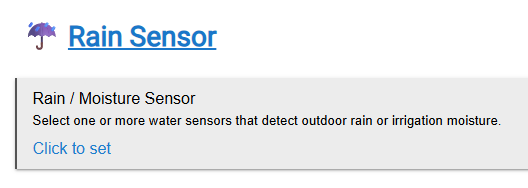
WET-IT does a forecast pull at the start of the program run. If you have a Tempest, that can be added so the haptic rain sensor will stop the programs from running. It literally is the “it's raining now!” sensor.
For the rest of the providers, if it gets an “it's raining” message, that takes the place of the Bobber. Not all providers have a “currentPrecipitation” value, but we check anyway. Even then, some that do only update the data hourly, so a passing rain might not even show up. The rain total will show up later, but not the “it's raining” signal.
You can add any water sensor in Hubitat, and WET-IT will honor that for the Bobber signal.
I haven't used it, but here's one: Tuya Zigbee Solar Rain Sensor RB-SRAIN01 Review | SmartHomeScene
Soil depletion is the cumulative loss of soil moisture from the root zone due to evaporation and transpiration. In other words, the “drying out factor.” How much moisture has been lost by the soil to the environment.
Got it! In my case, my Programs are currently in "Saturation Skip" because of the rain we got earlier today. What triggers the Saturation Skip to stop/go away and allow the programs to resume?
The documentation says: " * Normal operation resumes once depletion thresholds are reached" What are these thresholds and can I adjust them? I 'think' it is a combination of plant type (which equates to root depth) and soil type that are selected in the zone setup. So in my case I have "Warm Season Turf" and "Loam". Somewhere there is background math that figures out a default threshold. But then in the Advanced Parameters there is an "Allowed Depletion" that seems like I can put in my own number if I wanted to???
The best thing you could do is turn off Saturation Skip and walk away. 
Let things settle down. I truly appreciate trying to fine-tune everything, but with all the wx provider changes, the code update, etc., you really need to let it catch up and then see if you need any tweaking.
Yes, the background formulas take all of that into account.
To directly answer your question, the saturation isn't something you control. Mother Nature does. Most of it is weather. How quickly will the ground moisture return to the air? What about the wind? How much more rain is coming?
The main purpose of ET is to “set and forget.”
Yes, there are many knobs to turn. For example, if you have old growth trees, you can change the root depth to account for that. Old growth is typically 24" compared to 12" for newer trees.
Soil type is a large knob. That's why I included the USDA lookup so you didn't have to guess if you didn't know what's in your area. But... maybe you laid down 1 foot of topsoil. Like the old food pyramid, the USDA map looks like this:

Your “grid” may be “loam,” but your lot has more silt; you can change that per zone. I'm certain there are dozens of test kits out there. I built in the overrides so you could change things if needed.
Saturation Skip is a setting that says, “If I have enough moisture to keep the plants healthy, don't do anything at all,” rather than, say, a 5% ET run. It prevents overwatering, which is something Rain Bird's “seasonal” adjustment never looks at. It is 100% not something you ride daily. It needs trending and forecast data. It's an overall setting that says if there is ever enough moisture in the soil, just skip for now and water more later if required later so I don't overwater and leach nutrients.
Enjoy the sausage for a while. It's yummy. You can go into the kitchen and see how it's made after dinner. 
While you're enjoying the sausage, there are tons of literature in the Google box to read.
There is so much more that goes into crop production-level ET that is just beyond the scope of “make my grass green.” I even looked at incorporating this: https://etdata.org/
Six months ago I didn't know irrigation ET from Spielberg's ET. Lots of reading and reference material, and here we are. After getting the Rain Bird driver working, I went looking for what made Rachio different and stumbled upon evapotranspiration and started to work on it. Originally, I was going to just stop at the calculations and let everyone write their own scheduler in RM or WC. We all know how that went. 
Ha....Love it. I'l avoid making any setting changes and just watch the system do its thing. I'm implementing this at a really good time to test it out. This time of year in Dallas can go stretches of no rain and then stretches of lots of rain. But in about a month and a half, we will probably see our last rain shower (slight exaggerating) until fall.
Feature Request: The Cycle and soak feature: As it stands, if I have all 10 zones programmed to run and their ET Adjusted time is 600s, zone 1 runs for 300s, pauses 15 mins (or whatever the pause is set at) and then runs 300 again. Zone 2 does the same thing.
A suggestion I had from a landscape architect (who would totally nerd out on this program BTW), was they said to run all zones back to back at half the time and then circle back and do them all again for a second time. So it would be Z1 300, Z2 300.....z10 300, 15 min pause, z1 300, z2 300. They said this allowed for the absorption to get in there even better.
Would it make sense to have your smart cycle and soak to do half of all the zones, then take a single pause, and finish all the half zones.......or maybe there is a nugget I'm missing there.
The way it currently sits, with 2 cycles and 15 min pauses (and assuming my ET is 100), my "Normal" run of all my zones will take over 5.5 HOURS to complete. The all half single 15 min then all half again takes just over 3 hours.....and the same amount of water is used and also in this way each zone has over an hour to soak before the second half hits the zone again.
Love it.
I have alredy updated the Soak & Cycle on my test instance to do first do 20% of the run time and then move to the next zone, it then comes back and splits the remaining 80% of the time based on how many cycles you set. I haven't released this update yet.
What this does is allow the first, smaller cycle to break surface tension. It doesn't take much water. Then it will cycle through the rest.
Yes, your landscape architect is spot on. That's on the “white board” of updates. I wanted to put something in that made sense and was a feature that most home controllers don't have. My Rain Bird ESPme doesn't do any of this.
You wouldn't even need the 15-minute pause once all the zones ran through and started over again; it'd be a floor rather than a hard number. IOW -- let it soak for at least that long. If it's been less than 15 minutes, wait until 15. If it's already been 15 minutes, just keep going.
The problem is this is complicated to pull off and still support the end by time. Not impossible, just complicated math projections. ET changes every wx update (2 hours), so the program cycles have to be reprogrammed, and potentially the start times would move. What if the start time moves to before now because it requires more time than we projected for the next cycle? The math is simple; what about the business rule?
If you really want to take this a step further, what Rachio does is take into consideration the slope of the zone as well as the soil type and calculates the soak time based on how much potential runoff there would be. I thought about this too. It's a rabbit hole. Now you have to show folks how to properly measure slope by zone. We're approaching professional installer level.
When running a watering schedule with Smart Cycle turned on, Rachio software divides the total watering time for each zone into a number of cycles. For each cycle, a zone is watered for a period of time short enough so that the water will not immediately runoff. The next zone is then watered for its period of time, etc., until all of the zones have had their "cycle". During this process, it's important that the soil in each zone gets enough time to absorb the water. Specifically, Rachio guarantees that each zone will get at least 30 minutes between the end of one cycle and the beginning of the next.
When running a watering schedule with Smart Cycle turned on, Rachio software divides the total watering time for each zone into a number of cycles. For each cycle, a zone is watered for a period of time short enough so that the water will not immediately runoff. The next zone is then watered for its period of time, etc., until all of the zones have had their "cycle". During this process, it's important that the soil in each zone gets enough time to absorb the water. Specifically, Rachio guarantees that each zone will get at least 30 minutes between the end of one cycle and the beginning of the next.
So, in their example, it takes 3.5 hours to go through four zones. You have 10 !
WET-IT's current Cycle & Soak is at least something for those that want it. Is it perfect? Not yet. I have some ideas. This is definitely an OFI.
I love it. I didn't even think of the surface tension concept, but this makes sence.
Correct!
100%. And this is why I assumed you did it the way you did for this version.
Holy crap...yeah, that would get pretty complex.
Neither did mine, but that is why on my esp-me, I just did 2 runs of the same program with half the desired zone run time each. And the 2 runs were at say 9pm and 11:30pm. This accomplished this just fine. And because my seasonal adjustments aren't recalculated like ET is, it didn't pose any issue. Because ET is recalculated, doing 2 separate program runs won't work......saddly it would require back end mat.
My Orbit hose timers run zones consecutively with no gap for soak in. I ran two zones each day with no soak-in time required. They also had a max time per zone so they switched between zones based onthe soil type.
@MHedish there is no need for soak in time when alternating between two or more zones. WET-IT could go directly from one to the next. The time spent on the other zone(s) is more than enough for soaking in.
@MHedish I don't get the need to run an ET update so frequently. Users only need an update after WET-IT runs in the morning and then later in the day if the rain forecast changes or when the rain stops. Then an update is needed due to significant changes in conditions. (an event)
As a user I just want to know the next program to run. The exact amount is not very important.
The important ET update is done just before the irrigation cycle starts, to set the actual schedule.
Once the irrigation cycle starts there is little reason to adjust the ET. The changes in cycle time are likely to be small unless it starts to rain. Suggest that the cycle should be stopped if the rain exceeds a set amount.
The only other reasons to stop an irrigation cycle are wind and temperature alerts. Again ET update is not required.
@sabre170 you could run 2 zones a day so a full cycle of all zones would take 5 days. This may be a compromise that gets the watering done quickly each day. If 5 days is too long between watering, then a 3-3-4 zone cycle over 3 days would also work. From my point of view watering more than every 3 days produces plants that can't handle a drought if you have watering restrictions in the summer.
Edit: @MHedish I am looking for good to great not perfect. The ET is an estimate.
In Dallas we are on water restrictions where I can only run sprinkler heads on Tuesday and Saturdays. (Drip lines can run whenever). And in the heat of Texas summer (as you are aware).....For me to only run half my zones on a Tuesday and then the other half on a Saturdays just isn't enough. I have to run all zones on Tues and Sat with the rate of evaporation. Hell.....in the high heat of summer....I sometimes even sneek in a 3rd day on Thursdays too.
My response was about normal watering season, not during water restrictions. That's when you want to establish healthy, strong plants.
When restrictions are in place, alternating between 5 zones shouldn't require any soak in time. You get more than enough during the other 4 zones.
That's exactly what I said. It's just not the current implementation. Ideally, the run time for one zone is the soak time for another. That's on the whiteboard for later.
The only way we know there was “an event” is the bi-hourly weather check. The entire ET calc time is negligible:
2026-04-22 13:57:00.494 debug [WET-IT] calcNextProgramEvent(): Evaluated 2 programs in 13ms. [program:1, name:Sprinklers, epoch:1776935401000, start:Thu Apr 23 05:10:01 EDT 2026, end:Thu Apr 23 05:26:04 EDT 2026, schedule:[schema:meridian.unified.v2, version:1.4.0.12, schedule:[[program:1, name:Sprinklers, epoch:1776935401000, text:2026-04-23 05:10:01, conflict:false], [program:2, name:Test Program, epoch:1776956253000, text:2026-04-23 10:57:33, conflict:false]]]] wins.
13ms is nothing for the platform. Updating it every forecast event lets the app recalculate the schedule based on updated conditions such as solar radiation and wind. The “end by” calcs are updated this way so they are more precise than updating it today for tomorrow's ET needs. There's no reason not to update it every forecast. Less than 200ms per day for the ET to be recalculated with better precision and let those that may want to “progress bar jockey” see it.
ET also feeds the end-by program timing, which is one more reason to update it at each weather gathering event.
I'm not one to let perfection stand in the way of good enough, but I really don't understand why the already implemented increased precision is an issue. 
Didn't know that the calculations have so little CPU utilization....
On to yet another request. Using BHyve, our front yard did well, but the back yard not so well. Using WET-IT, it's the opposite. Our weather station is is the back yard under the forest. We have 5 nearly 40 year old trees. The main part of the front yard has no trees. So the sun bakes the ground.
Watchtower charts show the same pattern of shading the weather station every day that's sunny. Wife refuses to have the weather station mounted above the roofline.
To get proper solar radiation for the front, can we have an option to use the backup, on-line weather service for some zones? The front lawn is watered nicely during its program, but dries out before the next program.
That definitely falls in the bad idea box. Here's why “multiple weather providers executing independently per zone” isn't the answer…
This path leads directly to:
- duplicated API traffic
- synchronization problems
- inconsistent forecasting windows
- ET incoherence
When you talk about “proper solar radiation,” you already have the most accurate possible with your Tempest PWS. Adding another provider that is presenting solar radiation for a polygon that could be anywhere from a few square meters to a half-kilometer wide will not be any more accurate from the front to the back of the house. It's just going to be different. While solar radiation is a factor in ET calculations, it's the smallest of the dials to tune.
The better answer is to turn the right dials that already exist. For example, you mention old growth trees. Have you adjusted the root depth per zone? When you select trees for the plant type, the default root depth is 12 inches. Old growth trees like you're describing can be anywhere from 24 to 48 inches deep, depending on the tree.
Tree root growth
| Species | Regrowth | Typical root architecture * | Typical root depth (m) * | Mechanical root penetration | Water requirements (1=lowest 6=highest) |
|---|---|---|---|---|---|
| Ash | 3 | Surface | 1.1 | Medium | 2-4 |
| Aspen | 3 | Surface | 1.3 | High | 4-6 |
| Birch | 2 | Heart | 1.8 | Medium | 1-2 |
| Beech | 1 | Heart | 1.3 | Low | 2-3 |
| Common alder | 3 | Heart/surface | 2 | High | 2 |
| Corsican pine | 0 | Tap | – | Medium | 1 |
| Douglas fir | 0 | Heart | 2 | High | 1-2 |
| English oak | 2 | Tap | 1.5 | High | 3-6 |
| European larch | 0 | Heart | 2 | High | 1 |
| Hornbeam | 2 | Heart | 1.6 | Medium | 2 |
| Japanese larch | 0 | Heart | – | Medium | 1 |
| Lime | 2 | Heart | 1.3 | Low | 3-4 |
| Norway maple | 2 | Heart | 1 | – | 2-3 |
| Norway spruce | 0 | Surface | 2 | Low | 1 |
| Poplar | 3 | – | – | – | 4-6 |
| Red oak | 2 | Heart | 1.6 | Medium | 3-6 |
| Scots pine | 0 | Tap | 2.1 | High | 1 |
| Sessile oak | 2 | Tap | 1.5 | High | 3-6 |
| Silver fir | 0 | Tap | 2 | High | 1 |
| Sycamore | 2 | Heart | 1.3 | Low | 2-3 |
| White pine | 0 | Surface | 1.7 | Low | 1 |
Again, because your Tempest is local, I would not recommend mixing weather providers by zone. This sounds more like a zone-demand issue than a weather-source issue. For front turf competing with mature trees, first increase the zone’s root depth/effective root zone. If the grass still dries before the next run, use the manual Kc override to raise that zone’s water demand slightly. That tells WET-UT the zone is thirstier without breaking the consistency of the weather model.
Root depth says:
“This zone has a larger/deeper active water profile.”
Manual Kc override says:
“This zone has higher crop/water demand than the default plant model.”
Would it be possible to add the ET and/or Duration for each zone to the nextProgramScheduleJson? Plus the highlighted Comment for Conflict or Cycle & Soak that you have in the Programs list.
The other possibility would be to have a dashboard that contains the Next Program info at a specific URL.
I use the HD+ dashboard and want to have the WET-IT dashboard embedded in an HD+ dashboard.