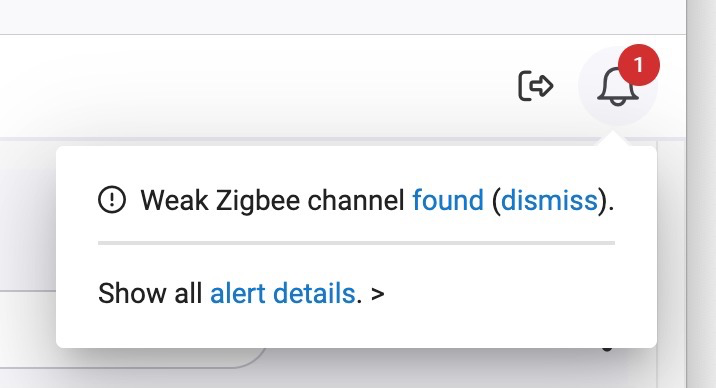
I think that message is often spurious.
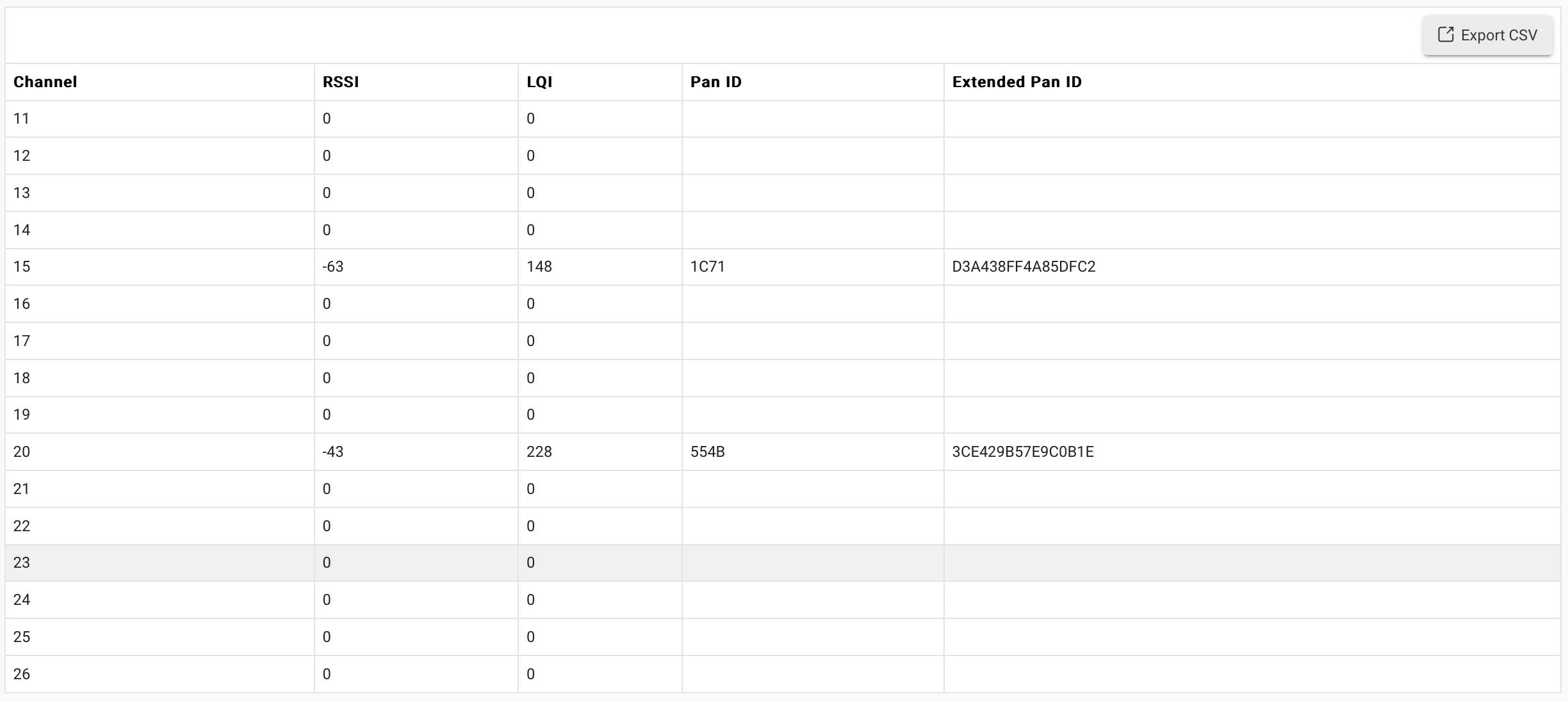
I see it, but a channel scan indicates a pretty good RSSI and LQI on Channel 20 (I have a second zigbee coordinator on Channel 15).
I think that message is often spurious.
I see it, but a channel scan indicates a pretty good RSSI and LQI on Channel 20 (I have a second zigbee coordinator on Channel 15).
I agree I have zero zigbee issues and honestly never on the zigbee status so I am just letting the warning live there happily on its on.
Just to add a "me too post" to the "dismiss" has no impact. No zigbee issues, but warning showing.
Running C8 Pro and 2.4.0.148
RSSI and LQI look good, but I do have 2 channel 20s. No idea why.
Another "me too" post, to hopefully prod some movement into dismissing this message.
Migrated to the C8 Pro a few days ago from a C8 (excellent migration, went flawlessly) and immediately discovered this message. Running on Channel 20, not having any mesh issues, but cannot dismiss this message. Clicking dismiss does nothing.
Running v2.4.0.151.
Hopefully fix coming in 2.4.1, I think I saw mention of it being looked at over in the beta section.
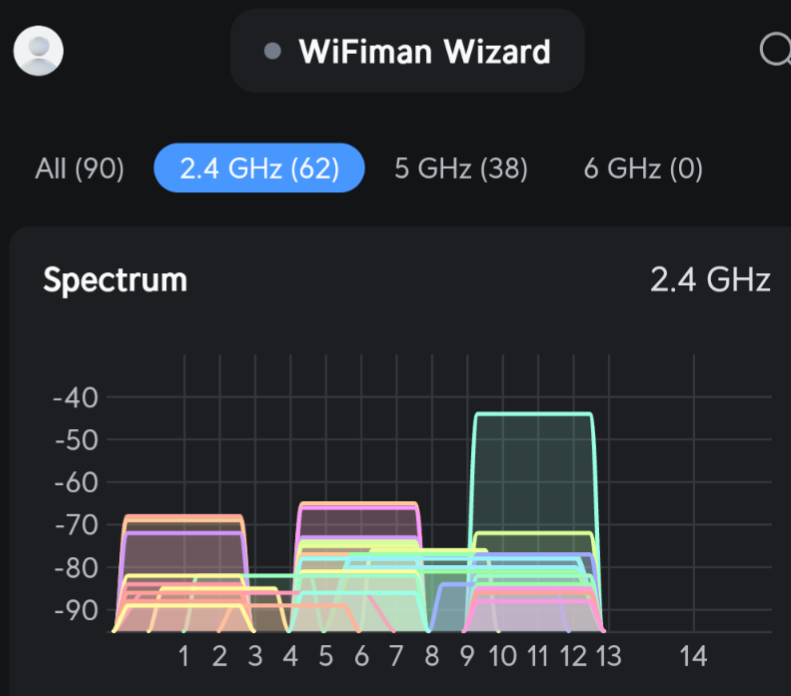
Thing is when one analyzes their local WiFi environment we find a Wild West mess of signals.
The power limit on ZigBee Ch 26 is 12. The max is 16. So not to bad of a hit. Why I am on 26. 12 is more than enough plus there are some strong signals already on 25.
And another confused user. 
2.4.0.151
Alert always on, dismiss does nothing.
Channel scan (when it occasionally works...) shows:
Is that Weak? 
Everything seems to be working fine.
Unless I hear otherwise, I feel this is just a IUI issue, ie: the link doesn't work. Not a big deal.
If your Zigbee network is working fine, then you should just ignore that warning. The Dismiss feature used to work. Sounds like it is just a bug.
I've scanned this entire post but didn't notice anyone experiencing this issue when Zigbee is DISABLED. In my case, Zigbee is disabled - I don't have any zigbee devices. Yet I get this warning as well, and am unable to dismiss it. I did enable Zigbee and set the channel to 25 as once post suggests - that didn't solve the problem. I've re-disabled Zigbee and guess I will just tolerate the warning.
From my understanding, this is just a message and not a diagnosis of an issue. It doesn't scan and see a weak channel, it is just warning that ch20 may not be the best choice.
I agree that it should be able to be dismissed, hopefully that gets fixed soon. But it isn't harming anything by being there either and it isn't an indication of a problem.
You are sure it took the change to channel 25? Changing the channel should clear the warning.
As of the last update this can be dismissed now.
2 channel 20?. You may have an orphan device which doesn't know it has been unpaired.
alex1... I thought I should be able to find one... I only have 29 devices. I cannot. How do I best go about it please?
FYI, this sounds like an oddity which will eventually be resolved since I have received this message today after updating to version 2.4.2.119 from 2.4.2.117 even though I have zero zigbee devices on this C8-pro.
In another house with a C4, and in two other houses I have C7s. None of those show the alert and they are all running version 2.4.2.119 as updated today. (only one house has any zigbee deevices and it only has two outlets)
This alert only shows on a C8 Pro with Channel 20 selected. A lot of people have issues adding devices on the Pro with channel 20 for some reason. So this was to push people to change the channel if having issues. If it works it works and you can dismiss the alert.
Not sure why it suddenly popped up on your hub after updating though.
This is what the 2.4Ghz spectrum at my house looks like. Why I moved my zigbee to Channel 26. Yes there is a 25% reduction in Max power but turns out 12 of 16 is adequate.
Is that single family homes or some sort of a complex?
I had that when I lived in an apartment building and the 2.4Ghz was nearly useless for actual Wifi, even if you were in the same room.
Single family. 1/4 Acre lots. Looks like an Apt complex don't it.