Why? If you only want what you describe, just set the option to only generate motion for smart detections for type person, which it sounds like you’ve already done, and then just use the device as a regular motion sensor in any app.
1 Like
I want to maintain the flexibility to use general motion is I want to use that for something in the future. Under motion, it didnt have the option for smart detection. So needed to find the variable which you point to under custom.
Here is an example I wrote a while back to test the feature:
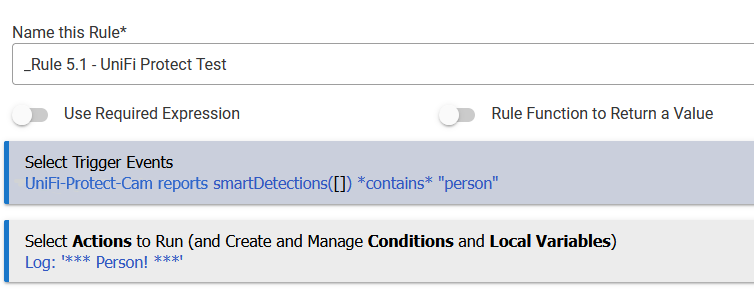
(RM doesn't have true JSON parsing, but this approach is good enough for any data the value will actually contain.)
This assumes you want to use it as a trigger event; in that case, you'll just choose "Custom Attribute" as the trigger type rather than one of the standard capabilities like "Motion Sensor" (and then choose this device and the specific attribute, smartDetections). There are other ways you can test this in a conditional action or otherwise use this data in the rule, depending on the actual rule you want to write.
Another option is just to use it as a motion sensor for now, with the options discussed above, and re-visit this if you ever change your mind. If the camera is outdoors, I suspect you won't.  It's quite "chatty" for motion, at least in my environment and with my settings, and Smart Detections plus this preference in the device is an easy way for me to use it like a standard device (no rule necessary) while only capturing things I actually want it to.
Yes, I set up a trigger event for each camera similar to what you shared for which I want to detect a person or a vehicle. Once that triggers, lights turn on. All was very straight forward once you pointed out where to find the smart detection variable. That was all I was looking for.
Have you checked community provided Integrations?
Figured out my issue. Motion events were apparently turned off on the camera 
1 Like
A post was split to a new topic: Streaming UniFi Protect to Dashboard?

