anybody streaming unifi protect camera feeds on a dashboard? i am using protect in tandem with blue iris; the only thing keeping me from abandoning blue iris is that it is so simple to stream BI feeds on my dashboards. i haven't been able to get this working with unifi yet. anyone have some tips?
Legacy or Eazy Dashboards?
Is there a iframe option in legacy Dashboards. You may be able to use that with the "Public Share-Link" url. Not sure i would want to enable that though.
Legacy dashboards. This may be all for naught as I can no longer upgrade Hubitat or all of my dashboards break (the devices will not respond to commands) so I've stopped doing Hubitat updates and may jump ship to Home Asst. becase of this ... but still toying with scrapping Blue Iris. I do use iframes for some other things on my dashboards, but it's a bit of a pain.
That seems crazy why is that if you don't mind me asking. Has support been egaged.
Tagging @support_team
Can you provide more details of your setup? Kind of hub, platform version, diagnostic tool version, whether you’ve tried a soft reset or not, number of devices on the dashboard etc.
Sure - here are more details. The issue first surfaced with the release of 2.4.2.157 back in September: Dashboard link tiles not working on 2.4.2.157 - #29 by bertabcd1234
The development team released a patch, but it didn't work. I've tried every patch released since and each time I have to roll back with the diagnostic tool else my tiles won't communicate with devices, they just say "sending", as soon as they roll back, everything is fine. I've tried all suggestions and the aforementioned post. I've just given up.
For the record thoughn, I am on a C8, 2.4.2.143, diagnostics 1.1.132. I have done every kind of reset and combination of settings they've posted, the dashboards simply stop working. Others have reported the same thing in a separate thread: Dashboard behaviour on iPhone becoming increasingly frustrating
I do have iframe advanced (I use that for a sports ticker in my basement on a tablet in my "lounge" area) ... I tried using a unifi protect rtsp & rtsps address within an iframe, but it doesn't populate.
I should state that I can technically get this working by using the "can only use on 1 device at a time" https link that unifi provides, within an iframe, but:
A) I'd like it on multiple dashboards at once
B) It comes thru with a bunch of riff raff in the image:
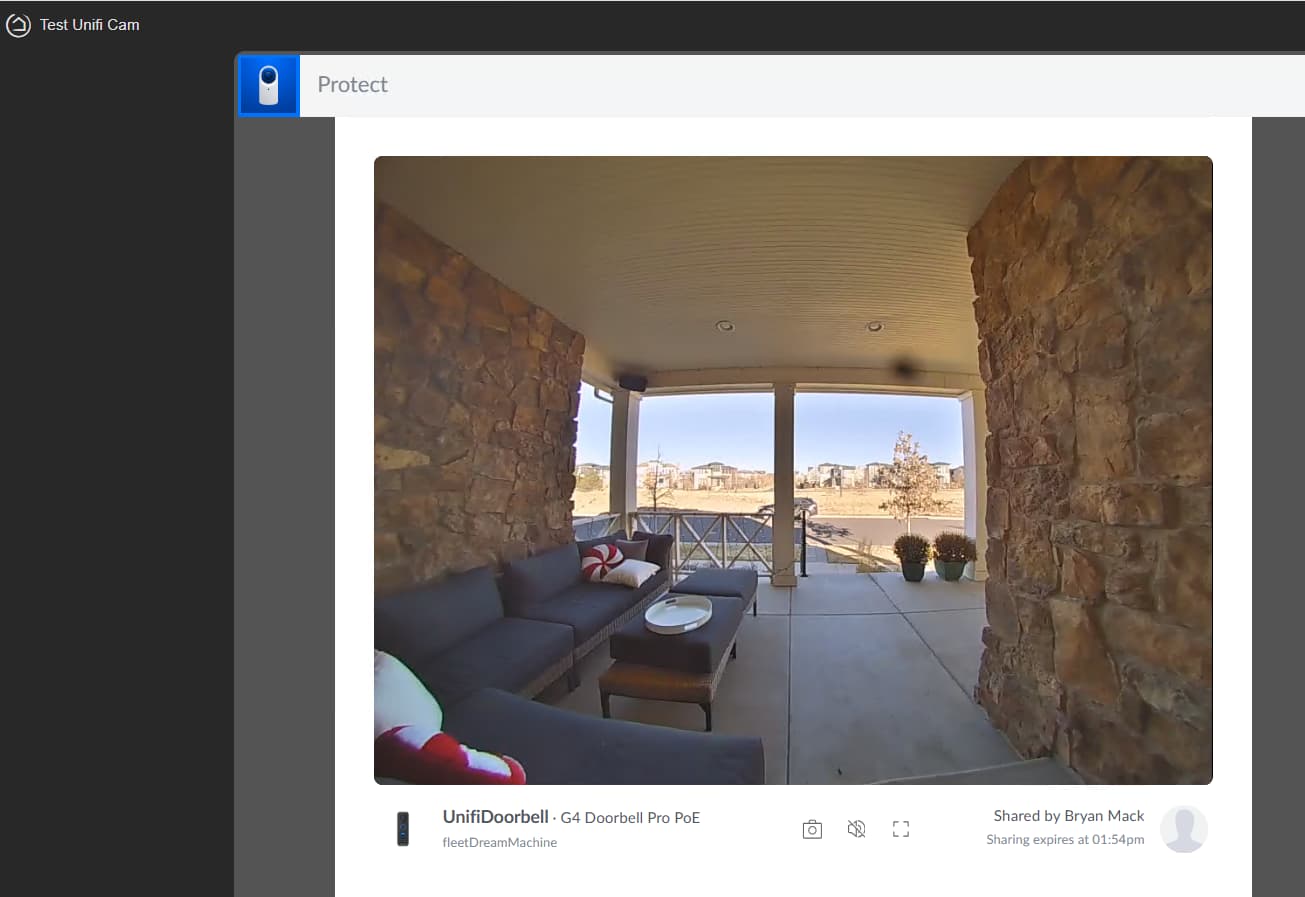
I've also set up "enable shapshot" in unifi and was able to point to the snapshot and have it refresh every minute, but that's just not as nice as blue iris. In trying to replace BI, I am hoping for no degredation in quality or features.
Ok - I figured out a way to stream from unifi protect to a hubitat dashboard. I used my synology nas as an intermediary, I'll make a video on how to do this, but high-level is:
- Install go2rtc as a docker container (I did this on my synology 423+ nas)
- configure yaml to point to the camera rtsp stream (do not use rtsps)
- build an iframe device in hubitat (using iframe advanced device type) - put the URL of the go2rtc link in the device
- add iframe device to dashboard
- profit!
Now I just need to figure out how to get rid of that "MSE" and the annoying streaming-timeline bar that appears at the bottom for some reason (it's the cam in the lower-right of this dashbard I have wall-mounted by my front door - the other 2 cams on there are still blue iris streams):

After just reading posts on Reddit today about people about to jump ship based almost solely on Hubitat Dashboards, I really think Dashboards should get more priority from the development team. It is a single issue that can literally chase people off the platform.
https://www.reddit.com/r/Hubitat/comments/1q530cx/why_is_the_dashboard_so_clunky/
Maybe dashboards need a start from scratch, EZ doesn't seem to be going anywhere, and Legacy is just too bogged down with Legacy stuff. Neither of the current options seem like a good path to get to nice looking and easily customizable dashboards. Maybe EZ could be reworked as a starting place to better dashboards, but I don't know how the code is written to know if it would be extensible to the real improvements needed.
I'm not going anywhere, but I would hate to add up all the hours I have spent over the years playing with CSS stuff to get what I want out of Legacy. It is just too much to ask for the user to put in their own time to learn CSS hacks to make Legacy look good.
Nice solution! I just use mjpeg feeds, as they stream automatically into an image tile (being a quick succession of images format). It depends how fluid you want your video. I get about 8 frames per second, more than enough for the dashboard view for me.
The issue was caused by an update to fix a security issue discovered in the Dashboards ⚠️ Security Issue in Hubitat Dashboards
Unfortunately the fix, for me at least, stopped my Dashboard "link" tiles that I use to move back and forth between dashboards from working. Firmware update version 2.4.2.158 fixed that issue, but the subsequent issues both I and others are experiencing here remain unresolved by subsequent updates unfortunately.
Totally agree that these Dashboard issues need to be a higher priority than they currently appear to be with the development team. It's a fundamental part of the user experience, which has only become more frustrating since the security fix was originally implemented.
I've considered moving over to Sharptools, but the thought of starting my dashboard design from scratch fills me with dread after all the CSS changes I've made to get it to behave how I wanted, and don't think I should have to pay extra to have an acceptable dashboard user experience in order to overcome a Hubitat self inflicted issue that must be entirely fixable by their development team.
8fps seems more than acceptable for a dashboard. How did you get an mjpeg feed into a dashboard, though, from unifi protect? I can't find that there is an mjpeg url for this ... your approach sounds simpler than mine, which is preferred - so if I'm missing the "easy button" I'd be interested in finding that button!
My Camera's put out a local ONVIF feed, even though they are technically cloud devices. I use the old ISpy software to receive them, and it rebroadcasts the streams in multiple formats, including mjpeg. So I connect my Image tile to the IP of the laptop running the ISpy software putting out that feed.
I bought another of the same camera recently, and ISpy cannot find it. That new camera has a high firmware version that actually has a setting to enable ONVIF, but ISpy cannot find the feed. The older camera firmware never mentions it even sends ONVIF, ISpy just found the feed in a scan.
So, the "updated" version of ISpy is Agent DVR (still free for local). They changed absolutely everything in Agent DVR, as it is now a webapp interface, instead of being a stand-alone Windows application. With Agent DVR, I can pull in my new camera ONVIF, but it cannot find the ONVIF feed from the old camera firmware. I also haven't figured out if Agent DVR resends mjpeg feeds or how to set that up. I should get back to that to figure it out.
I like ISpy because it also can call an API on motion detection, so I can use a camera as a motion sensor, using a virtual motion sensor in Hubitat with MakerAPI, and I have the ISpy software call the api to set motion active in the virtual motion sensor with motion on the camera. Since I can draw boxes on the screen for where to look for motion, and set sensitivity, it is the only motion sensor device I can use in my Driveway, to block the road where traffic would constantly set it off. Agent DVR may do that api call as well, I just have to get in there and figure it out.