I think addressing the above qustions in the separate discussion is more appropriate.
Using multiple hubs spreads a load across them and reduces a load on each individual hub.
The C8 Pro is a main work horse.
It runs all automations (only RM Rules are used for every automation). It handles all ZWave Device near all Zigbee Devices, good number of DIY LAN Devices and of course, bunch of Virtual Devices. Total number of reported Devices is 502. But I guess this number includes all Devices brought in via Hub Mesh from C7. I am lazy to count how many devices are per each protocol/technology.
The C7 handles all Matter Devices and also number of LAN Devices. Totall of number of Devices is 161. Again, this number includes (I think) all Devices from HA brought in via HADB.
The HA is used exctly as a Home Assistant.
It takes care about Ecobee Tstat for 100% local control via HomeKit Device integration, number of BT Devices, Asus Router presents all LAN Devices as a Presence Sensors (few are used in automations), few ESPHome Devices and two very nice highly customisable Touch Panels (these are re-flashed Sonoff Touchscreen Panels). One of the very uncommon/unique device is a DIY Geiger Counter (just in case).
It will be a very huge list for description of all uatomations.
My general phylosophy for automatins is:
everything must have a manual control (request ftom my wife);
everything must be under 100% local control (no clouds must be involved);
all automations must be True Automations, i.e everything must be driven by Sensors with near zero manual interructions. Of course, something definitely needs a Button Push to start because it simply impossible to define a right set of conditions to automatic start.
Here is a short description of automations:
All Lighting Automations are depend on Time and deriven by Motion/Presence/Contact/Light/ sensors. Normally these automations do not required any human interructions;
Curtains Automations is similar to to Lighting Automations but Motion/Presence sensors are not used;
The AC On/Off control is driven by Contact Sensors on Balcony Doors and Windows. Since we are near always at home and located in South Florida the AC Temp is a Constant and Mode is always Cooling. There is no need to control AC Mode/Temp but easely cold be done if needed.
There are 6 Ecobe Temp/Motion sensors arosss the apartment. Tstat it self is located not in a right spot, so its temp sensor is not used. Instead a scatered remote sensors are used for balancing appartment temp.
Two Ceing Fans (living room and bedroom) are controlled by Inovelli VZM36 Canopy Module (the companion switch is not used) with excellent @bertabcd1234 driver. Belive it or not but fan speed control is very smooth and could be anything in a 0-100% range. The related RM Rules for fan speed control are tuned for balancing room temp. The fan automations do not require any human interruction as well.
There are 2 modified Flair Vents (original controllers replaced with ZEN53) also part of temp balancing rm rules.
The automatic DIY Vinegar Dispencer is used to prevent AC Drain Line clogging (unfortunately this is very common problem in South Florida.
Kitchen Stove is equiped with DIY Power Switch. There are few RM Rules monitoring Stove Status. If Apartment is Ocuppaid a warning is annouced if Stove is On for 3.5 hours. However if Apartment is unocupied and Stove is acidentally leaved On it will be immedietly tirned Off.
All Doors (2 Balcony Doors and Apartmet Front Door) equiped with Actuators. There are many rules related to Doors Automations.
Both Adjustable Beds (Reverie 5D bases) are also controlled by RM Rules.
This is just a fraction on what was done.
I will be happy to answer a specific questions if anyone have one.
There is a ZERO problems (well, next to zero) when ZIP is used for the ZWave.
There are a gasillions of problems immedielpy popping up as soon as hub switched to the ZWaveJS. My comment about resource limits was because ZWaveJS definitely requires more resources and maybe my setup reached (or just nearby) a threshlod after which everything fall appart. At least it fills like some sort of limits is/was reached. And if this is case I may need just an extra C8 Pro dedicated only to the ZWave Devices (or wait for a next HE hardware upgrade, sonner or later new more powerful hub my popup).
All my new rules (and many old modified accordingly) are State Machines. Beeing EE I learned a lesson that true automation must be designed as State Machine. At the beging I did not follow this very robust design approach only because HE does not allowed to nicely group set of the related rules. Of course, I was using a naming convention which hepled to organize rules but this way manes becomes too long.
Of course I have to use Waits, this is unavoidable. Using loops is minimised and they are used only as a work around for potentially missing Commands and/or Status Reporting. BTW, many failures with ZWaveJS are due to missing Status.
Please tell me how to avoid these "Wait" statement?
It looks the case.
All Zwave Devices are already on a single C8 Pro hub. However this hub is a main work horse (please check the original post what this one is doing). I don't have another C8 Pro handy just to dedicate it for handling only the ZWave Devices. And even if I had one around it will be enormous effort to separate all ZWave Device to a dedicated hub. At this time I have no any desire to mess up with my system. Plus (or minus) the positive outcome is not guaranteed and very questionable.
Two plain Zigbee PIRs and one Linptec mmWave.
But why does it matter?
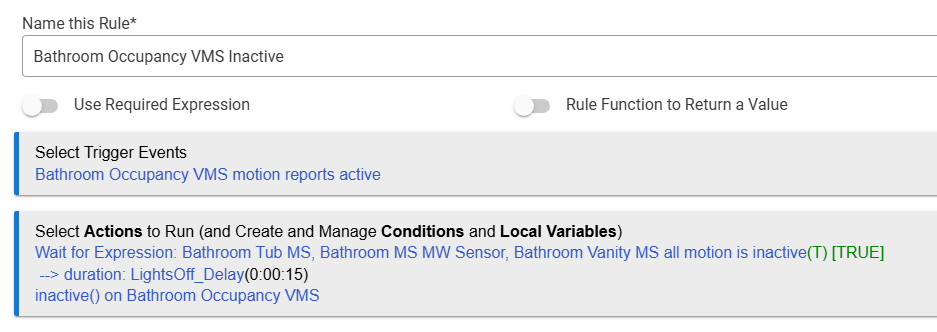
This example rule is triggered when Occupancy VMS (this is virtual device) becomes active, waits for all 3 MS becomes inactive for the certain time and once condition is met deactivates Occupancy VMS. Occupancy VMS is a part of many other bathroom automations rules.
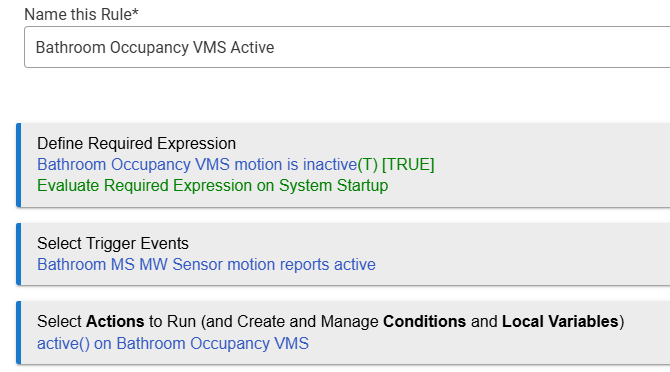
Just in case here is a rule for activating Occupancy VMS:
These two rules is a simple Ocuupancy State Machine with only two active states.
I will be very surprised if you tell me these rules are problematic.
Waits are fine. Rules don't actually wait; wait actions behave similar to triggers. All that happens is an event subscription is created and the rule execution stops, only to be woken up when the subscribed event occurs: the condition for the wait is evaluated, and if true, the rule continues with the next action(s). Waits get cancelled on rule retriggering, so no stacking / multiple simultaneous instances of one rule (delays are another story). Most if not all of this is covered in the documentation
I'm not sure what could constitute a blocking rule (super long action list? long loops ?) - if you had a problem like this that occured frequently, it should show up in the app stats section of the hub's logs.
It might be helpful to staff if you can identify which specific devices fail to report status or if there is any pattern to the problems you're seeing.
Yes, Waits are not a problematic at all. I was addressing @JumpJump questions and concerns about Wait statements. He thinks Wait Statements are problematic but they are not.
Unfortunately many different devices randomly failing when ZWaveJS is in place. But the Ultraloq ZWave Lock is very first in line. Frankly speaking this one ocasionally fails to report status with ZIP as well. But failure level is very low and therefore acceptable. However with ZWaveJS it fails near 80% of times. Of couse, this is unacceptable.
What device and what driver matters because some of them have functions for things like "fade time". With that kind of feature you set the effect of your wait at the device level. Like the linptech device. Its doing on device motion smoothing with fade time. So you don't need a wait of 15 seconds with it. You can set fade time to 15 seconds.
To avoid waits you can use delay timers. A rule that runs on motion state change that cancels any rule timer to turn off the light. You turn on the light or set a cancelable delay timer to turn turn off the light after 15 seconds.
Using a wait can make a rule hard to cancel cleanly.
I think also considering what this conversation seems to be primarily about we need to get some perspective on actual usage of the Hub. Do we have any stats about cpu and memory consumption. Do we have any signs that there is resource conention other then anectodal evidence.
It would also be good to know how long the Zwave JS software has been allowed to stay activated, and what steps were taking for a given device once the switch was made to fix a given problem. These would be steps such as:
The device was reinterviewed after the conversion and it wasn't talking
Was the device helped to talk to the hub once the switch was made by pressing the action button
Was a given device excluded and paired again to help it get in a better state.
It would also be good to know if after Zwave JS the logs were monitored to know if any message like the Zwave queue was jammed or busy.
Lastly with us talking about 660+ devices that has to indicated there is a fairly high requirement for a threading requirement. I suspect with that many devices weather physical or virtual there is overhead.
I would really like to see some performance statistics as well as stats for the devices and apps.
Oh well, using a WAIT Statements is recommended and these are not a problem.
However using a DELAY definitely will create a bunch of problems.
My suggestion to you: If you are using DELAY replace them with WAIT ASAP.
I am not saying they are evil or anything. However, one of the things you complained about was state changes and waits can contribute to missing events.
Next time when I will try ZWaveJS again I will try to pay attention on the statistics.
Unfortunately I did not do this previously.
I was waiting 3-4 days before switching back to ZIP despite complains from my wife.
I did try to exclude/re-include few most problematic devices. This did not change anything.
And as I alredy mentioned, except for the Lock all other devices are responsive but ocasionaly the delays are geting too long.
But please do not suggest something well known as a problematic.
The DELAY statemt is not recommended to use at all after "Wait for Event" was introduced long time ago or must be used very carefully.
I am not using DELAY statements at all for a lo....ng time.
I forgot what it was about but most likelly related to the attempt to synchronize multiple rules. HE does not guarantee a precise timimg specifically in a range around a second.
Why? It is not true that such a recommendation has ever been made for any legitimate reason. The only reason to prefer "Wait for event: elapsed time" is that it's easier (for you) if you want to cancel on re-trigger, as this behavior is automatic with a wait but must be manually selected and executed for delays. They are otherwise essentially the same, creating a scheduled job that will execute at the specified future time.
This tends to be less confusing, particularly for users new to Rule Machine -- but that's it.
(If you received a specific recommendation not to use a delay -- or wait or something else -- because of some specific use in your rule, that context would be helpful, but that's a different story.)
Seems like a reason worthy of consideration. Delays aren’t cancellable by default. I would guess many don’t even realize rules can have multiple instances and would not necessarily look for a Cancel Delayed Actions action.
So Wait for Event (certain time) seems like a better place to start, even if that’s not a recommendation over Delay