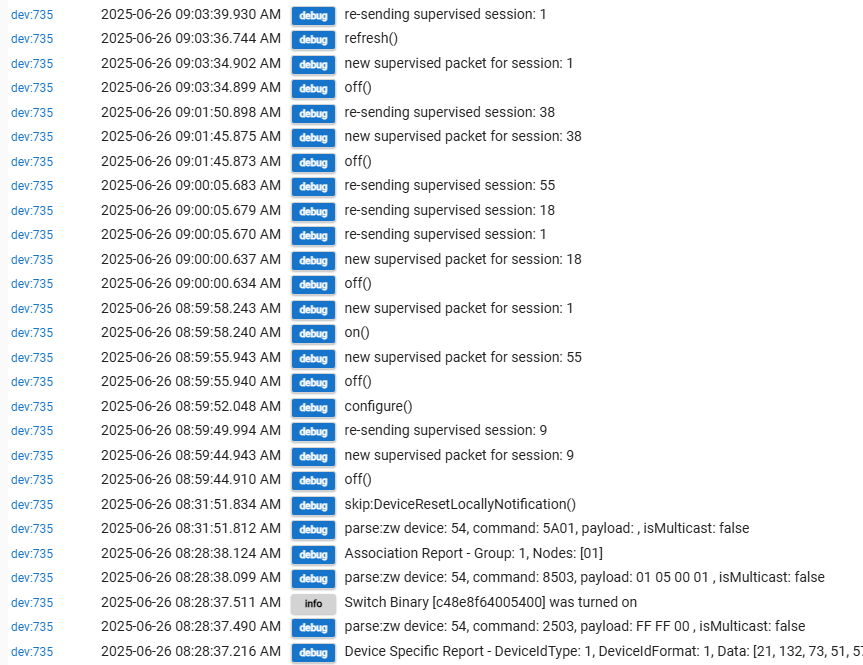
So, I did the factory reset after the aborted SmartScan...
Looks like the device had paired at some point, you possibly factory reset it afterwards which is why its not working now. I would delete the smartstart entry, and then you will also want to try to to remove this dead device and z-wave node before you do the rest of the process. You may need to factory reset the device again if it was partially paired to the hub.
- Device was paired and working
- but then you factory reset it


Yup, just figured that out. The SmartScan in the mobile app never returned. I didn't see the device with the name I tried to give it...
So, delete the Smart Start Entry and try again?

The device probably paired before you even set the name in SS, if it was already powered up when you scanned the code it possibly paired immediately.
"remove this dead device"
How?
Just remove on it's device page?
You can try the force remove from the device page and it may take the z-wave node out with it. Seems to be a new magical un-announced feature.
If there is still a zwave node afterwards then see this guide (Section 3): How To Remove Ghosts using hub tools or a UZB Stick
Ok,
Would you advise waiting until I get a USB stick to do the removal, or try without doing that?
I also have another hub that's in an out building. Haven't read beyond needing the USB stick or secondary controller--I'll do that next.
Thank you!
Sorry, I should wait longer before posting-- I will try the magic...
Ok, did the forced removal and the renamed device disappeared from the device page.
I'm still not sure what to look for on the zwave details page to check for ghosts.. Probably need to read the references you posted.
I do see an unnamed device. But, maybe it's been there for a while. Either way, I should probably get rid of it.

The one you posted before was (84), so yes that one you found now is older. You should try to get rid of it but you could ignore it for now and tackle that later if you want. If (84) is gone then the Force removal took the node out with it. Not sure how Hubitat got that magic to happen but I have seen it multiple times now!
Ok, I just retried the SmartStart from the mobile app. Again, it just hangs on the "not included, pending" and never returns.
But, I see the new unnamed device in zwave details. I can rename it and the on/off button now changes the state of the device.
Do I now just hit the trash can icon in the mobile app SmartStart thing? Or, do I have to do some clean up (besides the old ghost device)?
Its not hanging there, thats it, you added it to the SmartStart list, you are done with that part.
-
If the device was powered off when you added it, you could add a name then power up the device and it would then take that name.
-
If the device is already powered up when you scan the code it often will pair so fast that it is done before you can even type in a name.
-
Once paired if you exit that screen in the mobile app and go back it will say it is added with a node number. (Might require quitting the app to force it to refresh, not sure)
You can if you want, or you can leave it in there. Removing it prevents accidental re-pairing if you ever do exclude it on purpose later.
For next time--
After I initiate the SmartStart, there's an entry that looks "greyed out" which I interpret as disabled. The message "not included, pending" just sits there.
So that's what's expected when it works?
When what "works" ?
When you scan the code in, that's it, you are done. You can scan the code in and then power up and pair the device a month later, it will sit there waiting.
When the device paired the status will change but not dynamically if you have that window on the app open, it only refreshes when you open it (and as I said you might have to quit the app to force it to refresh).
This is why I suggest to have the logs open, to watch for the paring messages.
I feel like you have used SmartThings before? Which actually does not use real SmartStart pairing. It has you scan the code then uses that to start manual inclusion. Its a more linear process and maybe a little more user friendly so I see why they did it that way. Forget everything you thought you knew if you used SmartThings before.
"That it worked"...
That the device was successfully included.
No, never used SmartThings. This is the first time I've tried SmartStart.
I was just expecting some sort of feedback that it worked. To me, a "greyed out" message "non-included pending" sounds like something didn't work or I need to keep waiting.
Especially after reading about the hassles of ghost devices...
But now I know.
Thanks!
Btw, doing the zwave2 enable, refreshing, then removing the ghost device on the zwave details page eliminated the ghost device.
I have noticed that sometimes it takes nearly a minute for a couple of devices to turn on or off. Never understood why--maybe getting rid of the ghost device will fix that.
Yeah, true, the app should really refresh that screen frequently or have an obvious refresh button. Its not very intuitive the way it is now. I just always have logs open when I include devices...

