It should show up in the device list in the PCS as a notification sensor if it worked... you can highlight the secondary controller and then click on "Update"..
After rebooting the hub, I see this entry in HE

So it seems to be on the zwave radio but not in the device database... Clicking discover just refreshes the page and nothing changes. What is the next step?
EDIT: Clicked refresh and now the status is pending instead of OK and the discover button is gone.
Unfortunately no hard and fast rule in my experience - you have to play around a bit. You can put the HE hub into pairing mode and then see if anything pops up - if not then put the device into pairing mode as well (without resetting anything).
You can also hit refresh and discover a bunch of times as well..
So I think it's included twice now.
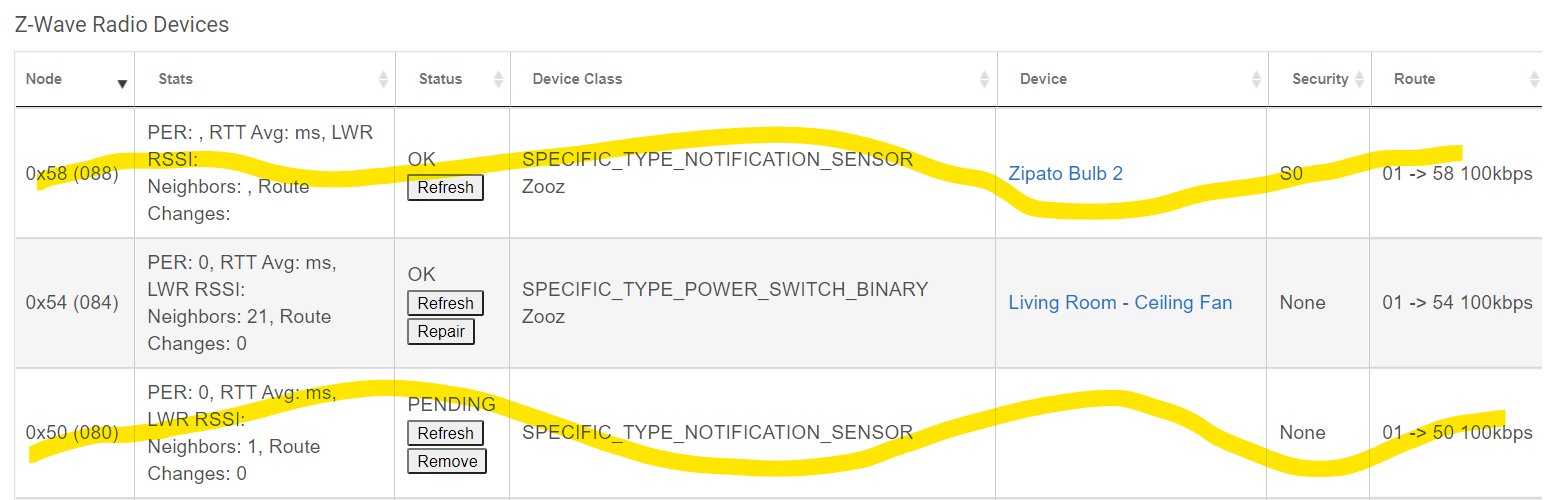
This is really frustrating. I wish I had never excluded it to begin with.
EDIT: Also, @bcopeland I think this is a bug: The device fingerprint is registering as a Zipato Bulb 2. I compared it to my other 4-in-1s and it's the same.
You should be able to change the driver entry to the appropriate device type right?
Also using the PCS would run an "Is Failed" check on both devices 80 & 88.. then do a "Remove Failed" on the one that is not responding (turns red).
Keep in mind that the 4-in-1 issue you have is not likely going to be considered a "bug" unless reproducible by a supported device but since I'm not affiliated with Hubitat Inc other than being a community member I can't say for sure.
Yes, I can. But that is the device included through HE with S0 security.
I also can't figure out how to sync up the pc controller and Hubitat. I now have devices showing on each that do not show on the other.
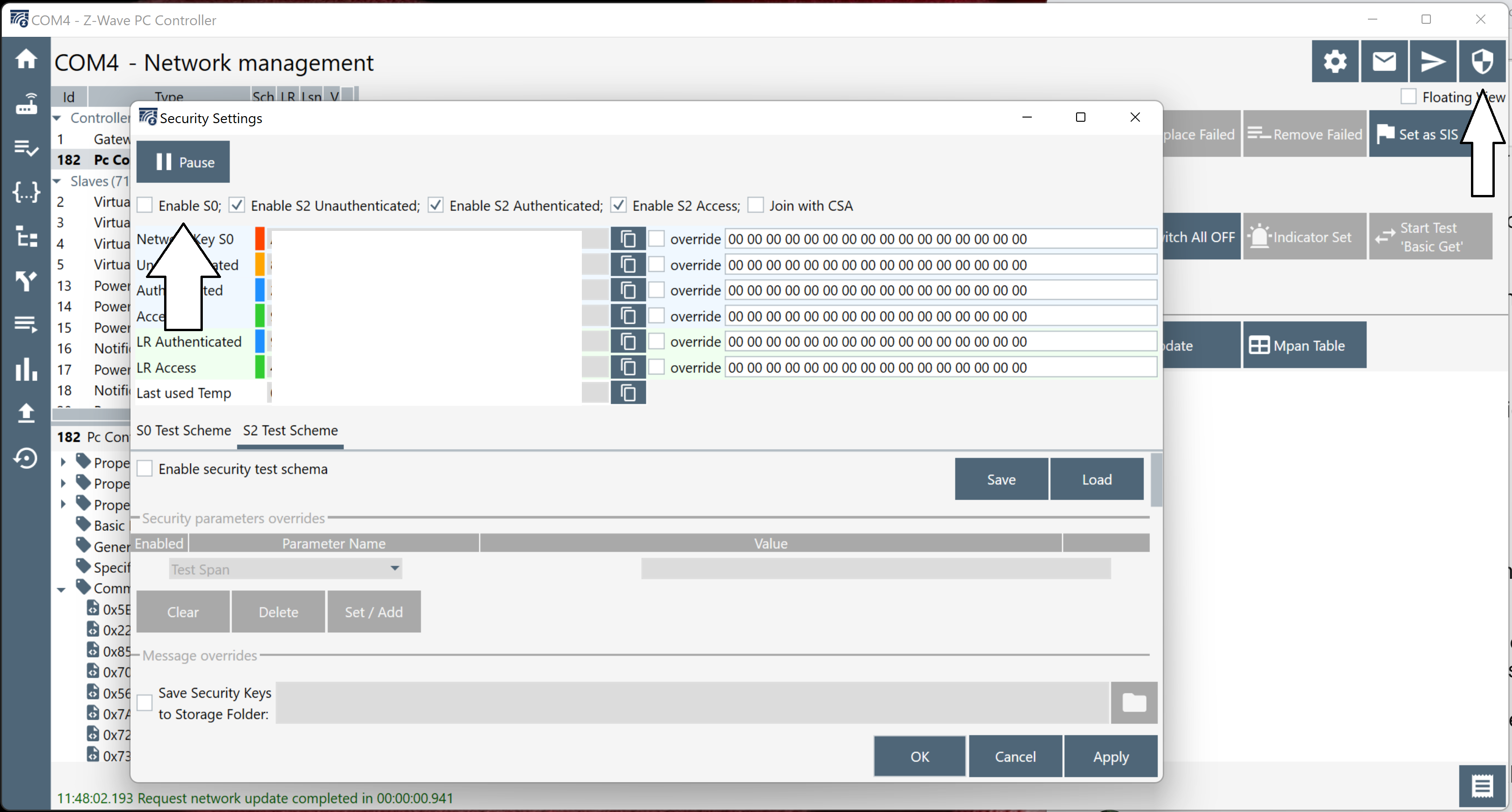
Then it doesn't look like it paired via the PCS.. maybe. One thing to do in the PCS software click on the shield in the upper right part of the window and uncheck S0 as part of the default security and try again. You'll have to remove the device of course.
Were you able to remove device 80?
Yes, I removed 80, which was added via pc, and removed 88 which was added via hubitat. But... device 80 still shows in the pc software, and I just realized that a new device in Hubitat (device 84) doesn't show on PC.
So I think before I go about trying to re-include this sensor, I need to figure out how to sync up the pc controller with hubitat again. I have tried the only thing that looks like it should do this, which is the update button, but no success in pc software.
Did you remove the battery and do an "Is Failed?" then "Remove Failed" on device 80?
For device 88 I went through the normal zwave exclude through hubitat. For device 80, I just clicked the remove button on zwave details in Hubitat and it disappeared after I did so.
EDIT: what is the best/quickest way to determine if your zstick is even working right? Can I use the pc software to turn a light on or off to test?
So that is a ghost - it's removed from HE but not from the Z-Wave table. Using the PCS you can hopefully remove it.
yes you can use "Basic Set On/Off" to test a switch..
Okay, I thought that might would have been it. I had tried already and nothing happened with several switches. I probably should have realized this sooner than I did, but the zstick got migrated over from the C5 to the C7 just like everything else did. I should probably remove it and rejoin it manually. I had just completely forgotten about this until now though.
Now just have to figure out how to actually exclude the zstick without creating a ghost...
1 Like
Start exclusion mode in HE then with the controller highlighted "Select Learn Mode" / "NWE"... I might reboot the hub after it's done. Hopefully the list of devices will disappear from the PCS.
That did it. Now just need to find the PDF I used to initially set it up and start over. Shouldn't take to long this time around since I'm a little more familiar with the tool and all the software is installed already.
1 Like
Okay, got it included. Kinda... I think. Hubitat stalled at initializing the device after finding it. But if I look in the zwave details I see this.

But in the pc software I seem to be able to see everything, including several virtual nodes near the end of the list that must be ghosts from trying to include the motion sensor. I verified I can turn my kitchen lights on/off from the PC.
So does this mean I'm good, or is the fact there is no device associated with node 89 going to cause problems? Do I exclude and re-include the zstick again?
you should be good. Don't worry about the virtual nodes, they are NOT ghosts.
Even though I don't see them as devices or in the zwave details area of Hubitat?
I got the ZSE40 added back to HE with a node id of 90. But now I'm back to here, where it's available to the zwave radio, but there is no device associated with it. I click discover and the page just reloads.
EDIT: Can it be as simple as creating a virtual device and changing the DNI to 59?
EDIT2: I just needed to be patient I guess? Not sure what happened, but there is a device now called Zooz 4-in-1 Sensor that I definitely didn't create. What's interesting though is it has a DNI of 5A and the entry for 59 in zwave details is gone.
EDIT3: I'm a dummy. I put the wrong screenshot above. 59 is the zstick and 5A is the ZSE40.
Thanks for the help.
1 Like
Question related to this topic... @danabw @erktrek
Do you see any issues with me adding garage door openers using this method? Specifically GoControl/Linear GD00Z-5's? They automatically pair S0 with my C7and are not capable of S2 like the newer GD00-8's... I have two that are my only S0 devices on my network... Probably not a big deal, but I am thinking about trying to add them with no security... Do you see any issues with this? Even though they are a "door", I'm not worried about having any security on them. I have plenty of other motion sensors and automation for the garage...
Part of this is just me tinkering and to see if i can do it... But will there be a problem with the hub, the generic z-wave garage door driver or anything else I'm not thinking of?

