Hi all.
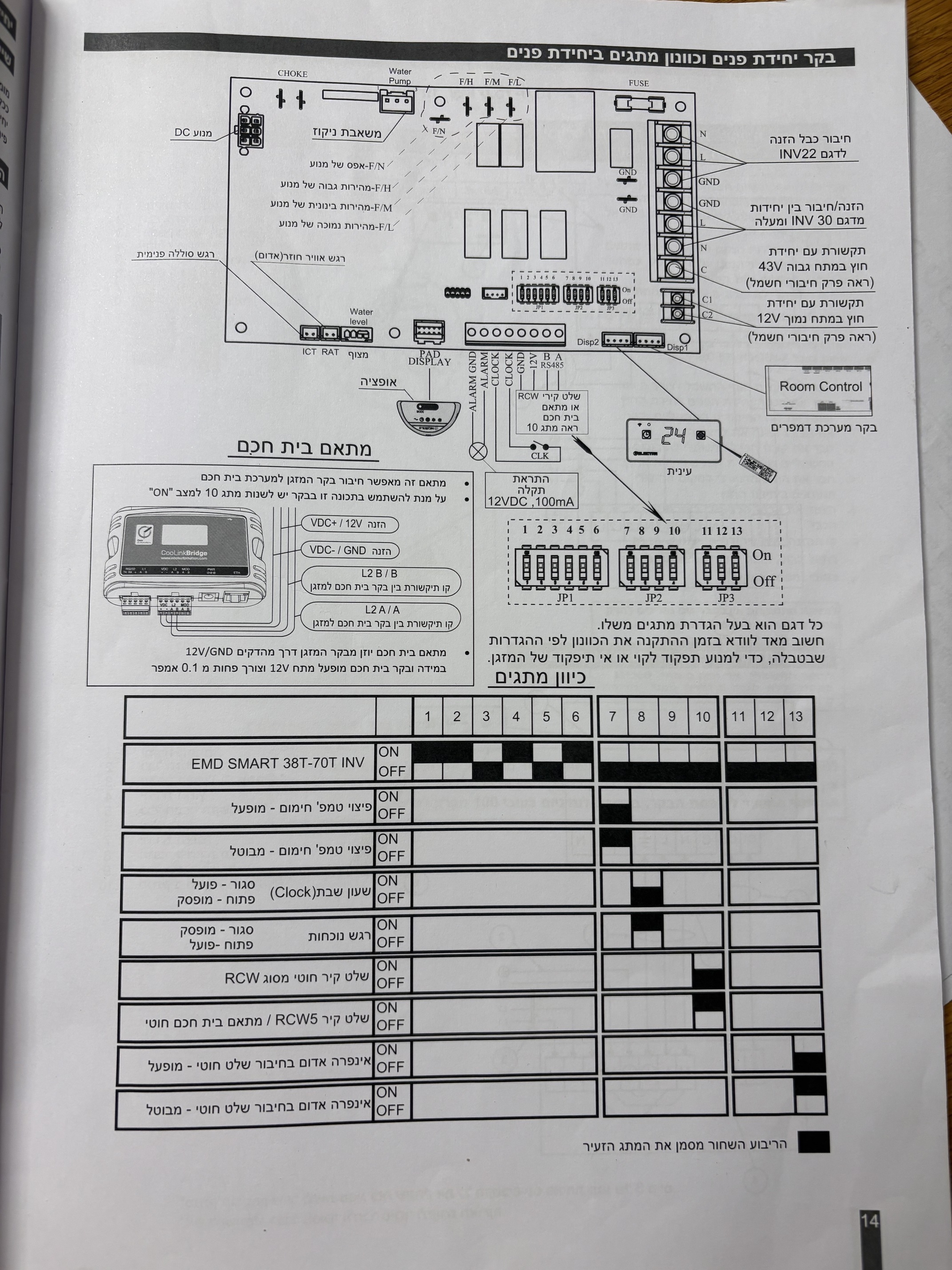
I have a smart air conditioner but I can’t control it via hubitat, it has own app and need internet connection.
Until now I used it blaster to control and current sensor to receive feedback.
Today I saw something new, there is a new module “ RS485 to Zigbee 3.0 Wireless Module” that I can connect it to board of the hvac and I can control it via hubitat.
Anyone tried or knows something about this module?
What model is the smart air conditioner?
You don’t have it in USA
It is 2022
Link?
Do you think you can list the detail anyway?
Is this a repeat of this thread?
Yes
Nice catch
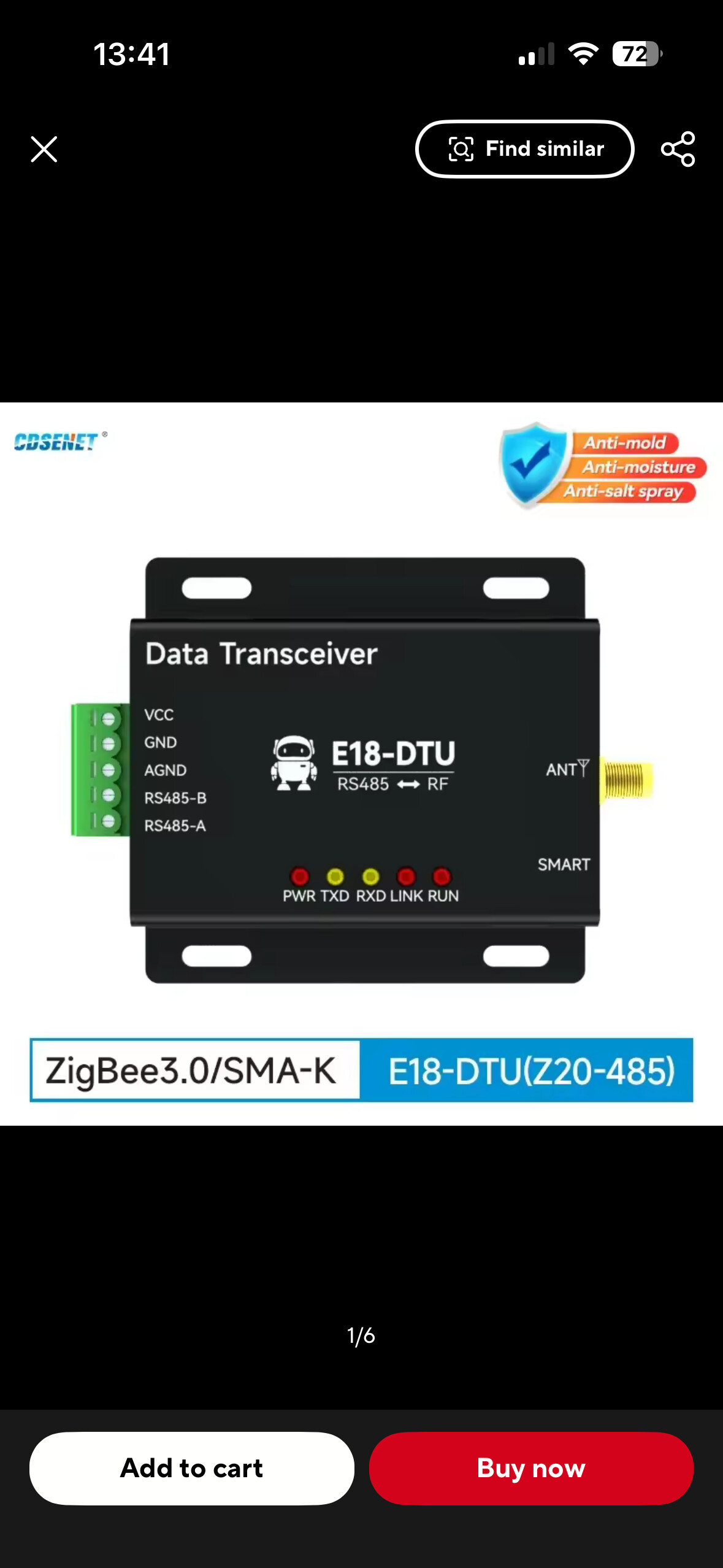
Such a thing exists, but it would be nice to have some specifics.
My GoogleFoo found this: Google Search
@Reuven - None of these devices have default HE drivers, so that's going to need to be written. And even more importantly, your going to need a protocol document, that describes what are the serial commands that the AC unit understands.
Personally, I wouldn't even drag Zigbee into this - Just use a EtherNet/IP serial to 485 device, and write a driver to just issue the proper commands over a socket in the driver - I've personally done this with Lantronix and/or Moxa devices to talk to molding machines and collect data into a Windows historian.
The key is know how to talk to the AC unit - What ASCII commands are there, and their format. - Effectively linking a serial port over ethernet to a HE is relatively doable
But you going to need to write this yourself - As there is no 3rd party community drivers for this AC unit. (that I'm aware of - per the earlier thread)
2 Likes
I hate to ask Gemini or ChatGPT but this is the answer I get:
Yes, absolutely. Since the E18-DTU is a "transparent bridge," it doesn't filter anything. Whatever the AC "whispers" back onto the wire, the Zigbee module will package into a Hex string and send it straight to your Hubitat.
To see this in Hubitat, follow these steps:
-
Enable Logging
-
Open your Hubitat Dashboard.
-
Go to Devices and select your Zigbee RS485 module.
-
Click on Enable debug logging (usually stays on for 30 minutes).
-
Open a separate browser tab for Logs.
-
What to Look For
When the AC "talks back," you will see an entry in the logs under descriptionText or data. It will look like a string of pairs of letters and numbers.
For example, if you ask the AC for its status, it might reply with:
01 03 04 00 18 00 01 31 DA
How to decode that reply:
• 01: Address (The AC unit).
• 03: The "Read" command.
• 04: Number of bytes coming back.
• 00 18: This is the important part! 18 in Hex = 24 in Decimal. This is the AC telling you the temperature is 24°C.
• 31 DA: The "CRC" (a security check to make sure the wire didn't glitch).
This is definitely the way to go. I know a few people with Briggs & Stratton generators who use this approach to integrate their generators with Genmon.
This is essential.
1 Like
You need to know the byte order to interpret that data. The key word in that AI response is "might".
Your A/C manufacturer should have some documentation on the data sent over the RS485 interface as well as command structure.
1 Like
Usually, you poll these sorts of devices - Basically, send a command, and the device replies. For an AC unit, I guess you could change mode, fan speed, and read back actual temperature and the SP. - But I'm guessing at all that.
The connectivity is the least of your problems - Asking ChatGPT isn't going to likely get you the details you need - Usually, the manufacturing supplies a document of the command and response formats - default baud rate, parity, and stop bits requirements - You need all that detail.
From your earlier thread - This device looks like your best bet, as it has a REST API, that is likely documented and could be folded into either a custom driver, or even into RM GET/POST HTTP request. -
You can try and reverse engineer all this. but that seems like alot of work - Why is the Bond IR approach problematic, as that seems fairly straightforward without additional protocol information from the manufacturer.
I found this document, but again, it's IR based on an RPI
2 Likes
I assume the op wants to DIY because that device is expensive.
First thanks for all for responses.
Second the problem with IR is even it is easy I don’t have any feedback from the ac unit; only works or not.
You could always add a Hubitat-compatible temperature sensor and use it to evaluate the function of the unit. That might help?
Not exactly.
It can be controlled by remote and their app.
App is sync with the ac unit but not remote.
I need some bridge or something that can talk with ac unit.
I would skip the Zigbee portion altogether, as that is just complicating things significantly. Instead, as @GuyMan mentioned earlier, focus on getting something to talk to your HVAC system over the RS485 connection, like an ESP32 or a Raspberry Pi. Once you can read and write data, it is fairly easy to integrate one of those systems with Hubitat via a simple LAN connection. Users of my HubDuino software have implemented Hubitat to RS232 devices in the past. Or, one can use Hubitat's built-in Telnet integration with a Terminal Server that can communicate with RS485 devices. This would probably be the simplest solution. The nice thing about a terminal server is that you can connect to it via TELNET using a simple app like PuTTY, and then figure out the ASCII command syntax for reading and sending data. Once that is worked out, just write a Hubitat driver that uses the Telnet interface to implement those ASCII commands.
2 Likes
Is the app control cloud based? What's the name?

