Hi, I'm trying to create two rules to shut off a bathroom fan. If a single physical push turns on the fan, then turn it off in 5 min. If it's a double tap, turn it off in 15 min. It would be even better if I could do it in one rule by testing whether there was a single or double tap. I want to do this in RM instead of button controller so I can cancel the delayed actions for these rules from a third RM rule, that controls the fan based on humidity. This is what I tried, but nothing triggers.
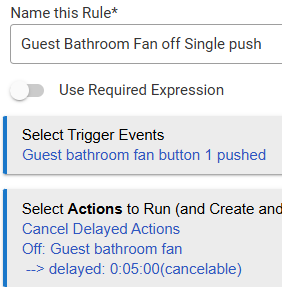

Suggestions appreciated
I haven't really thought deeply, lol, about your question, but I do recall that I never managed to use the single tap button. The physical aspect always gets in the way.
@hydro311 did suggest this once regarding cancellable waits. Maybe it's relevant here:
Let me also say that you have to have your ZEN76 to accept button pushes, as I recall.
edit: Maybe.
Not sure if this is relevant, but it sounds like the double (+?) button pushes aren't being recognized by default:

Perhaps check on the device page to see if double tapping gets you anything. As I said, I've never had luck with try to incorporate a single tap button, but maybe thing changed.
Anyway, something to think about.
1 Like
Use my advanced driver: [DRIVER] Zooz ZEN Switches Advanced (and Dimmers)
Make sure the Scene control is on as @velvetfoot pointed out.
Test the switch and watch the logs, you should see button events being logged for every action. Once you see the events being logged then the rules should work.
2 Likes
I do something similar with a ZEN71 for my bathroom heater. Along with scene control, I also turned on smart bulb mode, so basically the paddle is just a remote controller and has no direct connection to the relay.
Thanks everyone, I got it working after a few discoveries:
- I had downloaded @jtp10181 's advanced drivers in HPM, but had only installed the dimmer component, so I had to modify my installation in HPM to add the switches.
- For some reason, when I installed the switch, the system recognized it as a Zen 76, but it's actually a Zen 71 (confirmed by removing the cover plate). I swapped to a virtual switch, excluded it, and then re-included it, and it grabbed the advanced driver right away. I then enabled scene control and saw the button events in the logs.
- Finally I was able to use one rule by passing %value% to a local variable and using that in a conditional statement.

FYI that was totally not necessary, all you had to do was change the driver (Type) to the correct one. Either built in ZEN71 or my advanced driver.
OK, My recollection is that I installed the switch drivers in HPM and then changed the driver on the Device page, but I didn't have access to the parameters to turn on scene control. The device name still had Zen76 in it, and I was getting errors about unknown device? So, perhaps there was a simpler fix, but it's all good now. Many thanks for your guidance.
1 Like
If it was saying unknown device then you might have been missing some of the fingerprint data in the info section for some reason. Its fixable (my newer drivers ask the device and fix it automatically), but in this case maybe it was just better you re-paired it anyway.
1 Like