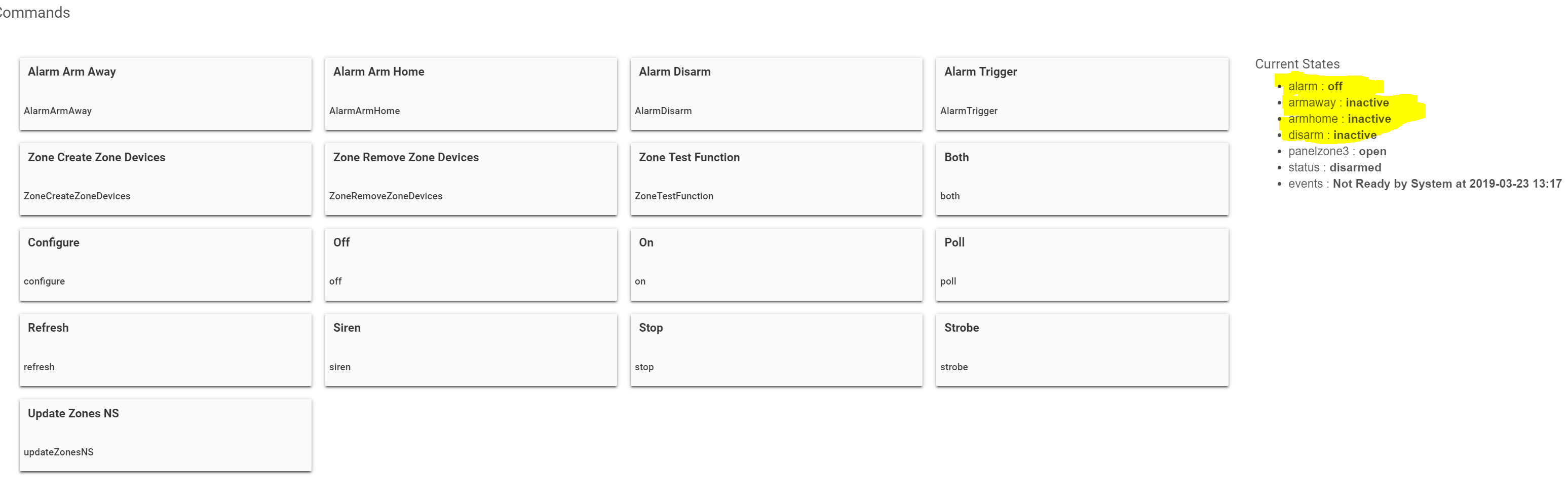
Apart from WATO (great app, but cant use global variables), is there any way for RM to use device attributes as triggers. That is, to check the status of a variable (as per the image), and use that as a trigger for RM. I was hoping to be able to remove a stack of virtual switches with the new Global Variables, but WATO cant see Global Variables because it's outside of RM.
I have an alarm that has three states. HE has those three states in the device page. I want to trigger MODE based on the 3 states. Currently I'm using virtual switches to do so, but it's rather cumbersome.
I do have hub slow downs, but I'm not sure what causes it. I'm not prepared to abandon WATO as it's linked in with the backbone of my home automation (home alarm and motion sensor).
I should have been more specific when I said device. I should have said is there a way to set a GV from a device driver. I think the "Set Global Variable" action only supports setting static values or values from other GVs, right?
My goal is to be able to take one of the weather forecast devices around here that gives a forecasted high and low temperature and send notifications if that low temperature is ever below a threshold so that I can warn my wife she is going to lose her plants to a frost. Those devices don't put the forecasted high and low in supported attributes. I'm hoping to avoid having to create another device just to hold the low temperature in a place that I can check it in RM.
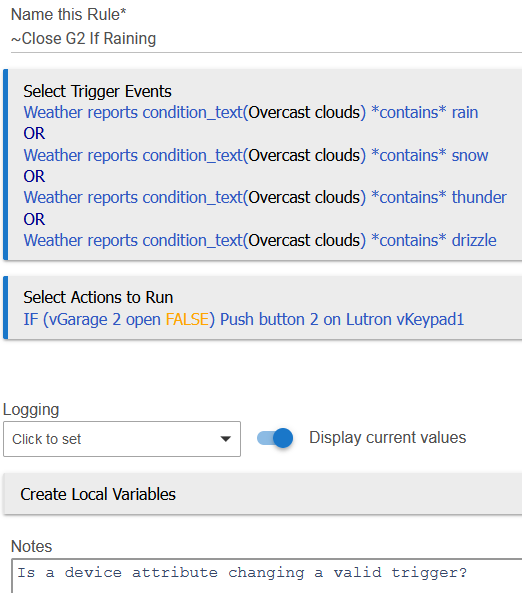
Yes, the rule should run if any of those triggers are met. However I believe the "contains" operator is case-sensitive, so "rain" and "Rain" are not the same thing.