I'm going to have to swap out the sensors with the extras, but right now it's sticking. It's odd and not totally consistent. I can use magnets to change it, so it's at least partially functional. I may have some interference from another sensor/magenta, but at first glance it doesn't seem to be the case.
Coming at this from Vera. Some clever earthling get ago created a "garage door" plugin that manifested itself as a lock, and we've got three doors, each with such a "lock". That original plugin specified a GC100 wifi-relay. We had trouble with ours dying, and hated how much we had to dumb down the WiFi network to get them to work, so at one point, I replaced it with a rPi ZeroW and a relay HAT, modified the code to match. The Pi has a simple PHP page that takes a door name and closes that relay for a second, then reopens it. I removed the on/off delay code from the plug-in. This approach also has the nice side effect that we can also toggle door state with a trivial iOS shortcut.
I've looked through the driver code for this Zooz approach (BTW, is it just me, or does this code look a lot like Python?), and there's just one issue I see for making it work with our Pi HAT: how do I do the PHP "get" from the driver?
I am thinking the solution (and I am very new to Hubitat) may be to use Maker API to create a virtual relay device, which can then be invoked from the garage door driver. Am I nuts? I'm not averse to spending a few bucks to get the Zooz relay, and have ordered Ecolink tilt sensors to replace the ancient ECO-DW sensors currently in use (with mercury switches across the closed-contacts). But would love to hang onto the direct-from-iOS method. This also doesn't suffer from any of the wake-up state issues I've read above about the Zooz relay powering up and briefly closing contacts.
I guess one thing I could do is get the relay, and just wire it up in parallel to everything else. Belt and suspenders, as it were. Seems a bit much.
This app is designed to interface with a relay / switch and also a contact sensor.
So in order to use it, you are correct, you would need to create a virtual device on the hub that coordinates with your relay you currently have.
There might be a driver out there someone made which can have custom http on/off commands. I have a vague recollection but no idea what to search for to find it.
Otherwise you could either write your own custom driver, or use the standard virtual switch driver and then create a Rule Machine rule to execute the http call when ON is pressed.
I am sure someone has seen this before or I just can't find it in the thread...
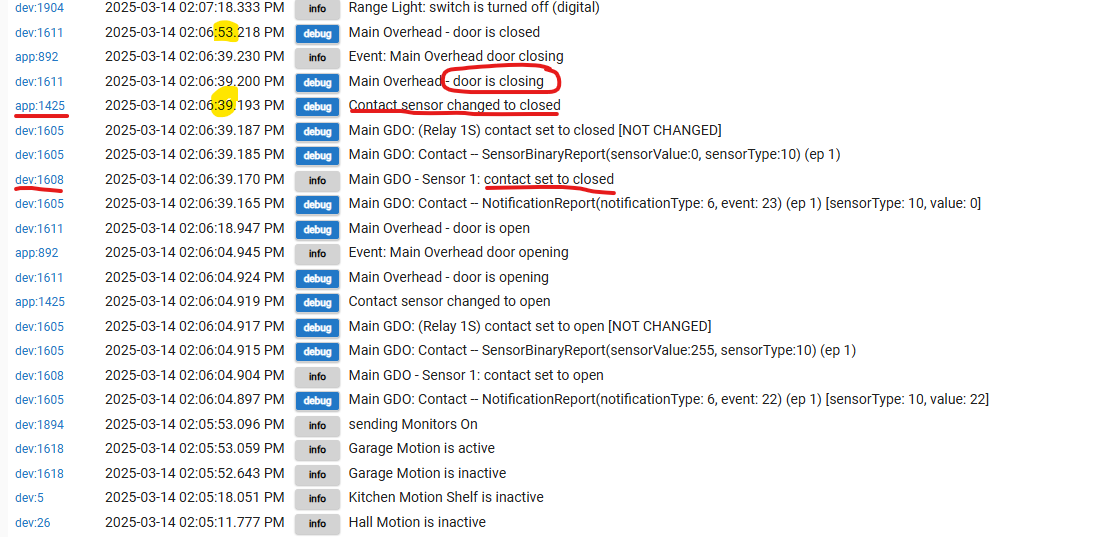
This has been like this since I installed my GDO App and kinda bugged me, so today I done a little investigating. My setup is very simple, ZEN17 relay control for the GDO with a magnetic sensor hooked to the sensor input for closed. When using the wall switch if I press close, the door will start to shut but no indication on the Dashboard tile until the magnetic sensor activates in the fully closed position, then the tile will go to closing, then seconds after (the number of seconds in the Zooz App, 14 i think I have) it will indicate closed. Why does the app not interpret the switch closed, but rather closing?
What do I know, but when you hit the legacy switch on the wall, the hub has no idea that you did so. Only when the contact sensor is changed from open to closed, then it does its thing.
When you open from the dumb switch on the wall, no problem because the contact opens as soon as the door starts moving.
The app has time in there for a typical open/close cycle.
If you did it from the dashboard, no problem. The hub would know you pushed the dashboard button.
This is very true. However that wouldn't explain why when the sensor indicates closed, the dashboard says closing instead of closed. It should certainly know it's closed the sensor told it. Instead it cycles through the "closing " period then to close. Maybe in this case it should skip closing and just go to closed, as it is in fact, really closed.
The sensor just became vertical, it does not know for certain the door is fully closed. The only way to know would be two magnetic sensors so you can detect the precise open and closed positions.
Its the opposite when you open the door via a separate remote or button when you have the tilt sensor at the top of the door. The tilt sensor will indicate open almost immediately, and there is a built in delay from that point until the app switched the door device to open.
If you close the door using the relay then the app knows the door started closing BEFORE the tilt sensor activated, so in this case it sets it to closing and waits for the delay AND the sensor to confirm it actually closed.
Overall, you could make the app much more complex, have different delays depending on what triggers the state change and which way the door is going. his could get you more accurate state changes. IMO its not worth it.
I believe this app is designed with a tilt sensor in mind, that is the typical device which is used on a garage door since it is simple to add and gives you good enough results. So yes it will work with a true contact sensor, but it is built around the limitations of a tilt sensor.
In my case it does. The only time the sensor is closed is when the door is closed. Even if it's open a crack it will be open . It's actually really good because I know for sure when the door is completely closed. I have an analog old school, 2 wire, door / window style sensor on it.
Maybe I would just be better off with a rule and not the app. if it bugs me that much.
I hear ya on the not worth it, there could be many scenarios and all with fit. Is the other app the same , LGK or something?
I have never used that app but if they have built conditions in there to specify what type of sensor you have it possibly has more accommodations. This Zooz app was purpose built to go with the garage door kit they sell which is a ZEN16 and Ecolink tilt sensor. Which is exactly what I have and it works good enough. With the tilt sensor all the way at the top of the door on your typical garage door, it does not flip to closed until it is nearly fully closed (~98%).
True, I made the bad choice of being able to see the dashboard on a 24 inch monitor from where I stand to hit the physical button. I always look at it and go, hey that doesn't match what's happening.
You could augment the app with a rule that overrides the app. Make a rule that triggers when the contact closes, delay it maybe 0.5 seconds or so, then force the virtual garage door to closed. I think that should fix it without messing up anything else in the app.
If it bugged you that much, you could use a ZEN34 wireless switch. I use one in the car. It replaces the gate and garage openers. Better range with the 800LR.
Me too. I have one by the door to turn off the well pump when I leave, lol.
Or, how about this:
I have some switches in the garage that I can triple tap up or down to open or close the garage. Not as simple as pushing that big ■■■ manual button though. Or even the ZEN34.