Sorry to go off-topic but thought I would throw this out there as another possible solution.
I had a similar issue and ended up buying a cheap Aqara M100 hub and paired the temp/humidity sensor to the M100 and then brought the M100 into HE using Matter. It's been pretty solid. I had one occasion where the sensor stopped reporting so I moved the M100 and haven't had another drop off. The only thing that doesn't come across in the temp/humidity is the atmospheric pressure reading. My sensor is located in the backyard along with the rain guage (which is powered by an Aqara open/close sensor to count pulses when it rains).
dandanache
When using : zigbee-neighbors.html
It seems to lock-up with new ver.3.0.1. < can not click or zoom on main page.
But seems to finish the DEVICES and STATUS < Weird I know.
Tested both chrome and opera
Yeah, it does complete the full scan but nothing on the output except repeaters.
I've rolled back one beta and it's working again.
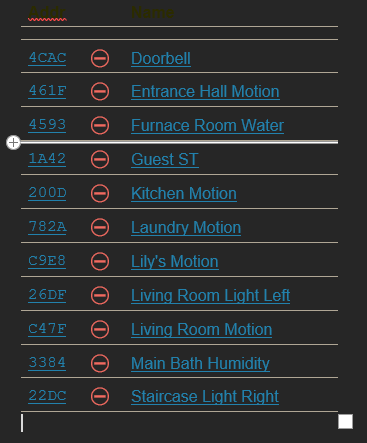
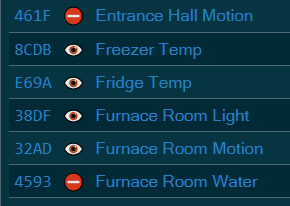
Still hates 17 of my devices.
PS: I went to Devices tab and back to Status after double clicking on one undiscoverable device.
Graph page is now frozen.
But there is some other UI bug -- I don't know if this is new or I just triggered it.
I was running a map (3.0.1 on 2.4.3.149 and 155) and mousing around looking for the device I paired. All of a sudden the link particles stopped moving.
A second time I trigged this problem just by moving the move over a node - not zooming at all. I can cause this to immediately happen just by mousing over the Hubitat node once I refresh the page and the initial Hubitat node is drawn.
"Starting interview" keeps coming and the Interview Queue on the status tab keeps updating. But the rest of the map doesn't update. I can send the whole stacktrace if that helps.
Happens with Chrome on Win10, Version 142.0.7444.162 (Official Build) (64-bit).
I've since updated it to 142.0.7444.163. It also happens on Edge.
Yes all good.
On a side note, I have had lots of orphaned devices since my ZB radio went nuts over a year ago. I got everything back after some messing around and reinstalling devices.
However, Unless I delete the items in this list and reinstall them they are always outcasts in the app.
Is it because the core routing is still corrupt, and your app knows that, but ZB is resilient enough to keep in trucking?
If I click on any of my "Bad Actors", hate that latest buzz phrase, nothing gets added to the Interview queue.
Does this work for other people in 3.0.2?
I'm on a C8Pro in the beta testing group. Not sure when it stopped working.