Thanks for the suggestion.
Just did the install and it worked great. I also have Home Assistant and this is similar to HACS. So thanks for the info here.
so now to figure out why my Wyze color bulb groups are not showing as available.
Thanks for the suggestion.
Just did the install and it worked great. I also have Home Assistant and this is similar to HACS. So thanks for the info here.
so now to figure out why my Wyze color bulb groups are not showing as available.
Did some research on this and found what could be the issue.
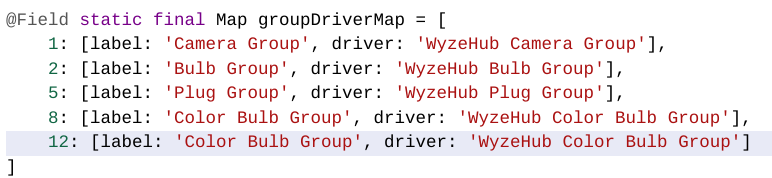
I added the following line in the Group Section:
***12: [label: 'Color Bulb Group', driver: 'WyzeHub Color Bulb Group']***
I also noticed that there is a comma at the end of the line 8: with the closing bracket. The Comma should not be there, so that implied something was there and then deleted.
Once I added that line, I am able to see the grouped color bulbs now. I am testing to see if there are any other issues.
Quick Question though:
If I am looking at Devices I see the Group Name conataining each device. I like that. But how do I use the Group Name on a Dashboard? Meaning: If I add the individual Color Bulbs, I can control them. If I add the Group Name, it seems I cannot use it. Is there a specific template type I should use?
Thanks
That was going to be my suggestion, let me know if commands and status are working as expected and i'll update the code.
Full disclosure, most of the existing code was written by jakelehner so I am working through it too, any suggestions are welcome.
I only have cameras so i'll defer real world experience with bulbs to the rest of the community. Based on the driver capabilities, i would expect that both the group and the individual devices to be compatible with thr color bulb template.
Yea, I agree. If I go to the Devices List and select the group name, I can set the color, turn them on or off. However, I cannot add it to a Dashboard and get it to work. I will see if I can figure that out as well.
Additional Finding
When I selected more than one COlor Bulb Group Names to be added as devices, it will add them, but the individual bulbs seem to not load all of its information and then cannot be added to a Dashboard. If I add one group at a time, things seem to function. So the Bulk load seems to have an issue.
I cannot uninstall this from HPM. Every time I try I get the following error. The app isn't being used and doesn't even show in my apps section. Is there any help I can get on this for a manual removal process?
Uninstall in progress
Your uninstall is currently in progress... Please wait...
Uninstalling WyzeHub
Uninstalling WyzeHub Camera
Fatal error occurred, rolling back
Not sure, there is a seperate thread specifically for HPM but you could try
Possibly check that there are no left over devices using one of the package's drivers.
Thanks guys. It looks like I had to go through an unmatch, match, repair, uninstall dance one by one. Kinda weird and I don't know how that happened, but I.... think? my HPM is now working once more. It also had 2 versions in the listed packages, which didn't make sense either.
Can anyone comment if it is possible to turn certain camera settings on/off with this app?
Use case is that I have some WYZE cameras mounted inside, looking outside using the WYZE window mount. I do not permit the cameras to record sound for privacy in my own home. However I'd like to be able to turn the sound recording setting on when away. WYZE automations does not have this capability and in order to accomplish this I would need to go into each camera setting and change manually when I leave. I'd like to know if it is possible to have this setting exposed via this integration and use Hubitat to change the setting when I leave. Thanks.
Yes. See this as an example:
(since then I have put the "Inside Cam" on a Zigbee power switch, so I no longer command the camera on/off and instead hard power it on/off)
Thanks for the reply, sorry if my question wasn't clear.
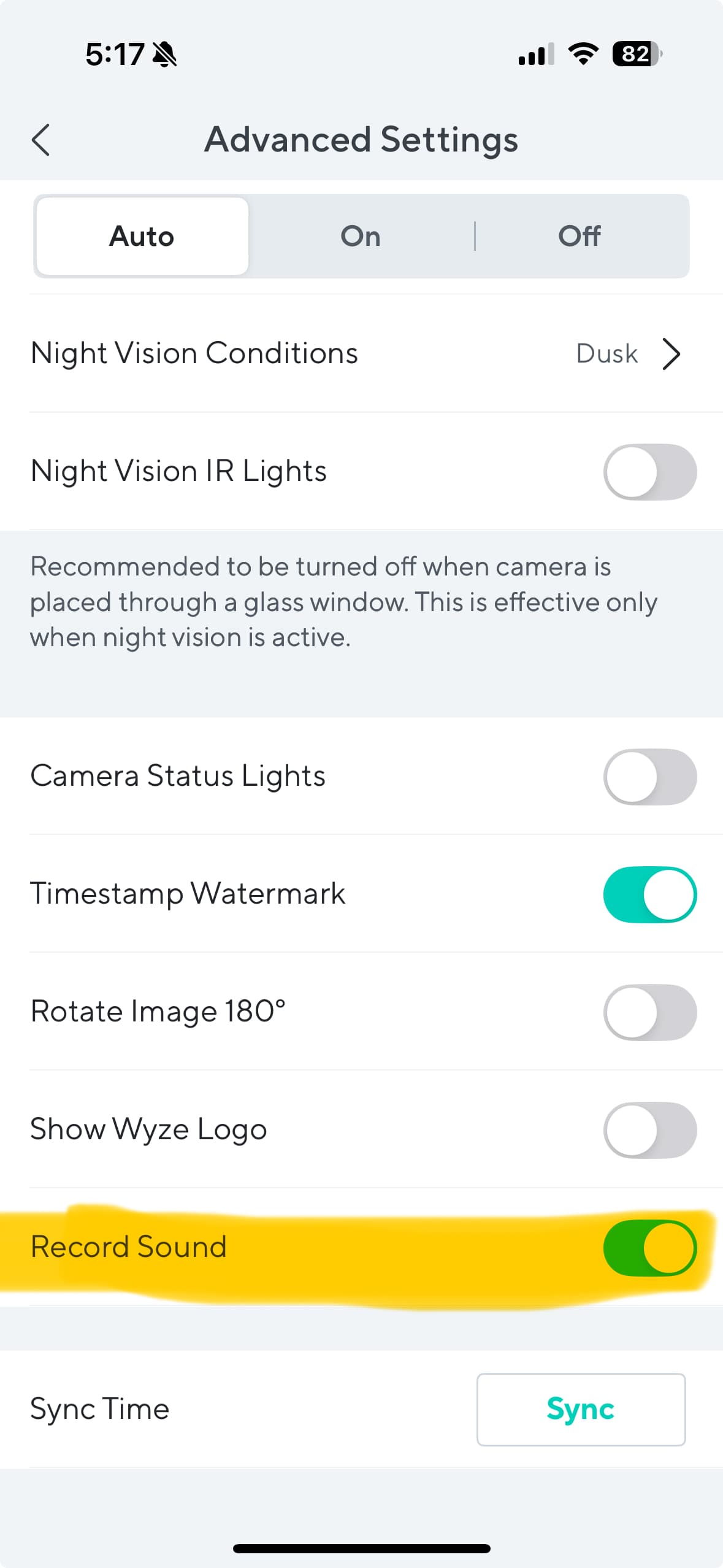
I don't want to turn the camera on or off, just change a setting as to whether or not sound is recorded when a monitoring event happens. Here is where the setting is in the WYZE app
I have inside facing cameras that I hard power on/off just like you. but this request is for an outside facing camera that is actually inside my home but looking through a window. So I only want it to record sound if a motion event happens AND we are not home. When it records outside motion events but we are home, I don't want it to record sound.
It does not in current state, it might be possible if the parameter is exposed via the API. I will try to review this week.
Unfortunately, doesn't appear to be an exposed parameter.
I did some testing with my cameras, on to off and I do not see any parameter changes.
appreciate you looking!
My use case is somewhat similar. 'Living Room Cam' is similar to what you have: an outside facing cam that is inside the house pointing out a window. In my example, I have it turn on/off setSoundNotification. I thought that was what you wanted, but I guess that only turns on or off notifications for sound, not whether it is recorded. I just have it set to always record, but only have the notifications for sound turned on when we are away.
Hi I am new to Wyze. I just bought a bulbcam with accessory bulbs. Installed the WyzeHub, it discovered the bulbcam together with the accessory bulbs as one device. I turned it on and off but it only turned on/off the camera but not controling the lights.
I then uninstalled the camera driver only kept the bulb driver, the the bulbcam failed to be created in hubitat at all.
Doesn't look like WyzeHub knows it works as a light, only as a camera.
Hey fieldsjm are you still around? I just got some Wyze Cam OGs and the driver wasn't working for them. I made a PR against your repo with updates to fix that (plus a couple other changes/improvements). Was hoping you could accept it so I don't have to publish my own fork. 
Also, if anyone has some older cameras that currently work with the existing driver, would love to have you test out the new version of the driver to make sure there are no regressions in functionality. There shouldn't be, but I don't have any old cameras to test with.
Awesome. I tested on my old cameras (v2/v3) and don't see any obvious issues with my current use case. I don't not have any OG cams so I'll defer to you for testing your updated code.
PR has been merged and available for update via HPM.
Download the Hubitat app