[RELEASE] Tuya Zigbee Thermostats and TRVs driver

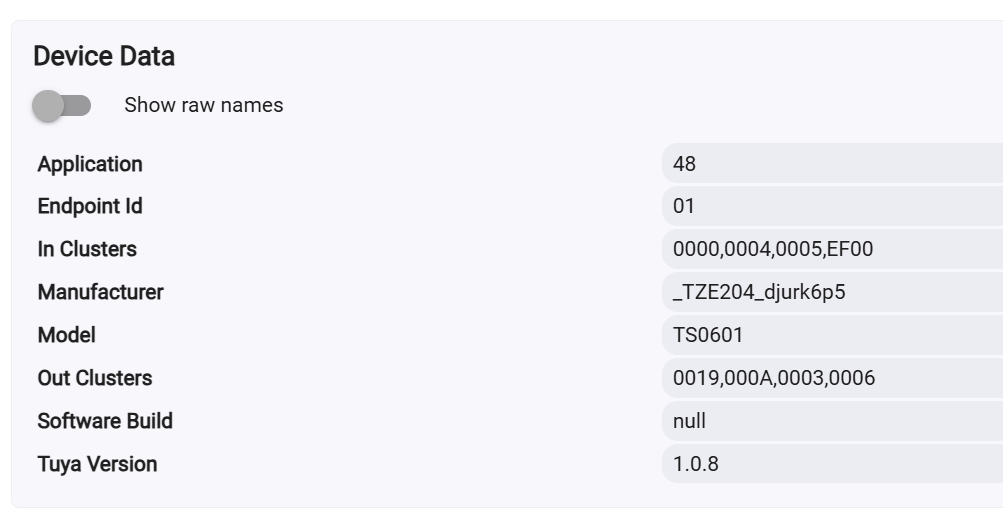
I was looking for the Zigbee model/manufacturer as it is recognized in Hubitat.

From the picture, it seems that this device is not a fully functional thermostat but rather a unit with a relay and a temperature probe. However, you can still use it as a thermostat by creating rules in Rule Machine (RM) to control the relay. For instance, you can configure it to turn on the relay when the temperature falls below a certain value and turn it off when the temperature exceeds the heating setpoint plus a specified threshold.

This device does not have a dedicated 'Device Profile' in this "Tuya Zigbee Thermostats and TRVs" driver. You can try using the 'Tuya Temperature Humidity Illuminance LCD Display with a Clock' driver. There was also a dedicated driver built by another Hubitat user for this device. I will need more time to search for it.

Thansk for the advice, I tried using the Tuya Temp with Clock withotu scucess. Maybe the dedicated driver you refer was this one [RELEASE] Tuya Zigbee Thermostats and TRVs driver - #120 by lwbenso

/**

  • Tuya TS000F Temperature Relay (Multi-Endpoint EF00 Decoder)
    */

metadata {
definition(name: "TS000F Temp Relay (Multi-EP)", namespace: "chatgpt.custom", author: "ChatGPT") {

    capability "Switch"
    capability "Temperature Measurement"
    capability "Refresh"
    capability "Configuration"

    // MAIN fingerprint
    fingerprint profileId:"0104",
        inClusters:"0000,0003,0004,0005,0006,E001,E000,EF00",
        outClusters:"000A,0019",
        manufacturer:"_TZ3218_7fiyo3kv",
        model:"TS000F"

    // Extra fingerprints to ensure Hubitat binds EF00 to this driver
    fingerprint endpointId:"02", profileId:"0104",
        inClusters:"0000,0003,0004,0005,0006,E001,E000,EF00",
        outClusters:"000A,0019",
        manufacturer:"_TZ3218_7fiyo3kv",
        model:"TS000F"

    fingerprint endpointId:"03", profileId:"0104",
        inClusters:"0000,0003,0004,0005,0006,E001,E000,EF00",
        outClusters:"000A,0019",
        manufacturer:"_TZ3218_7fiyo3kv",
        model:"TS000F"
}

}

preferences {
input "debugLogging", "bool", title:"Enable debug logging", defaultValue:true
input "useF", "bool", title:"Use Fahrenheit?", defaultValue:false
}

def logDebug(msg){ if(debugLogging) log.debug msg }

def parse(String desc) {
logDebug "RAW: ${desc}"

// Do NOT filter EF00 by endpoint — accept everything
if (!desc.contains("EF00")) return

def map = zigbee.parseDescriptionAsMap(desc)
if (!map?.data) return

def raw = map.data
if (raw.size() < 6) return

//---------------------------------------------------------
// Decode Temperature from last 2 bytes
//---------------------------------------------------------
try {
    def tail = raw[-4..-1].join()
    def tempRaw = Integer.parseInt(tail, 16)
    def tempC = tempRaw / 10.0

    def out = tempC
    def unit = "°C"
    if (useF) {
        out = (tempC * 1.8 + 32).toDouble().round(1)
        unit = "°F"
    }

    sendEvent(name:"temperature", value: out, unit: unit)
    logDebug "Temperature decoded → ${out}${unit}"
} catch (e) {
    logDebug "Temp decode failed: ${e}"
}

//---------------------------------------------------------
// Relay state based on last byte
//---------------------------------------------------------
def lastByte = raw[-1]
if (lastByte == "01") {
    sendEvent(name:"switch", value:"on")
    logDebug "Relay → ON"
}
if (lastByte == "00") {
    sendEvent(name:"switch", value:"off")
    logDebug "Relay → OFF"
}

}

def on() { sendRelayCmd(1) }
def off() { sendRelayCmd(0) }

def sendRelayCmd(val) {
def payload = "00001F010001" + zigbee.convertToHexString(val, 2)
logDebug "Send Relay Cmd: ${payload}"
sendHubCommand(new hubitat.device.HubAction(
"he cmd 0x${device.deviceNetworkId} 0x01 0xEF00 0x00 {${payload}}",
hubitat.device.Protocol.ZIGBEE))
}

def refresh() {
logDebug "Refresh"
zigbee.readAttribute(0x0006, 0x0000)
}

def configure() {
logDebug "Configure"
}
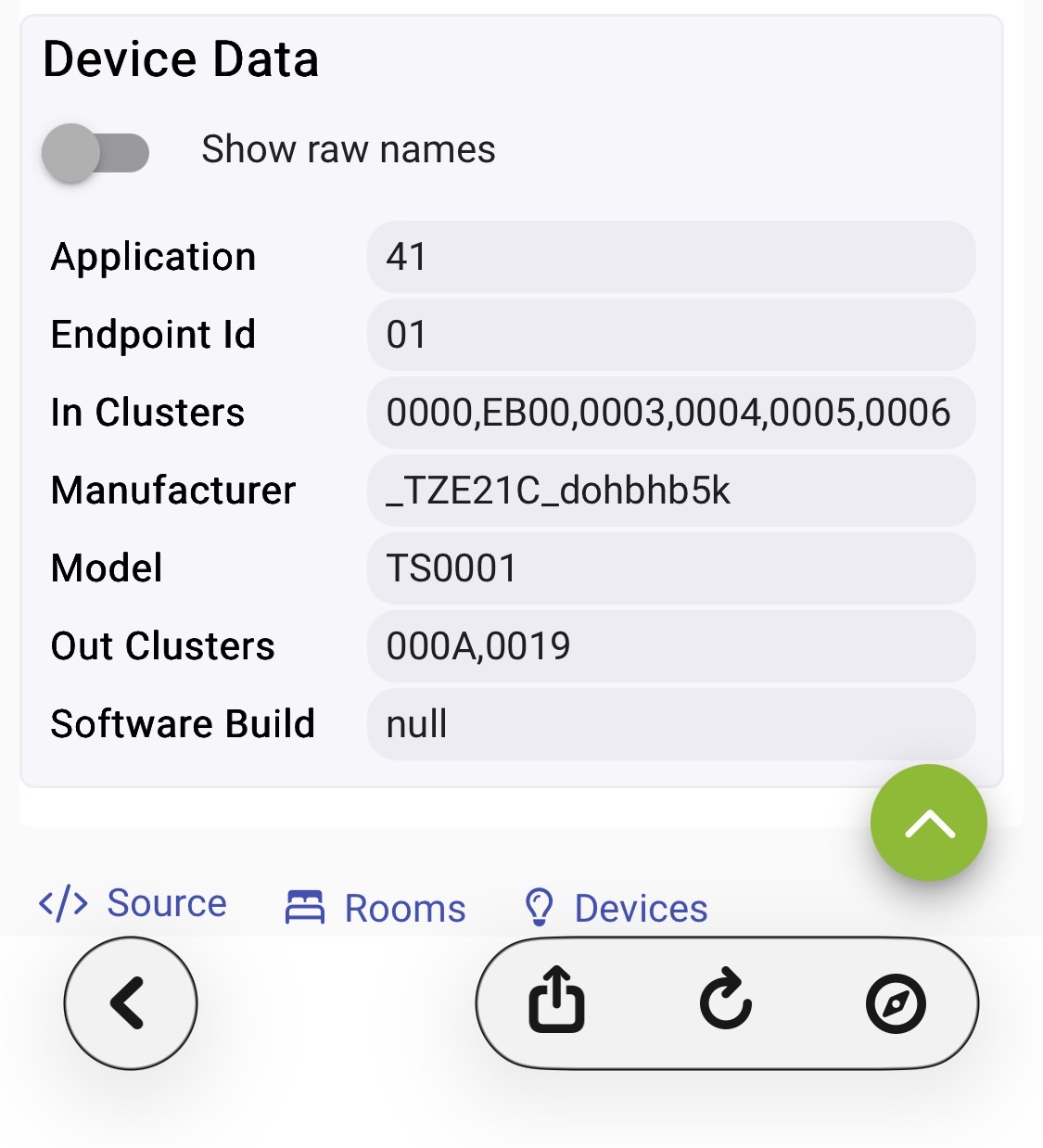
Please follow the instructions for identifying your device…

1 Like

Driver installed, floor heating up, currently no warnings. I think this is going to work; if there are any problems I will let you know. Many many thanks!

1 Like

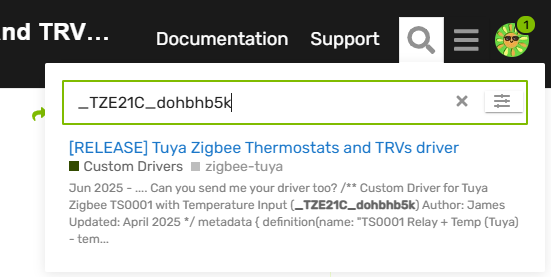
Your device unique Zigbee Manufacturer ID is _TZE21C_dohbhb5k

Searching for it in the forum shows this post :
image

The dedicated driver in this post should be working with your device :

Hi kkossev,

Thanks for the update, after LOAD ALL DEFAULTS and Configure, hysteresis works perfect now! powerSource is still 'ac' and there is no battery level reporting. I know that battery reporting is very slow, so if it appears in the next days I will let you know (I'm afraid it won't change).

Current States

Show raw names

status clear
antiFreeze off
childLock off
coolingSetpoint 35.0
healthStatus online
heatingSetpoint 23.0
hysteresis 0.2
powerSource ac
supportedThermostatFanModes ["auto","circulate","on"]
supportedThermostatModes ["off","heat","auto","on"]
temperature 24.2
thermostatFanMode auto
thermostatMode heat
thermostatOperatingState idle
thermostatSetpoint 23.0

State Variables

deviceProfile MOES_ZHT_S03_THERMOSTAT
deviceType Thermostat
driverVersion 3.6.1 2026/02/08 11:47 PM (TS0601 _TZE204_zxkwaztm) (C-8 Pro 2.4.3.177)
health {"checkCtr3":1,"offlineCtr":0}
lastHeatingSetpoint 20
lastRx {"timeStamp":"2026-02-10 12:31:39.595","tempTime":1770722149523,"setPoint":23,"checkInTime":1770723099599}
lastThermostatMode heat
lastThermostatOperatingState idle
lastTx {"setBrightness":-1,"setPoint":-1,"cmdTime":1770722667002,"isSetBrightnessReq":false,"isSetPointReq":false}
states {"isRefresh":false,"isDigital":false,"isPing":false}
stats {"cfgCtr":2,"rxCtr":33,"txCtr":42,"tempCtr":2}
1 Like

Just a litle update. Nothing has changed in the past week. No battery level and powerSource is still ac. I think if it hasn't changed until now it won't change.

I'm not sure where to request a new device to be added to this?

I have a ENGO Controls EONE-BATW zigbee thermostat which appears to be TUYA under the hood going by its device fingerprint. Could this be added to the driver please?

What else do you need to add this?

Thanks for your excellent work so far!

1 Like

Hi @happygreentreefrog ,

Unfortunately, at this time, it is almost impossible to add new TRV/Thermostat device profiles.
This driver reached the maximum allowed size of static data (the device profiles definitions), and I can't add new ones. I have to decide what to do further - go the risky way of converting all the static definitions into external JSON files (same approach as implemented in the [BETA] Tuya Zigbee mmWave Sensors or to split the driver into two new drivers - one for TRVs only and another one for Tuya thermostats only... Both approaches have weak sides.

Meanwhile, can you try some of the existing device profiles? There is a good chance the most important functionalities will work ...

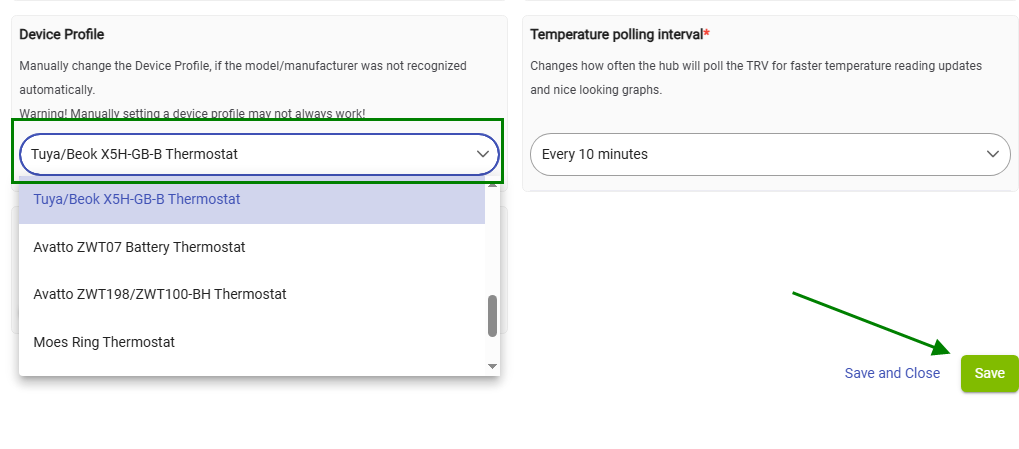
Try the 'Tuya/Beok X5H-GB-B Thermostat' profile :

Will it work?

Hi,

Ok, yeah, I realised the size was a problem when I made some edits and got a method too large error.
I did manage to implement a driver that works, including humidity, heating state ('idle'/'heating'), setpoints etc by adding a new entry and a ZigBee handler for humidity.

Maybe you could create a parent driver with a drop-down (or automatch via fingerprint) and then pull down the correct definition? Could query a web service or GitHub directly. Not really my field, I'm an electronic engineer but I tinker with code occasionally.

All the best.

1 Like

@happygreentreefrog, please send me in a DM your modified copy of the driver via DM. I will try to include it in a future update.

@happygreentreefrog
I happen to have ended up with the same fingerprint from a recent aliexpress purchase so probably have the same version. Would be interested in testing your version too if possible as the profiles Ive played with in this handler all seem to have different oddities (but admittedly Tuya/Beok X5H-GB-B Thermostat does seem the best of the ones Ive tried, curiously alongside a TRV profile.... TUYA_HY367_HY368... ).

EDIT: I realise it isnt exactly the same, and that the difference is not just a serial number at the end of model number - TS0601 _TZE204_cvub6xbb which translates to 'VANCOO / Beok Model
TGM50-Zigbee'