[RELEASE] Tuya Zigbee Multi-Sensor 4 In 1 (PIR motion sensors) w/ healthStatus

The device has changed its DNI (the short Zigbee address) - did you pair it for a second time or not?

If you remove the batteries, wait 15 seconds and then insert the batteries back - is there anything in the live logs? (do not click on any commands from the device web page, the device should report itself).

Also, please confirm that this device is sold as a 'PIR motion sensor with Illuminance (Lux)' only? No any mentioning of mmWave 'Presence' sensor features?
(I am still confused about this HOBEIAN manufactured devices, seems that there are at least two three different variations floating around)

Called ChatGPT for a help - this is the result (to be double-checked manually, never trust 100% ChatGPT! :slight_smile: )

Model Sensing hardware & role What it exposes (Zigbee2MQTT) Notable options Power
ZG-204ZL
inClusters: "0000,0003,0500,EF00,0001,0400", model:"ZG-204ZL", manufacturer:"HOBEIAN"
PIR + Lux (no radar) → classic motion/illuminance occupancy, illuminance, battery + sensitivity (low/med/high), keep_time, illuminance_interval Simple PIR tuning (keep-time, sensitivity). Coin cell CR2450 (vendor spec for Z/ZL family). (Zigbee2MQTT)
ZG-204ZV
inClusters: '0000,0003,0500,EF00,0402,0405,0001,0400', manufacturer: 'HOBEIAN', model: 'ZG-204ZV'
mmWave presence model with temp & humidity (no PIR listed) presence, illuminance, temperature, humidity, battery + fading_time, indicator, illuminance_interval, motion_detection_sensitivity Has temp/humidity calibration; presence only (no PIR “occupancy”). (Battery not stated in docs page; varies by seller.) (Zigbee2MQTT)
ZG-204ZM
In Clusters: '0000,0003,0500,EF00,0001,0400', Manufacturer: 'HOBEIAN', Model: 'ZG-204ZM'
PIR + 24 GHz mmWave combo → presence + motion state + lux presence, motion_state {none, small, large, static}, illuminance, battery + fading_time, static_detection_distance, static_detection_sensitivity, motion_detection_mode {only_pir, pir_and_radar, only_radar} (fw ≄ 0122052017), motion_detection_sensitivity, indicator Full mmWave tuning and PIR↔radar mode switch (on newer firmware). 2×AAA (review teardown/spec). (Zigbee2MQTT)

@damianPL , update this driver manually to ver. 3.5.4 2025-10-03:

  • (dev. branch) adding model:'ZG-204ZL' (note the 'ZL' sufix!), manufacturer:'HOBEIAN' 2-in-1 sensor into TS0601_2IN1' device profile group

Then delete the ZG-204ZL device and pair it again to your hub.
Please let me know if it works.

i cannot find 3.5.4 version could you help me?

It is the same link : https://raw.githubusercontent.com/kkossev/Hubitat/refs/heads/development/Drivers/Tuya%20Multi%20Sensor%204%20In%201/Tuya%20Multi%20Sensor%204%20In%201.groovy
but sometimes GitHub is cacheing the pages, or by some other reason the changes are shown after some time.

If you still see the older version, try opening the page in incognito tab

2 Likes

Now is good version maby i was too fast ;).

After this update device work well.
Thank you

1 Like

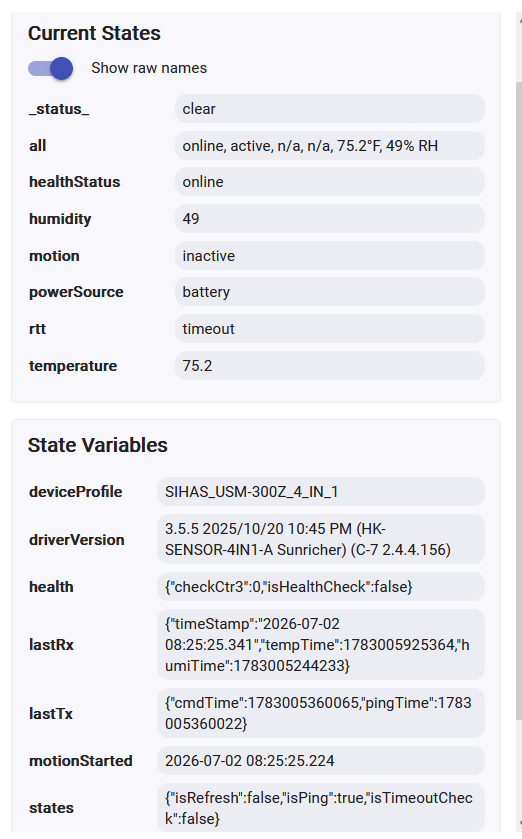
'Tuya Multi Sensor 4 In 1' driver version 3.5.5 2025-10-20 - added IMOU Motion Sensor ZP1 model:'ZP2-EN', manufacturer:'MultIR'

This is a simple PIR sensor, the cooldown time is 60 seconds.

2 Likes

@kkossev I have a _TZE200_3towulqd motion sensor. The driver I'm using (I think it auto-chose) is 'Human Presence Sensor'.

The sensor provides Illumance which seems somewhat accurate - however it has no 'update firmware' option. If I change to the Tuya multisensor - will it function okay and support both motion as well as Illumance while providing Firmware update option? I switched in your driver but don't see the firmware update option...

There seem to be at least two different variations of the “2-in-1” TS0601 sensors using the same manufacturer ID _TZE200_3towulqd.

Did your unit pair and work correctly with this driver?

I don’t plan to add a “Zigbee Firmware Update” command to this driver. Tuya OTA updates done outside of their own ecosystem are quite risky — they don’t fully follow the standard OTA process (again
), and there’s a significant chance of bricking the device.

2 Likes

I bought one from this manufacturer and the instructions say only the ZG-204ZM model has mmwave radar detection

I apologize - my nov 2025 post you responded with a question and I didn't answer.
Did it pair and work. I guess thats two questions. All have paired. All have worked with the system 'Human Presence Sensor' driver. But I'm backing looking to see if others had fails on theirs with battery consumption.

All 4 units have had the same issue. One room, just this week, which gets very little activity, triggered to Motion Active, but would not go off. This has happened exactly the same on all 4 units. More heavily trafficked rooms go out faster - the other 3 had gotten hung this way months back.
It seems to be battery. I just looked at battery in my logs and influx and the batteries on all have said '100%' since implementation. They have never budged off.
I attempted resetting and re-pairing, but it would just stay active. The solve last night was to replace batteries. Once I swapped batteries the unit became operational again. I think the system driver is not functioning correctly, but thats a supposition.
I intended to look for different drivers, and failing that, I'll swap the units for third reality motion sensors which are rock solid in my environment.

Here to say 'Kudos'.
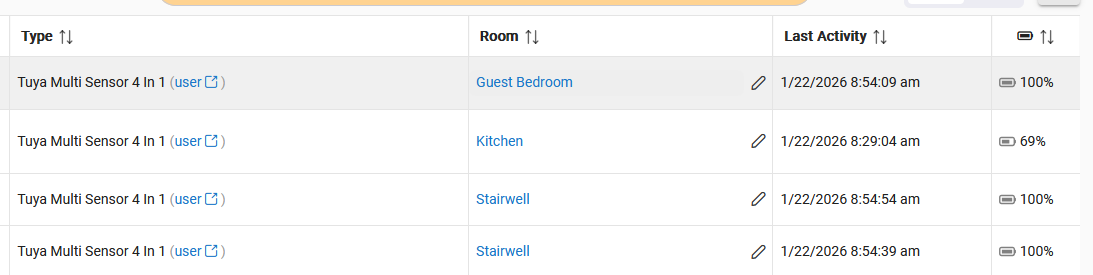
@kkossev I switched from (System) Human Presence Sensor to (User) Tuya Multi Sensor 4 in 1, which I know you built.
As always, I get bowled over by how much more sophisticated user drivers are as compared to system drivers. Your 'Profile' nailed it perfectly, detecting that I had a 2 in 1 and got the correct profile immediately and without user (me) interacting.

And now I have values in Battery that are not 100%! So that supports my theory the Human Presence Sensor is bugged or at least wrong for this device. One shows '69%' now, where it was 100% pre-driver change.

Thanks you for your hard work.

1 Like

Really quick question: I'd like the bathroom light to stay on as long as someone is in the bathroom. Now, there are two ways to do this. One is the difficult way:

Sense motion
Cancel previous "off timer" for this rule
Turn on light
Set off timer for light to 1 minute.

This is what I did w/the Hue motion sensor and for the most part it worked. My issue is that my husband had to wave his hand above the shower glass doors cos hue couldn't "see" through the patterned glass. I bought the SNZB-06p cos it CAN see through glass - and indeed through walls... so I want this to be more accurate w/o him handwaving in the dark.

The second is to rely on motion sensor (in my case a Sonoff SNZB-06p) to trigger an "on" when it senses a person and trigger an "off" when it sees no motion in room (hopefully for a specified amount of time...but if reporting interval matters, then 1 minute or less.

Which is better and what are the "costliest" (ie: more chatty and therefore more accurate) ways to do this?

I see reporting can be set from 0 to 240, but is 0 "constant" or is 0 "never" (driver does not explain). I have Keep Time set to 0 so it will report all motion.

Thanks!

Jann

A quick question:

Is it possible to disable the LED function on the Tuya 4 in 1? If so, how?

@kkossev Thank you for what you have done - this driver alone is currently handling 16 hardware devices - perfectly!

I recently started cleaning my environment, and trying to get more stability - I noticed that when I went from the Generic motion Sensor (no temp) to this, I lost the ability to push the update Firmware button.

I know that HE doesn’t maintain a large list of firmwares, but they do occassionally have some, and the Third Reality units are currently very popular. I recently moved them from HE to HA so I could do the firmware updates, so all my Third Reality Devices are at this time, current BUT I’d love to have the options to mash the Firmware Update check button!

Stealing from another driver it seems to boil down to this (and a Command

        command 'updateFirmware'
/**
Update Firmware Command
*/

List updateFirmware() {
log.info 'checking for firmware updates'
return zigbee.updateFirmware()
}

Would you consider adding this or putting it on a Future features pile?

Again. Huge amount of thanks for all you already do for me and the community.

1 Like

You could revert for a day or so to the Generic driver to get a Firmware Update button back, then return to the @kkossev driver.

3 Likes