Hi @garyjmilne, I'm moving on to creating some attribute tiles now that the rooms are getting near completion and I was wondering if the Attribute tile could have the option to use the Device Name in place of the Device Label. All my device labels, since I started, are coded like xyy where x is the room and yy is the device within the room. When I was starting I didn't know how many devices I would end up with so creating a naming convention wasn't on my radar. This format made expanding a little easier. Now, unfortunately, it makes the tile harder to use almost to the point of useless since I'd have to cross reference the device. Thanks.
Edit: I don't know if this breaks anything or not but it didn't seem to. I did a quick test; on line 1015 in the attribute monitor app I changed the device name variable from toString to the getName function and the tile populated with the names instead of the labels. The values and sorting all worked fine. Maybe a switch can be added to select Name vs. Label?
Hi @garyjmilne, I just came across an issue with the iconbar. My bar does not seem to be updating on the dash. What can I look for or any ideas? If I hit publish it will update but then it becomes stale. Even refreshing the dash does not change the values. All the other devices, that I've noticed, have been working.
This is dash...
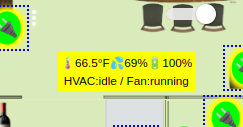
This is the tile...

1 Like
Yes, I just tested it out and it's not a difficult change. It will be in the next release of the respective apps. Attribute Monitor and Activity Monitor next week sometime. Followed shortly thereafter by multi-attribute monitor.
2 Likes
Great! Thanks.
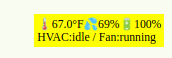
An update on the icon bar, which makes it weirder. I've noticed that it did actually update but it seems to use old data. I have my fan set on circulate mode so it runs periodically regardless of the HVAC state. I've been watching that value (since that changes more often) and when the state changes the dash updated but to the previous state.
i.e. the fan is 'running' on the dash but is actually 'idle'. When the fan starts 'running' the bar updates and changes the fan to 'idle'. And vice versa, when the fan stops running the dash updates bar with 'running'. But the really weird thing is that the tile preview in the app is correct.
Thanks for bringing that to my attention. I did look at the code but nothing jumped out at me. Your description of the scenario is helpful, if a little baffling. But everything will make sense in the end.
I'll take a look at it tomorrow. I'll have some time in the AM.
Ok, thanks for looking. It stayed consistent BTW, as soon as my fan turned on again the dash updated to 'idle' and the tile preview is correct with 'running'. I agree, baffling.
Dash
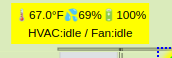
Tile
I have released TB Rooms version 1.1.1 via HPM.
- Version 1.1.1 - Fixes bug in the refreshing of IconBar data.
3 Likes
Not that I wish bugs on anyone, but I'm glad you found something as I thought I was doing something wrong because the symptoms seemed very odd. 
Attribute Monitor and Activity Monitor Updated to Version 1.4.0 as of 9/29/23. Improvements are:
- Incorporated improvements first introduced in Multi-Attribute Monitor:
- Added selectable and improved compression level.
- Added selectable "eventTimeout" field and runInMillis logic to reduce publishing load.
- Added "Also Highlight Device Names"
- Update threshold operators and variables from using numbers 1-5 to 6-10.
- Added %time1% and %time2% for full 24hr and 12hr times.
- Added selector for Device Naming. Choose Device Name or Device Label (Default).
- Added attribute "level" as selectable attribute.
- Added Disable Overrides as a recovery method.
Let me know if you have any issues.
It's worth pointing out that increasing the scrubbing level from "Normal" to "Aggressive" will typically reduce the size by 100 - 150 bytes for a table that is around the 1K mark. By enabling this you can get several additional rows of data (or added features) in your table and still be less than the 1K dashboard limit.
2 Likes
I feel a little explanation\reminder of this might be good.
When a bulk change happens in your home, such as groups of lights coming on at sunset, Tile Builder will receive notification of a change from each individual device. If there were 6 lights coming on it would receive 6 individual changes and regenerate the table for each event. This can be desirable in some instances and unnecessery in others.
What this setting does is reduce these group events into single events. It works this way:
When an event comes in Tile Builder sets a timer for the value selected, lets say two seconds (default) then the timer starts counting down. If another change comes in before the 2 second timer expires then the timer is again reset to 2 seconds. Once 2 seconds passes without any new activity then Tile Builder will generate the new table.
There are some tables where you won't care, such as battery or temperature and others where you will care, such as contacts or lights. Set this to the appropriate value for this purpose you have in mind. Even a 250 millisecond delay will reduce mass events into one or two refreshes.
@garyjmilne I am so loving my TB app. absolutely in my top 2! Thanks Gary!
Regarding 'Units'. On an attribute tile there is a drop down for units - which I interpret as 'concat to end of device value'.
In my table my expectation was in the Temp column to see '72.3 _ºF'. I can't seem to get that to show. I'm also wanting to use this for "PPM" in my air quality tile and LX for my outdoor tile.

What am I missing?
PS - Coffee coming your way!
1 Like
Not to derail you conversation, but I want to add a nugget I learned a little while ago...
If you want to add the degrees sign, use ALT-2-4-8 (use the numbers on the number keypad) on your PC keyboard (not sure how to do the equivalent on laptops without the keypad).
On an iPhone, hold the zero (0) to add the degrees sign.
1 Like
i appreciate the info - easily I can use the charmap of windows, the alt-hex values as you describe and even cut past from a screen - all would work - I was hoping the app author might take a moment to review if his tool wasn't functioning as he expects or if it was I/O (Inputting Operator) error. thanks for reaching out and graciously offering your knowledge.
@garyjmilne - Gary - I wonder if you would consider adding as a future feature another variable - line-height.
In a couple of reproduction of tables from dev HTML of existing apps, the dev has relied on Line Height to get scrunched past the HE dashboard problems. While I freely admit and advertise I don't use HE Dashboard except for debug and some qa script testing - if your 3 modules that produce such incredible tables could have a line-height option on their General tab I could well take advantage of it! Thanks for your consideration.
Shu
Yes, your expectation is spot on. Should be an easy correction. I'll get to it in a day or two.
No need, you are worth it.
Row height is automatic based on text size and padding. If borders are on then border padding takes precedences. If borders are off then text padding on the rows takes effect.
Border Padding 0
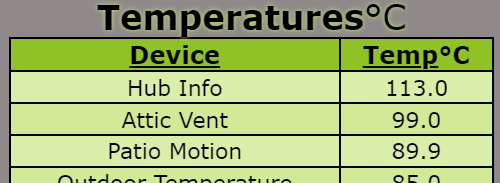
Border Padding 8
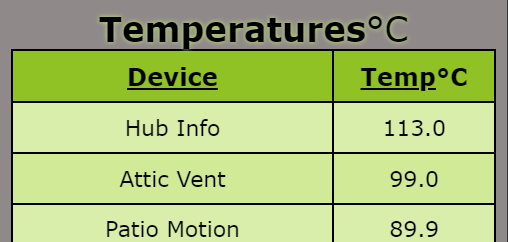
Let me know if that helps at all. If not send me a screen shot of the table in question. It can probably be done with overrides.
If you have the Advanced version you will find some useful values in the Highlight Notes where you can cut and paste the degree symbol for example plus some others.
1 Like
Thats how my understanding was also on the row-height. No issue there.
If you're referring to my other topic on line-height- I'm was trying to spot on reproduce what hub info driver v3 was creating in html - to stuff the 8 lines into the tile - line-height was used to cut the line down to fit. Using Tile Builder I can clean it up a boat load! I really. really. love this tool. the more I dig, the better it gets!
One of the hidden beauties of Tile Builder is the versatile nature of the "Overrides"
Even though I do not have a built-in value for line height it can easily be applied like this.
All this does is add "line-height:10px" to the table row definition and viola.
Pretty much any valid CSS can be added with this method.
I just finished re-reading the docs for the 4th time! how'd I miss that! THanks Big G.
1 Like



