[RELEASE] Sofabaton X Series Universal Remote Driver

Hi All, this is heavily based on @mike.maxwell driver, but is dumbed down a bit for us mere mortals. :grinning_face_with_smiling_eyes:


This driver lets a Sofabaton X Series remote trigger Hubitat automations. Start or stop an activity on the remote and it sends a value to your hub over local HTTP, which the driver turns into a button press you can use as a rule trigger.

Hardware: X1S (minimum) and X2

What you can trigger on:

  • Numbers 1-10 → buttons 1-10

  • Any string you like (e.g. watchTV) → buttons 11-20, via ten user definable slots you configure in the driver preferences

  • on / off → a switch event, no setup needed

String activities also set two attributes, lastButtonValue (the raw text the remote sent) and lastButtonLabel (your own description), so you can trigger on the text itself with a Custom Attribute trigger instead of tracking button numbers.

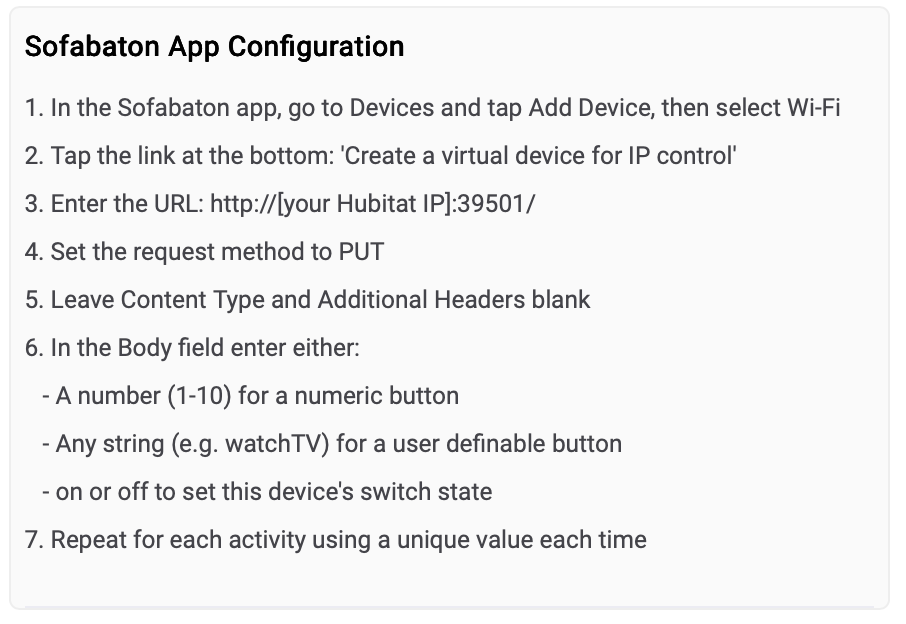
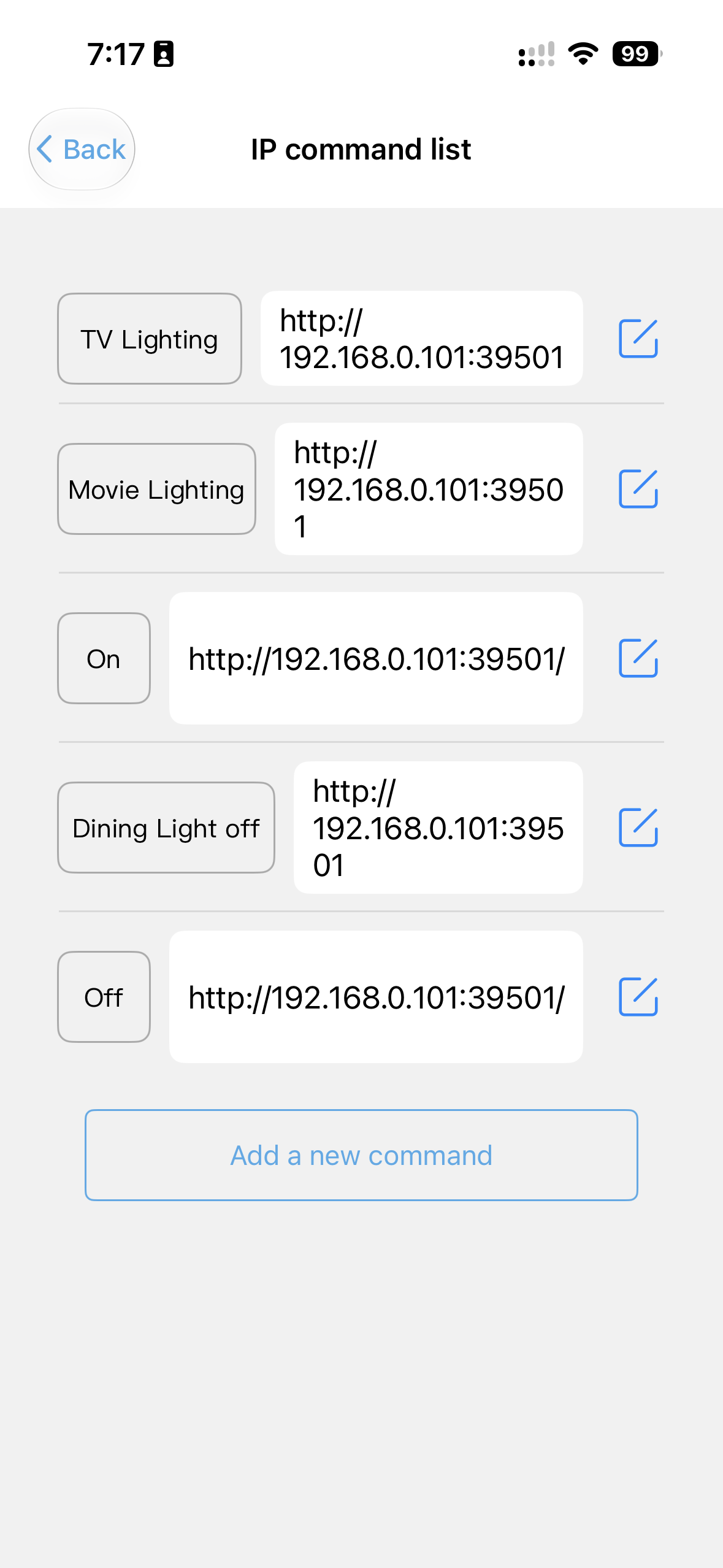
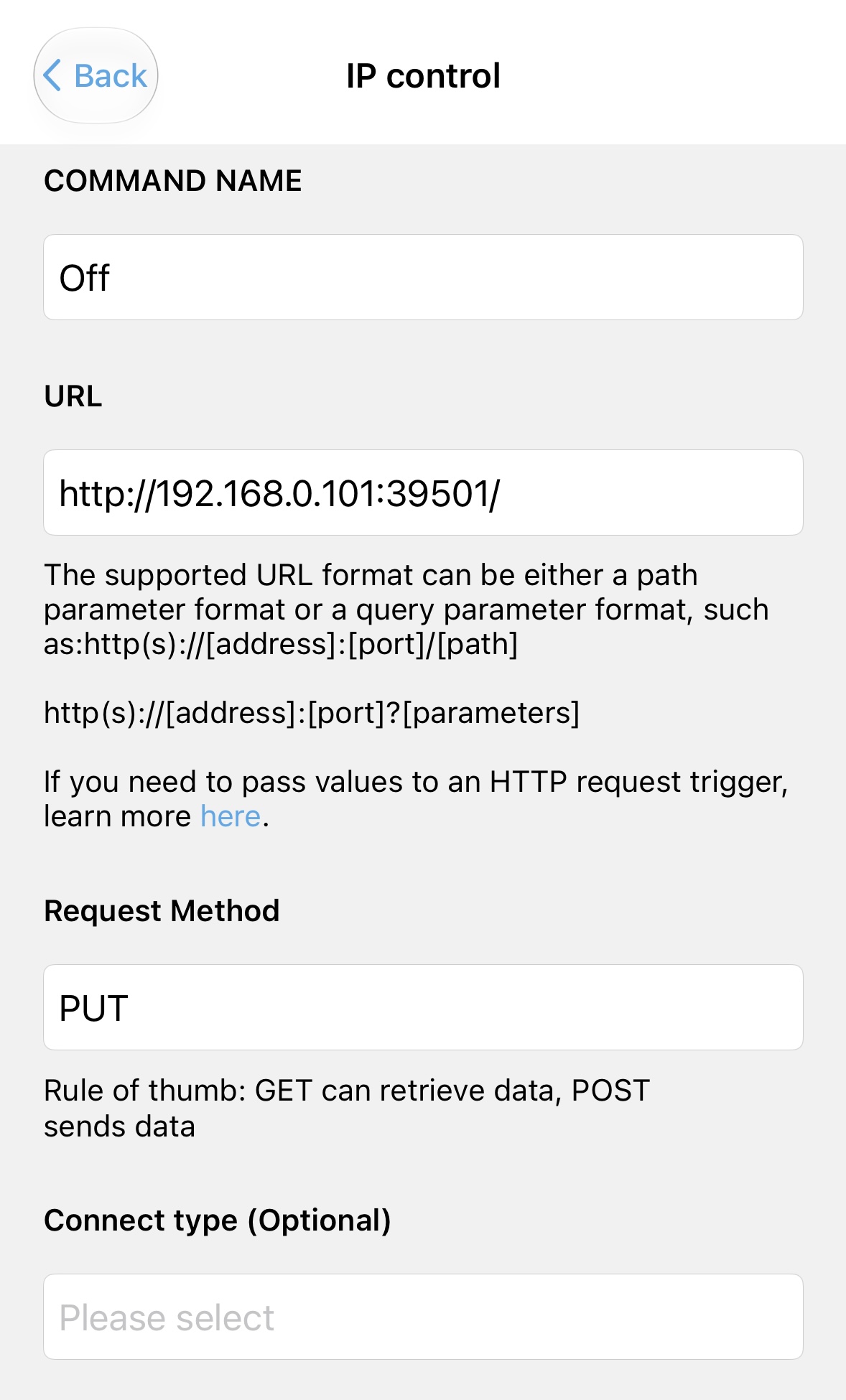
Setup is roughly: import the driver, create the device, give your Sofabaton hub a static DHCP reservation and enter that IP, then in the Sofabaton app add a Wi-Fi device pointing at http://[hubitat IP]:39501/ with the method set to PUT and your chosen value in the body. One per activity.

Worth noting this is one-way, remote → Hubitat. To fire a Sofabaton activity from Hubitat, enable the API in the Sofabaton app and drop the webhook URL it gives you into a Send HTTP GET action. No driver needed for that direction.

Full install steps, configuration and troubleshooting are in the README:

Installation

Via HPM - Search for “sofabaton”:

or manually:

  1. In Hubitat, go to Drivers CodeNew DriverImport.

  2. Paste this URL and click Import, then Save:

    https://raw.githubusercontent.com/dJOS1475/Hubitat-Sofabaton-X-Series/refs/heads/main/Sofabaton_Driver.groovy
    
    
  3. Go to DevicesAdd DeviceVirtual, give it a name, and set the Type to Sofabaton X Series.

  4. Set a static DHCP reservation for your Sofabaton hub on your router.

  5. Open the new device and enter that reserved address in Remote IP Address, then Save Preferences.

You can find more info here on Github:

Credit to Mike Maxwell for the original, with contributions from Gassgs and SViel.

Updates:

2026-07-27

v1.10.0 - Fixed a typo in the instructions (read Content instead of Connect).

2026-07-26

v1.9.0 - Bug fixes and new config warnings

2026-07-22

v1.8 - Just clarified the instructions to include on/off info for the switch, no other change.

2026-07-18

v1.7 -

  • Fixed string activities never triggering automations: pushed is a NUMBER attribute per the PushableButton capability, so the string values previously sent were invalid.
  • User definable slots 1-10 now map to button numbers 11-20
  • Added lastButtonValue and lastButtonLabel string attributes so rules can also trigger on the raw string sent by the remote, or on the friendly label
  • push() now accepts 1-20 as well as a match string, resolving it to its button number
  • Trim whitespace from the request body before matching

Example use cases:

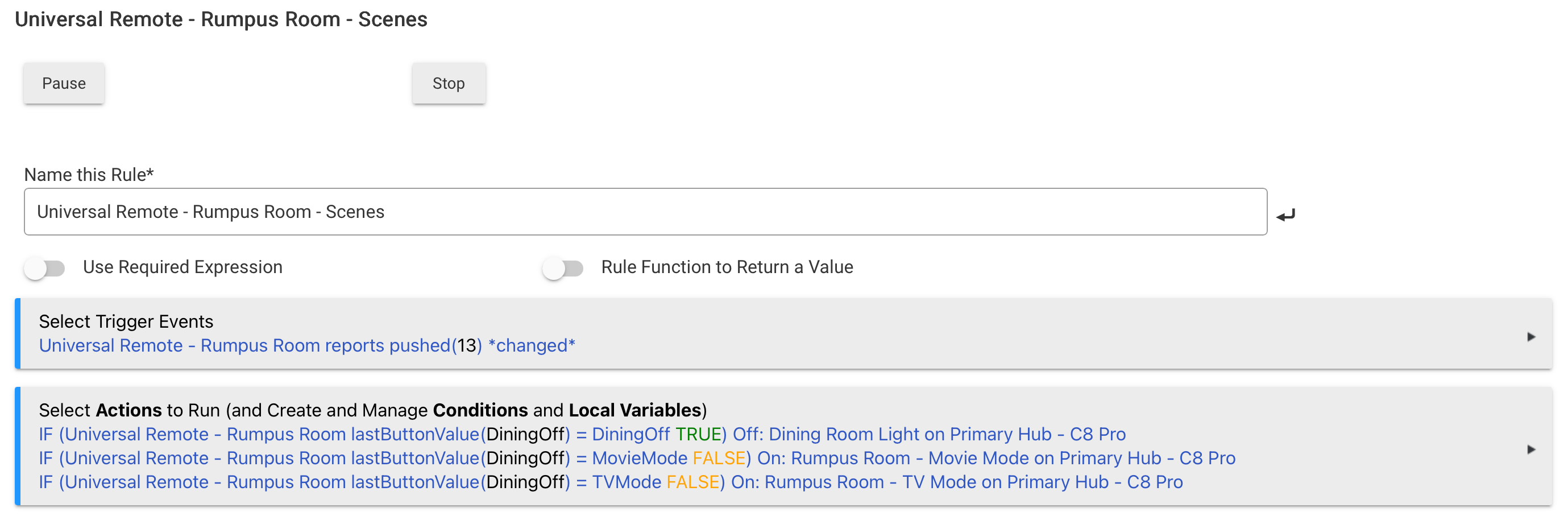
Simple Rule to trigger scenes etc:

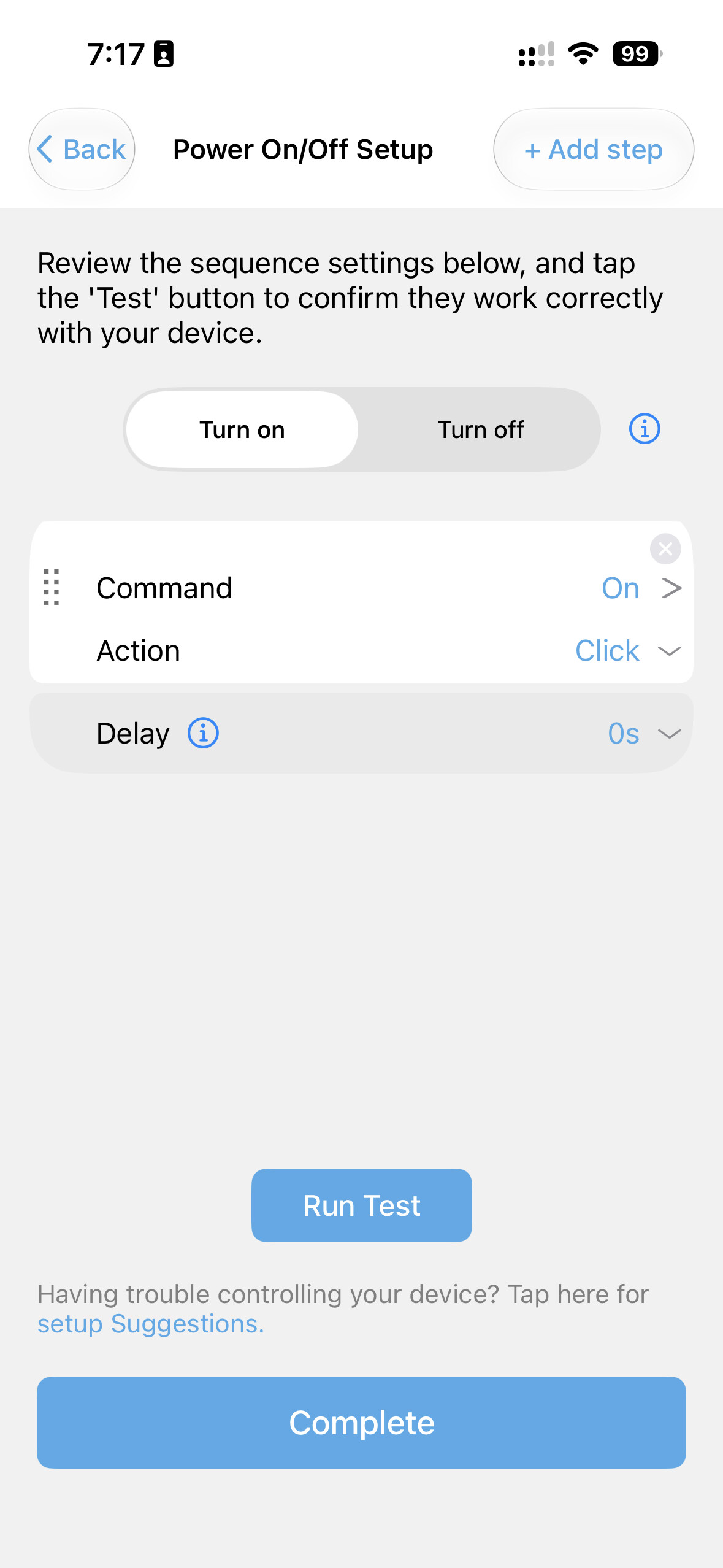
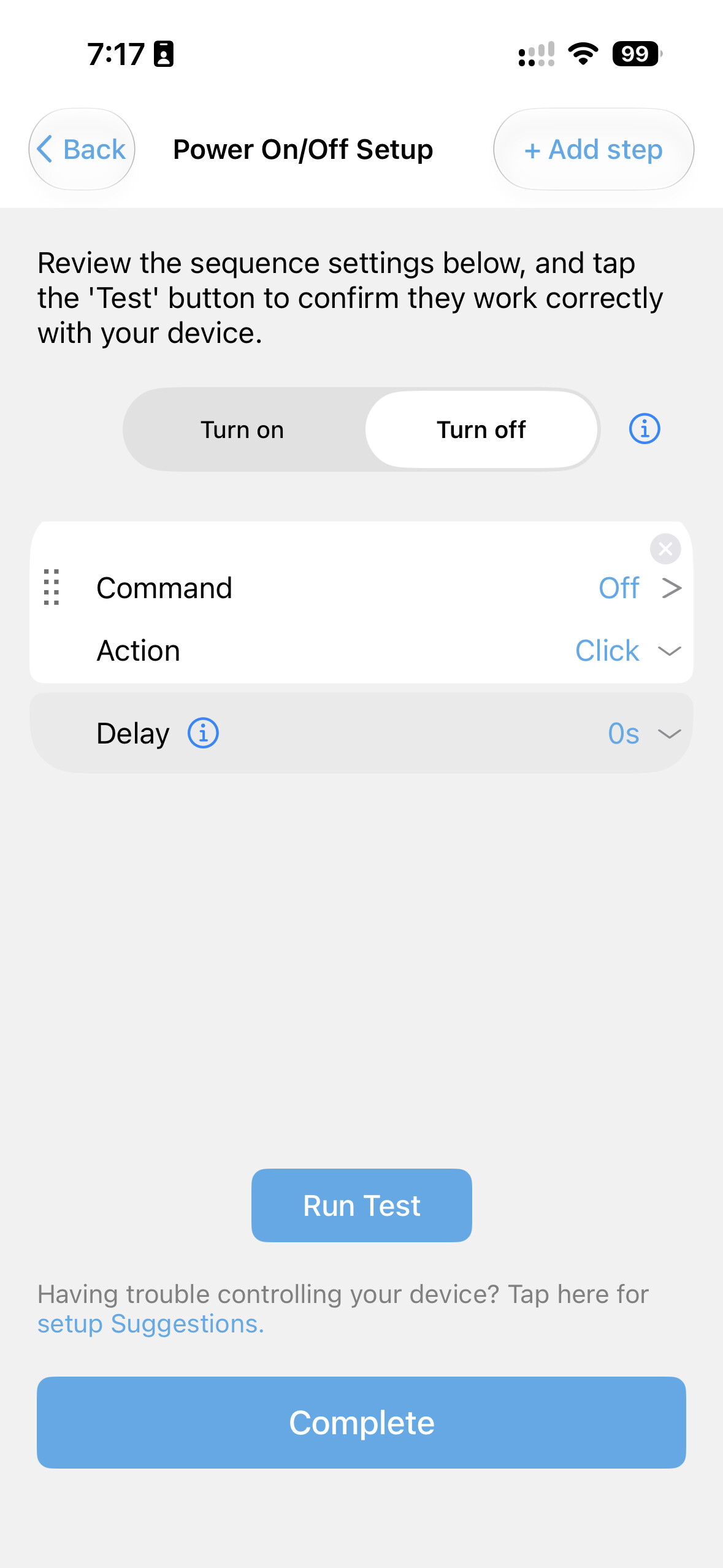
If you do want to use the Device Switch in Hubitat, you can send on or off to set the Hubitat’s device switch state. On the remote you do need to configure power control for the Hubitat device after setting up the buttons and then it’ll be automatic.

On/Off is a native command for the driver, no need to configure anything - I’ve updated the notes in v1.8 to clarify this:

EDIT: and it’s now available via HPM:

Minor update today:

v1.9.0 - Bug fixes and new config warnings

In your instructions above you say to leave content type blank. Mine doesn’t have this field, but it has a field labeled ‘Connect type (Optional)’. Even tho it says Optional it would not let me leave this screen without making a selection there. I chose text/plain and everything worked.

Mine is an X1S.

Hmm, looks like a typo on my part, I’ll fix it tomorrow. I’m running an X2 and it looks like this for me.

This is fixed in v1.10.0. :+1:

Have you tried the API interface in the Sofabaton?

I enabled it and got a bunch of links to start/stop activities. But I can't seem to execute them from HE.

First off I don't know if they are Get or Post. I tried httpGet(uri,result) and httpPost(uri,result) Both produced an error No signature of Method. Not really knowing what I am doing doesn't help matters.

From the Github page linked at the top - looks like it's Get...I've not used it in that direction myself but will give it a try

Triggering Sofabaton from Hubitat

This driver only handles remote → Hubitat. To go the other way, enable the API in the Sofabaton mobile app, which exposes a webhook URL per activity. Paste that URL into a Rule Machine action of type Send HTTP GET. No additional driver is needed.

Pretty sure it’s an HTTP GET as well.

Where did you see this error?

Strange - I'm not seeing an error, I just see the log showing it was sent but nothing happens, the activity doesn't start. If I test by clicking the link in the Sofabaton app's API page everything works as expected.

Actually that is strange as I'm already sending each of four 'off' GET commands in my goodnight rule which has been working normally for the last few weeks. I wonder if I'd need to send the GET to end the current activity before the GET to start the new one? Nope - just tried turning everything off and running the action - doesn't turn on.

I did a get in RM and it worked fine. What I am trying to do is do it in a custom app.

I tried httpGet(uri) but that's when I get the error. I believe it's due to me not fully understanding how to set that up.

I have an activity called Hubitat. I use that to enable the remotes buttons to HE when the TV activity is not on. When I shut down a TV activity I have to remember to start the Hubitat activity. Which is no big deal for me, but my other half seems to forget.

In the shutdown sequence of the TV activity I added as the last step to trigger one of the Hubitat IP commands which triggers a button in this app. I used that button in RM to issue the start for the Sofabaton Hubitat activity. Seems to work great.

I just prefer rolling my own apps rather than using RM. And that’s where I’m bogged down.

No, Im more interested in controlling my Home from the remote, rather than the other way around.

Although if there was an easy way to control a PS5 On/Off from Hubitat I'd be thrilled - Sony have made it nearly impossible.

Finally got mine all set up with Bi-Directional control

I have virtual switches in HE that are set when any activity is turned on. That way I know what activity is running.

If I turn one of the TV activities off it will now turn on my Hubitat Activity. (saves a couple button pushes).

If I execute my bedtime routine it will turn off whichever TV activity, if any, might be running.

I only wish the API was local rather than cloud, but it is what it is.

Yes, SofaBaton provides local control capabilities via its newer hubs

(like the X1S and X2), allowing local network communication for integration platforms like Home Assistant, though support depends heavily on your specific hub model and firmware version. [1, 2, 3, 4, 5]

Local Control Features

  • Local HTTP/IP Requests: Newer hub models allow you to configure virtual IP control devices or send local HTTP requests directly across your local network. [1, 2, 3]
  • Home Assistant Integration: Community-driven integrations (such as the Home Assistant SofaBaton X1S/X2 integration) can communicate with the hardware locally on your LAN without routing standard activity triggers through external cloud servers. [1, 2, 3]
  • Cloud Dependencies: While device configuration and IR database lookups happen through the mobile app/cloud, routine hub operation and local network command execution function locally. [1]

According to google search, the API is local, only cloud depedency is for setup

Comms from the X1S is local. API from HE is cloud. I understand Home Assistant has figured out a local api but I’m not interested in doing HA.

The MoF just gave me approval to buy a 2nd X2 remote to replace our very worn out and ancient Lounge Room URC MX-980, happy days! Amazon had them on sale for 16% off RRP, so good timing! :ok_hand:

It looks as thought can be set up without HA if you have a Pi:

From ChatGPT

The reverse-engineered protocol has now been extracted from the Home Assistant integration into a standalone Python package called sofabaton-x. It is specifically intended for people who don't want to run Home Assistant.

The workflow would simply be:


Hubitat
    │
HTTP or MQTT
    │
Node-RED
    │
Python (sofabaton-x)
    │
LAN
    │
SofaBaton X2 Hub

or even:


Hubitat
    │
HTTP
    │
Python (sofabaton-x)
    │
X2 Hub

The library supports local operations including:

  • discovering the hub
  • starting Activities
  • sending button/command presses
  • reading Activities, devices and macros
  • monitoring activity changes
  • backing up and restoring the hub configuration

—all without using the SofaBaton cloud.

Given your Raspberry Pi running Node-RED, I'd skip Home Assistant completely. Install the Python package on the Pi and either:

  • have Node-RED call a Python script with an exec node, or
  • run a tiny Python REST service and let Node-RED or Hubitat call it.

I can also help you build a minimal solution (around 50–100 lines of Python) that exposes endpoints like:


GET /activity/WatchTV
GET /activity/Movie
GET /command/VolumeUp

using the same reverse-engineered protocol as the Home Assistant integration, with no Home Assistant involved.