Do we now know your access code?
Your Tile Builder Advanced code also works for Remote Builder.
I have released Remote Builder - SmartGrid version 4.0.4. It's a really big upgrade and you can find details on this post.
Here is an example:
1 Like
Gary, it looks like your having a great time updating this awesome app. Thanks so much for your dedication to something so beneficial to Hubitat fans. I hope more enthusiasts catch wind of what's happening on this app... because it seeming so visually organized and easy to follow. great work again. I just donated via paypal and looking forward to jumping on the band wagon of Smart Grid as my desktop homebase for my smart devices.
Thanks, I'm glad to hear you like it. I'm using SmartGrid for 90% of my activity now, just a few Tile Builder tiles for a few more specialised things. Still a few more features to add over the next few months when I get time. I do plan on posting a simple how to video to help people get started.
I sent you a key via DM. I hope you will post some images of your final solution.
1 Like
Thoroughly enjoying this awesome app.
In the sensors section are you planning to add motion sensors?
I currently use Tile Builder for Motion sensors.
Glad you like it. Would love to see a screenshot to see what you have built, especially if you are using the Custom Sort configuration.
I will commit to trying it out and seeing what the performance is like. Given these can cycle frequently (every 30 seconds) I'm wary of the impact of constant updates. But I will try it out and see what it is like. Perhaps there is a way I can optimize it, or perhaps it would be just fine as is which is probably true if you are already doing it with Tile Builder.
I'm keeping things pretty basic at the moment.
I need to spend some time experimenting with all the options available but I like to keep things simple.
I find the layout of SG simple and easy to read.
Keep up the fantastic work.

I also have lights, sockets, contact sensors but these log on, off and duration. Cannot get the options displayed all on my mobile screenshot I'm afraid.
1 Like
I have released SmartGrid 4.2.0 to HPM. The main improvement over version 4.1.0 is a change in how the polling operates.
In version 4.2.0 the polling is stopped whenever the Applet is not visible such as when you minimize Chrome or switch to a different Tab. As soon as you switch back, polling starts again with an immediate check. I have tested this on Chrome on Windows, Android and iOS but it is using well supported calls so it should work on any modern browser.
The impact has meant a huge reduction in the Hubitat app usage stats for instances of SmartGrid. In my own case the reduction is in excess of 90% but it will depend on how you use it. There is also a corresponding decrease in the CPU use of the host platform.
This will be my last feature update for a few weeks as I'm going to be gone next week, but I do have some new features planned for over the summer.
As always happy to receive your feedback.
5 Likes
100%%% This is huge. Great work man! going to start testing.
1 Like
If you want to visualize the change turn on Trace Logging and you will get something like this

If you make the SmartGrid non-visible the polling will pause and then resume when it becomes visible again. Each client would have it's own unique session ID.
Of course turn off Trace logging when you are satisfied.
2 Likes
Guys, any idea how i can use the function RENAME DEVICES, but for my STATE colum?
in this example im using SmartGrid for column 1, and TileBuilder column 2.
I need the smart grid to change the "open" text to be "Remoto" like i can do with TileBuilder.
Is this possible with SmartGrid? I really need this function for my project. And it seems it only works with Devices Columns
Thanks in advance for anyone who can help!

SmartGrid does not support that option today but having it be able to support other languages seems like a very reasonable request so I will add it to my list of enhancements. Can't promise anything quick as I'm going out of the country for a trip but I'll take a look when I get back.
Seems fairly easy in concept but I won't make any promises yet.
1 Like
Very much appreciated!
It's the next feature on my list.
I have created a SmartGrid Overview video that some of you might find helpful\interesting. It goes through the process of creating a simple SmartGrid and then demonstrates it working side by side with typical Hubitat Dashboard tiles. Total duration is 14 minutes and 20 seconds.

https://www.youtube.com/watch?v=E_eQKtyAx-Q?vq=hd1080
I will add a permanent link to the first post.
3 Likes
I have released version 4.3.0 of SmartGrid to HPM and it is available for immediate download. There are two new features as follows.
Collapsible Groups.
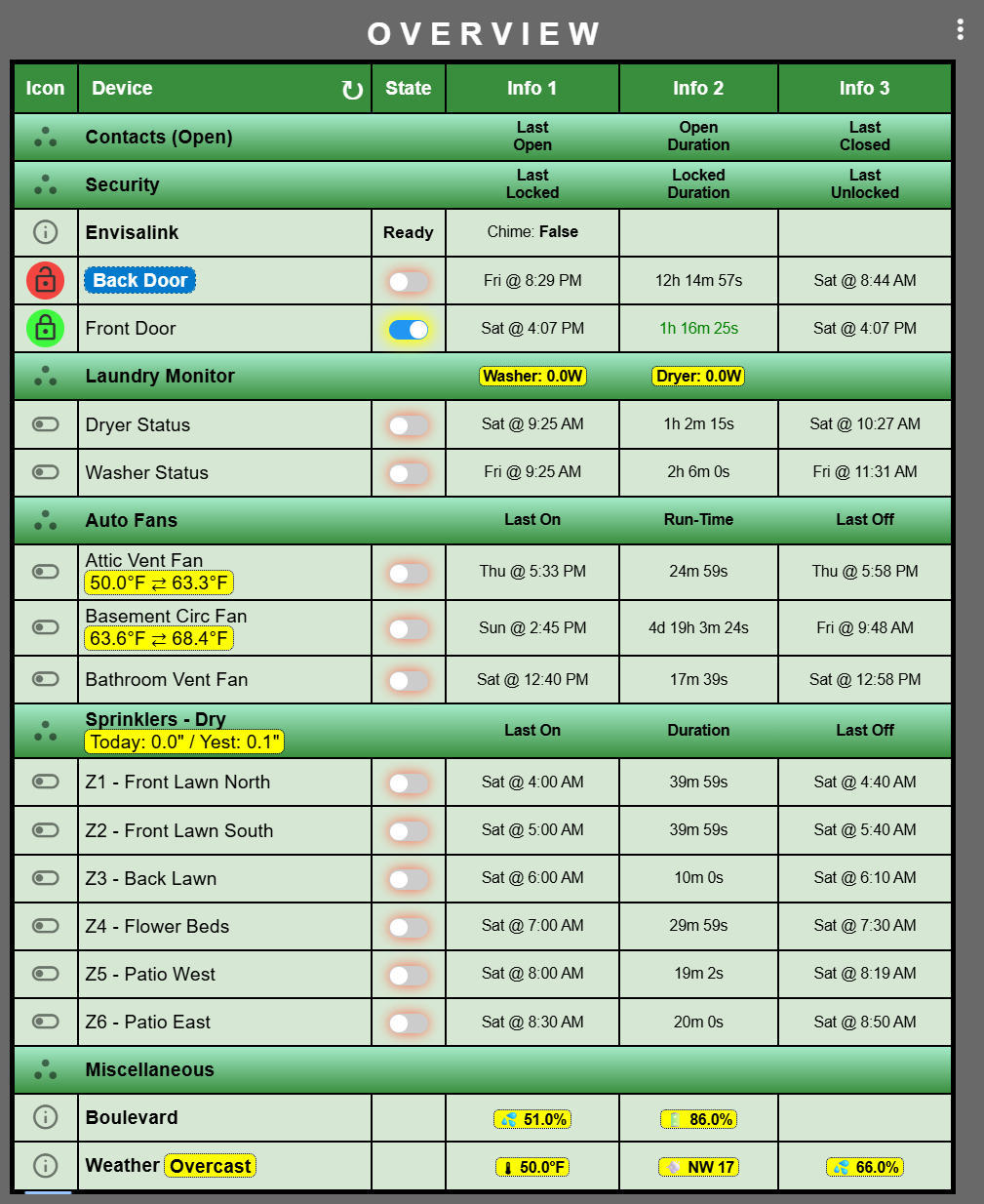
One of my primary SmartGrid's looks like this and I use it for monitoring.

By clicking on the three dots icon I can collapse a group and its appearance changes to show its in a collapsed state. Click it again and it expands.

This is not the same as filtering as this collapses the whole group regardless of content or device state.
Configurable Decimal Places for Variables.
If we zoom in on part of that same SmartGrid you can see the various variables highlighted with a yellow background.

In this example I'm using the following configuration:
0 decimal places for the outdoor temperature (and others).
1 decimal place for the Automatic Fan control temperatures.
2 decimal places for the precipitation in the Sprinklers section.
Required Format:
The number of decimal places is determined by the capitalization of the variable name as described below:
%var22% = 0 decimal places (integer)
%Var22% = 1 decimal place
%vAr22% = 2 decimal places
%vaR22% = 3 decimal places
Example: 0 decimal places.

Example: 1 decimal place.

Example: 2 decimal places.

I hope these feature additions make SmartGrid more useful and fun.
Gary Milne - 6/15/25 @ 11:53 AM
3 Likes
You have chosen the "made for kids" content option when uploading to YouTube. That limits the ability to save, among other things. Request to please change that.
1 Like
Thanks, I thought it was asking me if it was safe for kids, which of course it is. Fixed now.
2 Likes
Yeah, the option is not as clear as it should be. 
1 Like