Thought so. I did enter my ip:8083 and get the recorder web page from the docker with access to the location map. The issue seemed to start after i did a complete delete and start over from scratch, almost like it's trying to access the old cell name i used prior, but there is really nothing in the logs to tell. I did a second compltete delete and install to see if it would clear the 408 issue with no luck.
so you left the docker set to the default correct?
/mnt/user/appdata/OwnTracksRecorder/Storage/
and in the HE app you still have the /pub at the end correct?
Yes, i put it on my drive 8 only and not in the appdata. Yes, pub on the end. When i do a manual update on the app, i see it in the docker log. I'll give it another try tomorrow and leave the docker at default (appdata)
mnt/user/software/OwnTracksRecorder/Storage
I just noticed something very strange, but I dont know if its releated.
When I double checked the address I have entered into the HE it is missing a decimal.
should be http://192.168.1.21 :8083/pub but in the app it looks like this http://192.168.121:8083/pub
I just double checked and its working still when I update, but mabe something in the code got broken in the last update.
I did fix the missing dot, but everything is still working like it should still.
Hmm.. that is interesting. Short Answer: No, it should follow you if you trigger an update. If you do a manual location, does it snap to your location?
Oh wait, top right there is a "|| >" icon. That might be pausing locations back to Hubitat, which might be why your thumbnail doesn't update. If you tab that icon and make it just the play icon ">" does it fix itself?
1 Like
Ok, pushed another update with some "should be useful" changes. 
-
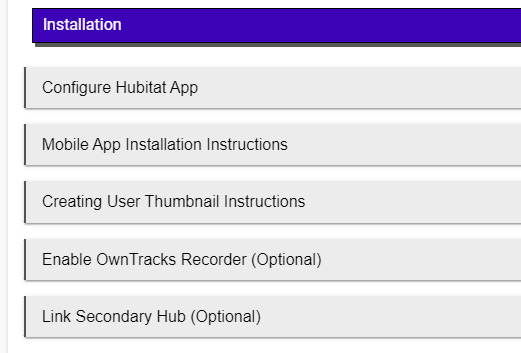
Moved the main app configuration to a "Configure Hubitat App" screen to clean up the page:
-
Added a "Member Status" section at the top of the app. Members that have reported a location in the past 12-hours are green, more than 12-hours, red with a red box around the "Last Location Report" time. Disabled members grey with a strikethrough. The other columns list what pending updates will be sent to that user's phone when the report a location.
-
Added a slider to enable/disable sending your own thumbnail back to you. This only works for Android, so disable if you have iOS phones linked to the app. Reasons unknown, the iOS app just creates a duplicate HTTP user, and doesn't update the thumbnail.
-
Added how-to / explanations on most config screens to clear up confusion. Added a slider to allow regions to just be deleted from the Hubitat app:



2 Likes
I will change it to > which means significant change
I had it set to II> for precise movement
I will have it set to > and see if the image thumbnail updates the location
Thankyou @lpakula
It doesn't look like there is anything you can do for iOS. This is from the Owntracks booklet and it also says only use move mode when charging. Looks like apple is what it is unless I can get +follow to work without destroying the battery usage.
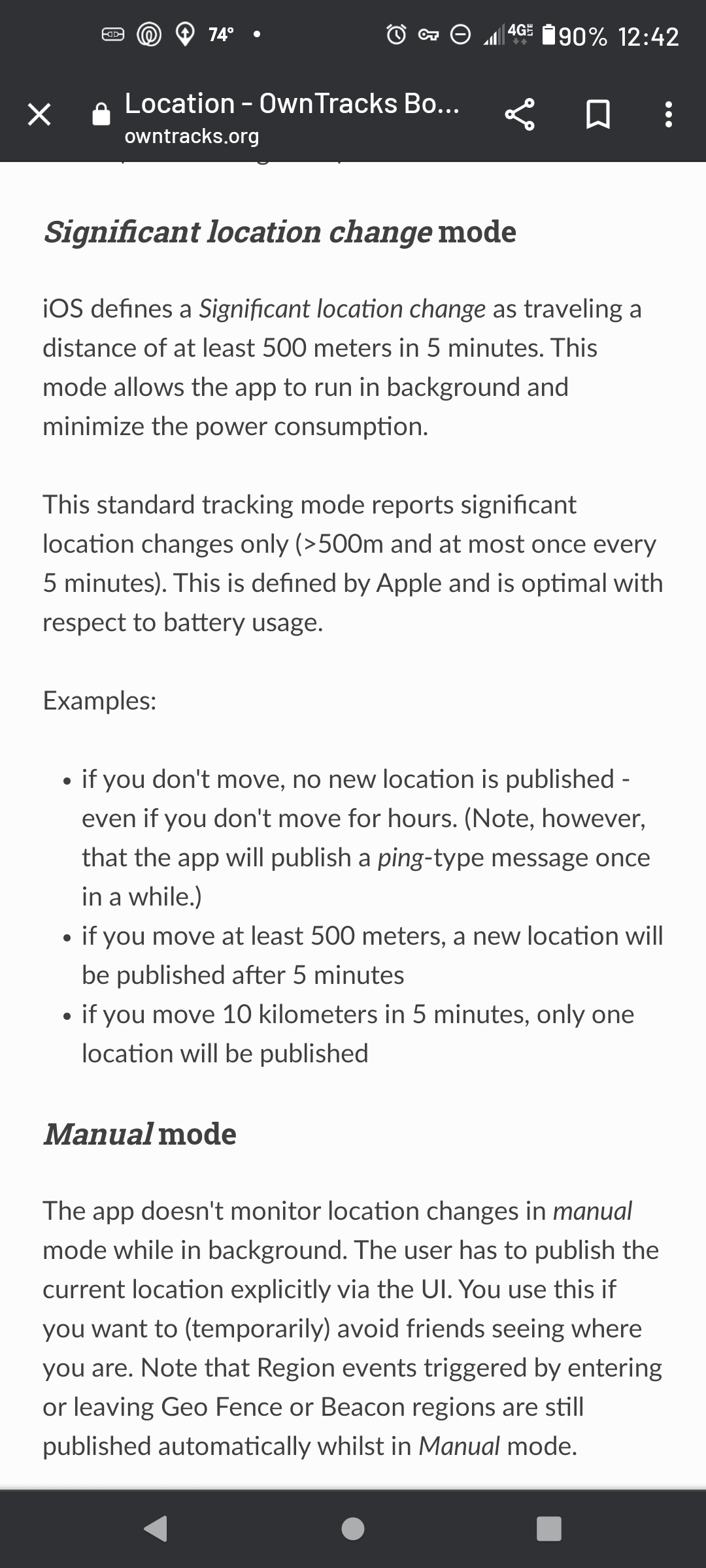
Note:I also noticed that my thumbnail was not following my blue pointer on Android when waking and I didn't have it paused. As soon as I pressed manual update the thumbnail moved to the pointer. Based on my settings, I would have expected it to update on it's own.
I have since added a +follow region and will report back on how well it works vs battery consumption.
3 Likes
I'm using your modified APK and my picture wasn't moving with the blue dot either.
I'll check again tomorrow to see if this new release affects that.
1 Like
I might have to kill off the "you get your own thumbnail" part. In order for that to work, that thumbnail moves once the phone sends a location to HE, and HE replies back.
Novel idea, looks cool for me, but just might not work in a reliable manner. 
2 Likes
I read about the +follow in the own tracks booklet, but it wasn’t obvious how to set up an area to use it. Do I define this the same way as I did for waypoints?
It also mentioned somewhere that if I use something like Home|1|2, it will change the mode from “significant” to “move” when I leave a zone, but that sometimes that is unreliable (?). Their solution is to use a +follow, but I’m a dumbass and couldn’t figure out how to do it…
Finally have it fix still not sure what caused it deleted everything again reinstalled one step at a time and error is gone weird. thanks all for the help and input.
I set the up the +follow last night and my bride and I took a walk this afternoon. The tracking worked better then ever. I also have my reporting threshold set to 45 feet which is significantly less than the default. I'm sure there will still be some tweaking. Previously when walking the app didn't seem to follow us very well
We checked battery percentage on both the iPhone and the Android before we started (we have a mixed marriage). We walked a couple of miles over the course of an hour or so (I walk slowly) and the battery hit was 2% on each device. I'm not sure how much of that 2% was owntracks but it seems acceptable to me.
They way I understand this is that the waypoints are actually dynamic so the actual lat/lon that you use are irrelevant. I created my +follow region using the coordinates of my current location (which is not inside any region) and set the radius to 5 meters. I don't think the radius matters either as long as it's greater than 0. The booklet says they it will update every 30sec as long as you move 50 meters. You can increase the 30sec time by naming your +follow like this - if you wanted 60 seconds then you would name it +60follow. The follow name can be anything. Owntracks is looking for the + symbol at beginning of the region name.
I have only had one test so my sampling is very small but so far, I'm pleased with the +follow region.
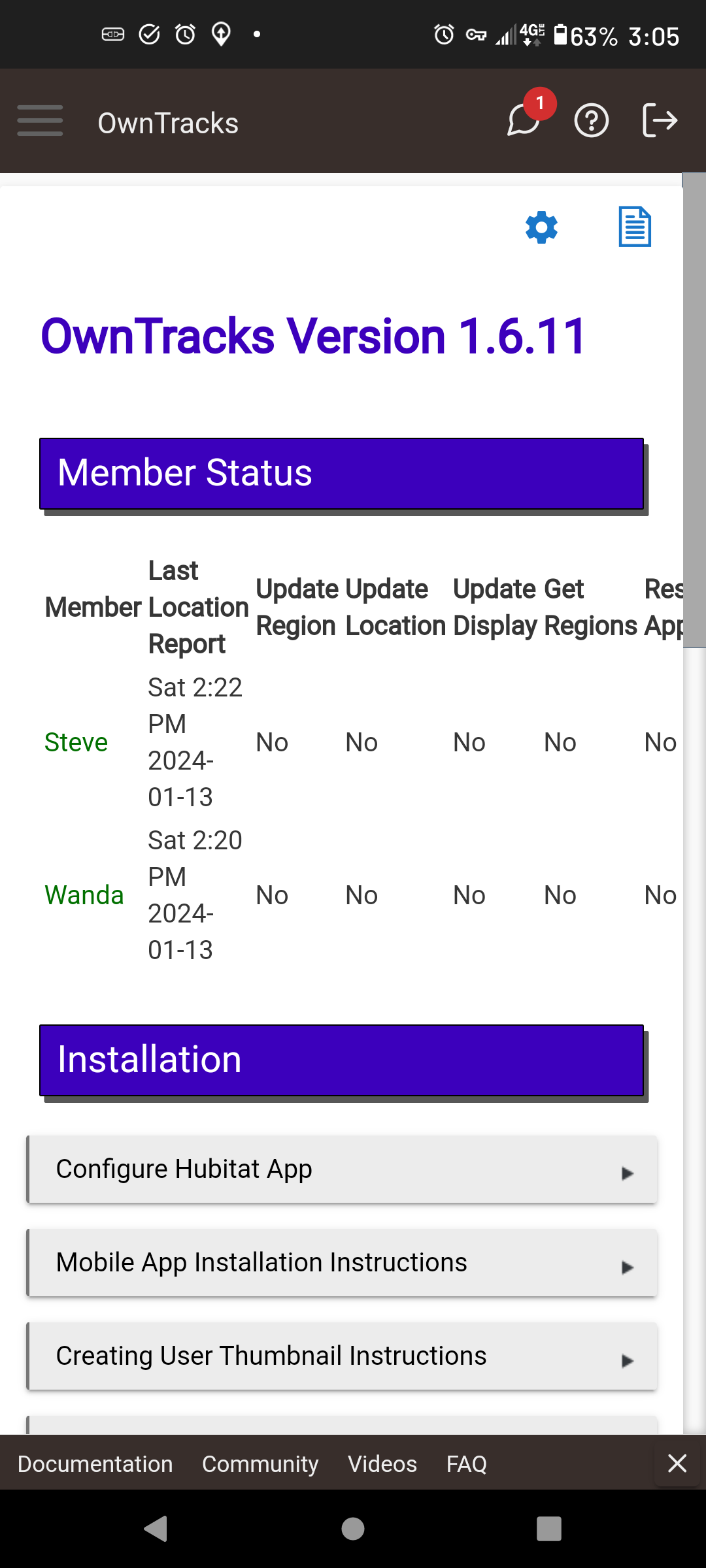
Are there supposed to be scroll bars to see the info to the right of the screen?
This is on a Moto G Stylus running Android 11 and the most recent version of Chrome.
@lpakula
No joy
No cigar
The thumbnail image does not update on the mobile app map
I have it set to significant >
- the thumbnail image will update only if i force the location reporting by hitting the upload tab in the far right corner of the mobile app
Android S22

Ok, sadness. I'm going to remove that feature from the next release. The rest of your "Friends" will retain the thumbnails, you just won't be able to see your own.
2 Likes
Never tried it on a mobile. Let me check into that.
I suspected. One of those late night coding sessions, eyes watering, back hurts. I'm almost done, 5 more minutes.....
1 Like
Darn all was working great for the afternoon then it started with this error again
warnOwnTracks: OwnTracks HTTP response: 408, with error: Unknown Exception
Probably for the best, I really don't need to see my avatar, I know where I am!
On the big plus side today, out and about for about 4 hours and tracked my departure, locations, and return without issue.
I'm calling this good on my S21. 
1 Like

