Does it show up under "Apps Code" ?
@jrfarrar, no it doesn't.
are there any errors in HPM when you install Life360 with stats?
Would need to see a debug log.
Nope no errors... I just uninstalled and reinstalled and it says successful... Just starting out with HE, so help me out w/ getting a debug log for you.
If you didn't see any errors in the log when using HPM try the next step.
To install after using HPM:
Be sure you don't have any other pages open in other tabs. Close everything. Open the browser back up and go the 'Apps' page, select 'Add User Apps'. If it installed successful, you should see 'Life360 with states' in the list.
If you don't see Life360 in the list, Do you see any user apps in the list?
Also, the last part of post #1 gives instructions on getting a debug log. 
and most important... Welcome to Hubitat!
Well.. Just figured it out... Went to make sure HPM was set to debug... annnnd I then remembered I turned on Hub Security yesterday and HPM needs that info to install apps... All good now...
Thanks for the welcome, bit of a learning curve, but I'm stumbling through it.. Great community.
2 Likes
Thankfully the learning curve isn't very steep, and once you get the hang of it you can do some powerful automations.
2 Likes
Bryan,
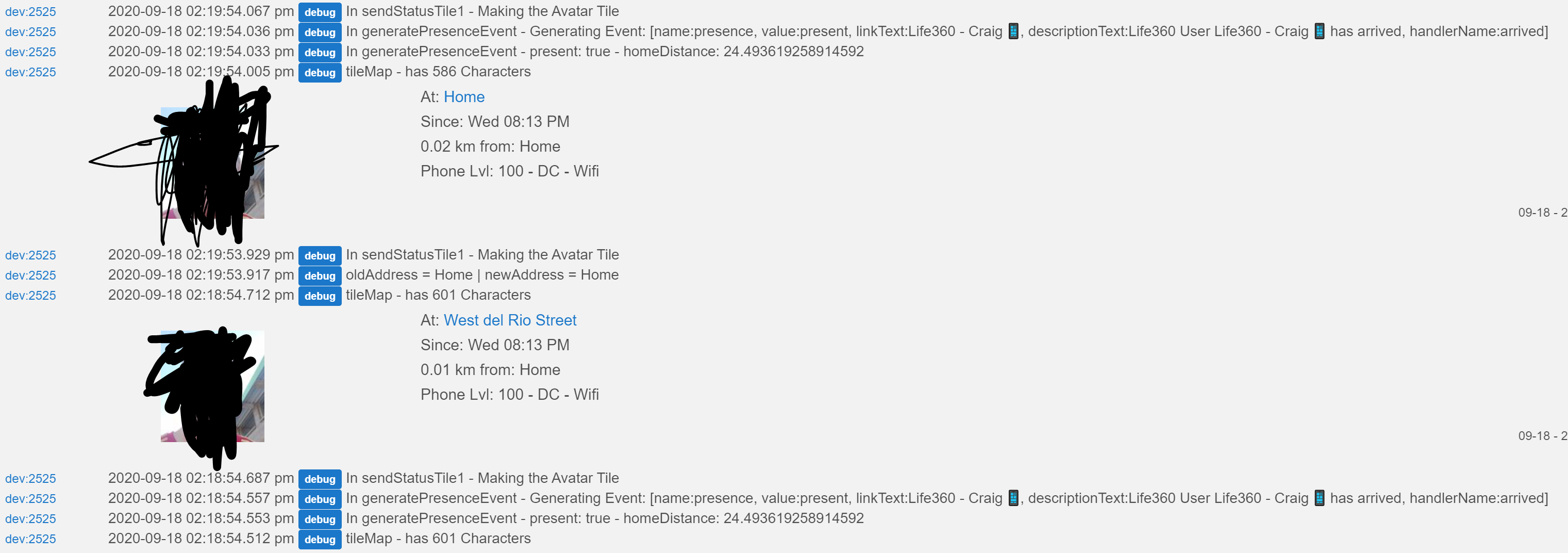
Life360 has been giving me fits, and sometimes has a disagreement where it reports the nearest street instead of being at home. Because of the address not being home, but my distance being less than my geofence, Life 360 with states will do an event saying I am not at home due to my address not matching in extrainfo function, but the generatePresenceEvent will set it right back to being at home since my distance is less than my geofence distance.
1 Like
Been having the same issue for past 12 hours.
I deleted all my location markers and then put them back and it's been happy since
And of course it just flipped out again.
1 Like
That is exactly what mine is doing....all night long too.
Mine has been playing up aswell, seems to make the three people i have it setup for as arriving home every night around 8.30pm even though we have all been home for a few hours. Not sure if it's a Life360 problem though.
It is a life 360 issue as I am inside the geofence.
Is any of this data open to Webcore?
And how do we turn on the tile?
I had to change my label from "Home" to whatever Life360 wanted to call it and now all is quiet. Anyone else have a better fix for this?
Move to a new house?
How can we use the google maps maplink attribute link using SharpTools? Anyone able to set this up?
What does the maplink attribute look like?
I have been seeing some issues with Life360 lately as well. As my wife has been in office the past couple days and I have been working from home sometimes my location mode will change from home to away, while I am sitting at my desk. Usually only happens for a minute, but it is annoying. I have also noticed when I arrive home it takes a minute to update I am there.
I recently migrated from ST, and used the tmleafs custom handler. It was always 100% for me using webcore for presence. Same webcore piston too, but for whatever reason it seems to randomly jump from home to away, or not update home from away as well. I also increased the geofence radius from 800ft to over 1000ft, and it did not seem to make a difference.
Life 360 is having issues where it is changing your place even when you are in you geofence.
1 Like

