Yes, I'm glad to see I'm not alone here. Just wanted to share I was seeing issues with it as well. Hoping for a fix soon really bugs me it keeps randomly switching to away mode. Luckily I do not have my siren setup as an alarm, so I don't have to worry about alarms going off.
Just label your "home" the same as the place 360 switches you too.
Interesting concept. I'll look into it for sure. Though, I do live on a corner, so I'm concerned it would switch between the two streets. Also, for the location tracking I am using the present/not present variable, rather than the address one. I use the address one in another piston to let me know where I am (have a few vacation places added too, incase I forget to put the place in vacation mode manually). But even with the present / not present it is still randomly switching to away mode. I assume though it is tied into the issues others are seeing as well, as it was going strong for a few weeks before.
Life360 had some issues with the app last week and since it's been odd. I deleted my circles and did a search for my address and labeled it home. Went back into the app and it changed my address to a street behind my house. So I changed my home label to match the street behind my house and it's been fine since.
I was able to fix the Life360 API issue by adding this code in the app. Basically it makes use of the location.name attribute when overriding inaccurate address1 data when inside your target geo fence.
            if(member.location.address2 == null || member.location.address2 == "")
            address2 = "No Data"
            else
                address2 = member.location.address2

   /**  Start Fix **/
   if(member.location.name != null) {
       if(member.location.name != member.location.address1) {
           log.warn "caught the issue, changing address1 to place " + member.location.nam

           address1 = member.location.name
           address2 = "No Data"
       }
    }
    /**  End Fix **/

            //Covert 0 1 to False True
            def charging = member.location.charge == "0" ? "false" : "true"
            def moving = member.location.inTransit == "0" ? "false" : "true"
            def driving = member.location.isDriving == "0" ? "false" : "true"
            def wifi = member.location.wifiState == "0" ? "false" : "true"
2 Likes
Thanks, will test.
did this work for your testing?
nope, the problem is with Life360 itself. Not with this app but was hoping this change would at least slow down the home/away messages. The Life360 service has been going crazy for over a week now.
1 Like
This has been working for me as well....hope Life360 gets the problem fixed as it's been so solid as presence for me for years.
My proposed code workaround has been working for my particular setup. Within your Life360 device driver you determine presence by evaluating the address1 attribute equal to the value of "Home". The Life360 API has been going crazy indeed when reporting the address1 attribute, however a more reliable place geofence indicator can be derived from member.location.name via their API. Most of the time address1 will take on the place name value when inside the geofence, however occasionally the address1 value will change to a near street address value while still inside your geofence! This triggers the away and present issue everyone is complaining about.. So, my code change will override this bogus address1 value while inside the geofence, thus preserving the place name as a constant. This in turn prevents your presence from changing inside your device driver. Mine has been going strong now for several days, no issues, despite the Life360 reporting problems with address1 attribute..
1 Like
I had that happen with my parents phones at their house this spring. I had to exclude Life 360 for a few weeks then it just fixed itself. Ours were working fine at the time about 30 miles away. We had our Hubitat presence doing that too for about a week once as well but Life 360 wasn't at the time. Strange stuff with presence occasionally.
I'll test this also. FYI for others this is in the "Life360 with States" app code. Line 428. I'll change my Home location back to "home" and see what happens. We can at least help Brian out with this one...especially because it's really Life360 weirdness.
I use other locations by name also will see if that solves that bouncing problem too.
2 Likes
How did it go for you?
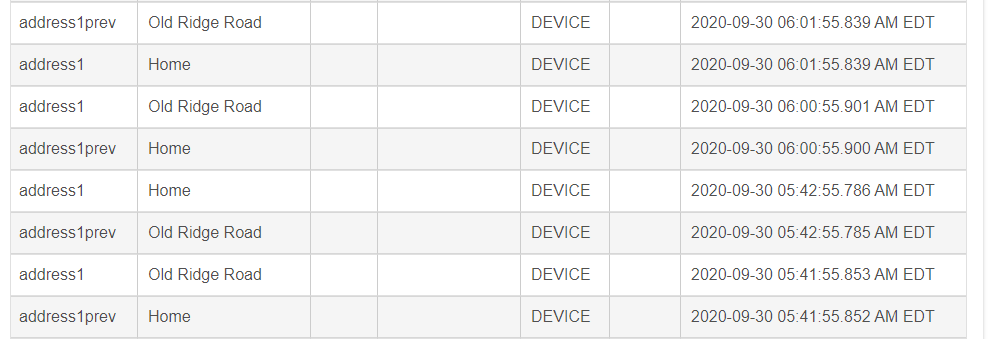

I'm seeing this issue also, and the suggested fix makes sense to me based on what the logs were showing. Havent tried it yet though.
Will try and report back.
I as assuming that Life360 have upgraded their features to be able to track you between places (ie what street youre on) but that this was conflicting with the location detection on their end.
Update: Fix appears to be working. Logs show it catching the issue,
I'm getting the bouncing as well. Started a few days ago. Somehow it already feels better just knowing I'm not the only one. Misery loves company 
I also tried the fix, but no joy. Any other options work for folks, other than wait and hope Life360 gets their act together?
I switched to the built in life 360 connector integration a week ago for presence. It seems to be working. I'm still using this integration also for all of the extras it has.
If the issue is still happening, I'd suggest adding this line in the cmdHandler......
  result = resp.getJson()
  if(logEnable) log.debug "JSON Results=${result}"
That shows you exactly what Life360 is telling the Hubitat app.
If its the same issue that I was seeing, it shows up as a difference between these 2 fields.....
....., timestamp:1601542666, name:Home, placeType:null, source:l, address1:Park Road, address2:, shortAddress:, inTransit:0,.......
Separately, ages ago I started to experiment with a custom version of this app and the tracker - aimed more at Life360 free users. (It seemed a bit expensive, and I think the UK had less billing options at the time). But sadly I got sidetracked.
The idea was to have all the locations managed in the hubitat app with the phone providing GPS coordinates, not the location. That would totally negate this issue because there is no need to pay attention to what Life360 thinks the location is.
I imagine that this wouldnt be as attractive to Life360 premium users since you probably like having the locations manged by Life360. Nothing would stop you doing both things I guess.
Ha, I have a full location tracker written that doesn't even need Life360 at all. Just an Android phone. I never released it though because I didn't want the headaches associated with GPS tracking!
1 Like

