Not having any alexa device, I can only guess your entities.
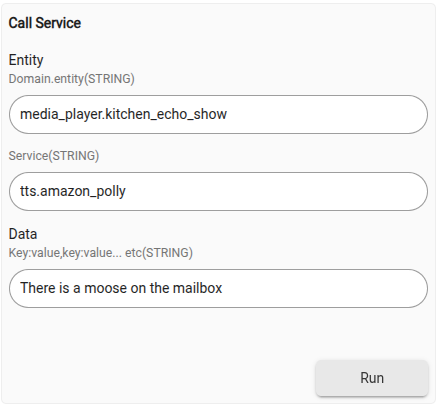
TTS still not working. I'll send you a PM with details to keep it out of the thread (because I think it is HA and not HADB).
If HADB brought over the notify._speak and notify._announce entities, those could get mapped to component devices with a capability "Notification" and invoke the callService directly. They'd just be directly usable in HE anywhere notification was wanted.
I created a pull request to implement this change.
With this change, if you import from HA the Alexa _speak and/or _announce entities, you can just sent notifications to them from the regular notification selection. E.g.,
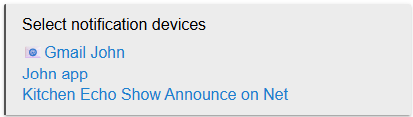
(this sends a push to my app, an email via the new built-in mail notifier, and makes an announcement (with a ding) on my Echo Show. The "on Net" is because HADB devices are connected to my main hub via HubMesh).
Just to note: this does not use the HA Alexa Skill, but instead just the (free) Alexa Devices integration (Alexa Devices - Home Assistant).
Version 2.26:
- Add support for notify entities. Thanks to @jlv
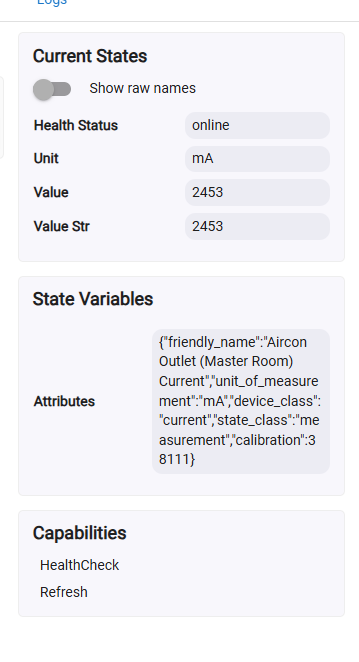
HADB does not specifically support "current class sensors". This why it falls under unknown sensor but it could be easely added.
As for showing in easy dashboard, I think it does not support custom attributes (not sure about that one).
Version 2.27:
- Add support for current sensor entities.
@KuehDadar Since your device is allready created, you should manually replace the device driver with the new "HADB Generic Component Current Meter" driver.
As for the Easy Dashboard, it doesn't seems to support that capability either.
Updated to new driver.
I am using watchtower and was able to monitor and display Amperage on its dashboard.
Thank you for the quick fix.
@ymerj - would it be possible to add driver support in HADB for basic alarm panel control? All my other attached sensors already bridge over, the panel is the only major component missing. Am willing to test. I'm also asking since Vivint's api was tricky enough in HE and is no longer being maintained and is now broken. The HA folks, however, are maintaining their support.
There is an Alarm capability in Hubitat that provides this:
Alarm
Device Selector
capability.alarm
Driver Definition
capability "Alarm"
Attributes
alarm- ENUM ["strobe", "off", "both", "siren"]
Commands
both()off()siren()strobe()
You can try getting AI to write one. I did a quicky prompt in Gemini to get a driver, but you would probably have to work with AI to tweak if it has any issues.
/**
 *  Home Assistant Device Bridge (HADB) - Alarm Control Panel Driver
 *
 *  Brings HA alarm_control_panel entities into Hubitat using the native 'Alarm' capability.
 */

metadata {
    definition (name: "HA Alarm Control Panel", namespace: "community", author: "HADB") {
        capability "Alarm"
        capability "Actuator"
        capability "Refresh"

        // Hubitat standard alarm states are: "both", "off", "siren", "strobe"
        // But for an alarm panel, we map HA states directly to a custom attribute "alarmState"
        // while setting the native "alarm" attribute to "off" (Disarmed) or "both" (Armed/Triggered)
        attribute "alarmState", "string"
        attribute "status", "string"

        // Native Hubitat Alarm capability commands
        command "both"      // Often treated as trigger
        command "off"       // Map to Disarm
        command "siren"
        command "strobe"

        // Standard Alarm Panel Commands
        command "armHome"
        command "armAway"
        command "armNight"
        command "disarm"

        // HADB parsing callback requirement
        command "parse", ["string"]
    }

    preferences {
        input name: "pinCode", type: "string", title: "Alarm PIN Code (if required by HA)", description: "Leave blank if your HA alarm panel doesn't require a PIN."
        input name: "logEnable", type: "bool", title: "Enable debug logging", defaultValue: true
    }
}

// Parse incoming events passed down from the HADB Parent App
def parse(String description) {
    if (logEnable) log.debug "parse description: ${description}"
    // Note: HADB usually updates states directly via componentUpdate or directly into parse depending on parent version.
}

// HADB Framework callback method for processing state payloads
def void updateSetting(id, value) {
    if (logEnable) log.debug "updateSetting called with id: ${id} and value: ${value}"
}

def void componentUpdate(List<Map> properties) {
    properties.each { prop ->
        if (logEnable) log.debug "Property update: ${prop.name} = ${prop.value}"

        if (prop.name == "state") {
            handleStateUpdate(prop.value)
        }
    }
}

// Maps Home Assistant alarm states into Hubitat attributes
def handleStateUpdate(String haState) {
    sendEvent(name: "alarmState", value: haState)
    sendEvent(name: "status", value: haState)

    switch (haState) {
        case "disarmed":
            sendEvent(name: "alarm", value: "off")
            break
        case "armed_home":
        case "armed_away":
        case "armed_night":
        case "armed_vacation":
        case "pending":
        case "arming":
            // Mark as active/off depending on preference; "off" signifies quiet/safe
            sendEvent(name: "alarm", value: "off")
            break
        case "triggered":
            // Triggered means the siren is sounding
            sendEvent(name: "alarm", value: "both")
            break
        default:
            sendEvent(name: "alarm", value: "off")
            break
    }
}

// Core Outbound Commands targeting the HA WebSocket Link
def armHome() {
    if (logEnable) log.info "Sending Arm Home command to HA"
    parent.componentCommand(this, "alarm_control_panel", "alarm_arm_home", pinCode ? [code: pinCode] : [:])
}

def armAway() {
    if (logEnable) log.info "Sending Arm Away command to HA"
    parent.componentCommand(this, "alarm_control_panel", "alarm_arm_away", pinCode ? [code: pinCode] : [:])
}

def armNight() {
    if (logEnable) log.info "Sending Arm Night command to HA"
    parent.componentCommand(this, "alarm_control_panel", "alarm_arm_night", pinCode ? [code: pinCode] : [:])
}

def disarm() {
    if (logEnable) log.info "Sending Disarm command to HA"
    parent.componentCommand(this, "alarm_control_panel", "alarm_disarm", pinCode ? [code: pinCode] : [:])
}

// Standard Hubitat Capability Mappings
def off() {
    disarm()
}

def both() {
    if (logEnable) log.info "Sending Trigger command to HA"
    parent.componentCommand(this, "alarm_control_panel", "alarm_trigger", [:])
}

def siren() {
    both()
}

def strobe() {
    both()
}

def refresh() {
    if (logEnable) log.debug "Refresh requested"
    parent.componentRefresh(this)
}
This driver would not work with HADB.
"Alarm Control Panel" in HA and "Alarm" in HE do not refer to the same thing. "Alarm" in HE is closer to "Siren" in HA (which is somewhat allready supported by HADB).
HA "Alarm Control Panel" is similar to HE "Security Keypad".
Gotcha. I have no alarms in HA to have any idea what entities are exposed, so I guessed it would be alarm capability based on the terms being used in the post.
So, maybe AI can write a driver for a Security Keypad? I really have no idea what entities are exposed in HA for this, or how HADB would translate them, so maybe not. I was just offering a quick example showing that AI could possibly write the driver.
Here's mikee385's code that was used for their integration.
/**
 *  Vivint Panel Driver
 *
 *  Copyright 2022 Michael Pierce
 *
 *  Licensed under the Apache License, Version 2.0 (the "License"); you may not use this file except
 *  in compliance with the License. You may obtain a copy of the License at:
 *
 *      http://www.apache.org/licenses/LICENSE-2.0
 *
 *  Unless required by applicable law or agreed to in writing, software distributed under the License is distributed
 *  on an "AS IS" BASIS, WITHOUT WARRANTIES OR CONDITIONS OF ANY KIND, either express or implied. See the License
 *  for the specific language governing permissions and limitations under the License.
 *
 */

String getVersionNum() { return "0.0.6" }
String getVersionLabel() { return "Vivint Panel, version ${getVersionNum()} on ${getPlatform()}" }

String getType() { return "Panel" }
String[] getStatusValues() { return ["disarmed", "armed home", "armed away", "alarm"] }

metadata {
    definition (
		name: "Vivint Panel",
		namespace: "mikee385",
		author: "Michael Pierce",
		importUrl: "https://raw.githubusercontent.com/mikee385/hubitat-vivint/master/hubitat/vivint-panel.groovy"
	) {
	    capability "Actuator"
        capability "Sensor"

        attribute "alarm", "enum", ["disarmed", "armed home", "armed away", "alarm"]

        command "armAway"
        command "armHome"
        command "disarm"
    }
    preferences {
        section("Preferences") {
            input "logEnable", "bool", required: false, title: "Show Debug Logs?", defaultValue: false
        }
    }
}

def installed() {
    initialize()
}

def updated() {
    unschedule()
    initialize()
}

def initialize() {
}

def logDebug(msg) {
    if (logEnable) {
        log.debug msg
    }
}

def update(deviceData) {
    logDebug("Updating ${device.label} with data: ${deviceData}")

    if (deviceData.id != null) {
        if (!state.id) {
            state.id = deviceData.id
        } else if (deviceData.id != state.id) {
            log.error "This update does not belong to this device."
            return
        }
    } else {
        log.warn "id not found in update. This update may not belong to this device."
    }

    if (deviceData.type != null) {
        if (deviceData.type != type) {
            log.warn "Type has changed from $type to ${deviceData.type}. This device may not update correctly."
        }
    } else {
        log.warn "type not found in update. This device may not update correctly."
    }

    if (deviceData.status != null) {
        if (deviceData.status in statusValues) {
            sendEvent(name: "alarm", value: deviceData.status)
        } else {
            log.error "Unknown value for status: ${deviceData.status}"
        }
    } else {
        log.warn "status not found in update."
    }
}

def armAway() {
    parent.sendCommand(state.id, "status", "arm away")
}

def armHome() {
    parent.sendCommand(state.id, "status", "arm home")
}

def disarm() {
    parent.sendCommand(state.id, "status", "disarm")
}
Always nice to see people wanted to help.
On the other hand, I'm probably too old because this stuff with AI coding is totally demotivating me. It make me feel like I am the janitor who have to cleanup the mess others made. (Not you. The AI)
I find more incentive to go cut my grass.
@user920 are those commands the only one you are interesting in?
command "armAway"
command "armHome"
command "disarm"
I messaged you links for testing.
Version 2.28:
- Add partial support for alarm_control_panel entities. thanks to @user920 for testing.
I think we have a small oops.
I've put together a couple Rules to pass update syncs between HSM and the panel and I've noticed a problem. When syncing from HSM to the panel things are fine, because device commands are used. But when the panel tries to sync HSM, the states are not matching, so the Boolean sync doesn't happen in the conditional statements. It doesn't matter if I use the Device Type: Security keypad, or the panels Attribute: securityKeypad. It all has to do if that underscore in the value.


@bravenel - this may be a bug in the Rule Machine.
I will remove the underscore